Funnel analysis
In a typical business process, a complete flow consists of multiple steps, and each step can be recorded as an event. Funnel analysis helps you analyze the conversion rate between these steps. For steps with low conversion rates, you can optimize the business logic. You can also use products such as Message Push and Smart Delivery to perform fine-grained operations.
To better understand funnel analysis, review the following concepts:
Conversion rate: Under specific conditions, the conversion rate from Event A to Event B is calculated by dividing the number of users who triggered both events by the number of users who triggered Event A.
User counts can be based on one of two dimensions: User ID or Device ID. You must select a dimension when you create a funnel.
Specific conditions include a time period and custom filter conditions.
Overall conversion rate: The conversion rate from the first event to the last event in the entire flow.
The following figure shows a funnel analysis for a shopping process:
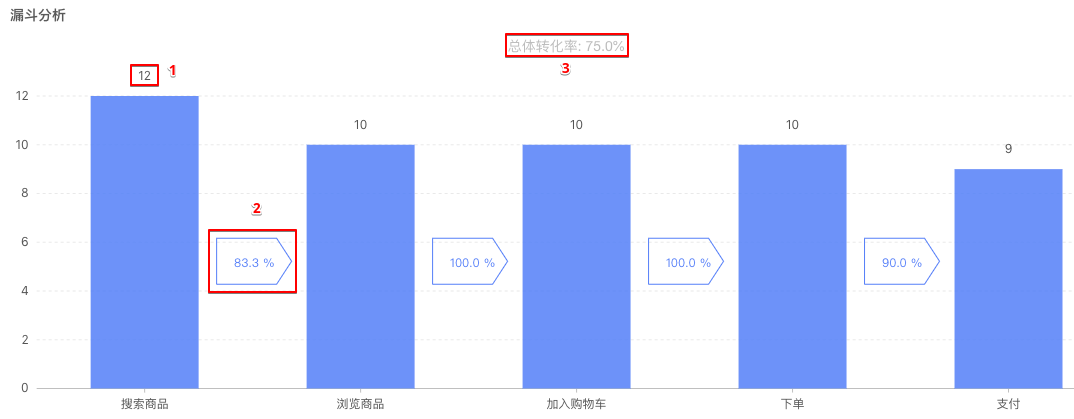
The shopping process includes five steps (events). The numbered labels in the figure are explained as follows:
12: The number of users for the 'Search for product' event.
83.3%: The conversion rate between adjacent events, from 'Search for product' to 'View product'. This is calculated as 10 / 12 = 83.3%.
75.0%: The overall conversion rate. This is calculated as 9 / 12 = 75.0%.
Prerequisites
Because funnels are used to analyze the conversion rate between events, you must configure custom events before you can perform a funnel analysis. For more information, see Custom Event Analysis Tutorials.
Procedure
Step 1: Create a funnel
To create a funnel:
Log on to the mPaaS console. In the navigation pane on the left, choose Mobile Analysis > Custom Analysis > Funnel Analysis. Click Create Funnel.
On the Create Funnel page, complete the configuration. Note the following parameters:
Time window: The maximum time allowed to elapse between two adjacent steps (events) in the funnel.
Calculation dimension: The dimension for the analysis. Select User ID or Device ID.
Add the steps (events) of your business flow.
Click Submit to create the funnel.
Step 2: View a funnel
On the Funnel Analysis page, click a funnel name to view the funnel.
Funnel analysis data is available on a T+1 basis. Calculations are performed in the early morning each day. You can query data for the previous day and earlier.