mPaaS provides the Configuration Management service (ConfigService) to configure switches for A/B testing.
The Configuration Management service provides an API to pull configurations on demand and a listener to detect changes. This enables an immediate refresh after a configuration is updated.
By default, the service pulls configurations every 30 minutes.
Procedure
Add the switch configuration SDK (APConfig.framework) to your project.
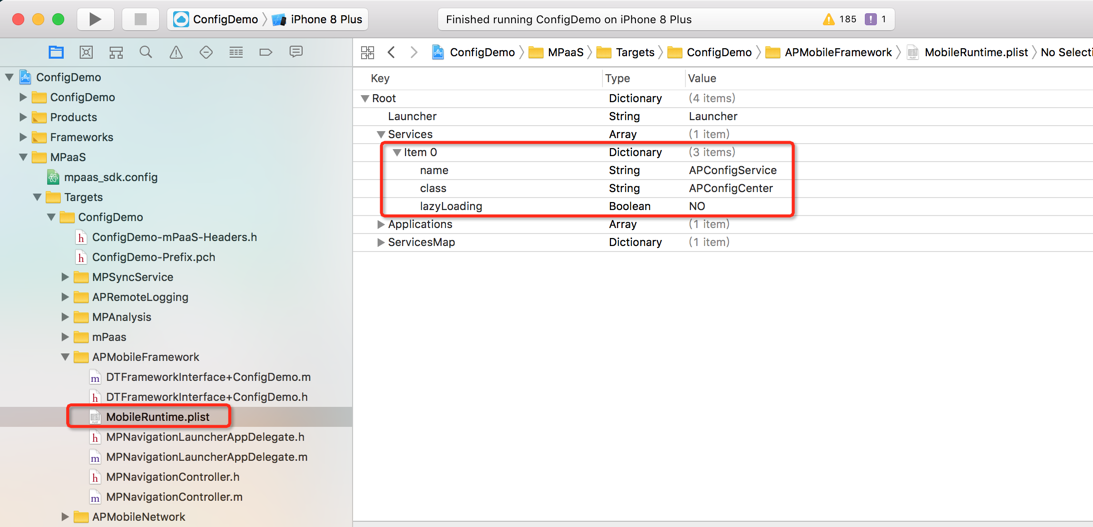
Configure the project. The switch configuration feature is provided as a service by mPaaS. Before using this service, you must register it in the service manager as shown in the following image:
Code example
Retrieve the A/B experiment value:
The client retrieves the value for a switch key by calling an API.
For example, to run an experiment on a button's text, set the text to Submit for experiment A and Confirm for experiment B. The code is as follows:
    + (void)testForABTest
    {
    id<APConfigService>configService = [DTContextGet() findServiceByName:@"APConfigService"];
    NSString *configValue = [configService stringValueForKey:@"ButtonTitleConfigKey" spmId:nil];
    if ([configValue isEqualToString:@"sure"]) {
    [self.button setTitle:@"Confirm" forState:UIControlStateNormal];
} else {
    [self.button setTitle:@"Submit" forState:UIControlStateNormal];
}The switch key-value is returned by a remote procedure call (RPC) pull, which may fail. You must implement local client-side logic to handle pull failures.
Set a default value for the switch in your local client logic. When a new switch is published from the console, the client uses the new configuration. If the pull fails, the client uses the local default value.