Bluetooth device development
Alibaba Cloud's IoT Living Platform offers the Breeze protocol for devices that use Bluetooth Low Energy (BLE) communication. The protocol provides a simple way to establish a complete link between your app, the device, and the cloud.
Background
This topic describes how to integrate the Breeze protocol with a device that has Bluetooth Low Energy (BLE) capabilities. It covers connecting to a mobile app, authenticating the BLE device, establishing a secure communication channel between the device and the phone, and pushing device data to the cloud through the app. For more information about mobile client and cloud development, see Bluetooth Connection Development Guide.
The Breeze protocol is similar to a profile in a BLE protocol stack. It must be adapted to run on top of the BLE protocol stack.
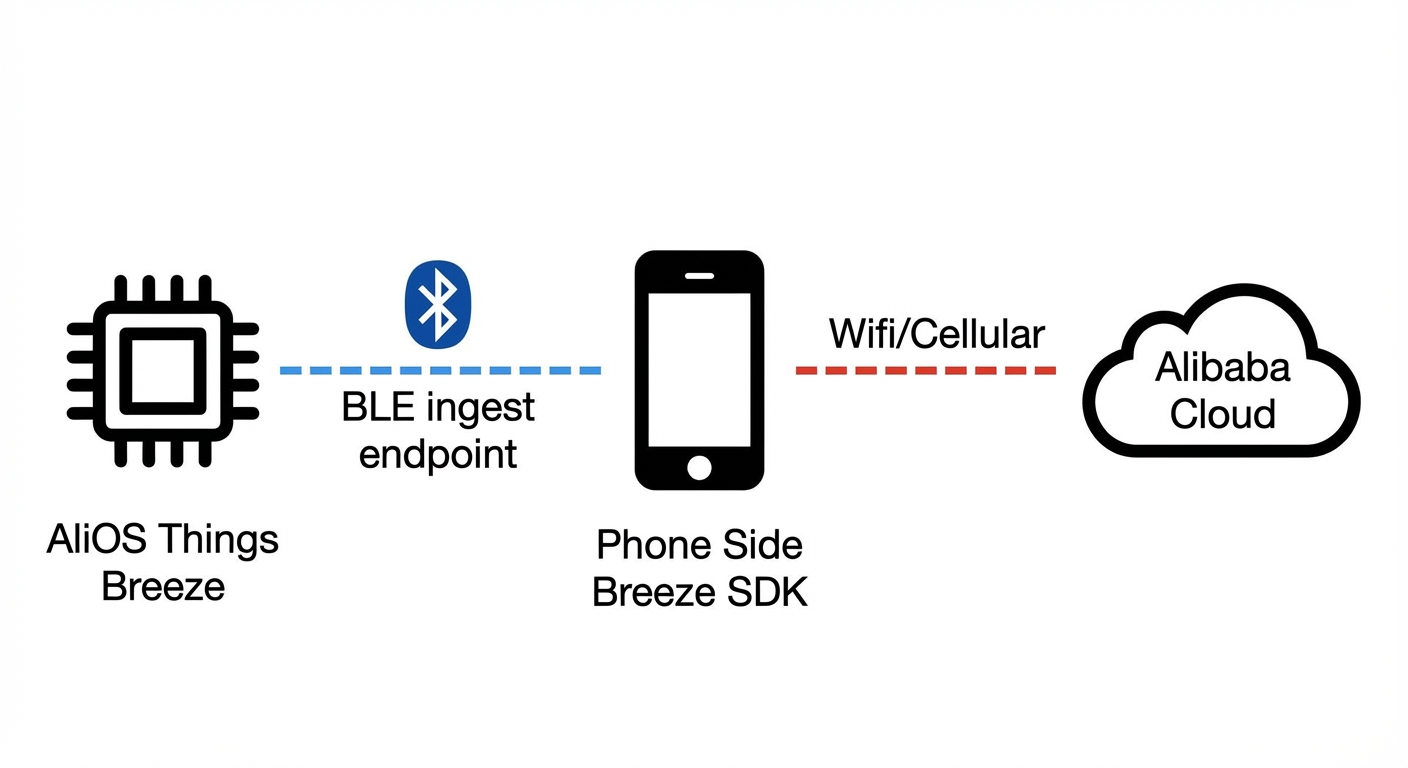
Device-side Breeze SDK
The Breeze protocol defines how BLE devices communicate with mobile apps when connecting to the Alibaba Cloud IoT Living Platform. To simplify integration, the IoT Living device software development kit (SDK) provides a code implementation of this protocol, called the Breeze SDK. The following diagram shows its structure.
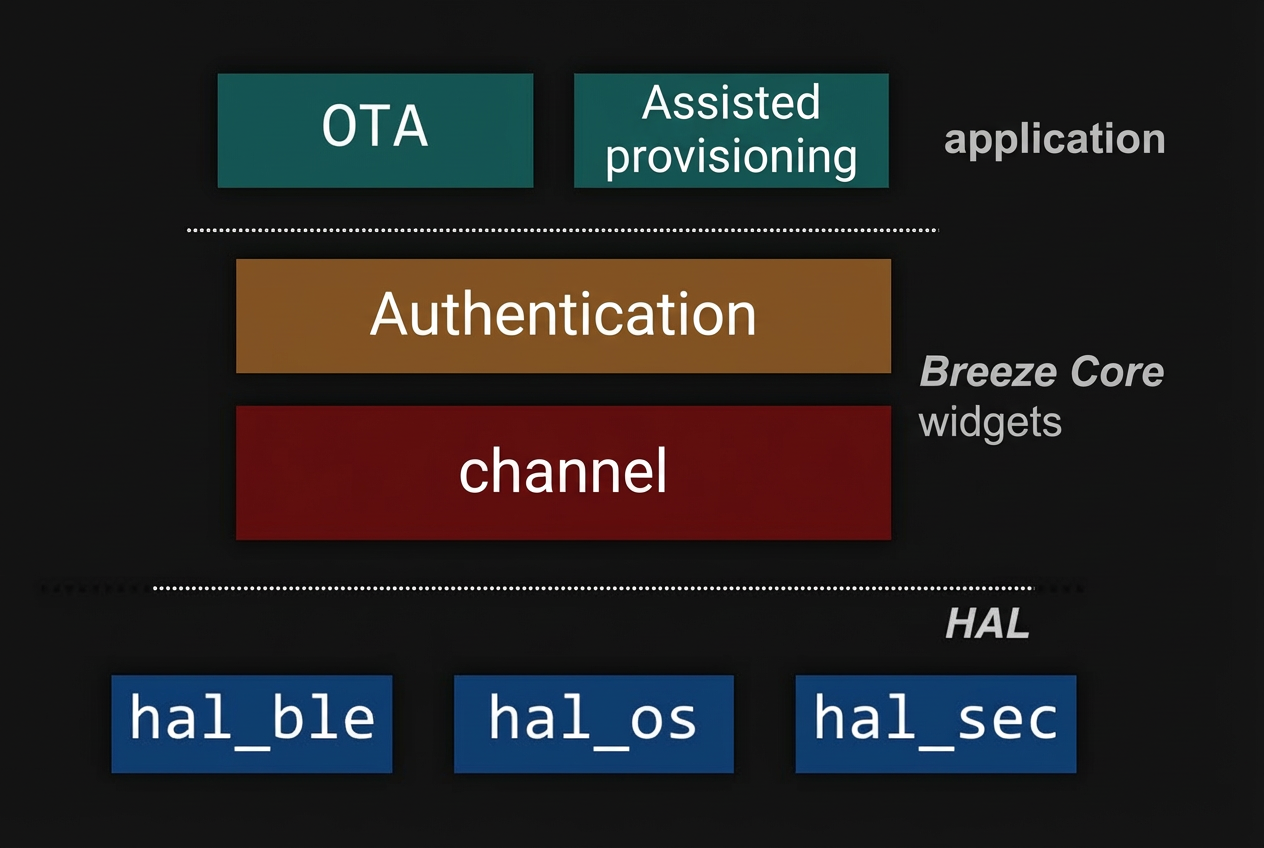
- HAL layer: The Breeze SDK must be adapted for a BLE stack. The Hardware Abstraction Layer (HAL) is used for this purpose. You must modify the HAL to port the SDK to different BLE stacks.
- Core component layer: This layer contains the source code for authentication, channels, and other logic for the device-mobile-cloud link. Typically, you can use this layer without modification.
- Application layer: Breeze provides channels for features such as device Over-the-Air (OTA) updates and assisted Wi-Fi provisioning. You can use these features as needed for your specific scenario.
Device-side Breeze SDK code structure
The device-side Breeze SDK is open source and is included with the IoT Living device SDK. To obtain the latest version, see Get SDK for the release that includes AliOS Things.
The code is located in the $(SDK Src)/framework/bluetooth/breeze folder. The directory structure is as follows.
.
├── Config.in  // Configuration for the menuconfig component
├── breeze.mk  // Makefile document
├── README.md  // Readme document
├── api    // Folder. The breeze_export.* interfaces are provided by the Breeze SDK for applications. The breeze_awss_export.* interfaces are for Bluetooth-assisted provisioning. Choose one based on your application scenario.
├── core  // Folder. The core source code implementation, including security, channels, and extended instructions.
├── hal  // Reference implementation for porting. Uses AliOS Things OS, BLE protocol stack, and internal mbed TLS and security references.
├── include   // Header files for the Breeze SDK
Development guide
You can use the HAL interfaces in the SDK to enable the Breeze protocol on your device that runs a BLE protocol stack.
Porting the SDK to a third-party platform
The breeze_hal_sec interface is for security components, which include the AES-128 CBC encryption and decryption algorithm and the SHA-256 interface. To use a third-party implementation, refer to the `hal` directory in the source code and replace the HAL implementations for the OS, BLE protocol stack, and security components in this folder. The HAL is defined in $(SDK Src)/framework/bluetooth/breeze/hal. The rest of the code and the application remain unchanged.
- breeze_hal_ble: Provides integration with the BLE protocol stack interfaces. These interfaces handle tasks such as Bluetooth broadcasting and registering the Breeze Bluetooth service.
- breeze_hal_sec: Provides integration with security components. This includes the AES-128 CBC encryption and decryption algorithm.
- breeze_hal_os: Provides integration with different OS interfaces. These interfaces handle OS timer resources and key-value (KV) storage and read operations.
API list
For detailed definitions and descriptions, see Bluetooth Device SDK User Programming Interfaces.
HAL interface list
For detailed definitions and descriptions, see Bluetooth Device SDK Porting Interfaces.
Defining a product on the IoT Living Platform
Devices must be authenticated by the IoT Living Platform. You must obtain the required product authentication information from the platform.
- Create a project.
For more information, see Create a project.
- Create a product.
For more information, see Create a product and configure the product as follows.
- Set Node Type to Device
- Set Connect to Gateway to Yes
- Set Gateway Protocol to BLE
- Define product features.
Define the product features. For more information, see Feature Overview.
- (Optional) On the Product > Device Debugging page, click Add Test Device.
On the right of the product definition page, you can find the following product information: Product Key, Product Secret, and Product ID. This information is sufficient for per-product authentication. For per-device authentication, you can also generate multiple devices for the same product on the Product > Device Debugging page. The Device Secret is unique for each DeviceName. You now have all five elements required for per-device authentication.
Advanced device-side application scenarios
After establishing a secure channel using the SDK, two main advanced application scenarios are available: Bluetooth-assisted Wi-Fi provisioning and BLE device OTA.
Bluetooth-assisted provisioning
- Scenario: A Wi-Fi device must connect to a Wi-Fi hot spot (Wi-Fi AP) before it can use IP to communicate with other devices.
For a Wi-Fi IoT device that has no keyboard, touch screen, or web server, obtaining the SSID and password of the Wi-Fi hot spot is the first key step to enable remote device management.
The process where a Wi-Fi device obtains the SSID and password for a Wi-Fi hot spot is called Wi-Fi provisioning. The Bluetooth-assisted Wi-Fi provisioning solution is for devices that support both BLE and Wi-Fi. In this solution, the SSID and password of the Wi-Fi hot spot are sent to the Wi-Fi device over a BLE channel. This allows the Wi-Fi device to connect to the Wi-Fi AP, which is usually a wireless router. The following diagram shows how Bluetooth-assisted Wi-Fi provisioning works.
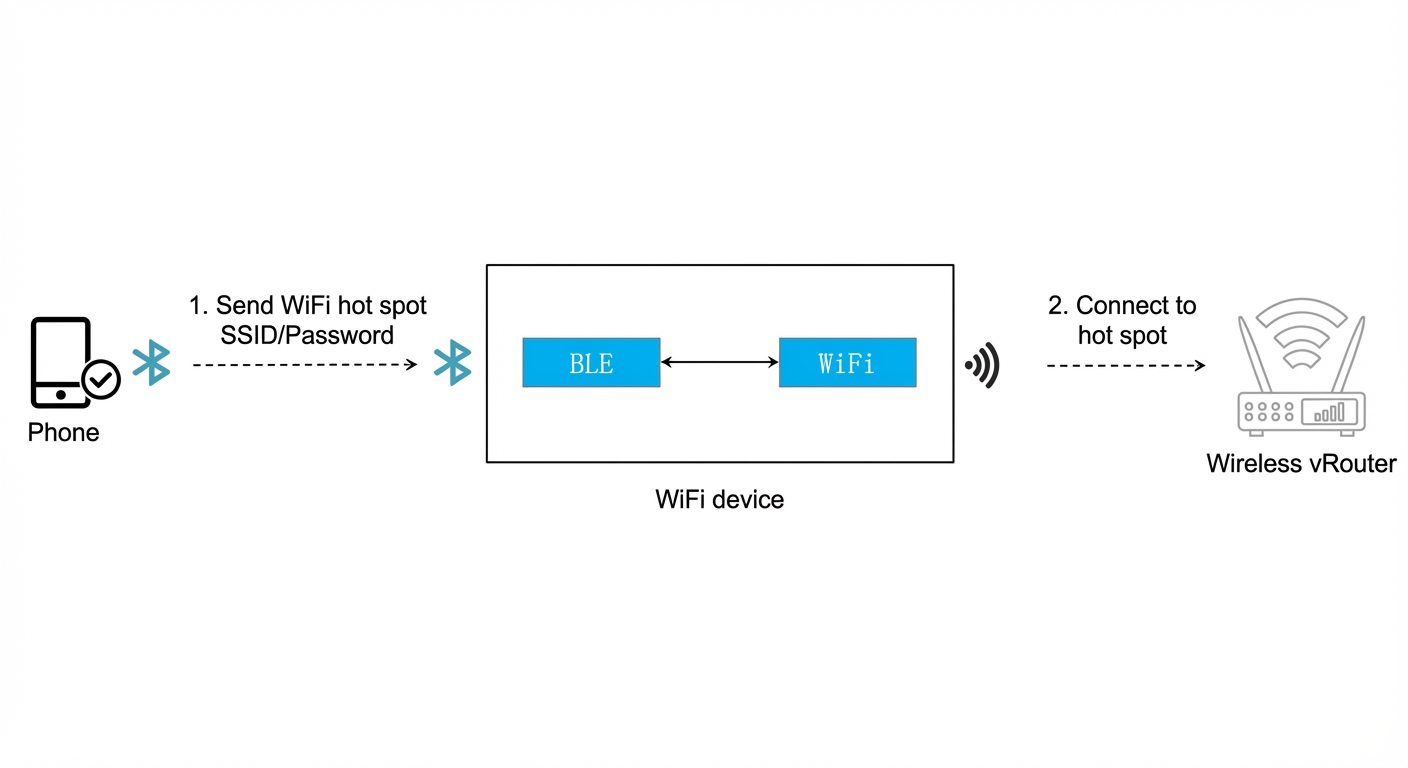
The components of Bluetooth-assisted Wi-Fi provisioning are as follows.
- Device-side SDK: The device hardware supports a combo chip (with both Wi-Fi and BLE) and runs the Bluetooth provisioning example based on the Breeze SDK.
- Provisioning mobile SDK: The mobile phone integrates the corresponding Bluetooth provisioning SDK or the "Cloud Intelligence" app.
- Development flow
If you are a Wi-Fi module or device vendor, and your module or device supports both BLE and Wi-Fi, you can follow this procedure to integrate the Bluetooth-assisted Wi-Fi provisioning feature from the Alibaba Cloud IoT Living Platform.
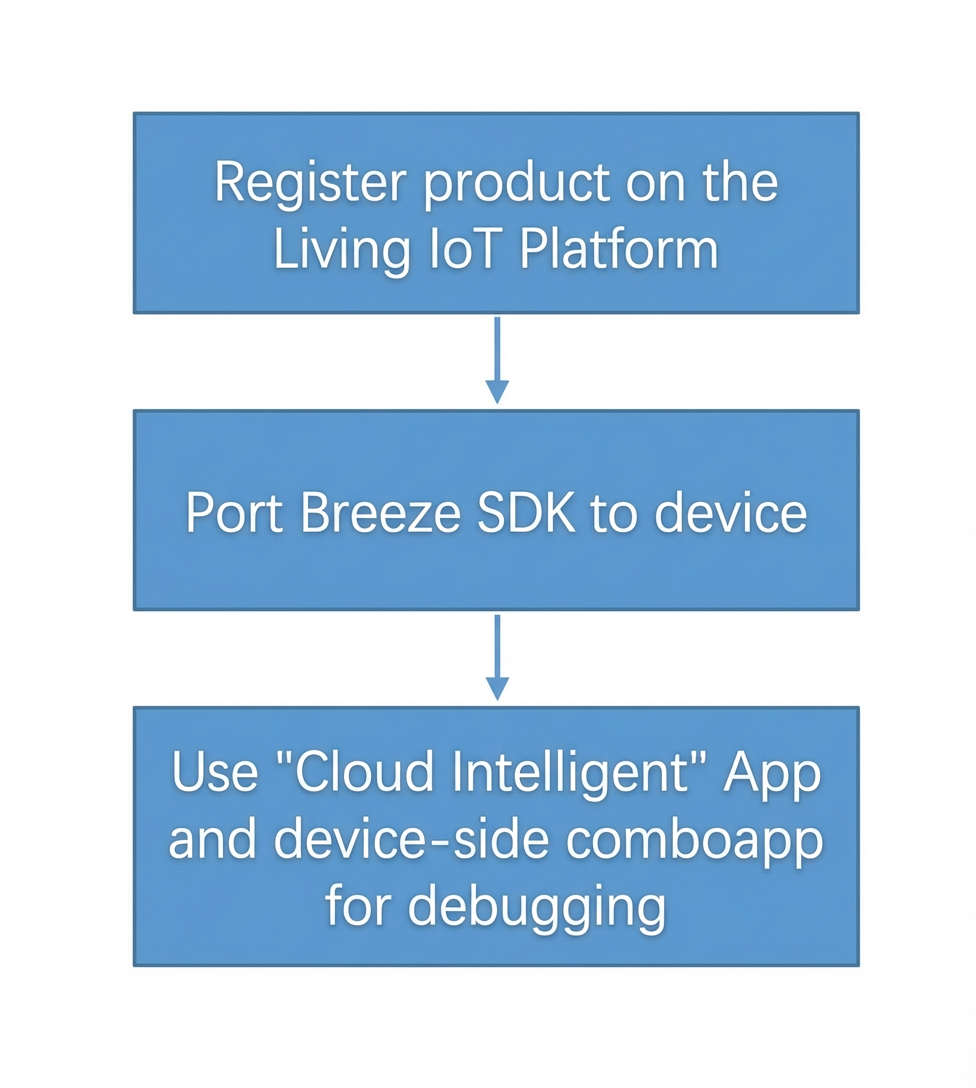
- Register the product as described in the Device Development Flow, and then add Bluetooth-assisted Network Provisioning as a provisioning method in the Network Provisioning Guide section of the Product - Human-Machine Interaction
- Develop the device-side combo app to work with the "Cloud Intelligence" app. If you are integrating the mobile SDK to develop your own app, for more information, see Bluetooth Connection Development Guide.
- Device-side comboapp development
After you port the Breeze SDK to your device, you can refer to
example/comboappto implement the Bluetooth-assisted Wi-Fi provisioning feature. You must set the device information that you obtained during product registration in the combo app.
Breeze device OTA
- OTA compilation configuration
You can refer to the breezeapp example. The OTA feature is enabled by default.
- OTA integration and porting
The OTA module code is located in the
framework/uOTA/src/device/blefolder, which contains the following directories.. ├── README.md ├── ble.mk ├── inc // Contains external interfaces and integration APIs │ ├── ais_ota.h │ ├── ota_breeze.h │ ├── ota_breeze_export.h │ ├── ota_breeze_plat.h │ └── ota_breeze_transport.h └── src // Implementation of the internal OTA logic ├── ota_breeze.c ├── ota_breeze_plat.c ├── ota_breeze_service.c └── ota_breeze_transport.cFor more information about specific integration functions, see Bluetooth Device SDK OTA Interfaces.
- OTA debugging and usage
For specific information about how to use OTA, see the "OTA configuration in operation" section in Bluetooth Connection Development Guide.