Enable signature verification to protect offline package integrity and confirm that packages come from a trusted source.
Signature verification confirms two things: that the offline package was not altered in transit, and that it originates from your server. The protection applies to the download and loading phases. It does not prevent a determined attacker from reverse-engineering or modifying H5 logic on a device they control — treat the backend as the security boundary for sensitive operations.
To enable signature verification, complete the following steps:
Generate a key pair. Store the private key on the server to sign each offline package before publishing. Embed the public key in the client app to verify signatures at load time.
Configure the private key on the offline package publishing platform. When a package is published, the platform produces an .amr file containing the signature — the hash value of the package encrypted with the private key.
-
After the client receives and decompresses the .amr file, the SDK uses the embedded public key to verify the signature. The SDK decrypts the signature to recover the original hash, recomputes the hash from the package, and compares the two. If they match, the package passes verification.
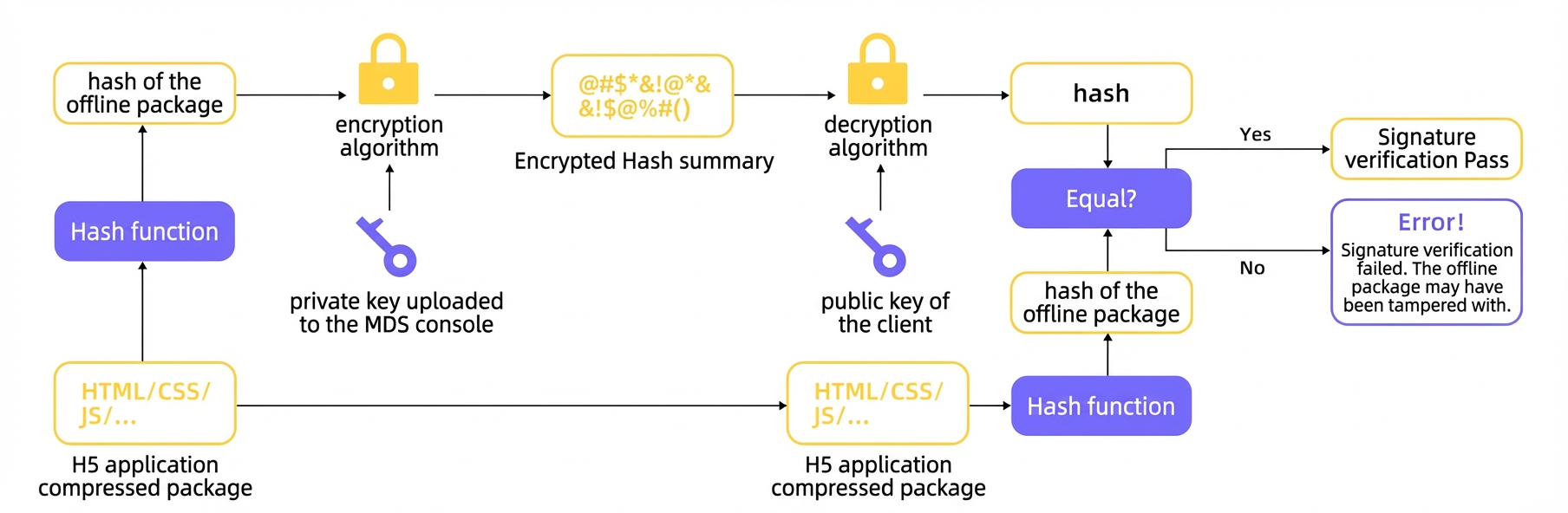 The signature verification process ensures both the content integrity and source authenticity of the offline package.
Signature verification protects package integrity during transmission and loading. It does not prevent client-side tampering after a package is installed, because the user has full control of their device. Always enforce access control and business logic on the backend. For example, time-sensitive operations such as flash sales and panic buying require server-side timestamp validation rather than relying solely on client checks.