Compile and debug PL
Background information
Procedural Language (PL) is an extension of SQL. It adds programming features to standard SQL statements. PL organizes data operations and query statements into procedural code blocks. This lets you use logic, such as loops and conditional statements, to perform complex tasks.
You can use PL to write programs with advanced features. Encapsulating business logic inside the database provides better abstraction and security. It also reduces network interaction and speeds up calls, which improves overall performance.
Developing PL programs is a key daily task for database developers. The PL debugging module is an essential feature, much like the support module for SQL statements. Therefore, developers need a dedicated area to develop and debug PL code.
PL statements can be used to write database objects such as functions, stored procedures, packages, and triggers.
OceanBase Developer Center (ODC) V2.2.0 and later supports creating, compiling, running, and debugging PL objects and anonymous blocks. You can compile PL statements in the editing area of the anonymous block window. You can also edit and debug existing PL objects. We recommend using the latest version of ODC for an optimal experience.
This document provides an example of how to create a stored procedure. The example creates an OceanBase Oracle stored procedure named PROC_VARCHAR2 in the GSH database.
The data used in this document is for example purposes only. Replace it with your data as needed.
Prerequisites
ODC PL support status
Feature |
Supported objects |
Supported data sources |
Supported versions |
Compile |
Functions/Stored procedures/Packages |
OceanBase Oracle, OB Cloud Oracle |
V2.2.7x, V3.0.0, and later. |
Debug |
Functions/Stored procedures/Anonymous blocks |
OceanBase Oracle |
V3.2.3 and later. |
Run |
Functions/Stored procedures |
OceanBase Oracle, OB Cloud Oracle, OceanBase MySQL, OB Cloud, MySQL |
V2.0.x and later. |
Functions/Stored procedures |
MySQL |
V5.7 |
|
Run |
Packages/Anonymous blocks |
OceanBase Oracle, OB Cloud Oracle |
V2.0.x and later. |
Also, note the following:
If the data source is OceanBase and is connected only through OBProxy, the instance does not support debugging.
The anonymous block window is available only for OceanBase Oracle and OB Cloud Oracle data sources.
Versions of ODC earlier than V3.2.3 do not support debugging on the ARM architecture.
Compile PL
Create a stored procedure in the SQL window.
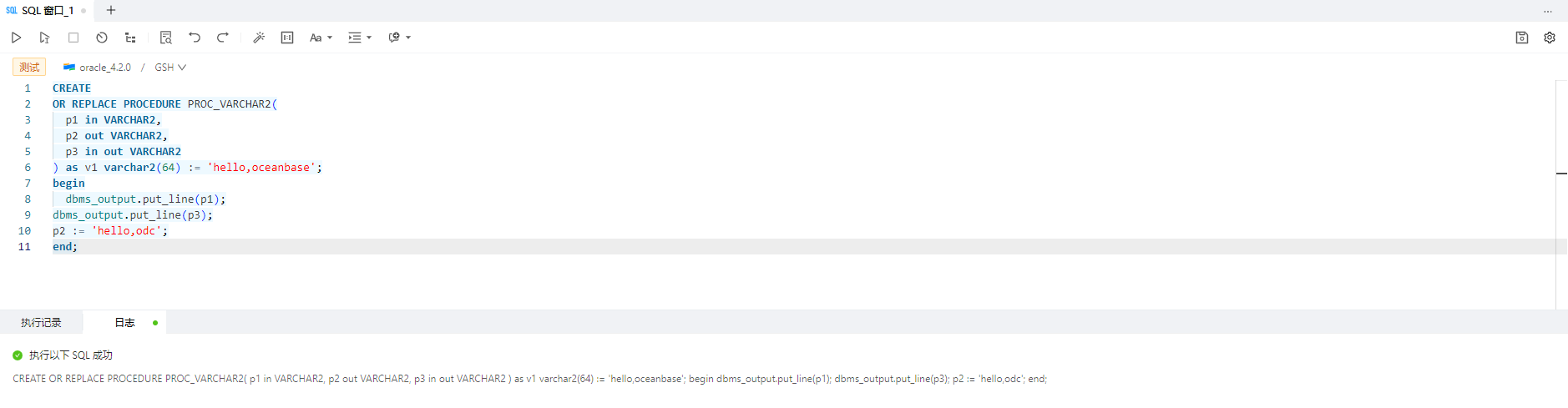
CREATE OR REPLACE PROCEDURE PROC_VARCHAR2(p1 in VARCHAR2, p2 out VARCHAR2, p3 in out VARCHAR2)
as
v1 varchar2(64) := 'hello,oceanbase';
begin
dbms_output.put_line(p1);
dbms_output.put_line(p3);
 p2 := 'hello,odc';
end;
In the SQL development window, navigate to the Stored Procedures list in the navigation pane on the left. Select the Compile option for the PROC_VARCHAR2 stored procedure.
Compile the PL statement and view the compilation result.

Debug PL
In the SQL development window, navigate to the Stored Procedures list in the navigation pane on the left. Select the Debug option for the PROC_VARCHAR2 stored procedure to enter debug mode.
Set the parameter values and click OK.
ImportantFor OceanBase V4.0.0 and later, you must obtain debugging permissions before debugging. Example:
GRANT DEBUG CONNECT SESSION TO GSH; GRANT DEBUG ANY PROCEDURE TO GSH;On the debugging page, click Batch Execute to run the PL statement.