Application integration
Continuous integration and delivery practices automate the path from code commit to production, reducing manual effort and catching defects earlier in the development cycle.
Continuous integration
When a developer commits code, the system immediately builds and tests it using automated unit tests or integration tests. This fast feedback loop catches problems before they compound—the earlier a defect surfaces, the cheaper it is to fix.
Code merges into the integration branch only after passing all tests, which prevents broken changes from blocking the rest of the team. For modern distributed applications, continuous integration (CI) automates builds and validation across all components, giving teams consistent, repeatable feedback they can act on.
Effective CI has two defining characteristics:
Fast feedback loop: Each integration produces actionable feedback. Teams use this feedback to catch and resolve problems early, before they propagate into later stages.
Full automation: Every commit triggers a build and test run automatically. Results are shared with the team—typically through pass/fail status indicators—so issues are visible immediately.
CI services listen for events in the code repository—such as Git pushes and merge requests—and trigger these processes automatically. Common tools include Jenkins, GitLab CI, CircleCI, and GitHub Actions.
Continuous delivery
Continuous delivery extends CI by frequently shipping validated software to a production-like environment, such as a testing or staging environment, where testing and business teams can review it. The core guarantee: the software is always in a deliverable state.
Unlike CI, which focuses on build and unit-level validation, continuous delivery also runs integration tests and API tests to confirm the full product is ready for production deployment.
Continuous deployment
Continuous deployment goes one step further: every change that passes all pipeline stages is deployed to the production environment automatically, without a manual trigger.
The key distinction from continuous delivery is the final gate. Continuous delivery keeps a human approval step before production; continuous deployment removes it entirely, trusting the pipeline to validate and ship code on its own.
CI/CD pipelines
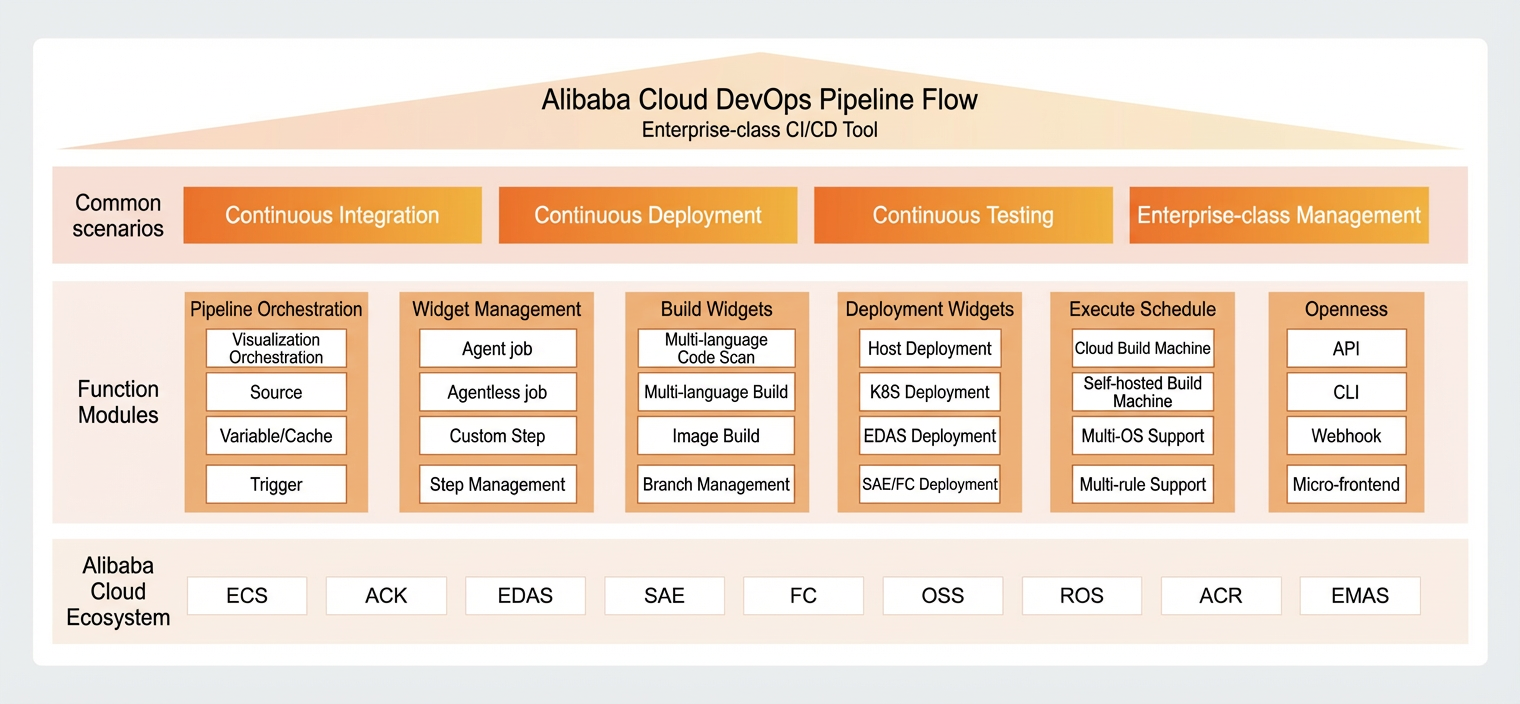
Apsara DevOps Flow is an enterprise-grade CI/CD tool that automates the full pipeline from development to release—builds, integrations, validations, and deployments included.
Deployment strategies
A direct full release to production carries unknown risks for the development and operations team. Use a canary release or a phased release to limit blast radius and protect service stability:
Canary release: Route a small percentage of traffic to the new version first. Monitor for errors and performance regressions before expanding the rollout.
Phased release: Deploy the new version to a subset of instances or regions in stages. Validate each stage before proceeding to the next.
Both strategies minimize the number of users affected by an unstable release and give the team time to detect problems before they reach full production scale.
Release process observability
Every production change requires active monitoring to catch regressions early. Track three areas:
Metrics: Monitor resource metrics (CPU and memory usage), service performance metrics (response time (RT)), and business metrics (failed logins, failed orders). Categorize metrics by priority so the most critical signals surface first. For guidance on metric categories and alert thresholds, see the Observability chapter.
Logs: Monitor operational logs from all devices and services. Flag abnormal log patterns and error messages for immediate investigation.
Distributed tracing: Analyze the upstream and downstream call chains for the newly released application to identify latency spikes or failure propagation.
Release rollbacks
Roll back immediately if a production release degrades service health. Treat rollback as a proactive safety measure—initiate it based on alarm thresholds, not just confirmed root cause. Key signals to watch:
Fault rate increase
Latency or RT degradation
CPU or memory usage spikes
Elevated error log rates
Keep a monitoring window open after each deployment to catch issues that emerge under low load or over time. During a rollback, account for potential service interruptions and dirty data writes before proceeding.
Apsara DevOps Flow provides a built-in rollback feature. In the deployment history of a pipeline, select any previous deployment record and roll back to it. Apsara DevOps Flow reruns the deployment task using the original deployment script and build artifacts from that specific run.