This paper introduces the principle and implementation process of the preset mini program.
What is a preset mini program?
Preset mini programs refer to the process of packaging static resources such as rendering, logic, and configuration of mini programs into a compressed package and integrating them into the client app. The mini program container can directly load resources from the local machine. Preset mini programs to minimize the impact of network environment on the mPaaS mini program page. Prebuilt packages provide the following benefits:
Improve user experience. You can embed static resources on a page into an application and publish the resources along with the application by using a preset package. When you open an application for the first time, you do not need to rely on the network environment to download resources.
Implement dynamic update When a new version is released or an emergency release is made, you can perform iterative development in the mini program IDE and release it in the mPaaS console. The integrated mini program SDK in the client automatically updates the mini program to the latest version. This release does not require App Store review and allows users to receive updates early.
Prerequisites
You have connected to the mini program component. For more information about how to install mini programs, see Getting Started.
Procedure
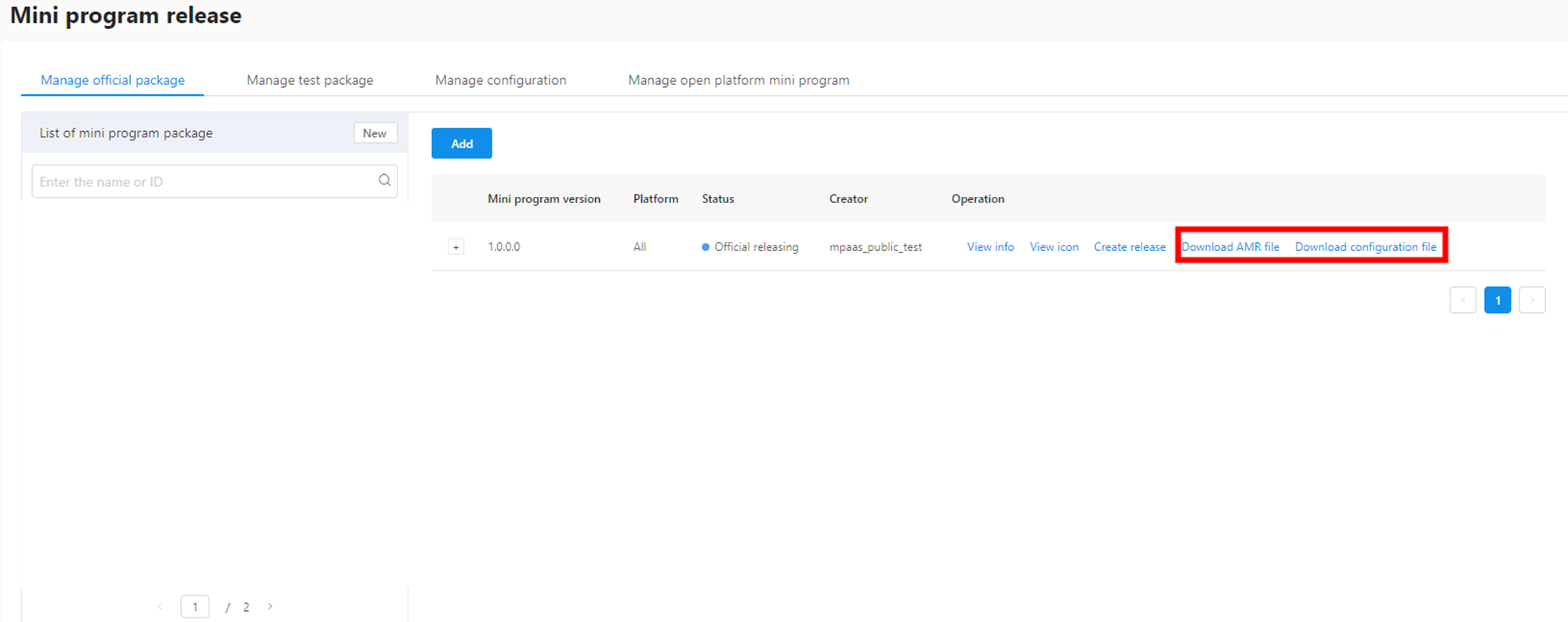
Release the mini program package in the mPaaS console and download the AMR file and configuration file.
Create a separate bundle. If
DemoCustomPresetApps.bundle, add the AMR offline package andh5_json.jsonfiles downloaded from the releasing platform to this bundle.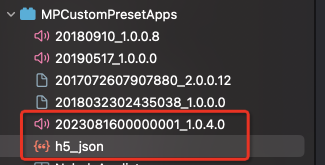 Note
NoteCurrently, the publishing platform only supports downloading the
h5_json.jsonconfiguration file of a single offline package. When multiple mini program packages are preset, you need to manually merge data from differenth5_json.jsoninto one configuration file.Specifies the path of the out-of-box mini program when initializing the mini program. Use the
initNebulaWithCustomPresetApplistPathto initialize the container and set the offline package path of the preset mini program to the bundle created in the previous step.- (void)application:(UIApplication *)application beforeDidFinishLaunchingWithOptions:(NSDictionary *)launchOptions { // Initialize RPC. [MPRpcInterface initRpc]; // Initialize the container and customize the preset mini program package information. NSString *presetApplistPath = [[NSBundle mainBundle] pathForResource:[NSString stringWithFormat:@"DemoCustomPresetApps.bundle/h5_json.json"] ofType:nil]; NSString *appPackagePath = [[NSBundle mainBundle] pathForResource:[NSString stringWithFormat:@"DemoCustomPresetApps.bundle"] ofType:nil]; [MPNebulaAdapterInterface initNebulaWithCustomPresetApplistPath:presetApplistPath customPresetAppPackagePath:appPackagePath customPluginsJsapisPath:@""]; }Start the mini program. Similar to a non-preset mini program, when entering the corresponding page, call the interface method provided by the container to load the mini program.
[MPNebulaAdapterInterface startTinyAppWithId:@"2020121720201217" params:nil];