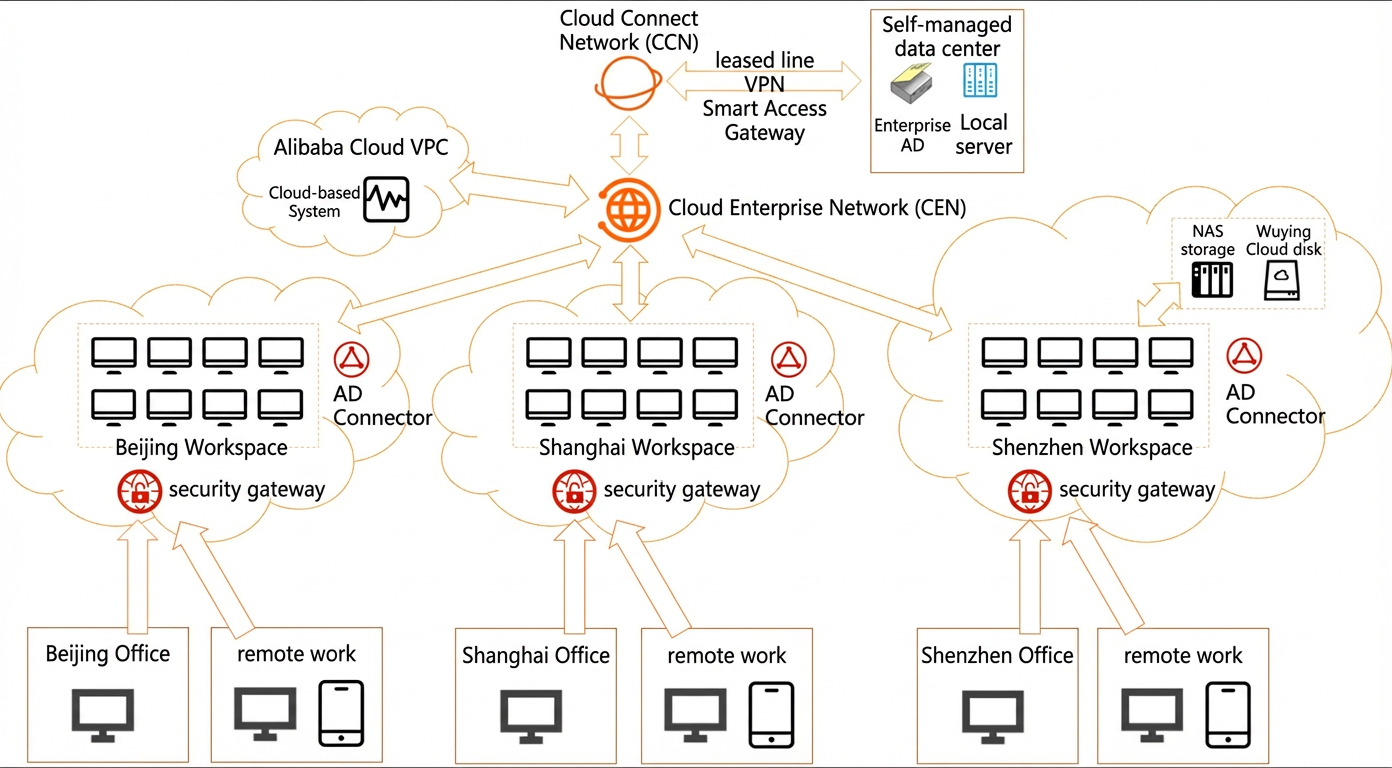
Automotive manufacturing industry
This topic describes the best practices for the WUYING Workspace solution for the automotive manufacturing industry.
Scenario overview
Digital and intelligent transformation places higher demands on enterprise endpoint infrastructure. Key requirements include security, reliability, mobile access, flexibility, and cost-effectiveness. In scenarios such as software R&D, vehicle or component design, and autonomous driving, preventing data leaks is a top priority for endpoint management.
Customer pain points
User behavior on computers is difficult to control. Employees can easily leak important digital assets, such as core code, algorithms, and design drawings, through USB devices or the network.
The demand for remote work is increasing. When core personnel work from home or on business trips, their security and efficiency are not guaranteed. This creates a need for a secure remote work solution that provides a good user experience.
The geographic dispersion and high turnover of employees at branch outlets and outsourced R&D personnel make user management and Operations and Maintenance (O&M) across multiple locations difficult. In addition, user behavior cannot be monitored. This necessitates a secure, elastic, and rapidly deployable office solution that also supports remote O&M on endpoints.
Scenarios such as autonomous driving and design require powerful graphics cards, and cloud computer specifications must adapt as business needs evolve. Traditional PC workstations are expensive, have fixed configurations, and cannot respond flexibly to these demands.
Solution overview
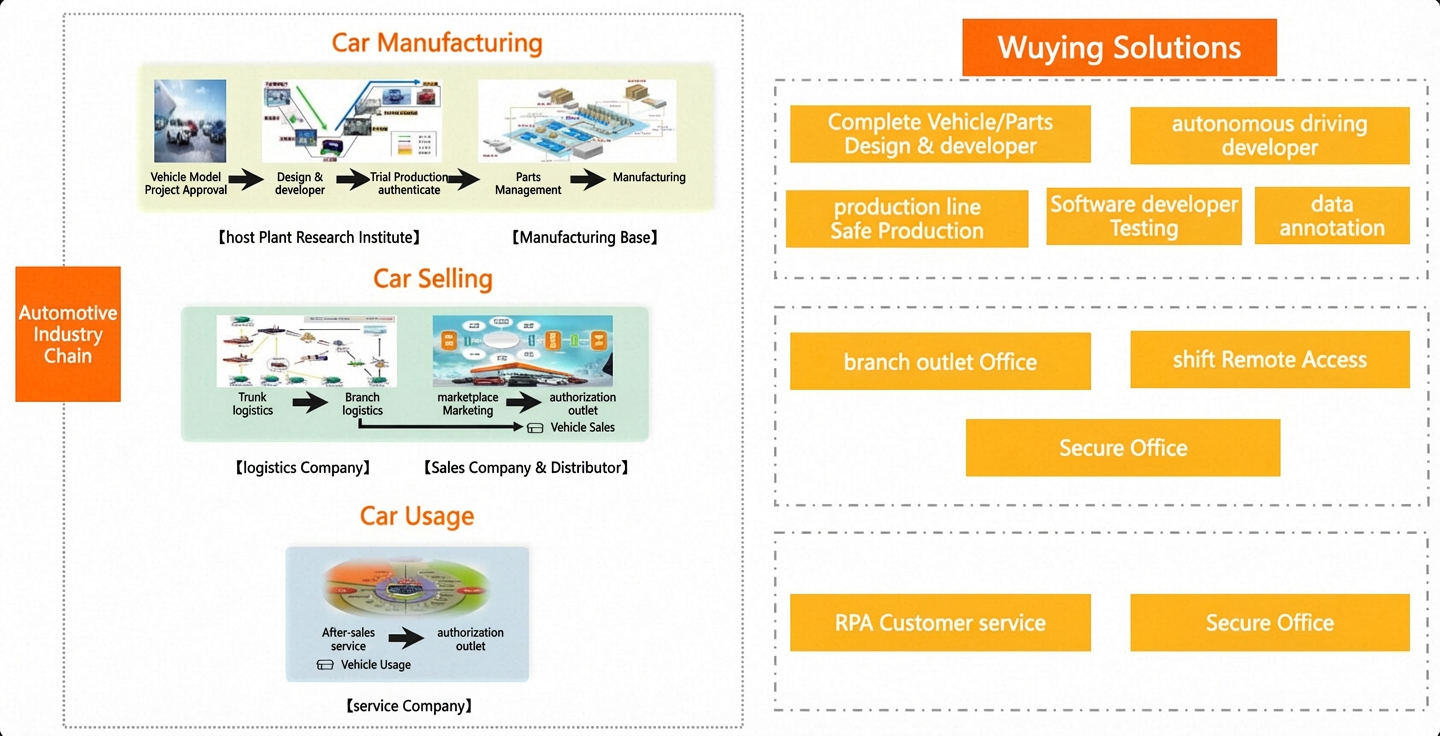
Solution architecture
Vehicle/component design and R&D scenario
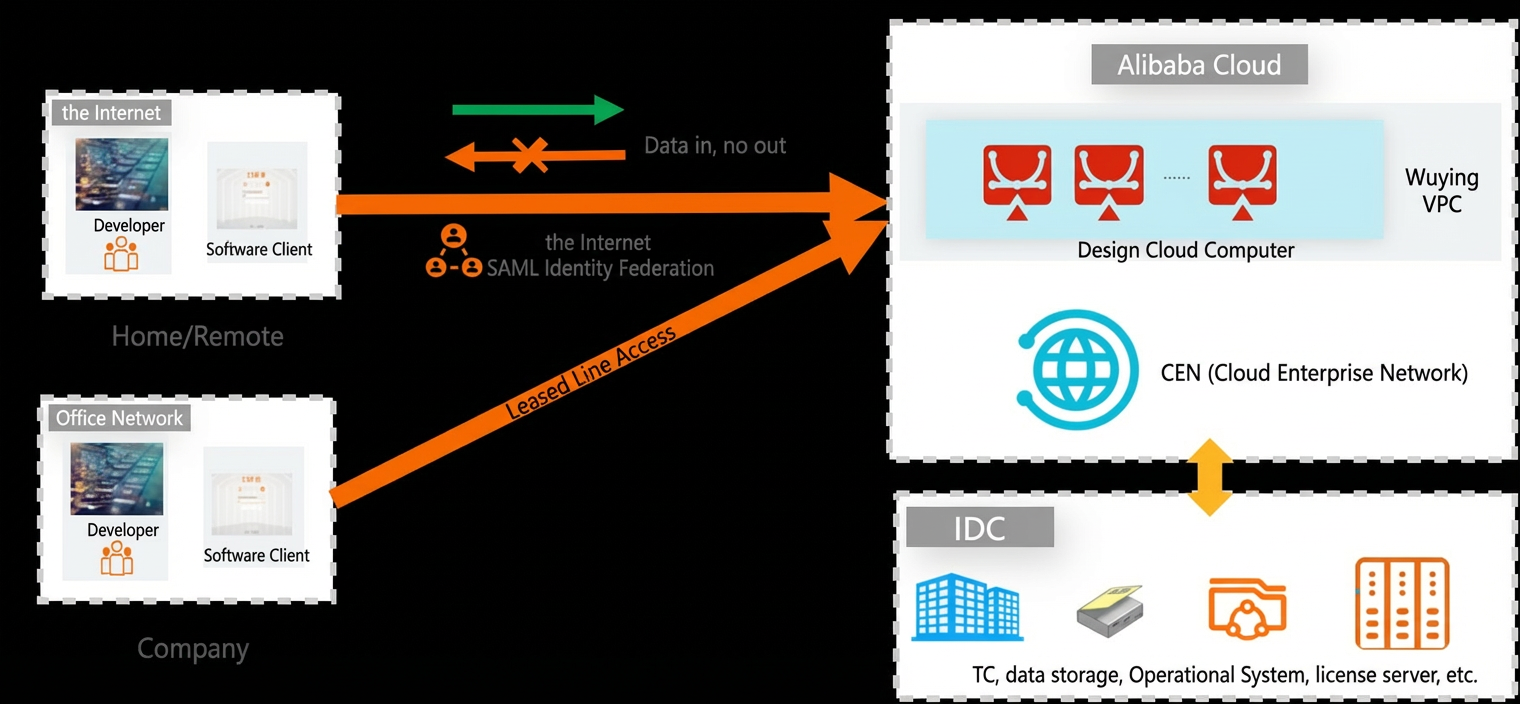
All design data is moved to the cloud, and no data is stored on local devices. WUYING Workspace features, such as screen recording audits, USB port control, watermarks, and security group policies, secure core data without requiring you to install additional security software.
WUYING Workspace provides GPU-accelerated cloud computers of various specifications with a low initial investment. You can flexibly upgrade or downgrade configurations for different business scenarios to meet evolving business demands.
A unified O&M portal simplifies operations and improves efficiency. Administrators can perform all O&M tasks remotely.
Secure and convenient remote access simplifies remote work, especially for employees on business trips.
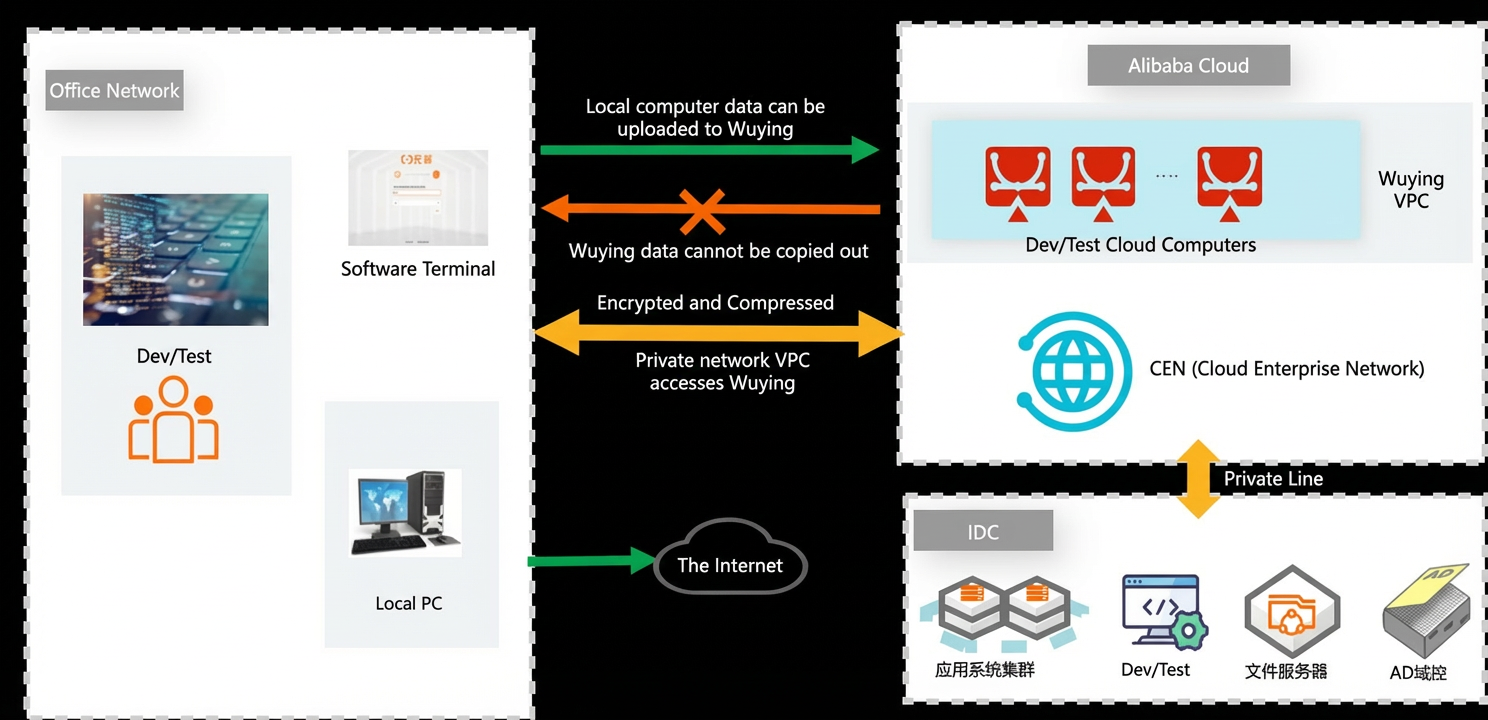
WUYING Workspace in the cloud and on-premises data centers are connected through leased lines to ensure efficient data transfer. Unidirectional data transfer control prevents data from leaving the private network.
Autonomous driving development scenario
WUYING Workspace provides high-computing-power endpoints and a proprietary protocol to overcome PC performance bottlenecks.
Data is not stored locally. Features such as screen watermarks, screen capture prevention, and USB port control provide comprehensive security.
Resource elasticity allows for the on-demand use of WUYING Workspace cloud computers to accommodate cyclical business needs and optimize costs.
Flexible access from multiple device types meets the demand for remote work. It also allows a user to log on to multiple operating systems from a single endpoint for greater convenience.
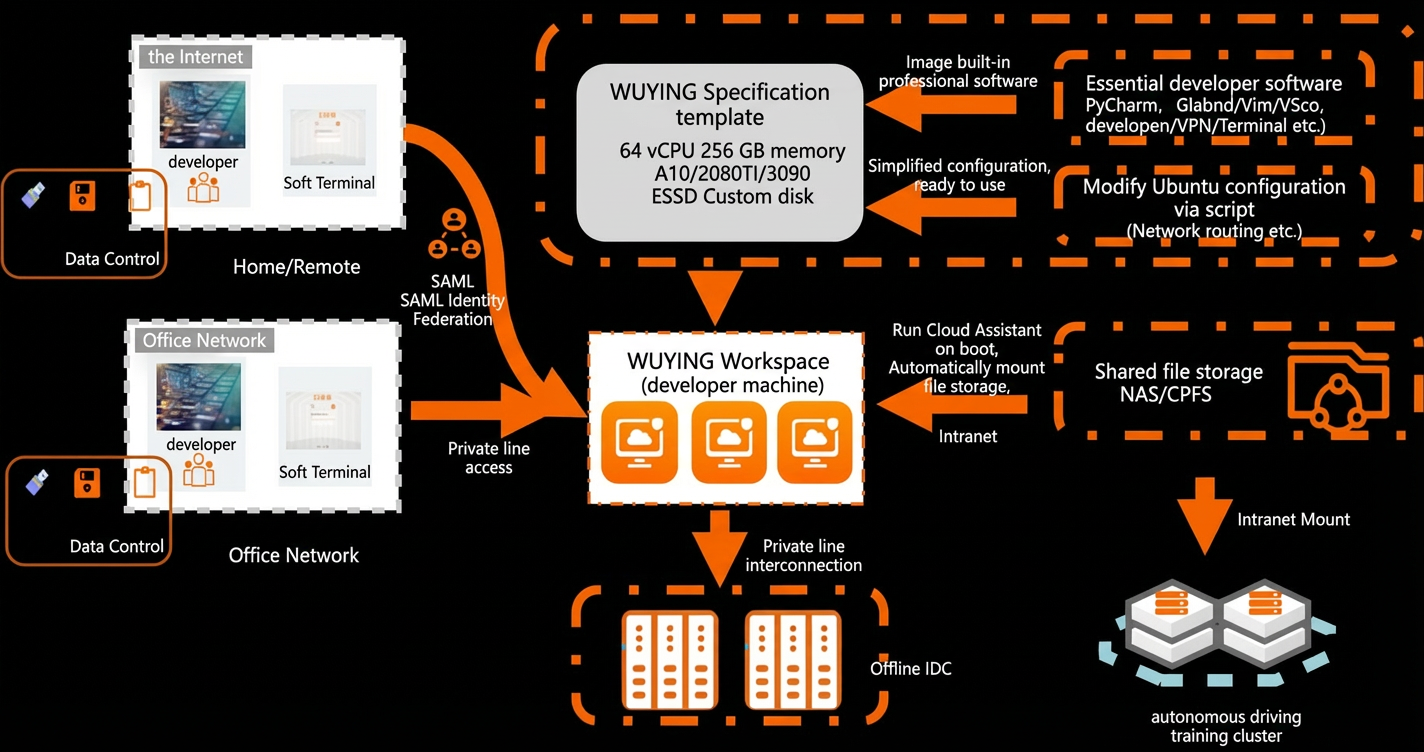
Cloud storage resources are integrated. Code, programs, and data flow seamlessly within the cloud. Resources do not leave the cloud unless necessary.
Software development and testing scenario
All R&D data is moved to the cloud and centrally managed by the data center. No R&D data is stored on local devices.
You can configure a dual-desktop environment with a local computer and the WUYING Workspace client for R&D and testing. Unidirectional data transfer control is implemented to support both general office work and development and testing.
Employees can access WUYING Workspace over the Internet or the company's private network to use their development desktops from home. Features such as watermarks, file copy prevention, and screen capture prevention ensure information security.
You can use templates to provision different types of cloud computers in batches. New instances can be ready in minutes to meet diverse testing requirements.
O&M is simpler and more efficient. Administrators can perform all O&M tasks remotely.
Branch/sales outlet scenario
All data from production computers is moved to the cloud and centrally stored in the data center, and no data is retained locally. WUYING Workspace policies, such as USB port control and watermarks, prevent production data leaks.
You can provision cloud computers with different specifications in batches. Software is pre-installed for a standardized, out-of-the-box deployment. This eliminates the need for business personnel to install and configure software.
WUYING Workspace uses highly reliable thin clients. You can simply connect a monitor to start using them. This approach significantly reduces the failure rate.
The central IT department at the headquarters can securely and efficiently manage and maintain all cloud computers at branch outlets.