Time to First Byte (TTFB)
Time to First Byte (TTFB) is a fundamental metric that measures connection setup time and web server responsiveness. It helps determine if a web server is too slow to respond to requests. For navigation requests, which are requests for an HTML document, this metric is captured before all other Web Vitals performance metrics. A low TTFB indicates a faster server response and a better user experience.
What is TTFB
TTFB is a metric that measures the time from when a resource is requested until the first byte of the response is received.
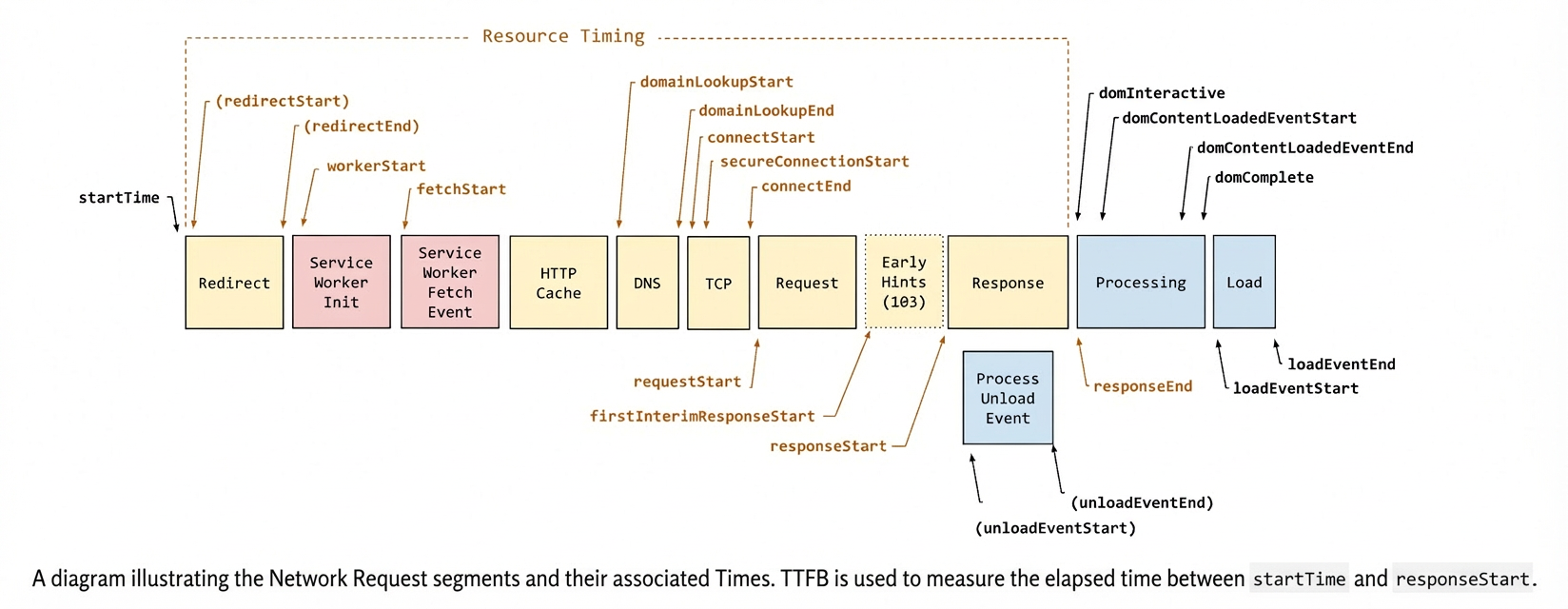
TTFB is the sum of the following request phases:
Redirection time
Service worker startup time (if applicable)
DNS query
Connection and TLS negotiation
From sending the request to receiving the first byte of the response
Reducing connection setup time and backend latency are effective ways to lower TTFB.
TTFB score thresholds
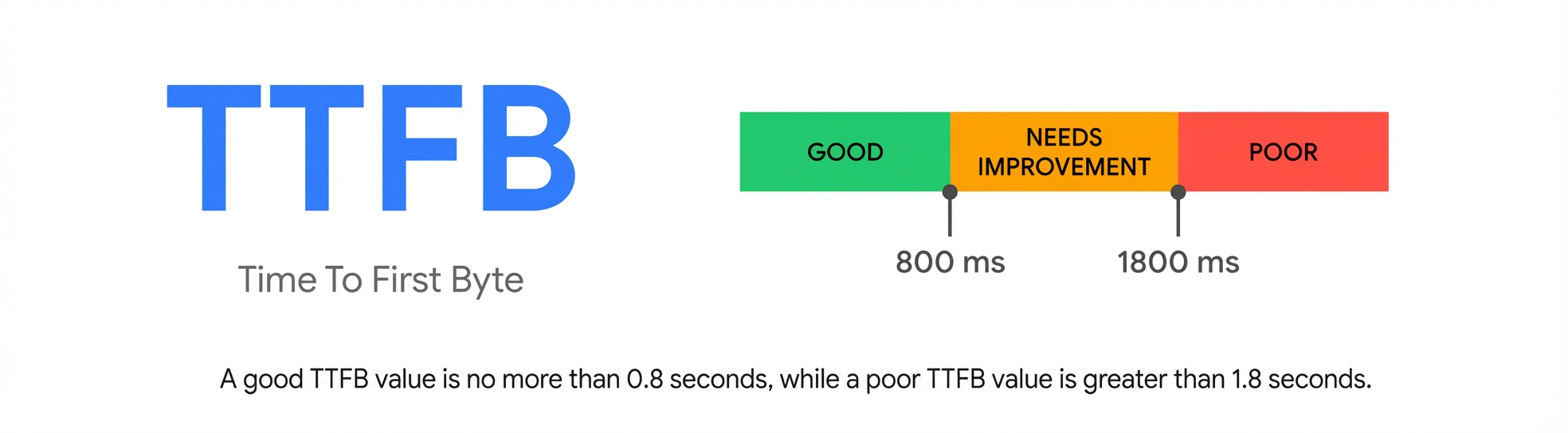
Because TTFB precedes user-centric metrics such as First Contentful Paint (FCP) and Largest Contentful Paint (LCP), servers should respond to navigation requests quickly to ensure that the 75th percentile of users experience an FCP within the "good" threshold. As a general guideline, most websites should aim for a TTFB of 0.8 seconds or less. A value under 0.8 seconds is considered good, and a value over 1.8 seconds is considered poor.
Because TTFB is not a Core Web Vitals metric, it is not essential for websites to meet the "good" TTFB threshold, provided that the TTFB does not negatively affect scores on other important metrics.
Websites vary significantly in how they load pages. A low TTFB is crucial for delivering HTML content to the client quickly. If a website delivers its initial HTML quickly but then requires JavaScript to populate it with meaningful content, such as with Single-Page Applications (SPAs), achieving the lowest possible TTFB is especially important for faster client-side rendering. In contrast, websites that use server-side rendering perform less processing on the client. Their FCP and LCP can be better even with a higher TTFB. Therefore, the TTFB threshold is only a general guideline and should be considered in the context of how a website loads its core content.
How to measure TTFB
In JavaScript, you can use the Navigation Timing API to measure TTFB. The following example shows how to create a PerformanceObserver that listens for a navigation entry and logs it to the console:
new PerformanceObserver((entryList) => {
  const [pageNav] = entryList.getEntriesByType('navigation');

  console.log(`TTFB: ${pageNav.responseStart}`);
}).observe({
  type: 'navigation',
  buffered: true
});
Reference links
Introduction to TTFB: https://web.dev/articles/ttfb?hl=zh-cn
Optimizing TTFB: https://web.dev/articles/optimize-ttfb?hl=zh-cn