View billing information
Billing for the Remote Log Access service is based on API requests and data upload traffic. The total fee is the sum of both. On the Billing tab in the Remote Log Access console, you can query the number of API requests, data upload traffic, account fees, and product pricing information.
Procedure
In the Remote Log Access console, click the Billing tab to view the Billing page.
On the Billing page, select a time range in the upper-right corner. The default is Last 7 Days.
View the daily and total numbers for API requests and data upload traffic for the specified time range.
Hover over the column chart to view the data for a specific day.
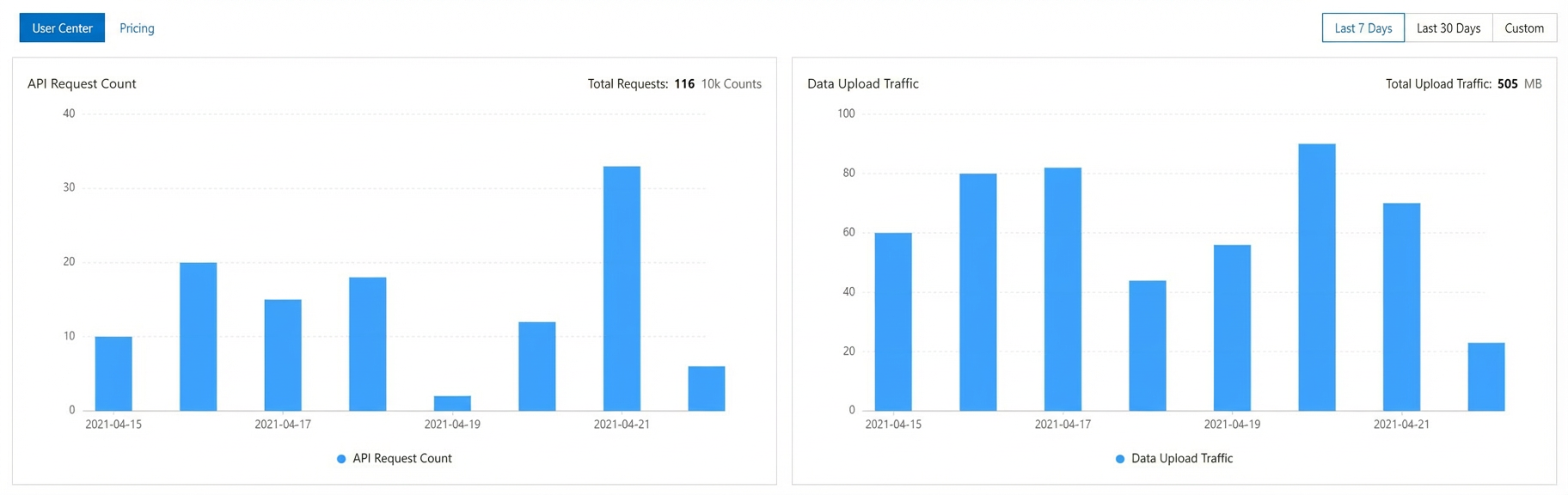
In the upper-left corner of the page:
Click Fee Hub to open the Expenses and Costs page and view your account fee information.
Click Pricing to view the product pricing for the Remote Log Access service.
ImportantThe Remote Log Access service is suspended if your account has an overdue payment. To maintain business continuity, check your account balance and add funds regularly.