Configure alerting
Data Transmission Service lets you configure metrics for data migration and data synchronization tasks. After you create a task, you can configure alerting for a single task or perform batch operations on multiple tasks. This topic uses a data migration task as an example to describe how to configure alerting.
Background information
The alerting and monitoring system is a key operations management feature of Data Transmission Service. It lets you fully monitor the status of data migration and data synchronization tasks. You can customize alert rules and message delivery methods. This improves the operations and maintenance (O&M) efficiency for data transmission tasks. It also reduces the risk of failures going unnoticed or unrecovered. This ensures the stability of data transmission and the continuity of your business.
Cloud Monitor is a service that monitors Alibaba Cloud resources and Internet-based applications. It provides an out-of-the-box, enterprise-grade, one-stop monitoring solution for cloud users. Data Transmission Service sends messages to recipients using the contact information that you add to the Cloud Monitor platform. You must also add these recipients to the Cloud Monitor platform. For more information about Cloud Monitor, see What is Cloud Monitor?.
Procedure
Log on to the OceanBase Management Console .
In the navigation pane on the left, click Data Transmission > Data Migration.
To configure alerting for a data synchronization task, click Data Transmission > Data Synchronization.
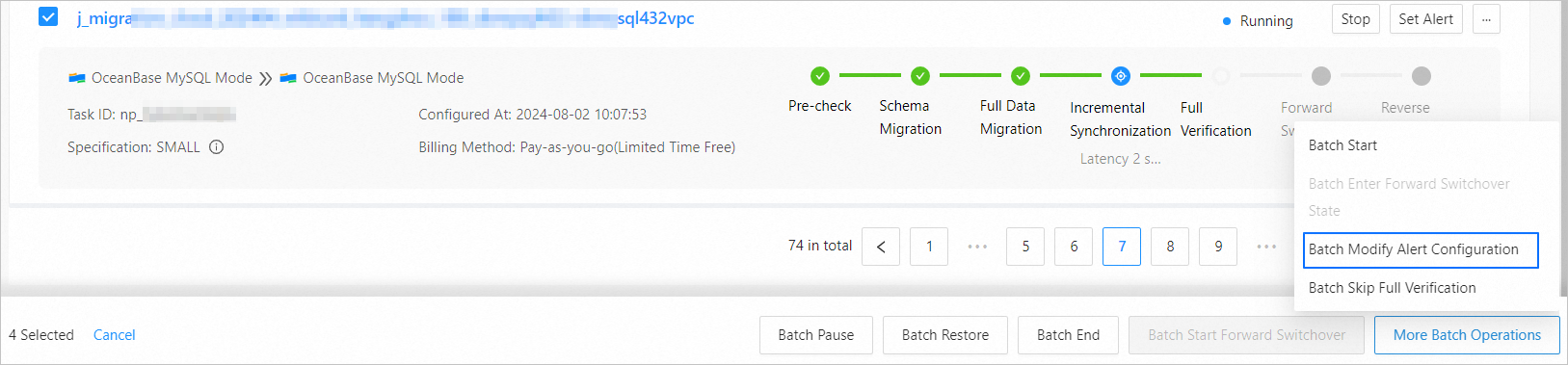
On the Migration Task List page, click Configure Alerting in the row of the target task.

To perform a batch operation, select the checkboxes for the target tasks, and then click Batch Edit Alert Rule in the lower-right corner.
 Important
Batch editing alert rules overwrites the existing alerting and monitoring settings for the selected tasks. Proceed with caution.
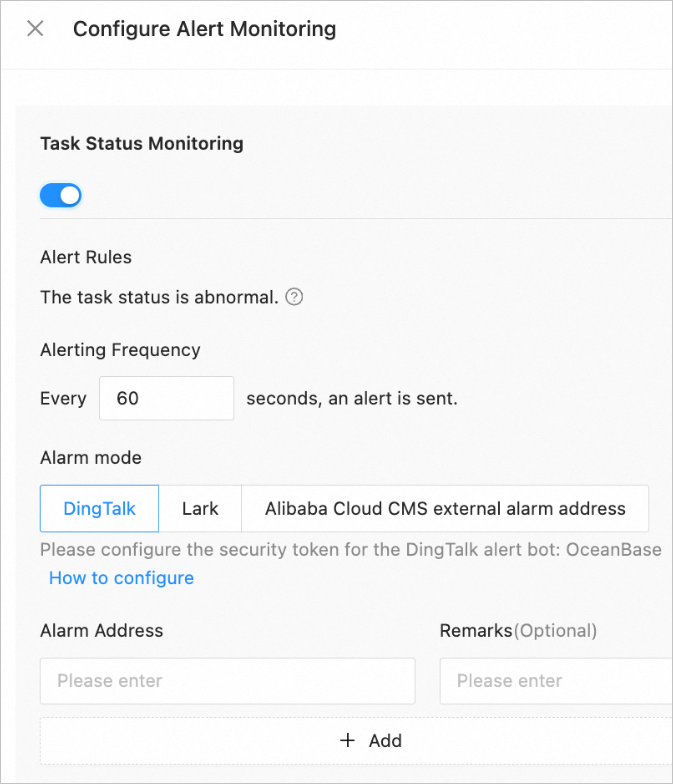
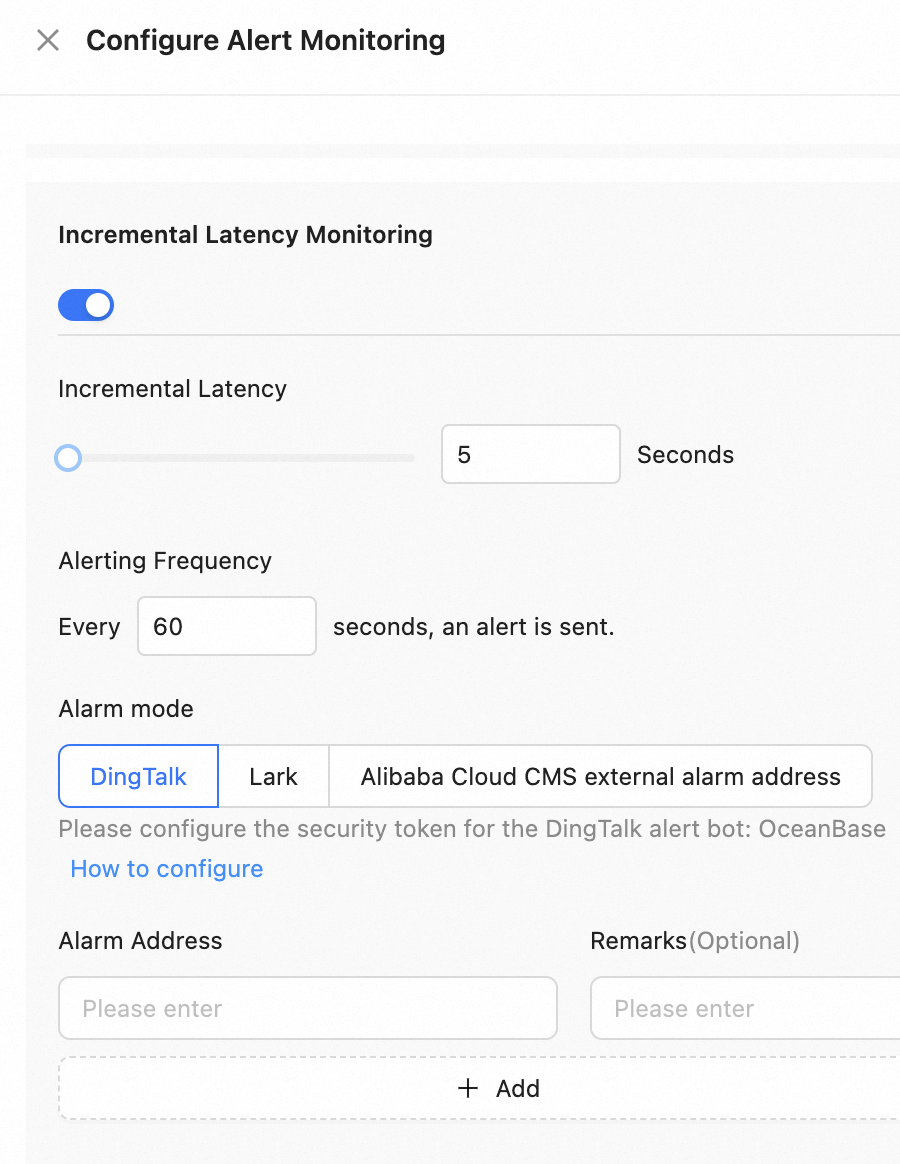
In the Configure Alerting and Monitoring dialog box, enable Task Status Monitoring or Incremental Latency Monitoring, and then configure the parameters.
Enable task status monitoring
Parameter
Description
Alert rule
The task status is abnormal.
This includes all exceptions that occur during the startup and running of precheck, schema migration, full migration, and incremental migration or incremental synchronization tasks.
Alert frequency
The interval at which an alert is sent. The value must be 60 seconds or more.
Alerting method
Data Transmission Service supports three alerting methods: DingTalk, Lark, and Alibaba Cloud CMS External Alert Address.
Alert address
After you select an alerting method, enter the alert address of the corresponding chatbot. For more information, see Configure an alert address.
Remarks (Optional)
The remarks for the alert address.
Enable incremental latency monitoring
Parameter
Description
Incremental latency
The alert threshold for incremental latency.
An alert is triggered if the incremental synchronization latency of a data migration or data synchronization task exceeds the specified threshold.
Alert frequency
The interval at which an alert is sent. The value must be 60 seconds or more.
Alerting method
Data Transmission Service supports three alerting methods: DingTalk, Lark, and Alibaba Cloud CMS External Alert Address.
Alert address
After you select an alerting method, enter the alert address of the corresponding chatbot. For more information, see Configure an alert address.
Remarks (Optional)
The remarks for the alert address.
Click Submit.
You can also click Submit and Test to verify that the alert message can be sent successfully. The alert message is sent to the recipient using the contact information that you added to the Cloud Monitor platform.
To view alert information for a data migration or data synchronization task, see View task alert information.