What is an associated mailbox?
This topic describes the associated mailbox feature.
What is an associated mailbox?
After an associated mailbox is created, an employee can access it to view and send emails as a delegate. An administrator can set up these mailbox associations. For example, if you associate Account A with Account B, Account A becomes an associated member of Account B, and Account B is the associated mailbox. A mailbox can have multiple associated members. These members can use the web client to log on to the associated mailbox without a password and have full operational permissions for that mailbox.
Set up an associated mailbox
Log on to Alibaba Mail with an administrator account. Go to Domain Management > Organization and Users > Employee Account Management. Search for the target mailbox, click the employee's name to open the edit page, and then click the Delegate tab.
Click Add.
Select Read and manage permissions and Send as delegate.
A delegate can open this mailbox directly and operate it like the owner. This permission does not include sending emails or calendar items, which requires the "Send As" or "Send on Behalf" permission.
How to view your linked accounts
This feature is available on the web client and in the DingTalk Mail client.
On the web client
In the upper-right corner, click Settings > Linked Mailbox to view your linked accounts.

On the DingTalk Mail desktop client
Click the account drop-down arrow in the upper-left corner. Below your current account, click the account labeled 'Linked' to switch to it.

On the DingTalk Mail mobile client, click the drop-down arrow next to Inbox at the top of the page. In the account list, select the account labeled 'Linked' to switch to it.
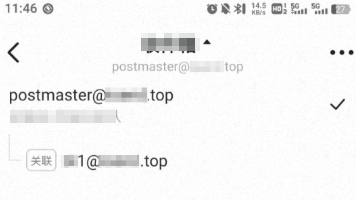
You can switch between linked mailboxes on the web client.
You must attach your DingTalk Mail account in the DingTalk client to switch between linked mailboxes.
Switching the associated mailbox is not currently supported in the Alibaba Client.
Notes
1. You can add up to 200 associated members for each associated mailbox.