Overview of Voice Service
The IoT Platform has upgraded its Voice Service. The new Voice Service page lets you quickly integrate and manage the service. This topic explains how to develop skills and attach products using the Voice Service management page in the Operation Center.
Overview
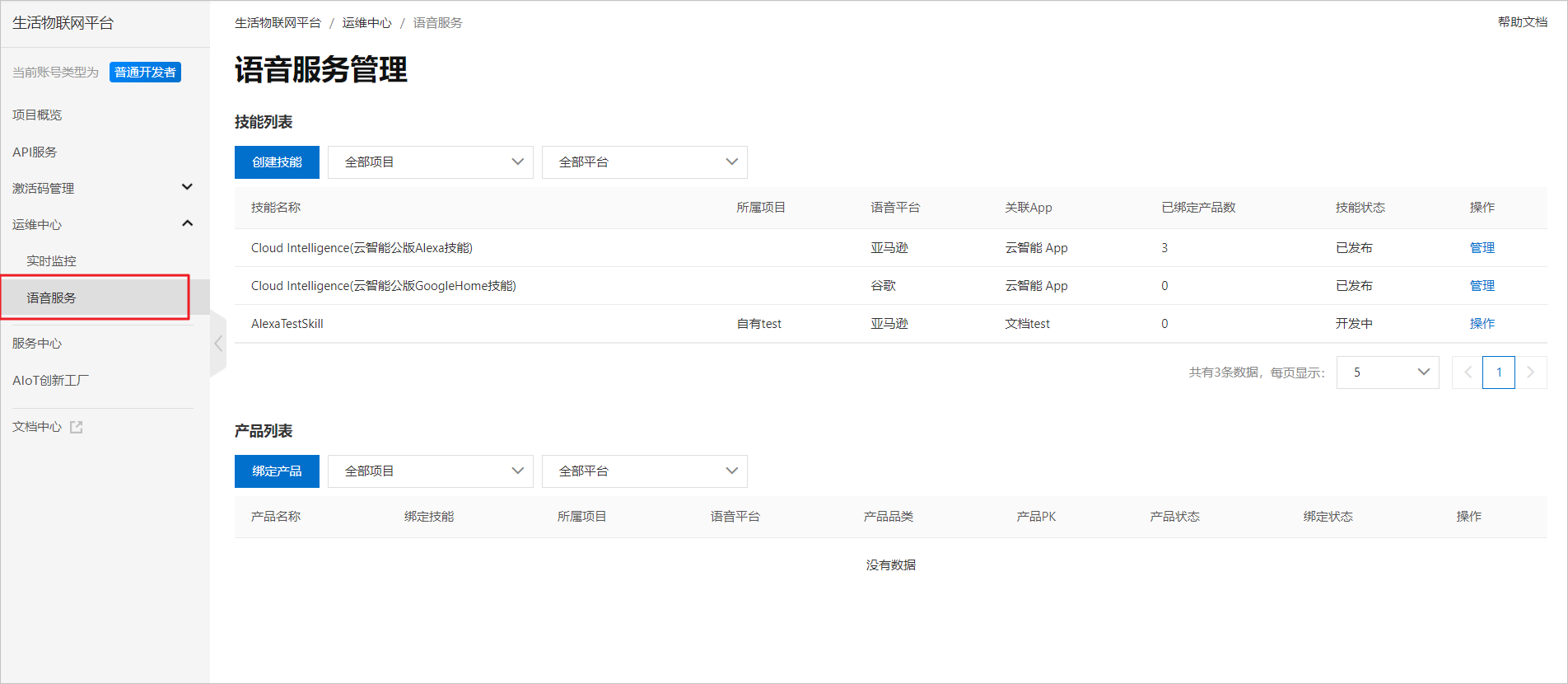
If your product needs a third-party voice service, you can create a skill in . The skill links accounts between platforms. You can attach the products that you want to control to the skill. This allows the third-party voice platform to control your products by voice. The following figure shows the Voice Service management page.
Main flow for developing a voice service
- Create a skill. For more information, see Create a skill.
- Go to the third-party voice platform to develop the skill. Then, return to the Voice Service page to configure and link the skill information. For more information, see Step 5 in Configure a skill.
- After you configure and link the skill information, purchase and enable the Voice Service. For information about the billing of custom skill services, see Service billing
Important To create a skill in this workflow, you must enable the custom skill service. Other purchased voice services cannot be used for this purpose.
- Download the app with the configured skill. After you test the skill, publish it.
- After you create the skill, attach a product to the published skill. For more information, see Attach a product.
- After you confirm the product information, enable the third-party voice control service for the product. For more information, see Step 5 in Enable the voice control service.
Important The voice control service enabled here is different from the custom skill service mentioned previously. For billing details, see Service billing.
Note: You must purchase the corresponding voice service by following this workflow. Do not purchase it from the Service Center. This helps prevent you from purchasing the wrong voice control service.
- After you confirm that the third-party voice control instructions are configured and verified, publish the product to complete the attachment process.
Features of the Voice Service management page
- Skill list
On the page, you can create and manage skills. For more information, see Create and manage skills.
Basic information
- Create Skill: Creates a skill that links the IoT Platform with a third-party voice platform. This skill enables voice control through the third-party voice platform.
- Skill Name: The identifier for managing the skill on the IoT Platform.
- Project: The project that contains the app associated with the skill. You can set this parameter when you create the skill.
- Voice Platform: The third-party voice platform that you want to use.
- Associated App: The app associated with the skill.
- Attached Products: The number of products currently attached to the skill.
- Skill Status: The creation status of the skill.
- Actions: Click to manage or edit skill information.
- Product list
On the page, you can attach products to skills and manage the attached products. For more information, see Attach and manage products.
Basic information
- Attach Product: Attaches a product to a published skill. This enables voice control of the product by the third-party voice platform.
- Product Name: The name of the product.
- Attached Skill: The skill attached to the product.
- Project: The project to which the product belongs.
- Voice Platform: The third-party voice platform of the skill attached to the product.
- Product Category: The category of the attached product.
- Product PK: The ProductKey of the product.
- Product Status: The development status of the product.
- Attachment Status: The status of the product's attachment to the skill.
- Click Actions to manage or attach skills.