The AUNetErrorView control displays exception views for empty pages and is available in two styles.
Minimalist (half-screen) style: The default style, which includes five variations.
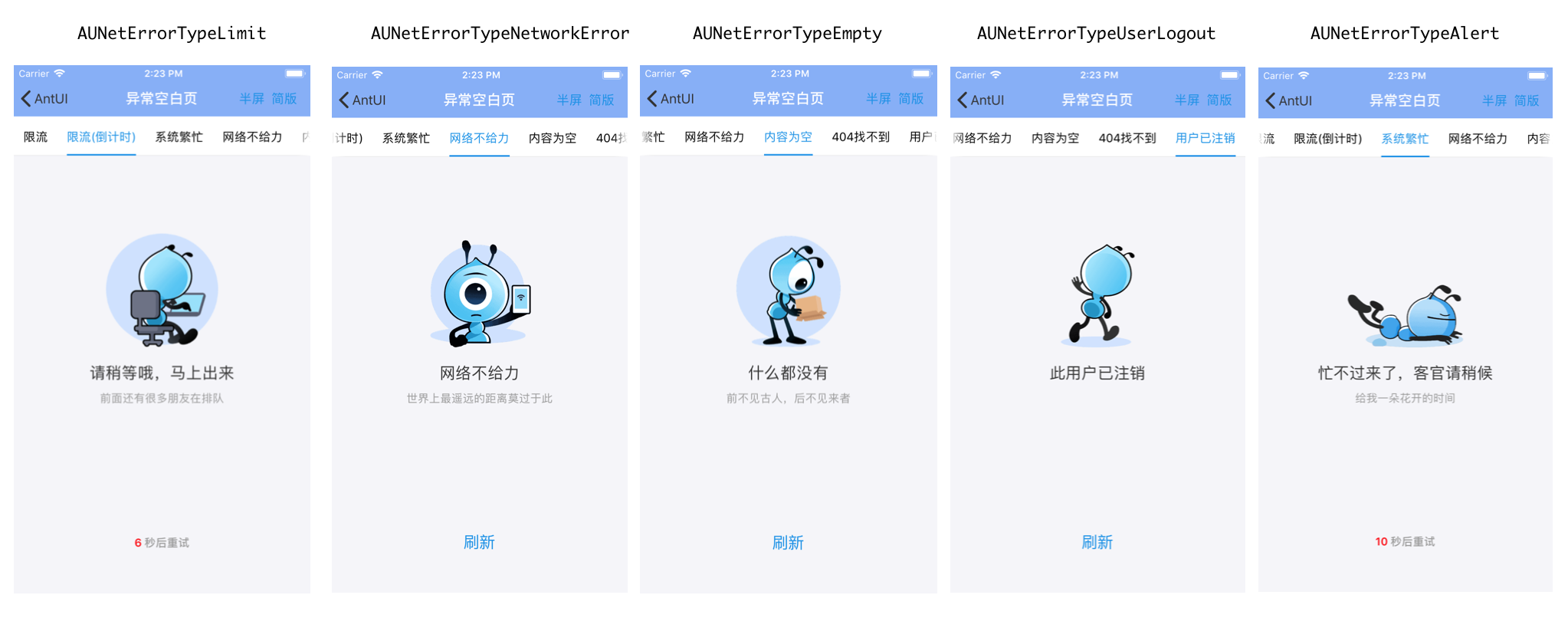
Illustration (full-screen) style: Includes five variations.
The main difference between the styles is the prompt image. See the following examples.
Examples
Minimalist (half-screen) style
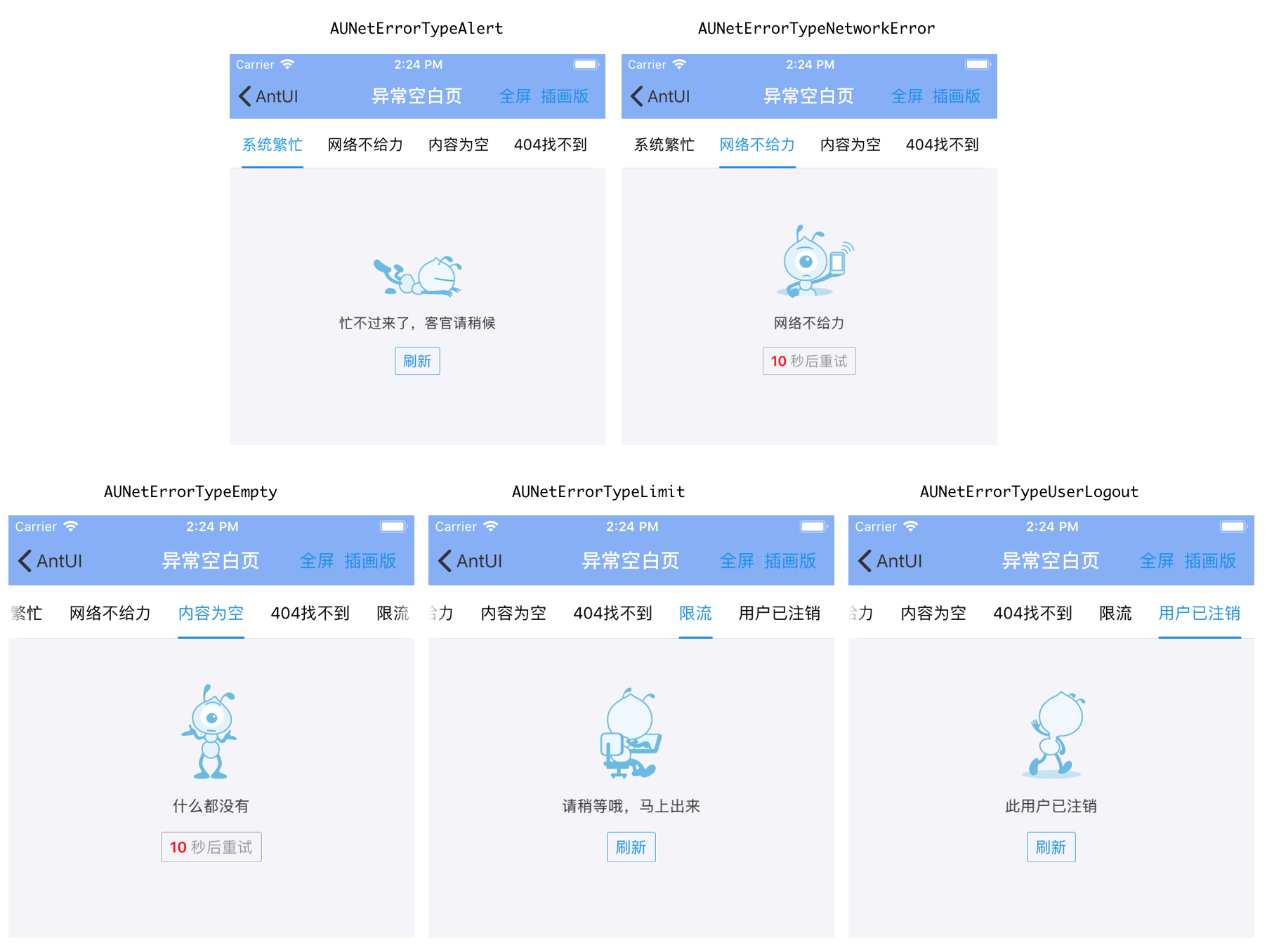
Illustration (full-screen) style
API reference
    typedef NS_ENUM(NSInteger, AUNetErrorType) {

    AUNetErrorTypeLimit,        // Throttling
    AUNetErrorTypeAlert,        // System busy (system error), alert
    AUNetErrorTypeNetworkError, // Network error
    AUNetErrorTypeEmpty,        // Empty content
    AUNetErrorTypeNotFound,     // 404 Not Found (uses the same image as AUNetErrorTypeAlert)
    AUNetErrorTypeUserLogout,   // User logged off

    AUNetErrorTypeFailure __attribute__((deprecated)) = AUNetErrorTypeNetworkError,
    AUNetErrorTypeError __attribute__((deprecated)) = AUNetErrorTypeNetworkError,             // Network error, connection failed
    AUNetErrorTypeSystemBusy __attribute__((deprecated)) = AUNetErrorTypeAlert,               // Alert
    APExceptionEnumNetworkError __attribute__((deprecated)) = AUNetErrorTypeNetworkError,     // Network error, connection failed
    APExceptionEnumEmpty __attribute__((deprecated)) = AUNetErrorTypeEmpty,                   // Empty content
    APExceptionEnumAlert __attribute__((deprecated)) = AUNetErrorTypeAlert,                   // Alert
    APExceptionEnumLimit __attribute__((deprecated)) = AUNetErrorTypeLimit,                   // Throttling
    APExceptionEnumNetworkFailure __attribute__((deprecated)) =  AUNetErrorTypeNetworkError,  // Network error
};


typedef NS_ENUM(NSInteger, AUNetErrorStyle) {
    AUNetErrorStyleMinimalist,    // Minimalist style
    AUNetErrorStyleIllustration,   // Illustration style

    APExceptionStyleIllustration __attribute__((deprecated)) = AUNetErrorStyleIllustration,     // Illustration style
    APExceptionStyleMinimalist __attribute__((deprecated)) =  AUNetErrorStyleMinimalist       // Minimalist style
};
/**
A control that displays exception views on empty pages.
It has two prompt styles:
1. Minimalist style (default): Includes 3 types.
2. Illustration style: Includes 7 types.
The main difference between the styles and types is the image.
*/
@interface AUNetErrorView : UIView
@property(nonatomic, strong, readonly) UIButton *actionButton; // The default text is "Refresh".
@property(nonatomic, strong, readonly) UIImageView *iconImageView; // Icon view.
@property(nonatomic, strong, readonly) UILabel *infoLabel; // Main prompt text label.
@property(nonatomic, strong, readonly) UILabel *detailLabel; // Detailed prompt text label.
@property(nonatomic, strong) NSString *infoTitle; // Main prompt text.
@property(nonatomic, strong) NSString *detailTitle; // Secondary prompt text.
/**
* Initializes an exception view and sets its style and type.
* (If target and action are empty, the refresh button is not displayed.)
*
* @param frame The coordinates of the view. Required.
* @param style The exception style, either illustration or minimalist. Required.
* @param type The exception type. Required.
* @param target The object that handles the refresh event.
* @param action The method that handles the refresh event.
*
* @return APExceptionView
*/
- (id)initWithFrame:(CGRect)frame
style:(AUNetErrorStyle)style
type:(AUNetErrorType)type
target:(id)target
action:(SEL)action;
/**
* Initializes an exception view and displays it on a specified view.
* (If target and action are empty, the refresh button is not displayed.)
*
* @param parent The superview of the view. Required.
* @param style The exception style, either illustration or minimalist. Required.
* @param type The exception type. Required.
* @param target The object that handles the refresh event.
* @param action The method that handles the refresh event.
*
* @return APExceptionView
*/
+ (id)showInView:(UIView *)parent
style:(AUNetErrorStyle)style
type:(AUNetErrorType)type
target:(id)target
action:(SEL)action;
/**
* Dismisses the exception view.
*/
- (void)dismiss;
/**
* Countdown timer. For throttling only.
* If completeBlock is nil and no click response event is set for the actionButton, the countdown feature does not work.
* If completeBlock is not nil, the completeBlock is executed directly when the countdown ends, and the actionButton is hidden.
* If you use getActionButton to add a response event to the button, make sure to add the event before calling this method.
*/
- (void)setCountdownTimeInterval:(NSInteger)startTime // Countdown start time
completeBlock:(void (^)(void))completeBlock; // Called after the countdown ends
@endCode example
    netErrorView = [[AUNetErrorView alloc] initWithFrame:CGRectMake(0, CGRectGetMaxY(label.frame) + 5, self.view.width, 300) style:AUNetErrorStyleIllustration type:AUNetErrorTypeError target:self action:@selector(pressedNetErrorView)];
    netErrorView.detailTitle = @"The type is AUNetErrorTypeError";
    [self.view addSubview:netErrorView];

    // Set the countdown timer
    [netErrorView setCountdownTimeInterval:10 completeBlock:^{
            NSLog(@"Countdown finished");
}];该文章对您有帮助吗?