List item component
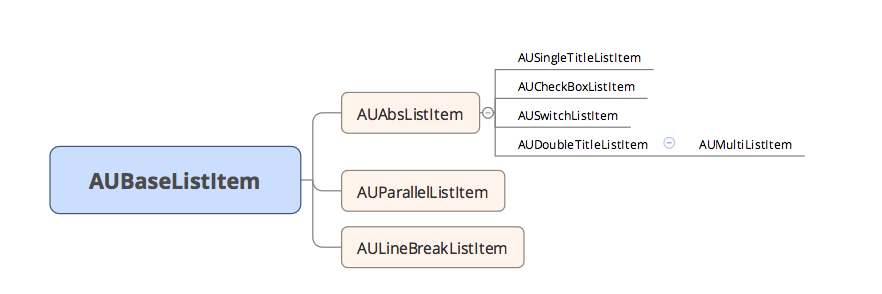
AUListItem is a list component that includes the following controls:
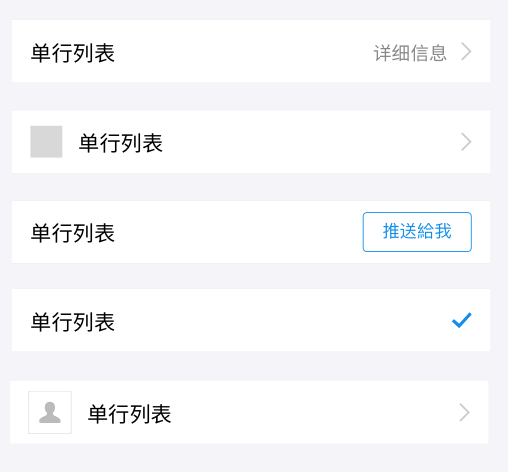
AUSingleTitleListItem
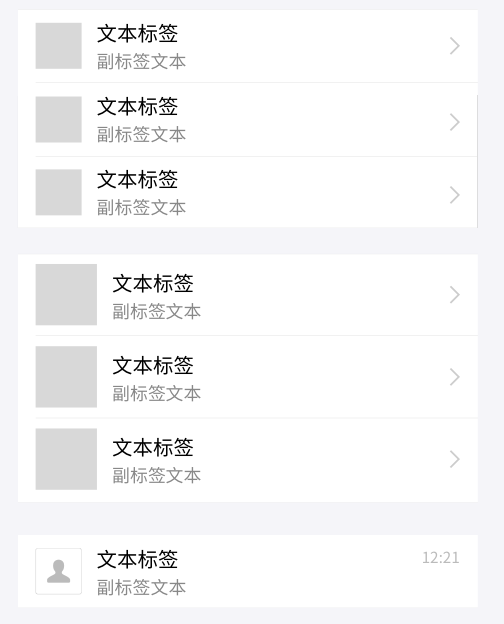
AUDoubleTitleListItem
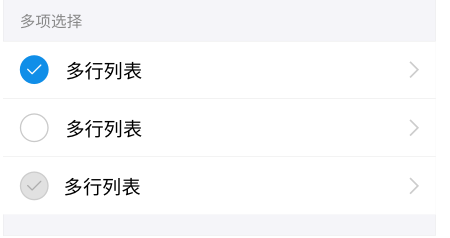
AUCheckBoxListItem
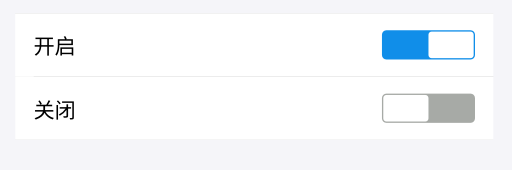
AUSwitchListItem
AUMultiListItem
AUParallelTitleListItem
AULineBreakListItem
Previews
AUSingleTitleListItem
AUDoubleTitleListItem
AUCheckBoxListItem
AUSwitchListItem
API reference
Basic APIs
/**
* Sets the item type: top, middle, or bottom.
*
* @param positionStyle AULineGroupItemInterface.NORMAL TOP BOTTOM CENTER LINE NONE
*/
public void setItemPositionStyle(int positionStyle)

/**
* Sets the visibility of the right arrow.
* @param isVisible
*/
public void setArrowVisibility(boolean isVisible)
Public interfaces
/**
 * Sets the icon image size.
 */
public void setIconSize(float width, float height)

/**
 * Gets the main text on the left.
 * @return
 */
public CharSequence getLeftText()

/**
 * Sets the main text on the left.
 * @param text
 */
public void setLeftText(CharSequence text)

/**
 * Sets the color of the main text on the left.
 * @param color
 */
public void setLeftTextColor(int color)

/**
 * Gets the image view on the left.
 * @return
 */
public AURoundImageView getLeftRoundImageView()
public AUImageView getLeftImageView()

/**
 * Sets the image on the left.
 * @param resId
 */
public void setLeftImage(int resId)

/**
 * Sets the image on the left.
 * @param drawable
 */
public void setLeftImage(Drawable drawable)

/**
 * The setLeftImage method already handles visibility.
 * If you call this method and then call setLeftImage, the system resets the visibility.
 *
 * @param vis View.GONE
 */
public void setLeftImageVisibility(int vis)

/**
 * Gets the text view on the left.
 * @return
 */
public AUTextView getLeftTextView()
}
AUParallelListItem
/**
 * Sets the text for all four positions at once.
 * @param leftText
 * @param leftSubText
 * @param rightText
 * @param rightSubText
 */
public void setParallelText(String leftText, String leftSubText, String rightText, String rightSubText)

/**
 * Sets the main text on the left.
 * @param leftText
 */
public void setLeftText(String leftText)

/**
 * Sets the main text on the right.
 * @param rightText
 */
public void setRightText(String rightText)

/**
 * Sets the subtext on the left.
 * @param leftSubText
 */
public void setLeftSubText(String leftSubText)

/**
 * Sets the subtext on the right.
 * @param rightSubText
 */
public void setRightSubText(String rightSubText)
AULineBreakListItem
/**
 * Sets the left and right text.
 * @param left
 * @param right
 */
public void setText(String left, String right)

/**
 * Gets the TextView on the left.
 * @return
 */
public AUTextView getLeftText()

/**
 * Gets the TextView on the right.
 * @return
 */
public AUTextView getRightText()
AUSingleTitleListItem
/**
 * Sets the checked state of the item.
 * @param checked
 */
public void setItemChecked (boolean checked)


/**
 * Sets the text on the right.
 * @param text
 */
public void setRightText(CharSequence text)

/**
 * Sets the color of the text on the right.
 * @param color
 */
public void setRightTextColor(int color)

/**
 * Sets the image on the right.
 */
public void setRightImage(int resId)
public void setRightImage(Bitmap bitmap)
public void setRightImage(Drawable drawable)

/**
 * Gets the text view on the right.
 * @return
 */
public AUTextView getRightTextView()

/**
 * Gets the image view on the right.
 * @return
 */
public AUImageView getRightImageView()

/**
 * Sets the text for the right button.
 * @param text
 */
public void setRightButtonText(CharSequence text)

/**
 * Gets the button.
 * @return
 */
public AUProcessButton getProcessButton()

/**
 * Handles the click event.
 * @param listener
 */
public void setButtonClickListener(OnClickListener listener)

/**
 * Sets the style on the right.
 * @param type AUAbsListItem.TEXT_IMAGE AUAbsListItem.BUTTON
 */
public void setRightType(int type)
AUCheckBoxListItem
/**
 * Gets the check icon on the left.
 * @return
 */
public AUCheckIcon getLeftCheckIcon()

/**
 * Sets the icon state.
 * @param status AUCheckIcon.STATE_CHECKED|STATE_UNCHECKED|STATE_DISABLED
 */
public void setCheckstatus(int status)

/**
 * Gets the check state.
 * @return
 */
public int getIconState()
AUSwitchListItem
/**
 * Sets the listener for switch state changes.
 * @param onCheckedChangeListener
 */
public void setOnSwitchListener (CompoundButton.OnCheckedChangeListener onCheckedChangeListener)

/**
 * Gets the switch.
 * @return
 */
public AUSwitch getSwitch()

/**
 * Returns the switch state.
 * @return Whether the switch is on.
 */
public boolean isSwitchOn()

/**
 * Sets the switch state.
 * @param status
 */
public void setSwitchStatus(boolean status)

/**
 * Sets the enabled or disabled state.
 * @param enabled
 */
public void setSwitchEnabled(boolean enabled)
AUDoubleTitleListItem
/**
 * Sets the subtext on the left.
 * @param text
 */
public void setLeftSubText(CharSequence text)

/**
 * Sets the text on the right.
 * @param text
 */
public void setRightText(CharSequence text)

/**
 * Sets the font color of the text on the right.
 * @param color
 */
public void setRightTextColor(int color)

/**
 * Gets the text view on the right.
 * @return
 */
public AUTextView getRightTextView()

/**
 * Gets the subtext view on the left.
 * @return
 */
public AUTextView getLeftSubTextView()

/**
 * Sets the text for the right button.
 * @param text
 */
public void setRightButtonText(CharSequence text)

/**
 * Gets the button.
 * @return
 */
public AUProcessButton getProcessButton()

/**
 * Handles the click event.
 * @param listener
 */
public void setButtonClickListener(OnClickListener listener)

/**
 * Sets the style on the right.
 * @param type AUAbsListItem.TEXT_IMAGE AUAbsListItem.BUTTON
 */
public void setRightType(int type)
AUMultiListItem
/**
 * Adds an extension view on the left.
 * @param view
 */
public void addLeftAssistantView(View view)

/**
 * Sets the subtext on the left.
 * @param text
 */
public void setLeftSubText(CharSequence text)

/**
 * Gets the subtitle text.
 * @return
 */
public AUEmptyGoneTextView getLeftSubTextView()
Custom properties
Property | Description | Type |
listItemType | Sets the position style. | normal, top, bottom, center, line, none |
listLeftText | Text on the left. | string, reference |
listLeftSubText | Subtext on the left. | string, reference |
listLeftTextSize | Font size of the text on the left. | dimension |
listLeftSubTextSize | Font size of the subtext on the left. | dimension |
listLeftTextColor | Color of the text on the left. | color, reference |
listLeftSubTextColor | Color of the subtext on the left. | color, reference |
listLeftImage | Icon on the left. | reference |
listLeftImageWidth | Width of the image on the left. | dimension, reference |
listLeftImageHeight | Height of the image on the left. | dimension, reference |
listShowArrow | Specifies whether to show the arrow on the right. | boolean |
listArrowType | Arrow direction. | arrow_right, arrow_down, arrow_up |
listRightText | Text on the right. | string, reference |
listRightSubText | Subtext on the right. | string, reference |
listRightType | Style on the right. | text_image/button |
listRightImage | Image on the right. | string, reference |
listShowCheck | Check image on the right. | boolean |
The properties supported by each control are listed in the Code examples (XML) section below.
To enable a background color change on press, add the
android:clickable="true"property.You can customize the control height and the dimensions of the left image.
Code examples
Import the XML namespace. If you connect to the software development kit (SDK) using the native AAR method, define xmlns:app="http://schemas.android.com/apk/res-auto". This associates all elements with the app prefix to the same namespace. The following examples use app.
Import the XML namespace. If you connect to the SDK using the component-based method, define xmlns:aui="http://schemas.android.com/apk/res/com.alipay.mobile.antui". This associates all elements with the aui prefix to the same namespace.
AUParallelListItem
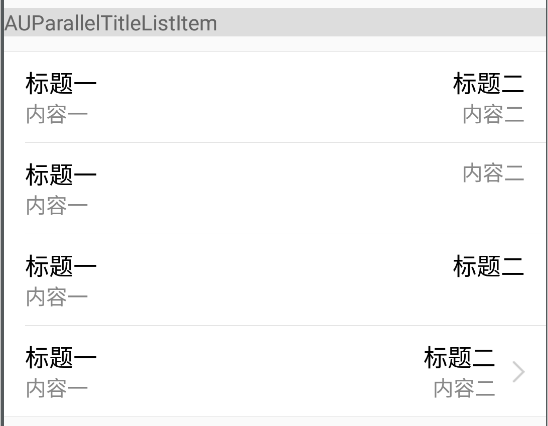
<com.alipay.mobile.antui.tablelist.AUParallelTitleListItem
    android:layout_width="match_parent"
    android:layout_height="wrap_content"
    android:clickable="true"
    app:listItemType="top"
    app:listLeftText="Title 1"
    app:listLeftSubText="Content 1"
    app:listRightText="Title 2"
    app:listRightSubText="Content 2"
    app:listShowArrow="false" />

<com.alipay.mobile.antui.tablelist.AUParallelTitleListItem
    android:layout_width="match_parent"
    android:layout_height="wrap_content"
    android:clickable="true"
    app:listItemType="center"
    app:listLeftText="Title 1"
    app:listLeftSubText="Content 1"
    app:listRightText="Title 2"
    app:listShowArrow="false" />
AULineBreakListItem
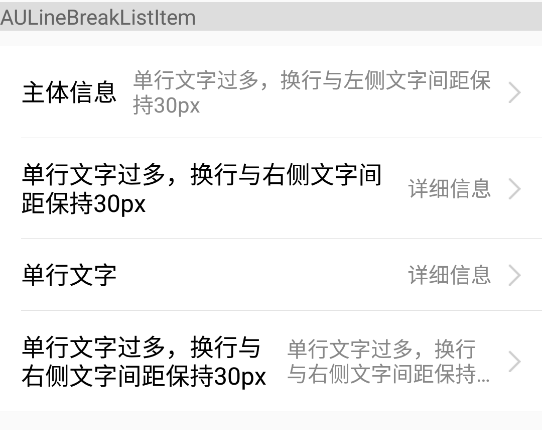
<com.alipay.mobile.antui.tablelist.AULineBreakListItem
    android:layout_width="match_parent"
    android:layout_height="wrap_content"
    app:listItemType="top"
    app:listLeftText="Main information"
    app:listRightText="If a line is too long, it wraps. A 30 px pitch is kept from the left text."/>

<com.alipay.mobile.antui.tablelist.AULineBreakListItem
    android:layout_width="match_parent"
    android:layout_height="wrap_content"
    app:listItemType="center"
    app:listLeftText="If a line is too long, it wraps. A 30 px pitch is kept from the right text."
    app:listRightText="Details"/>

<com.alipay.mobile.antui.tablelist.AULineBreakListItem
    android:layout_width="match_parent"
    android:layout_height="wrap_content"
    app:listItemType="center"
    app:listLeftText="Single-line text"
    app:listRightText="Details"/>

<com.alipay.mobile.antui.tablelist.AULineBreakListItem
    android:layout_width="match_parent"
    android:layout_height="wrap_content"
    app:listItemType="bottom"
    app:listLeftText="If a line is too long, it wraps. A 30 px pitch is kept from the right text."
    app:listRightText="If a line is too long, it wraps. A 30 px pitch is kept from the right text."/>
AUSingleTitleListItem
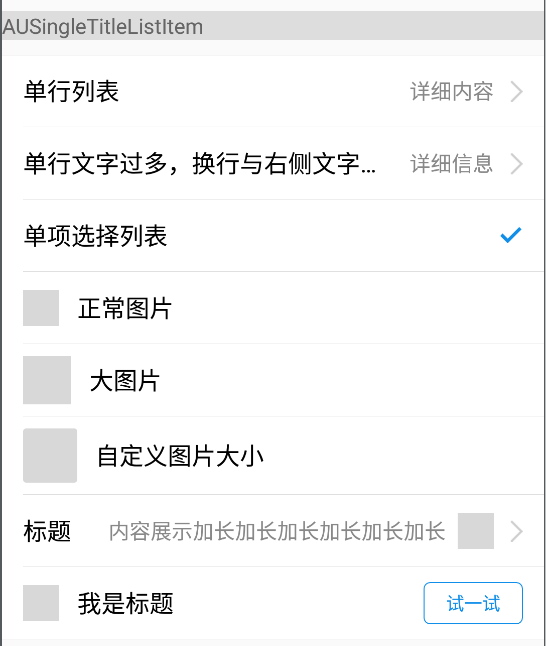
<com.alipay.mobile.antui.tablelist.AUSingleTitleListItem
    android:layout_width="match_parent"
    android:layout_height="wrap_content"
    android:clickable="true"
    app:listItemType="top"
    app:listLeftText="Single-line list"
    app:listRightText="Detailed content" />

<com.alipay.mobile.antui.tablelist.AUSingleTitleListItem
    android:layout_width="match_parent"
    android:layout_height="wrap_content"
    android:clickable="true"
    app:listItemType="center"
    app:listLeftText="If a line is too long, it wraps. A 30 px pitch is kept from the right text."
    app:listRightText="Details" />

<com.alipay.mobile.antui.tablelist.AUSingleTitleListItem
    android:layout_width="match_parent"
    android:layout_height="wrap_content"
    app:listItemType="center"
    app:listLeftText="Single-choice list"
    app:listShowCheck="true" />

<com.alipay.mobile.antui.tablelist.AUSingleTitleListItem
    android:layout_width="match_parent"
    android:layout_height="wrap_content"
    app:listItemType="center"
    app:listLeftImage="@drawable/image"
    app:listLeftText="Normal image"
    app:listShowArrow="false" />

<com.alipay.mobile.antui.tablelist.AUSingleTitleListItem
    android:layout_width="match_parent"
    android:layout_height="wrap_content"
    app:listItemType="center"
    app:listLeftImage="@drawable/image"
    app:listLeftImageSizeType="size_large"
    app:listLeftText="Large image"
    app:listShowArrow="false" />

<com.alipay.mobile.antui.tablelist.AUSingleTitleListItem
    android:layout_width="match_parent"
    android:layout_height="wrap_content"
    android:clickable="true"
    app:hasRound="true"
    app:listItemType="center"
    app:listLeftImage="@drawable/image"
    app:listLeftImageHeight="36dp"
    app:listLeftImageWidth="36dp"
    app:listLeftText="Custom image size"
    app:listShowArrow="false" />

<com.alipay.mobile.antui.tablelist.AUSingleTitleListItem
    android:layout_width="match_parent"
    android:layout_height="wrap_content"
    android:clickable="true"
    app:listItemType="center"
    app:listLeftText="Title"
    app:listRightImage="@drawable/image"
    app:listRightText="Extended content display" />


<com.alipay.mobile.antui.tablelist.AUSingleTitleListItem
    android:id="@+id/button_item"
    android:layout_width="match_parent"
    android:layout_height="wrap_content"
    app:listItemType="bottom"
    app:listLeftImage="@drawable/image"
    app:listLeftText="Title"
    app:listRightText="Try it"
    app:listRightType="button"/>
AUDoubleTitleListItem

<com.alipay.mobile.antui.tablelist.AUDoubleTitleListItem
    android:layout_width="match_parent"
    android:layout_height="wrap_content"
    android:clickable="true"
    app:listItemType="center"
    app:listLeftSubText="Alipay uses services such as flight reminders."
    app:listLeftText="Title 1"
    app:listRightText="10:30"
    app:listShowArrow="false" />

<com.alipay.mobile.antui.tablelist.AUDoubleTitleListItem
    android:layout_width="match_parent"
    android:layout_height="wrap_content"
    android:clickable="true"
    app:listItemType="center"
    app:listLeftImage="@drawable/testapp_icon"
    app:listLeftSubText="Description text"
    app:listLeftText="Normal image" />

<com.alipay.mobile.antui.tablelist.AUDoubleTitleListItem
    android:layout_width="match_parent"
    android:layout_height="wrap_content"
    android:clickable="true"
    app:listItemType="center"
    app:listLeftImage="@drawable/testapp_icon"
    app:listLeftImageSizeType="size_large"
    app:listLeftSubText="Description text"
    app:listLeftText="Large image"
    app:listRightText="10:30"
    app:listShowArrow="false" />

<com.alipay.mobile.antui.tablelist.AUDoubleTitleListItem
    android:layout_width="match_parent"
    android:layout_height="wrap_content"
    android:clickable="true"
    app:listItemType="bottom"
    app:listLeftImage="@drawable/testapp_icon"
    app:listLeftImageSizeType="size_multi"
    app:listLeftSubText="The 'Global Future Airport Plan' means that in the future, tourists at airports outside China can use Alipay for services such as flight reminders."
    app:listLeftText="Image-text list image"
    app:listShowArrow="false" />

<com.alipay.mobile.antui.tablelist.AUDoubleTitleListItem
    android:layout_width="match_parent"
    android:layout_height="wrap_content"
    android:clickable="true"
    app:listItemType="center"
    app:listLeftImage="@drawable/image"
    app:listLeftImageSizeType="size_large"
    app:listLeftSubText="Description text"
    app:listLeftText="Large image"
    app:listRightText="Try it"
    app:listRightType="button" />


<com.alipay.mobile.antui.tablelist.AUDoubleTitleListItem
    android:id="@+id/testLitItem"
    android:layout_width="match_parent"
    android:layout_height="wrap_content"
    android:layout_marginBottom="20dp"
    android:layout_marginTop="10dp"
    android:clickable="true"
    app:listItemType="normal"
    app:listLeftImage="@drawable/testapp_icon"
    app:listLeftImageHeight="70dp"
    app:listLeftImageWidth="70dp"
    app:listLeftSubText="Click the button to set the type"
    app:listLeftText="Custom image size" />
AUCheckBoxListItem
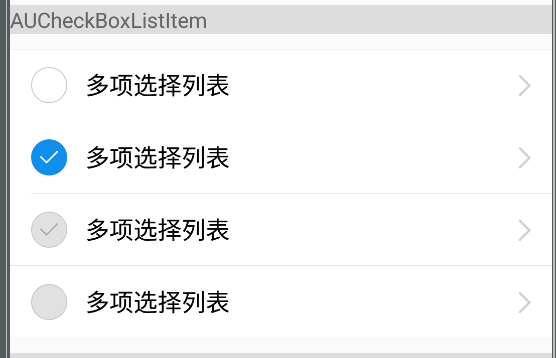
<com.alipay.mobile.antui.tablelist.AUCheckBoxListItem
    android:layout_width="match_parent"
    android:layout_height="wrap_content"
    android:clickable="true"
    app:listItemType="top"
    app:listLeftText="Multiple-choice list" />

<com.alipay.mobile.antui.tablelist.AUCheckBoxListItem
    android:layout_width="match_parent"
    android:layout_height="wrap_content"
    android:clickable="true"
    app:checkIconState="checked"
    app:listItemType="center"
    app:listLeftText="Multiple-choice list" />

<com.alipay.mobile.antui.tablelist.AUCheckBoxListItem
    android:layout_width="match_parent"
    android:layout_height="wrap_content"
    android:clickable="true"
    app:checkIconState="cannot_uncheck"
    app:listItemType="bottom"
    app:listLeftText="Multiple-choice list" />

<com.alipay.mobile.antui.tablelist.AUCheckBoxListItem
    android:layout_width="match_parent"
    android:layout_height="wrap_content"
    android:clickable="true"
    app:checkIconState="cannot_check"
    app:listItemType="bottom"
    app:listLeftText="Multiple-choice list" />
AUSwitchListItem
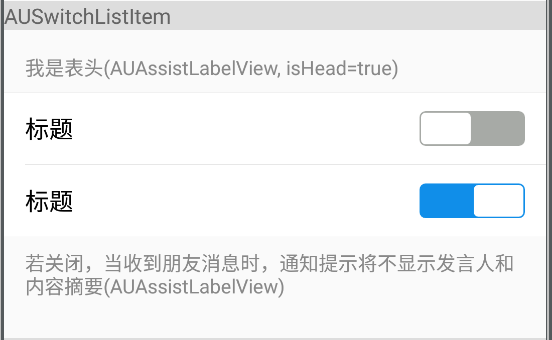
<com.alipay.mobile.antui.tablelist.AUSwitchListItem
    android:layout_width="match_parent"
    android:layout_height="48dp"
    app:listItemType="top"
    app:listLeftText="Title" />

<com.alipay.mobile.antui.tablelist.AUSwitchListItem
    android:id="@+id/disable_switch_list_item"
    android:layout_width="match_parent"
    android:layout_height="48dp"
    app:listItemType="bottom"
    app:listLeftText="Title" />