CLI reference
Alibaba Cloud CLI is a command-line tool that allows you to call Alibaba Cloud API operations in a terminal or a command-line interface to create, configure, and manage Alibaba Cloud resources. This topic describes how to call Elastic Compute Service (ECS) API operations by using Alibaba Cloud CLI to create and manage ECS instances and provides examples.
For more information about Alibaba Cloud CLI, see What is Alibaba Cloud CLI?
Use Alibaba Cloud CLI
Install and configure Alibaba Cloud CLI
Use an on-premises terminal
-
Install Alibaba Cloud CLI.
You can install Alibaba Cloud CLI on Windows, Linux, and macOS. Download an installation package that is suitable for the operating system that runs on your computer. For information about how to install Alibaba Cloud CLI in different operating systems, see the following topics:
-
Configure Alibaba Cloud CLI.
Configure the credentials, regions, and languages that are required to call Alibaba Cloud resources. For more information, see the Identity credential configuration methods section of the "Configure credentials" topic.
ImportantTo ensure the security of your Alibaba Cloud account, we recommend that you create a Resource Access Management (RAM) user that is used for calling API operations and create an AccessKey pair for the RAM user. For information about how to use an AccessKey pair in a secure manner, see Credential security solutions.
Use Cloud Shell (for debugging scenarios)
You can directly use Alibaba Cloud CLI in Cloud Shell without the need for installation or configuration. Due to the fact that the virtual machine (VM) destruction feature of Cloud Shell may cause data loss, we recommend that you run commands on Alibaba Cloud CLI in Cloud Shell to perform simple and quick operations, such as debugging.
-
Destruction on expiration: Each VM that is created by Cloud Shell is valid for only 1 hour. When the VM expires, Cloud Shell immediately destroys the VM. When you restart Cloud Shell, a new VM is created.
-
Destruction due to no operations: If no interactive operation is performed on a VM for 30 minutes or all sessions are closed, the VM is destroyed in 15 minutes. When you restart Cloud Shell, a new VM is created. For more information, see Limits.
Log on to the ECS console and click the Cloud Shell icon in the upper-right corner to go to the Cloud Shell console.

Use Alibaba Cloud CLI to call ECS API operations
-
For information about the formats supported by the fields of different data types, see Parameter formats.
-
For information about the command syntax, see the Generate and run CLI commands section of the "Generate and run CLI commands" topic.
-
Before you call an API operation, we recommend that you read the usage notes of the API operation.
After you install and configure Alibaba Cloud CLI, you can run commands in the following format to call ECS API operations:
aliyun ecs <API operation name> --<Parameter 1 Value 1> --<Parameter 2 Value 2> ...Use OpenAPI Explorer (also called OpenAPI Portal) to generate a CLI command for an API operation
-
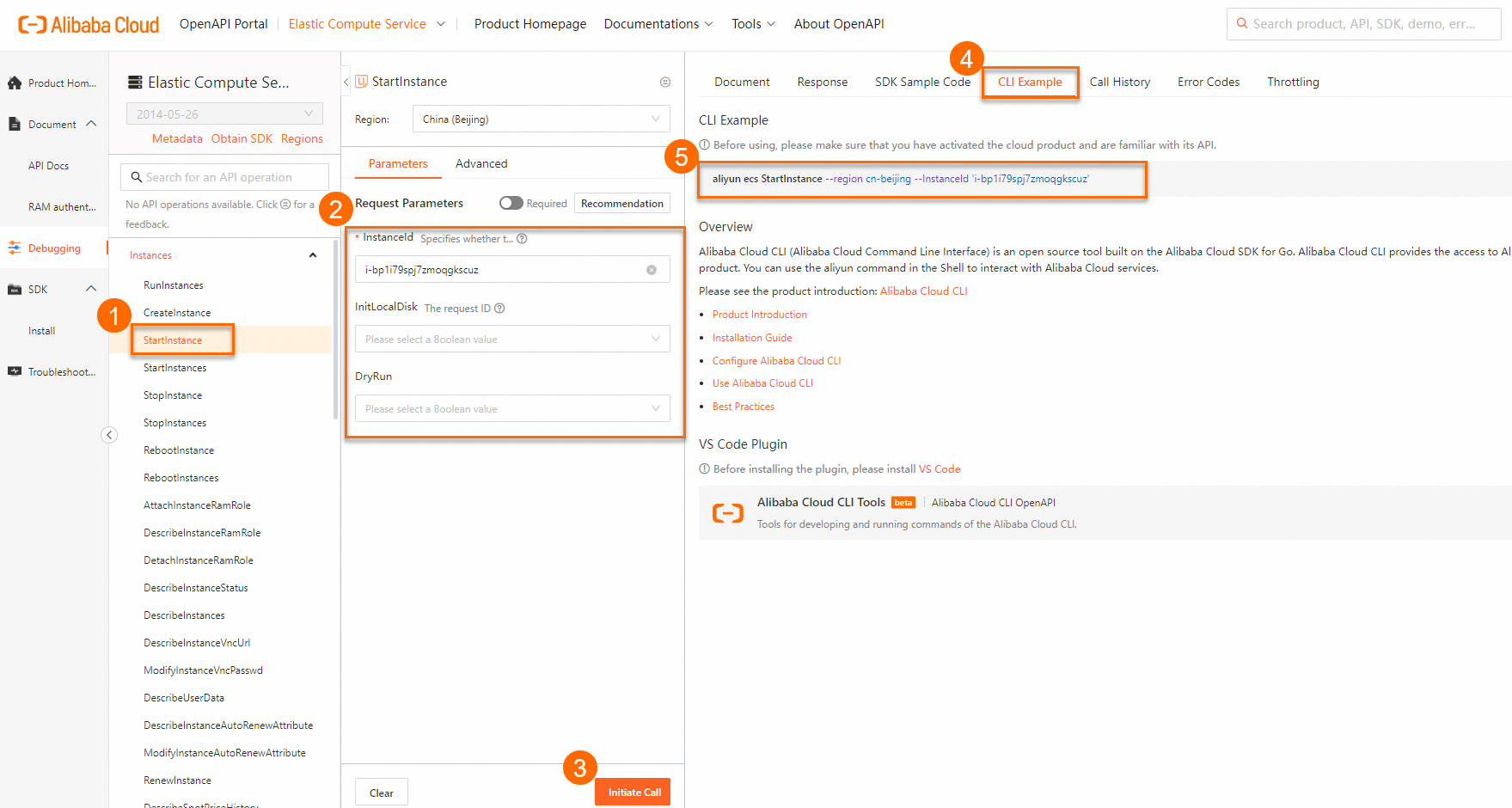
Log on to the Elastic Compute ServiceECS APIAPI debugging list.
Select the API operation for which you want to generate a CLI command and specify parameters.
Click the CLI Example tab in the right-side pane to view the CLI command that is generated with the specified parameters.
Usage examples
The following example describes how to use Alibaba Cloud CLI to call ECS API operations.
The following sample requests are only for reference. Modify the CLI commands based on your business requirements.
Create an ECS instance
The following example describes how to create a subscription ECS instance from an Alibaba Cloud Linux image in the China (Hangzhou) region by using Alibaba Cloud CLI.
Make preparations.
Before you create an ECS instance, create a virtual private cloud (VPC), a vSwitch, and a security group, and obtain the IDs of the preceding resources.
NoteIf you already created the preceding resources and the resources meet your business requirements, skip this step.
Create an ECS instance.
Connect to an ECS instance
Obtain the public IP address of an ECS instance.
Call the DescribeInstances operation with the ID of an ECS instance to query the public IP address of the instance. In this example, the ID of the ECS instance is
i-bp1ducce5hs1jm98****.Sample command
aliyun ecs DescribeInstances \
--RegionId cn-hangzhou \
--InstanceIds '["i-bp1ducce5hs1jm98****"]'
Sample command output
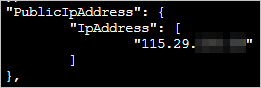
The PublicIpAddresses parameter indicates the public IP address of the ECS instance.
Connect to the ECS instance.
ssh <Username>@<Public IP address>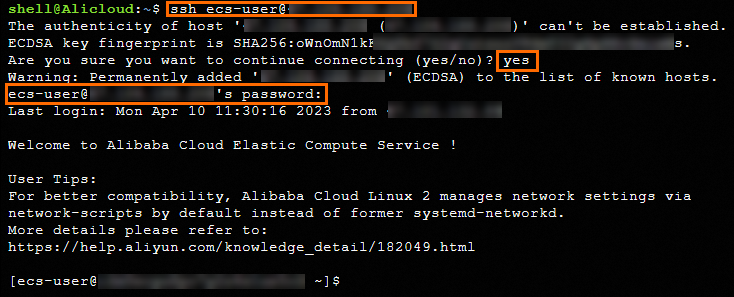
Start an ECS instance
Call the StartInstance operation to start an ECS instance.
Example scenario: Start an ECS instance whose ID is
i-bp1aq39j2yul5y01****in the China (Hangzhou) region (cn-hangzhou) after a dry run, and do not perform troubleshooting during instance startup.Sample command
aliyun ecs StartInstance \
--RegionId cn-hangzhou \
--InstanceId i-bp1aq39j2yul5y01**** \
--InitLocalDisk false \
--DryRun false
Sample command output
{
 "RequestId": "2DD09CBD-1F4D-4923-94C7-F3BD67137BBE"
}
Query the details of ECS instances
Call the DescribeInstances operation to query the details of one or more ECS instances.
Create a snapshot
Call the CreateSnapshot operation to create a snapshot for a disk.
Example scenario: Create a snapshot for an Enterprise SSD (ESSD) whose ID is
d-bp14bjlwo3t3owin****. Set the snapshot name to demoname, the description to demo, and the retention period to three days.Sample command
aliyun ecs CreateSnapshot \
--DiskId d-bp14bjlwo3t3owin**** \
--SnapshotName demoname \
--Description demo \
--RetentionDays 3
Sample command output
{
 "RequestId": "DFB0B01F-420D-4932-911E-7328920C2012",
 "SnapshotId": "s-bp1eyr9nxxoo9icj****"
}
Create a custom image from an ECS instance
Call the CreateImage operation to create a custom image from an ECS instance.
Example scenario
Parameter
Description and example
InstanceId
The ID of the ECS instance. Example: i-bp1aq39j2yul5y01****.
Platform
The operating system distribution for the system disk in the custom image. Example: Aliyun, which indicates Alibaba Cloud Linux.
RegionId
The ID of the region in which to create the custom image. Example: cn-hangzhou.
Sample command
aliyun ecs CreateImage \
--RegionId cn-hangzhou \
--InstanceId i-bp1aq39j2yul5y01**** \
--ImageName demoimage \
--Description demoimage \
--Platform Aliyun
Sample command output
{
 "ImageId": "m-bp1503ydxxrppctb****",
 "RequestId": "011AE447-20CE-4043-81AC-7AF2BBC4****"
}
Stop an ECS instance
Call the StopInstance operation with ForceStop parameter set to false and StoppedMode set to KeepCharging to stop an ECS instance in the Running (Running) state after a dry run. The ECS instance is stopped in standard mode, and billing for the ECS instance continues.
Example scenario: Stop an ECS instance whose ID is i-bp1aq39j2yul5y01**** in the China (Hangzhou) (cn-hangzhou) region.
Sample command
aliyun ecs StopInstance \
--RegionId cn-hangzhou \
--InstanceId i-bp1aq39j2yul5y01**** \
--ForceStop false \
--StoppedMode KeepCharging \
--DryRun false
Sample command output
{
    "RequestId": "121B5745-4983-57B1-BC97-C3A3536E****"
}
References
This topic describes specific API operations. For information about other API operations, see List of operations by function.
In Alibaba Cloud CLI, you can specify command line options to change the behaviors of commands or implement the extended features of commands based on your business requirements. For more information, see Command-line options.