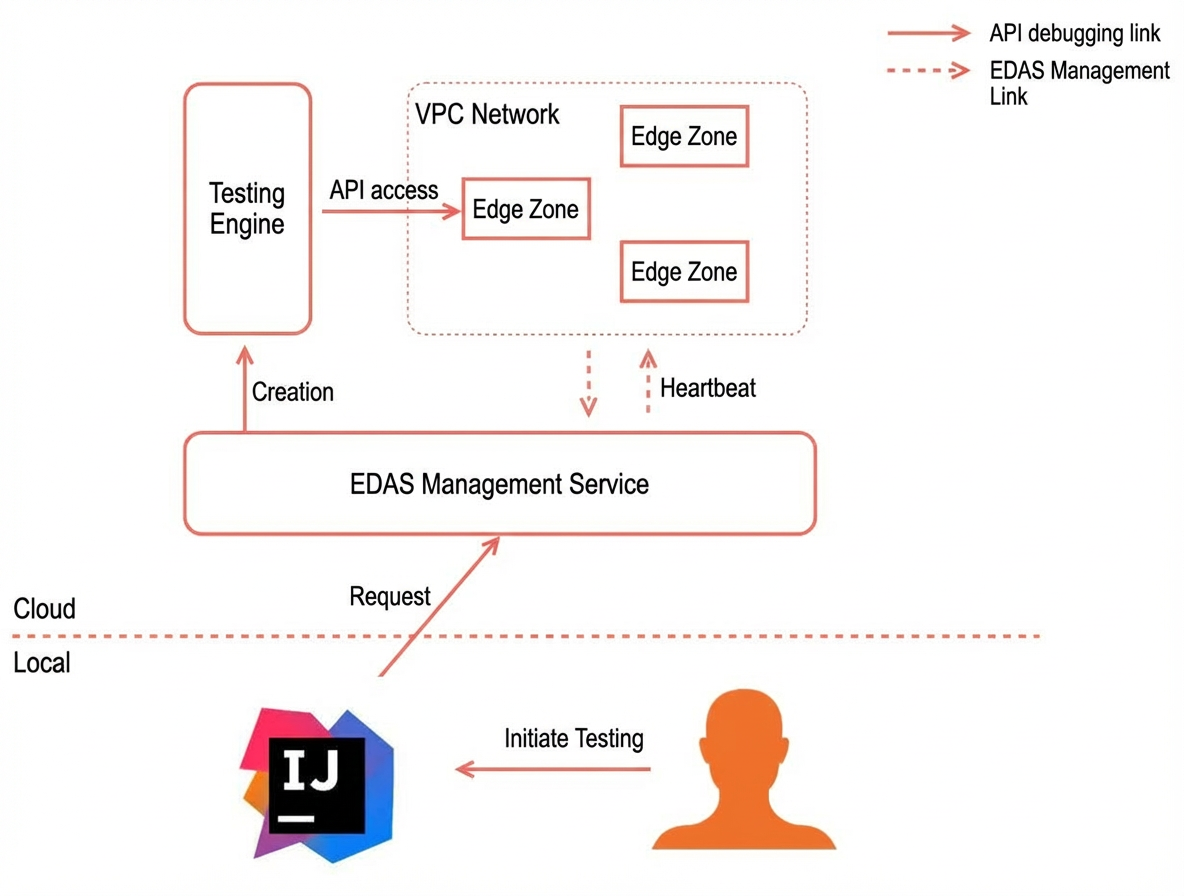
This topic describes how to use IntelliJ IDEA to debug API operations for Spring Cloud or Dubbo services in the cloud.
Flowchart
Limits
The Alibaba Cloud Toolkit plugin is version 2023.6.1 or later.
Permissions
To prevent unauthorized calls to API operations in the cloud environment, you must have the following permissions:
Permission to view the microservices namespace of the target service.
Permission to view the target service.
Permission to call the API operations of the target service.
-
Log on to the EDAS consoleEDAS console.
In the left navigation pane, choose System Administration > Permission Assistant.
On the Permission Assistant page, click Create Policy.
In the Create Policy wizard, on the Create Custom Policy tab, set the Policy Name and Note for the access policy.
On the Create Custom Policy tab, click Add Permission Statement. In the Add Authorization Statement panel that appears, set the view and API access permissions for the application and click OK.
For Effect, select Allow.
In the Action and Resource Authorization section, from the permission list on the left, select Namespace > View Namespace, Application > API Access, and Microservice > View Service. From the resource list on the right, set the Region, Microservices Namespace, and Application as needed.
In the Create Policy wizard, click Next.
On the Policy Preview tab, review the permissions. Follow the on-screen instructions to create a custom policy in the Resource Access Management (RAM) console and grant the permissions to the RAM user. Then, click Done. For more information, see Step 3: Create a RAM user and grant permissions. When the console displays the Policy authorization added successfully message, click Back to List to return to the Permission Assistant page and view the new policy template.
Procedure
In your IntelliJ IDEA project, right-click and choose Alibaba Cloud > API Debugging to open the API Debugging dialog box.
Debug the API operation.
Debug a Spring Cloud API operation
Parameters:
Parameter
Description
Example Value
Region
The region where the service is located.
China (Hangzhou)
Microservices Namespace
The microservices namespace where the service is located.
dev
Service
The target Spring Cloud service.
service-provider
Path
The path of the Spring Cloud service API operation.
/echo/{string}
Specify Invocation Target
Specifies whether to call a specific instance.
NoteThe IP address of a Kubernetes application changes after a restart. Do not specify a target instance unless necessary.
None
Query parameters
Query parameters. Enter parameters in key: value format. Enter each key-value pair on a new line.
color: blue
fruit: orange
Body
The body parameters for POST and PUT API operations. The following types are supported:
x-www-form-urlencoded: Enter parameters in key: value format. Enter each key-value pair on a new line.
json: Enter parameters as a JSON string.
xml: Enter parameters as an XML string.
text/plain: Any text.
For example, in JSON format:
{
"name": "Jack",
"age": 12
}
Description of response values:
Response property
Description
Example
Body
The response content of the API operation.
{string} from service-provider-group-1-4-78d5d49bc8-m****
Cookie
The cookie returned by the API operation.
None
Header
The header returned by the API operation.
Content-Length: text/plain;charset=UTF-8
Status code and call chain
Includes the following information:
Status code: The response status code of the API operation.
Latency: The time taken to call the API operation.
Size: The memory space that the response occupies.
Time: The time when the API operation was called.
Call chain: The trace details of the API operation call.
Status code: 200
Latency: 758 ms
Size: 293 bytes
Time: 2023-05-31 20:05:01
Call chain: None
Actual request
Includes the following information:
Request URL: The URL used to call the API operation.
Header: The header of the sent request.
Request URL:
http://192.168.XX.XX:18083/echo/helloHeader:
Content-Type: application/x-www-form-urlencoded
Debug a Dubbo API operation
Parameters:
Configuration Item
Description
Sample value
Region
The region where the service is located.
China (Hangzhou)
Microservices Namespace
The microservices namespace where the service is located.
dev
Interface
The target Dubbo interface.
org.apache.dubbo.springboot.demo.DemoService (Group: dev, Version: 1.0.0)Method
The method of the target Dubbo interface.
sayHello(String)
Specify Invocation Targets
Specifies whether to call a specific instance.
NoteThe IP address of a Kubernetes application changes after a restart. Do not specify a target instance unless necessary.
None
Interface parameters
The parameters of the Dubbo method, in the format of a JSON array. The elements in the array correspond one-to-one with the parameters of the target method. For more information about complex parameters, see Dubbo interface parameters.
["Jack"]
Attachment
Set the implicit parameters for the Dubbo method call. Enter parameters in key: value format. Enter each key-value pair on a new line.
color: blue
fruit: orange
Response:
Response property
Description
Example
Response content
The response content of the interface.
Hello Jack, from dubbo-provider-group-1-1-799c54cc5b-c****
Other information
Includes the following information:
Target: The target Dubbo request address.
Latency: The request latency.
Time: The time when the request was called.
Call chain: The trace details of the API operation call.
Target:
dubbo://10.0.0.1:20880Latency: 1509 ms
Time: 2023-05-31 20:44:06
Call chain: None
History
The history stores the last 50 call records. On the History tab, you can click Test for a record to view the previous request and send it again.
Contact us
If you have questions while using this feature, join the DingTalk group (ID: 34556175) to contact product technical experts for assistance.