You can use Cloud Toolkit to parse Spring projects. Cloud Toolkit automatically converts interfaces in Controller and RestController classes into APIs that you can then upload to API Gateway. This process lets you quickly add API information to API Gateway without manual entry. This topic describes how to upload APIs to API Gateway.
Prerequisites
You have installed and configured Cloud Toolkit in IntelliJ IDEA. The version must be 2023.10.1 or later. For more information, see Install and configure Cloud Toolkit in IntelliJ IDEA.
You have created an API group in API Gateway. For more information, see Create an API group.
Preparations
You can use an existing project to test the API upload feature or use the sample project provided in this topic: Demo.
Step 1: Configure the API Gateway plugin
In the top menu bar of IntelliJ IDEA, choose File > Settings.
In the navigation pane on the left of the Settings page, choose Alibaba Cloud Toolkit > Microservice > API Gateway.
The following table describes the parameters.
Configuration item
Description
Region
The region where the gateway instance is located.
API group
A group is a management unit for APIs. Before you create an API, you must first create an API group. The parsed APIs will belong to the selected group.
ImportantThe BasePath of the destination API group must be the same as the BasePath in the OAS definition. Otherwise, the import will fail.
API definition version
The OAS version. Only OAS 2.0 is supported for import.
Backend service
The default backend service type is Mock.
Overwrite
Specifies whether to overwrite existing APIs. If an API has the same HTTP request type and backend request path, it is overwritten.
Ignore warnings
Specifies whether to ignore warnings.
API authentication method
The API security authentication type:
APP: Only authorized apps can call the API.
ANONYMOUS: Anonymous calls are allowed.
ImportantIf you allow anonymous calls, anyone with the API service information can call the API. The gateway does not authenticate callers and cannot apply throttling. If you make the API public, configure throttling for it.
Request parameter mode
The default mode is pass-through. You can select pass-through, parameter mapping, or mapping with pass-through.
MAPPING: Maps request parameters and filters unknown parameters.
PASSTHROUGH: Passes through request parameters.
MAPPING_PASSTHROUGH: Passes unknown parameters through.
NoteIf the request parameter mode is pass-through, only path parameters are included in the API definition. Other parameters such as query, header, formdata, and body are ignored.
Step 2: Upload the API to API Gateway
In the file that contains the Controller or RestController class, right-click and choose Alibaba Cloud > Upload to API Gateway. The plugin automatically parses all interfaces in the current file and triggers a dry run for the upload.
In the Dry Run Result dialog box, confirm that the interfaces are parsed correctly. Then, click Import to upload the interfaces to API Gateway.
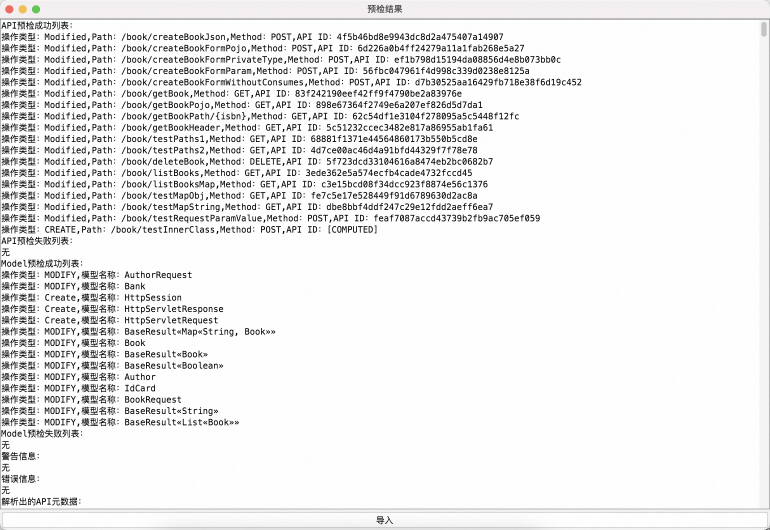
After the import is complete, go to the Published APIs > APIs page in the API Gateway console to verify the result.
Step 3: Test the upload
The sample demo in this topic is configured with Swagger. You can visit http://localhost:8080/v2/api-docs to view the actual OAS definition and compare it with the API definition generated by the API Gateway plugin. The API Gateway plugin does not depend on Swagger. You can upload APIs directly after you install the plugin without starting the project.
Spring support details
The API Gateway plugin parses interfaces by scanning for Spring annotations in the project. You do not need to add Swagger dependencies.
The scanned class must have the
@RestControlleror@Controllerannotation.The scanned method must have one of the following annotations:
@RequestMapping,@GetMapping,@PostMapping,@DeleteMapping,@PutMapping, or@PatchMapping.The parameter scan supports the
@RequestParam,@RequestBody,@PathVariable, and@RequestHeaderannotations. The plugin can also infer default parameter annotations.
Spring annotations are flexible and reflect how the server-side handles requests. For example, if you do not specify a method for the @RequestMapping annotation, it handles any request method. In contrast, an API in the OpenAPI Specification (OAS) has a specific request method, request path, and request parameters. The API definition is clear and shows how the client is expected to call it. The API Gateway plugin uses conventions to bridge the differences between these two semantics. The following examples show some of these conventions.
A parameter without an annotation is treated as
@RequestParamand parsed asin=query. Example:@GetMapping(value = "/getBook") public BaseResult<Book> getBook(String isbn) { return BaseResult.ok(new Book()); }The input parameter
isbnis parsed asin=query.If the
@RequestMappingannotation does not specify a request method, the plugin generates both a GET and a POST API. Example:@RequestMapping(value = "/getBook") public BaseResult<Book> getBook(String isbn) { return BaseResult.ok(new Book()); }If a method has the
@PostMappingannotation, its input parameters are parsed asin=formdata. Example:@PostMapping(value = "/createBook") public BaseResult<Book> createBook(String isbn, String title) { return BaseResult.ok(new Book()); }The input parameters
isbnandtitleare parsed asin=formdata.If a method has the @PostMapping annotation and a method parameter has the
@RequestBodyannotation, the plugin infersconsumes=application/jsonif theconsumesproperty is not specified. Example:@PostMapping(value = "/createBook") public BaseResult<Book> createBook(@RequestBody Book book) { return BaseResult.ok(book); }The input parameter
bookis parsed asin=body.
Other conventions are consistent with standard Spring usage. Although the plugin makes many inferences, you should still use explicit declarations to define your APIs.
Declare a specific request method. Use
@PostMappingand@GetMappinginstead of@RequestMapping.When you use @PostMapping, declare a specific consumes type. The
consumestype corresponds to the Content-Type of the HTTP request. Common Content-Type values include form parameter types, such asapplication/x-www-form-urlencodedandform-data, and the JSON data typeapplication/json. The API Gateway plugin parses form types and JSON data types differently.When you use parameter annotations such as
@RequestParamand@RequestHeader, use thenameproperty to specify the field name and therequiredproperty to specify whether the field is mandatory. This information is included in the API definition.
Parsing support details
When parsing the following common wrapper classes, the plugin unwraps them and parses the fields of the content. Custom wrapper types that require unwrapping are not supported.
org.springframework.http.ResponseEntityreactor.core.publisher.Fluxreactor.core.publisher.Monojava.util.concurrent.Callableorg.springframework.web.context.request.async.DeferredResultorg.springframework.web.context.request.async.WebAsyncTaskjava.util.concurrent.Futurejava.util.concurrent.CompletableFuture
Built-in variables, such as
HttpServletRequest,HttpServletResponse, andHttpSession, are ignored during parsing. Custom parameter types to be ignored are not supported.Generic objects, such as BaseResult<Book>, are supported. If a parameter includes a generic type, you must specify it clearly. Do not configure it as only BaseResult. Otherwise, the
Booktype will not be parsed.Enumeration types are supported.
Collection and Map objects are supported.
Circular references in request and response objects are supported.
Annotation property configurations have a higher priority than default configurations. For example, for
@RequestParam(name="id") String bookId, the plugin usesidas the API field name. By default, the variable namebookIdis used as the API field name.