Offline install the plug-in and initialize the local environment
This topic describes how to install the plug-in offline and initialize the local environment for device-cloud connect.
Install the IntelliJ IDEA offline plug-in package
The following are the plug-in installation packages for different versions of device-cloud connect. Download and install the package that corresponds to your version:
Device-cloud connect 3.0: https://toolkit.aliyun.com/idea/toolkit-intellij-2022.2.1-X.zip. Replace X with your IntelliJ IDEA version number, such as 201, 202, 203, 211, 212, or 213. For example, https://toolkit.aliyun.com/idea/toolkit-intellij-2022.2.1-213.zip.
NoteYou must upgrade to a later version of IntelliJ IDEA to install this plug-in. To use an older version, you can download and install toolkit-intellij-2021.4.1.zip.
Device-cloud connect 2.0: toolkit-intellij-2021.3.1.zip
Device-cloud connect 1.0: toolkit-intellij-2020.8.2.zip
To install the device-cloud connect plug-in in IntelliJ IDEA, follow these steps:
In the IntelliJ IDEA menu bar, choose .
In the Settings dialog box, click Plugins in the navigation pane on the left.
In the Plugins area, click , and then click Install Plugin from Disk....
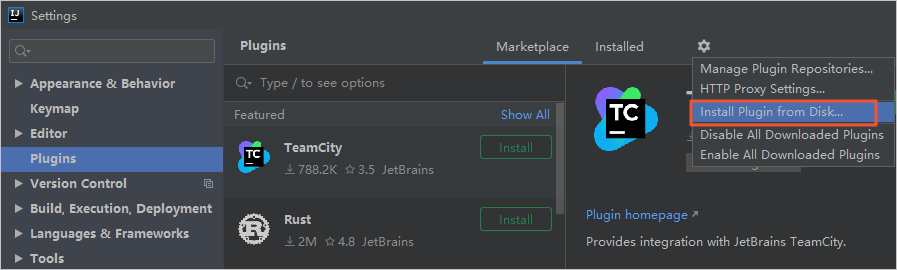
In the Choose Plugin File dialog box, select the Cloud Toolkit offline installation package. Do not decompress the package. Follow the on-screen instructions to complete the installation.
Initialize the local environment
Device-cloud connect 3.0
Windows environment
Create the C:\<current_user>\.edas\join_edas_register folder. Download the following file, decompress it, and place its contents in this folder.
Create the C:\<current_user>\.edas\agent\3.0.0 folder. Download the following files, decompress the ArmsAgent.zip file, and place all the contents in this folder.
etrans.exe: This is the Tunnel Service program. Before you use the program, ensure that it is executable. You can run the
etrans.exe --helpcommand on the command line to verify.
The following is an example of the local environment folder structure:
C:\<current_user>\.edas\join_edas_register
taobao-hsf.sar
C:\<current_user>\.edas\agent\3.0.0
edas-nio-proxy.jar
connect-agent.jar
etrans.exe
ArmsAgent
macOS environment
Create the ~/.edas/join_edas_register folder. Download the following file, decompress it, and place its contents in this folder.
Create the ~/.edas/agent/3.0.0 folder. Download the following files, decompress the ArmsAgent.zip file, and place all the contents in this folder.
etrans: This is the Tunnel Service program. Before you use the program, ensure that it is executable. You can run the
etrans --helpcommand to verify.
The following is an example of the local environment folder structure:
~/.edas/join_edas_register
taobao-hsf.sar
~/.edas/agent/3.0.0
edas-nio-proxy.jar
connect-agent.jar
etrans
ArmsAgent
Device-cloud connect 2.0
Windows environment
Create the C:\<current_user>\.edas\join_edas_register folder. Download the following file, decompress it, and place its contents in this folder.
Create the C:\<current_user>\.edas\agent\2.0.0 folder. Download the following files and place them in this folder.
etrans.exe: This is the Tunnel Service program. Before you use the program, ensure that it is executable. You can run the
etrans.exe --helpcommand on the command line to verify.
The following is an example of the local environment folder structure:
C:\<current_user>\.edas\join_edas_register
taobao-hsf.sar
C:\<current_user>\.edas\agent\2.0.0
edas-nio-proxy.jar
connect-agent.jar
etrans.exe
macOS environment
Create the ~/.edas/join_edas_register folder. Download the following file, decompress it, and place its contents in this folder.
Create the ~/.edas/agent/2.0.0 folder. Download the following files and place them in this folder.
etrans: This is the Tunnel Service program. Before you use the program, ensure that it is executable. You can run the
etrans --helpcommand to verify.
The following is an example of the local environment folder structure:
~/.edas/join_edas_register
taobao-hsf.sar
~/.edas/agent/2.0.0
edas-nio-proxy.jar
connect-agent.jar
etrans
Device-cloud connect 1.0
Windows environment
Create the C:\<current_user>\.edas\join_edas_register directory. Download and unzip the following content into this directory.
etrans.exe: This is the Tunnel Service program. Before you use the program, ensure that it is executable. You can run the
etrans.exe --helpcommand on the command line to verify.
The following is an example of the folder structure for the C:\<current_user>\.edas\join_edas_register folder:
taobao-hsf.sar
etrans.exe
macOS environment
Create the ~/.edas/join_edas_register directory, download and decompress the following content, then place the extracted files in this directory.
etrans: This is the Tunnel Service program. Before you use the program, ensure that it is executable. You can run the
etrans --helpcommand to verify.
The following is an example of the folder structure for the ~/.edas/join_edas_register folder:
taobao-hsf.sar
etrans