Use tags for access control
When multiple teams share an Enterprise Distributed Application Service (EDAS) environment, you need a way to restrict each team's access to only the resources they own. Manually listing resource IDs in every Resource Access Management (RAM) policy becomes unmanageable as resources grow. Tag-based access control solves this: tag your EDAS applications and clusters with attributes such as Environment or Team, then write RAM policies that reference those tags. When a new resource is tagged, existing policies apply automatically -- no policy update required.
Why tag-based access control
Compared to listing individual resource IDs in policies (the traditional approach), tag-based access control offers three advantages:
Advantage |
Description |
Scales without policy changes |
When a new application is deployed and tagged, existing policies apply automatically. No policy update is required. |
Reduces policy count |
One tag-aware policy can cover many resources, replacing dozens of resource-specific policies. |
Maps to business context |
Tags such as |
Tag-based access control requires RAM policies. The built-in permission control system in EDAS does not support tag conditions. For more information about EDAS permission control, see Permission management.
Example scenario
Three applications are deployed in EDAS with the following tags:
Application |
|
|
app-001 |
TEST |
team1 |
app-002 |
DEV |
team1 |
app-003 |
PROD |
team2 |
Three RAM users need different levels of access:
RAM user |
Required access |
User 1 |
Manage all applications in the DEV and TEST environments |
User 2 |
Manage all applications for team1 in the TEST environment only |
User 3 |
Read all applications except those in the PROD environment |
The following steps walk through creating a custom policy for each user, attaching the policies, and verifying the results.
Prerequisites
Before you begin, make sure that you have:
Applications deployed in EDAS on Kubernetes clusters or Elastic Compute Service (ECS) clusters
Tags added to the applications -- see Filter resources by tag
An Alibaba Cloud account or a RAM user with administrative rights
Step 1: Create a custom policy with tag conditions
Log on to the RAM console.
In the left-side navigation pane, choose Permissions > Policies.
On the Policies page, click Create Policy.
On the Create Policy page, click the JSON tab.
Enter one of the following policies in the code editor based on the access requirement. Policy for User 1 -- manage applications in DEV and TEST This policy allows
ManageApplicationon any resource tagged withEnvironment=DEVorEnvironment=TEST: Policy for User 2 -- manage team1 applications in TEST only This policy combines two tag conditions. Both must be true (logical AND) for access to be granted: Policy for User 3 -- read all applications except PROD This policy uses two statements. The first grants read access to all resources. The second explicitly denies read access to resources taggedEnvironment=PROD. An explicit deny always overrides an allow, so User 3 cannot access production applications: The following table summarizes the policy patterns used in these examples:Pattern
Mechanism
When to use
Single tag condition
StringEqualswith one tag key and one or more valuesGrant access by one attribute, such as environment
Multiple tag conditions (AND)
StringEqualswith multiple tag keys in one blockGrant access only when all attributes match
Explicit deny
An
Allowstatement plus aDenystatement with a tag conditionExclude specific resources from a broad allow
   {
     "Statement": [
       {
         "Action": "edas:ManageApplication",
         "Effect": "Allow",
         "Resource": "*",
         "Condition": {
           "StringEquals": {
             "edas:tag/Environment": ["DEV", "TEST"]
           }
         }
       }
     ],
     "Version": "1"
   }
{ "Statement": [ { "Action": "edas:ManageApplication", "Effect": "Allow", "Resource": "*", "Condition": { "StringEquals": { "edas:tag/Team": ["team1"], "edas:tag/Environment": ["TEST"] } } } ], "Version": "1" }{ "Statement": [ { "Action": "edas:ReadApplication", "Effect": "Allow", "Resource": "*" }, { "Action": "edas:ReadApplication", "Effect": "Deny", "Resource": "*", "Condition": { "StringEquals": { "edas:tag/Environment": ["PROD"] } } } ], "Version": "1" }Click Next to edit policy information.
Enter a Name and Description, review the content in the Policy document section, and click OK.
The custom policy now appears in the policy list.
Step 2: Attach the policy to a RAM user
Log on to the RAM console with an Alibaba Cloud account.
In the left-side navigation pane, choose Identities > Users.
On the Users page, find the target RAM user and click Add Permissions in the Actions column.
In the Add Permissions panel, set Authorized Scope to Alibaba Cloud Account.
In the Select Policy section, click Custom Policy, search for the custom policy created in Step 1, select it, and click OK.
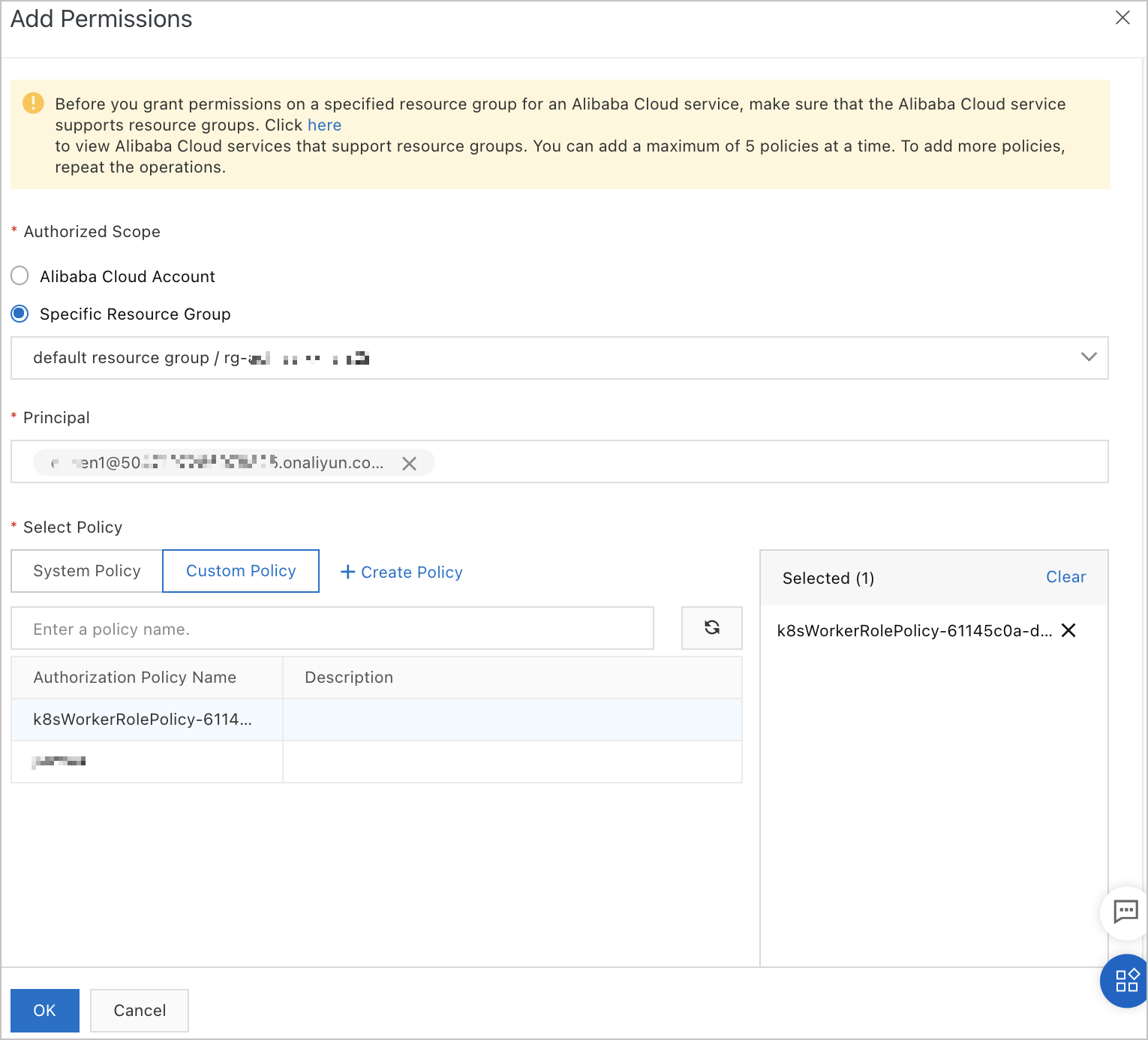
Confirm the authorization information and click Complete.
Repeat these steps for each RAM user or RAM user group that requires a tag-based policy.
Verify the result
After attaching the policies, log on to the EDAS console as each RAM user and confirm the following expected outcomes:
RAM user |
Expected behavior |
User 1 |
Can manage app-001 (TEST, team1) and app-002 (DEV, team1). Cannot access app-003 (PROD, team2). |
User 2 |
Can manage app-001 (TEST, team1) only. Cannot access app-002 (DEV) or app-003 (PROD). |
User 3 |
Can read app-001 and app-002. Cannot read app-003 (PROD). |
If a RAM user can access resources outside the expected scope, check the following:
Verify that the correct tags are assigned to the applications.
Review the conditions in the RAM policy for typos or incorrect tag values.
Make sure no other policies attached to the user grant broader permissions.
Scale and extend tag-based policies
Tag-based access control becomes more valuable as your environment grows. The following table lists common ways to extend the approach:
Goal |
How to achieve it |
Grant access to new resources automatically |
Tag the new application or cluster with the appropriate values (for example, |
Refine access with additional attributes |
Add conditions on more tag keys within the same |
For more information about RAM policies, see Permission management.