Billing
Internet Shared Bandwidth supports the subscription and pay-as-you-go billing methods.
Billing methods
Internet Shared Bandwidth supports subscription and pay-as-you-go billing.
Subscription: A pre-paid billing method.
You are charged at instance creation.
During the subscription period, you can only upgrade the instance configuration. Downgrading or early release is not supported.
To upgrade, see Change subscription Common Bandwidth Package configuration. Though you cannot downgrade the instance configuration when it is active, you can change the configuration when renewing the instance perform a renewal with configuration change — the new maximum bandwidth takes effect in the next subscription cycle. Renew and upgrade.
Pay-as-you-go: A post-paid billing method.
You can upgrade, downgrade, or convert the billing method of a pay-as-you-go instance. Change the configuration of a pay-as-you-go instance.
You can convert from pay-as-you-go (pay-by-bandwidth) to subscription. Convert billing method.
Each billing method offers different metering options. Select one based on your requirements.
Billing method | Metering method | Scenarios |
Pay-as-you-go | pay-by-bandwidth |
|
pay-by-enhanced 95th percentile |
| |
pay-by-dominant-traffic |
Recommended if you cannot predict traffic usage. | |
Subscription | pay-by-fixed-bandwidth |
|
A metering method determines only how fees are calculated. It does not affect bandwidth stability or performance. Regardless of the metering method you choose, the maximum bandwidth that you set is a reference upper limit, not a committed service metric. The actual available bandwidth depends on factors such as distributed forwarding across the system server cluster, per-connection limits, and resource contention. Choose a metering method based on the cost characteristics for the scenarios in the preceding table, not on bandwidth stability. For more information, see Limitations.
Billable items
The following figure shows Internet Shared Bandwidth billable items.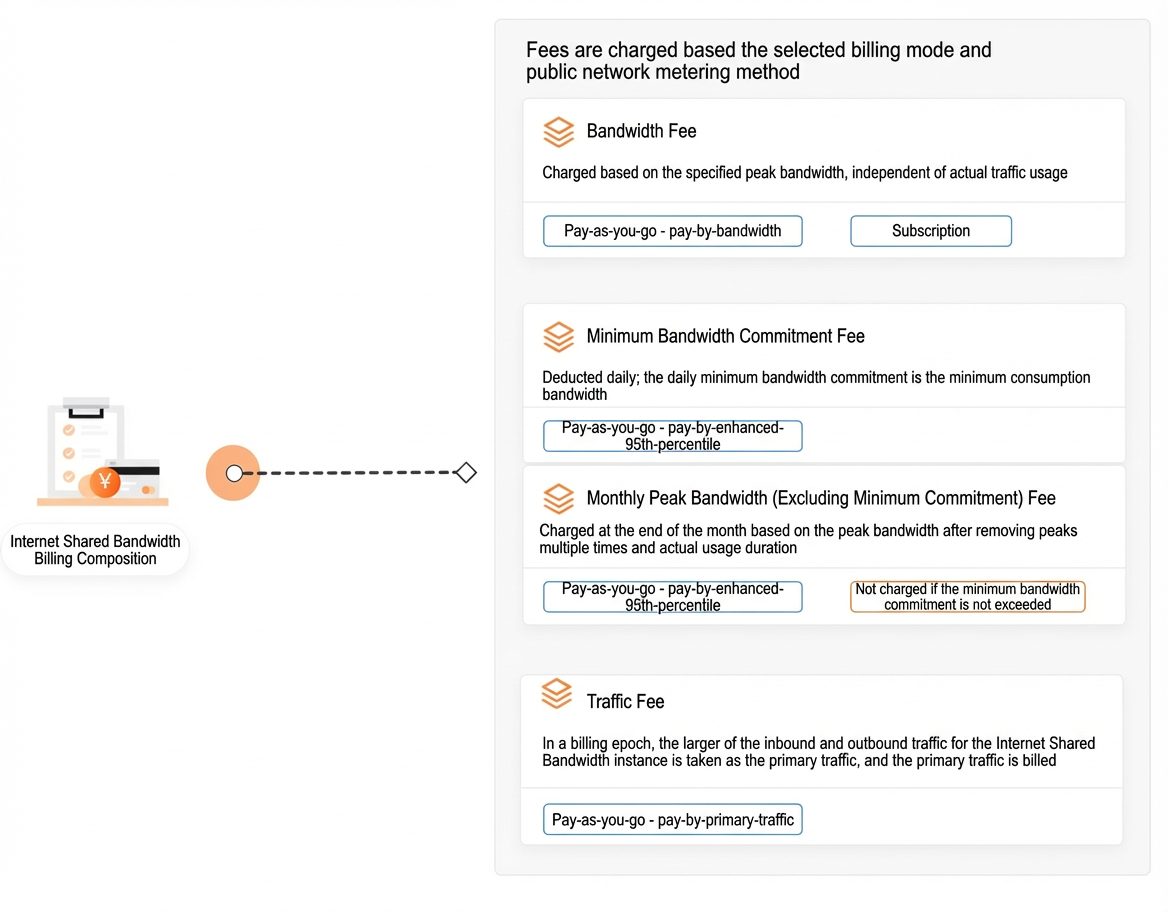
Billable item | Description | Metering method |
Bandwidth fee | Charged based on the specified maximum bandwidth, regardless of actual data transfer. | |
Baseline bandwidth fee | Daily fee for your minimum committed bandwidth (baseline bandwidth). | |
Bursting bandwidth fee (conditional charge) | Charged for the excess if your monthly average peak bandwidth exceeds the baseline. Otherwise, not charged. | |
Data transfer | Billed per billing cycle for dominant traffic (the greater of inbound and outbound traffic). |
Billing cycle
The following table describes Internet Shared Bandwidth billing cycles.
Billing cycle | Bill release time | Billable item |
Hourly | Generated within the hour after the billing cycle ends. Exact timing may vary. | |
Daily | Generated in the early morning of the next day. Exact timing may vary. | |
Monthly | Generated on the first day of the following calendar month. Exact timing may vary. |
Pricing
Internet Shared Bandwidth pricing by billable item:
Actual prices are on the subscription and pay-as-you-go Internet Shared Bandwidth purchase pages in the console.
More information
Overdue payments
Overdue payments for subscription instances
When a subscription instance expires due to non-payment:
Service stops, and the instance is retained for 7 days.
If you renew within 7 days through the console or the Renewal center, service is restored.
If you do not renew within 7 days, the instance is released. Associated EIPs are removed and revert to their previous maximum bandwidth and billing methods.
Overdue payments for pay-as-you-go instances
The service status of a pay-as-you-go instance changes as follows after a payment becomes overdue:
A payment becomes overdue if the available balance in your account, including cash, coupons, vouchers, and pre-authorization, is insufficient to cover a generated bill.
If your account has an overdue payment but is within the grace period quota, your service is not suspended.
NoteAlibaba Cloud provides a grace period that allows continued use of pay-as-you-go services for a specific period or quota. Services are billed normally during this period.Service suspension protection for overdue payments.
If the overdue payment exceeds the grace period quota, service stops and the instance is retained for 7 days.
If you pay the overdue bill within 7 days, the service is restored.
If the overdue bill is not paid within 7 days, the instance is released. Associated EIPs are removed and revert to their previous maximum bandwidth and billing methods.
For a subscription or pay-as-you-go pay-by-bandwidth Internet Shared Bandwidth instance, billing for the instance depends on whether the instance is released, not whether its service has stopped. If service stops due to an overdue payment, bills are still generated normally until the instance is released. Billing stops only after the instance is released.
View your bills
Monthly bill overview
Go to Expenses & Costs. On the page, you can view the total monthly settlement amount (including the full consumption billing cycle), make payments, and export stamped PDF files. Monthly Bills.
Bill details
Go to Expenses & Costs, and on the page, you can view billing records, detailed bills, usage details, and product usage and pricing summaries. For more information, see View and analyze bills.