Host replacement
This topic describes the procedure for host replacement.
Prerequisites
This feature is available for hosts that are not activated.
Activated hosts must be taken offline to use this feature. Otherwise, they do not appear in the list of hosts available for replacement.
Procedure
Use Alipay to scan the QR code on the new host, and then log on with your Alibaba Cloud account.
After you log on, the following page appears. Click Replace Host.
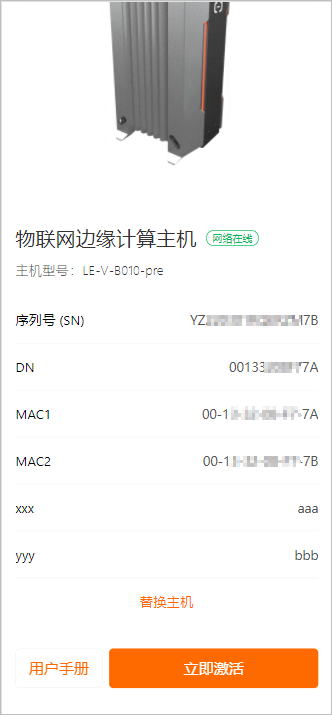
Click Host to be Replaced, select the old host to replace, and then click OK. Read the pop-up message, and then click Continue to start the host replacement process.
WarningOnly offline hosts of the same model can be replaced.
The replacement process deletes the old offline host and creates a new one. This may cause the loss of original runtime data. Before you replace the host, confirm whether a data backup is needed. Proceed with caution.
After the host replacement process starts, the message Your edge host is being activated is displayed. When the process is complete, the message Activation successful is displayed.
Log on to the Edge Computing console, and choose Node Management > Host Management to view the status of the host replacement.