This topic describes how to store and compute data from devices connected to IoT Platform to get more value from your device data.
Background
Data on IoT Platform typically comes from connected smart devices, sensors, and other endpoints. As long as these devices are running, they continuously generate device data.
The value of device data varies significantly by use case. Data timeliness has a different impact on each scenario, as described below.
|
Use case |
Description |
|
Monitoring and O&M |
Data older than an hour has little value, and processing must occur within seconds. |
|
Transactional online workloads |
Applications require data for a specific time window (for example, 7 days) for transactional use cases, and minute-level processing is required. |
|
Business reporting and statistical analysis |
Reporting and analysis require data to be retained for 1 to 2 years, with computation results generated hourly or daily. |
|
AI-driven analytics |
Full-lifecycle device data is fundamental for AI models, and processing requirements vary by business scenario. |
Challenges
Storing and computing device data across its lifecycle requires different technical solutions. The following are typical technology selections for various business scenarios.
|
Use case |
Description |
|
Monitoring and O&M |
Data is stored in stream storage products like ApsaraMQ for RocketMQ and computed using stream processing frameworks like Realtime Compute for Apache Flink. |
|
Transactional online workloads |
Data is stored and computed in online databases like Tablestore or Time Series Database (TSDB). |
|
Business reporting and statistical analysis |
Data is stored in big data warehouses like MaxCompute or Hadoop, and computed using Spark or Python. |
|
AI-driven analytics |
This approach is used in combination with big data warehouses. For example, using PAI (Platform of AI) on DataWorks or Spark ML on Hadoop. |
Addressing these scenarios requires different technical solutions. The main challenges are as follows:
-
Data pipelines and architectures are overly complex, with a bewildering array of technology choices.
-
Storing data across multiple products increases the risk of redundancy and inconsistency.
-
Managing data across its lifecycle to use the most cost-effective storage is complex.
Solution
To address these common challenges, IoT Platform has developed an integrated solution for IoT data storage and computation. IoT Platform provides data storage services, including tiered data storage, and essential storage-related services such as data export, change notification subscriptions, and connectors for big data products. It also supports computation components for real-time data processing, interactive analysis, and offline computation, allowing you to quickly process your IoT device data.
Tiered storage
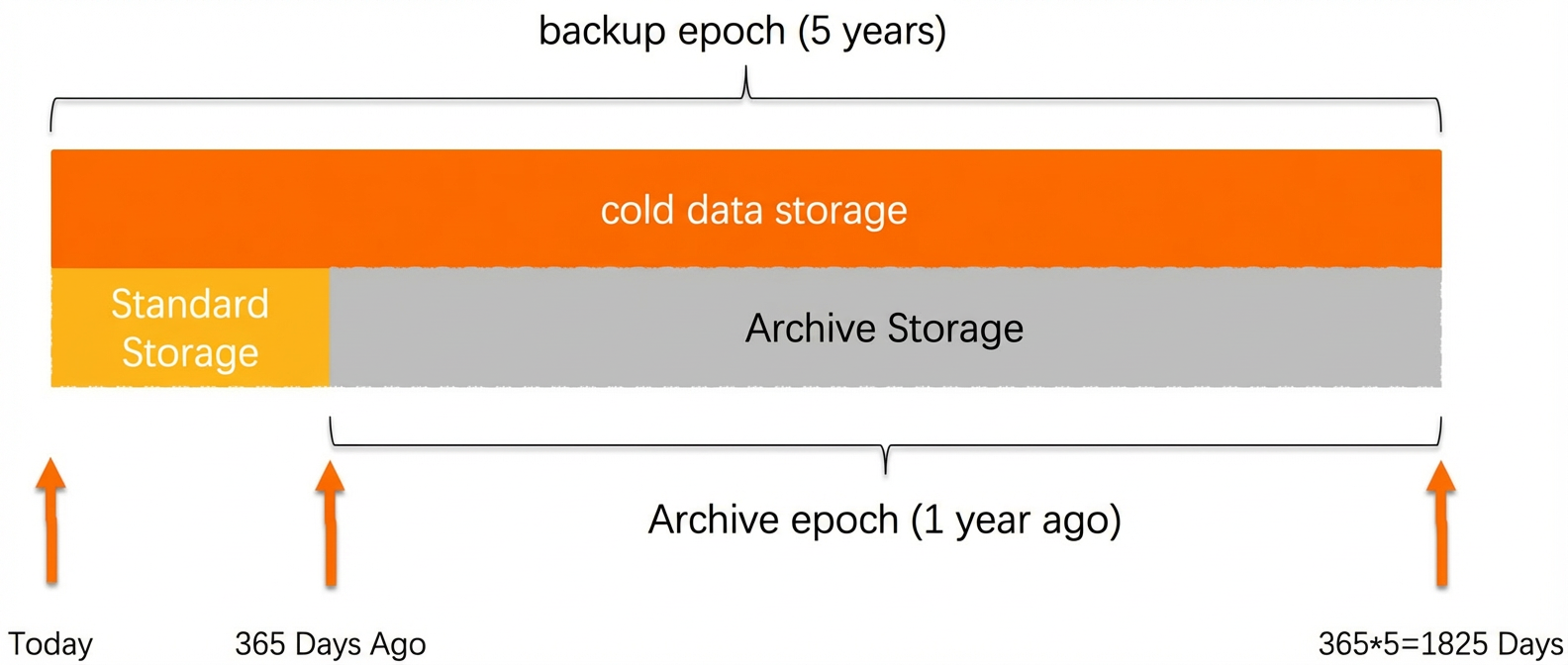
For example, a motorcycle manufacturer using IoT Platform generates about 20 GB of data daily, which amounts to 21 TB over three years. The estimated annual cost for standard storage products ranges from CNY 180,000 to CNY 280,000. By using IoT Platform's archive storage, the annual cost is less than CNY 10,000. If the customer needs to analyze the data, they can retrieve it from archive storage. Retrieving all 21 TB of data would cost an estimated CNY 50,000 for the year. A sensible approach is to plan the backup lifecycle and storage types based on data usage patterns. To achieve a cost-effective solution, define a time range to split data between archive storage and standard storage.
The following figure shows a sample storage plan:
Computation models
Real-time computation
To meet real-time IoT computation requirements, IoT Platform provides the Data Parsing feature. Key capabilities include:
|
Feature |
Data parsing |
|
Data source |
Supports parsing data from device data sources and API data sources. |
|
Timeliness |
Extracts and transforms data in real time, with second-level latency. |
|
Data format |
Supports JSON, ProtoBuf, Base64 (to_JSON), and raw data formats. |
|
Billing |
Data parsing tasks consume compute units (CUs). |
The following table details the supported features:
|
Function |
Node |
Description |
|
Input |
Source Node |
Select a data source to process. |
|
Custom |
If the Topic Format in the Source Node is set to Raw Data, a Custom node is automatically added after the Source Node. Use this node to configure a custom script to parse the raw data. |
|
|
Processing |
Data Calculation |
Automatically matches and displays relevant fields based on the Source Node configuration. You can configure expressions to compute new data fields from existing ones. |
|
Data Filter |
Configure filter conditions to output only data that meets specific criteria. |
|
|
Value Transform |
Configure conditional logic to transform the value of a field in the message flow. The new value can be written to the original field or to a new field. |
|
|
Data Aggregation |
Similar to a window function in Flink SQL, this node aggregates message fields within a specified window. |
|
|
Timeout Interpolation |
Configure a fixed policy to fill in values when data reporting is interrupted, preventing data gaps. |
|
|
Adjacent Message Calculation |
Performs calculations by using the same numeric field from the current and previous messages. This node supports only BIGINT and DOUBLE types. The result is written to a defined output field. |
|
|
Output |
Destination Node |
Forwards the parsed data to an IoT instance topic or the IoT Digital Twin engine for further use, or stores it in a custom storage table within the IoT instance. If you choose to store data in a custom storage table, the available output fields are automatically matched based on the output of the processing nodes. You can delete or modify fields as needed to configure the final output. |
For more information, see Data parsing.
Interactive query
For data exploration and analysis, IoT Platform provides an SQL Workbench where you can write and execute SQL scripts to analyze your data.
The left panel of the SQL Workbench has three tabs: Product Storage Table, Custom Storage Table, and Platform System Table. Double-click a table name to quickly generate a query statement. The toolbar in the upper-right corner includes buttons for Execution Settings, Publish, Undo, and Save. At the bottom, you can switch between the Run Log, Results, and Output Schema tabs to view execution details.
The SQL Workbench provides built-in access to the following IoT Platform data sources:
|
Option |
Description |
|
Product Property Time Series Table |
Stores Thing Model property and event data that is reported by devices to IoT Platform. |
|
Product Property Snapshot Table |
|
|
Product Event Table |
|
|
IoT Digital Twin Time Series Table |
Stores Thing Model property data for twin nodes in the twin entity graph of the twin space in IoT Digital Twin. |
|
IoT Digital Twin Snapshot Table |
|
|
Custom Storage Table |
Stores data that has been custom-initialized. This includes the scheduled output from Data Parsing or SQL Analysis tasks. |
|
Platform System Table |
Stores basic information such as products, devices, device groups, device tags, and device locations. |
For more information, see SQL analysis.
Offline statistical analysis
After analyzing data in the SQL Workbench, you can schedule your scripts to run hourly or daily. The IoT Platform system then periodically generates the analysis results from your SQL scripts.
In the Execution Settings dialog box, configure parameters such as Result Storage Table, Data Write Policy (optional: Append or overwrite by primary key), Primary Key, Business Time Field (ms), Scheduling Policy Effective Date, and Scheduling Cycle.
For more information, see Set a task scheduling policy.
AI analytics
For specific scenarios, the platform has built-in artificial intelligence algorithm models. These models are natively integrated with stored data to simplify the use of algorithms.
For more information, see Algorithm templates.
Data retrieval
IoT Platform provides several ways to retrieve analyzed data:
|
Method |
Description |
Related documentation |
|
Free reports |
Free visual reports for temporary viewing of relevant data. |
|
|
cloud-to-cloud integration |
Use the Data API to integrate data into your business systems. |
|
|
data integration |
Use the IoT Reader to integrate data with DataWorks. |
|
|
CSV export |
Exports data to a local CSV file for a specified time range. |