Cluster mode
MaxCompute Spark enables you to submit applications to a distributed cluster. You can leverage powerful cloud-based computing resources to process large volumes of data.
Step 1: Download and decompress the Spark client
Click this link or run the following commands in a terminal to download and extract the Spark client. This example uses Spark client version
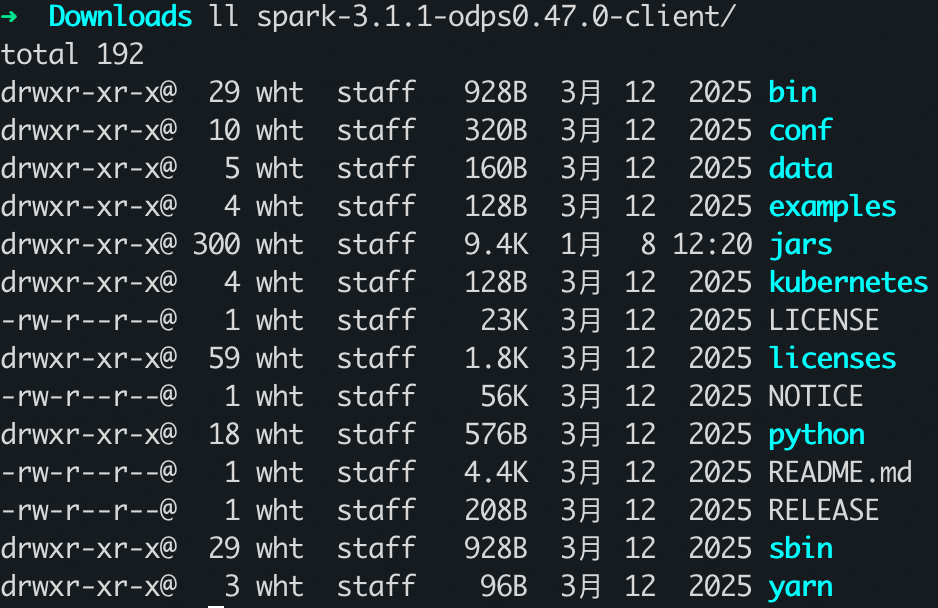
3.1.1-odps0.47.0.wget https://odps-repo.oss-cn-hangzhou.aliyuncs.com/spark/3.1.1-odps0.47.0/spark-3.1.1-odps0.47.0-client.tar.gz tar zxvf spark-3.1.1-odps0.47.0-client.tar.gzVerify that the client is downloaded and extracted to the correct directory.
Step 2: Set environment variables
Set JAVA_HOME
# Recommend JDK 1.8
export JAVA_HOME={{JAVA_PATH}}/jdk
export CLASSPATH=.:$JAVA_HOME/lib/dt.jar:$JAVA_HOME/lib/tools.jar
export PATH=$JAVA_HOME/bin:$PATH
Set SPARK_HOME
# Download the MaxCompute Spark client mentioned above and extract it to any local path.
export SPARK_HOME={{SPARK_PATH}}
export PATH=$SPARK_HOME/bin:$PATH
Set HADOOP_CONF_DIR
This parameter is required for Spark 2.4 and Spark 3.x.
export HADOOP_CONF_DIR=$SPARK_HOME/confStep 3: Modify the spark-defaults.conf configuration file
After you download the MaxCompute Spark client, configure the spark-defaults.conf file. This file is located in the $SPARK_HOME/conf/ directory.
Configure MaxCompute information
spark.hadoop.odps.project.name: Set this to the name of the MaxCompute project where the job runs.spark.hadoop.odps.access.id: Set this to your AccessKey ID.spark.hadoop.odps.access.key: Set this to your AccessKey secret.spark.hadoop.odps.end.point: Set this to the MaxCompute Endpoint required to submit the job. Configure the Endpoint based on the region of your MaxCompute project. If the Spark client is in a VPC environment, use the VPC Endpoint. Otherwise, use the public network Endpoint. For more information, see Endpoints.spark.hadoop.odps.runtime.end.point: Set this to the MaxCompute Endpoint required to run the job. Configure the interconnection Endpoint for Alibaba Cloud services based on the region of your MaxCompute project. For more information, see Endpoints.
Ensure that you use Kube mode.
Note: Different Spark versions require different configuration parameters.
spark.hadoop.odps.kube.mode=true
spark.hadoop.odps.cupid.data.proxy.enable=true
spark.hadoop.odps.cupid.fuxi.shuffle.enable=true
spark.hadoop.odps.spark.version=<Set based on the specific Spark version. If left blank, it defaults to the client version.>
spark.hadoop.odps.spark.libs.public.enable=true
spark.eventLog.enabled=true
spark.eventLog.dir=/workdir/eventlog/
Modify Catalog Information
Note: The parameters you need to configure vary depending on the Spark version.
Spark 3.x
spark.sql.defaultCatalog=odps
spark.sql.catalog.odps=org.apache.spark.sql.execution.datasources.v2.odps.OdpsTableCatalog
spark.sql.sources.partitionOverwriteMode=dynamic
spark.sql.extensions=org.apache.spark.sql.execution.datasources.v2.odps.extension.OdpsExtensions
Spark 2.4.5
spark.sql.catalogImplementation=hiveSpark 2.3.0
spark.sql.catalogImplementation=odps
Step 4: Prepare the project
MaxCompute Spark provides a project template. Download the template, create a copy, and then develop your project directly within it.
To ensure that the job uses the cluster's runtime environment correctly, the Spark dependency scope in the template is set to provided. Do not change this setting. If you do, the job will fail.
The templates and compilation commands for different Spark versions are as follows:
Spark 3.x template and compilation
git clone https://github.com/aliyun/MaxCompute-Spark.git
cd spark-3.x
mvn clean package
Spark 2.x template and compilation
git clone https://github.com/aliyun/MaxCompute-Spark.git
cd spark-2.x
mvn clean package
Spark 1.x template and compilation
git clone https://github.com/aliyun/MaxCompute-Spark.git
cd spark-1.x
mvn clean package
Step 5: Run a SparkPi smoke test
After you complete the steps above, run a smoke test to verify end-to-end execution of MaxCompute Spark. For example, submit a SparkPi job for spark-3.x to confirm that the feature works correctly. The submission command is as follows:
# /path/to/MaxCompute-Spark should point to the correct application JAR package after compilation.

# Bash environment
cd $SPARK_HOME
bin/spark-submit \
--master yarn \
--deploy-mode cluster \
--class com.aliyun.odps.spark.examples.SparkPi \
{{SPARKPATH}}/MaxCompute-Spark/spark-3.x/target/spark-examples_2.12-1.0.0-SNAPSHOT-shaded.jar

# Submit in a Windows environment
cd $SPARK_HOME/bin
spark-submit.cmd --master yarn-cluster --class com.aliyun.odps.spark.examples.SparkPi ^
{{SPARKPATH}}\MaxCompute-Spark\spark-3.x\target\spark-examples_2.12-1.0.0-SNAPSHOT-shaded.jar

# The smoke test job is successful if you see the following logs:
26/01/29 19:36:07 INFO Client:
	 client token: N/A
	 diagnostics: N/A
	 ApplicationMaster host: m***43
	 ApplicationMaster RPC port: 8088
	 queue: queue
	 start time: 1769686490830
	 final status: SUCCEEDED
When you submit a job, use the --jars parameter to add extra JAR dependencies and the --py-files parameter to add Python dependency files. See the following examples:
# Add extra JAR dependencies
bin/spark-submit --master yarn-cluster \
--jars path/to/dependency1.jar,path/to/dependency2.jar \
--class com.aliyun.odps.spark.examples.SparkPi \
/path/to/spark-examples_2.12-1.0.0-SNAPSHOT-shaded.jar

# Add Python dependency files
bin/spark-submit --master yarn-cluster \
--py-files path/to/dependency.py,path/to/package.zip \
/path/to/main.py