For preset and fine-tuned models, you can deploy them to create a dedicated inference service for high concurrency and low latency.
This topic applies only to the China (Beijing) region.
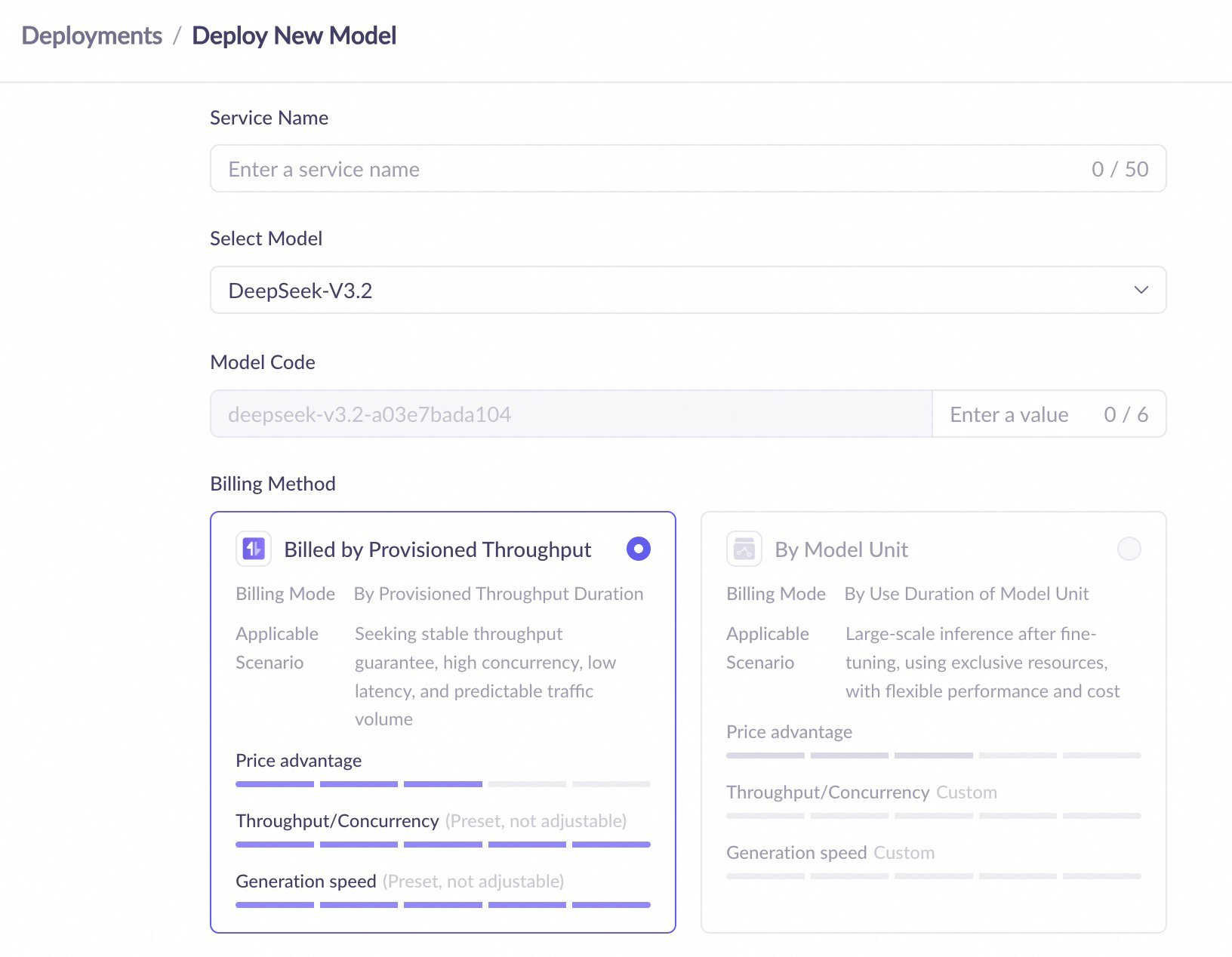
Billing
Before deploying a model, you can view the estimated hourly cost for different models in the deployment console (China (Beijing)).
The billing method cannot be changed after creating a service. To switch methods, you must undeploy the model and then redeploy it.
|
Provisioned throughput (PTU) (high throughput; high performance) |
Model Unit (custom performance metrics; resource isolation) |
Token usage (pay-as-you-go for fine-tuned models/performance validation) |
|||
|
Definition |
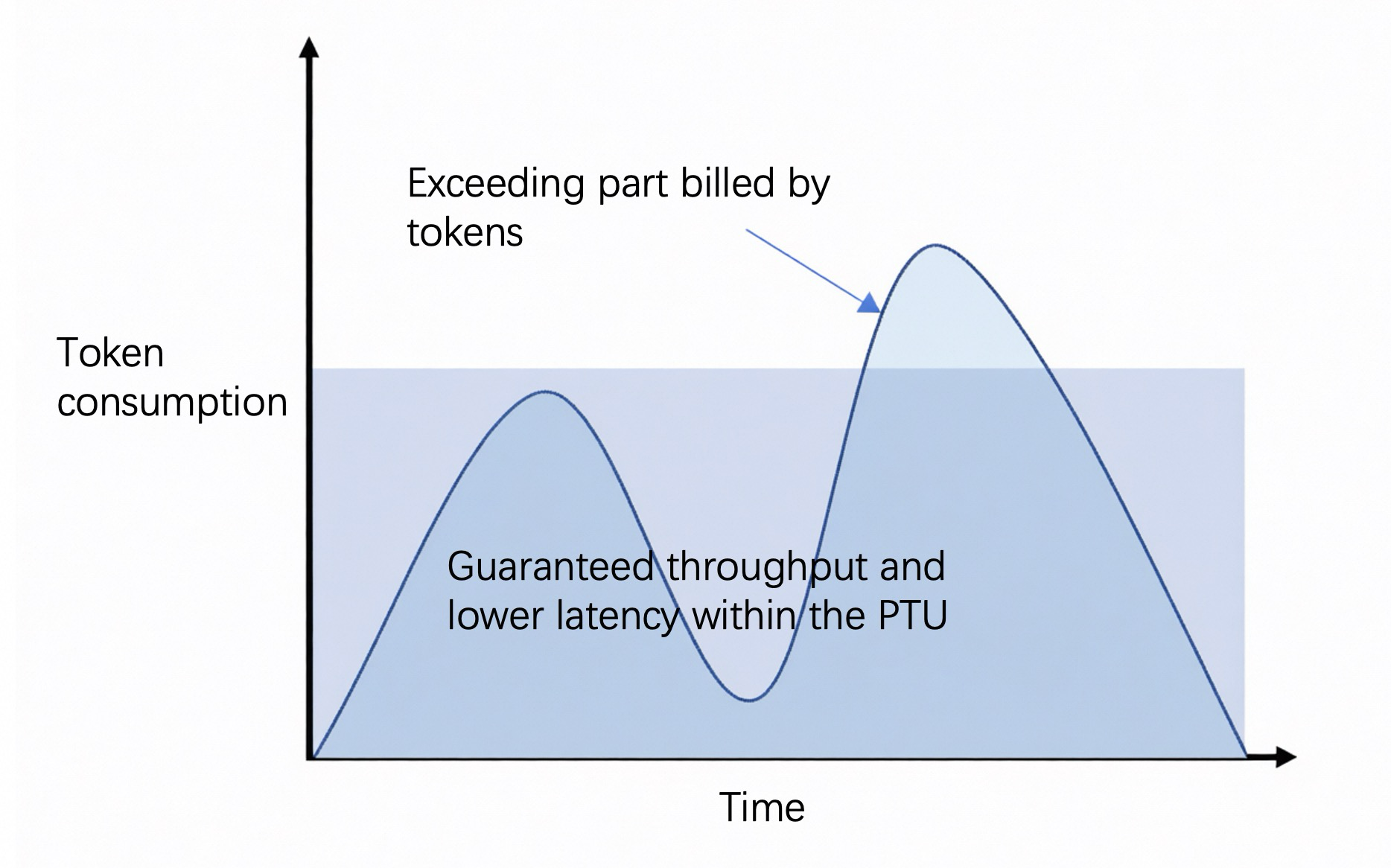
A deployment method that reserves platform resources to guarantee a specific throughput capacity in tokens per minute (TPM). No rate limiting is applied within the guaranteed quota. |
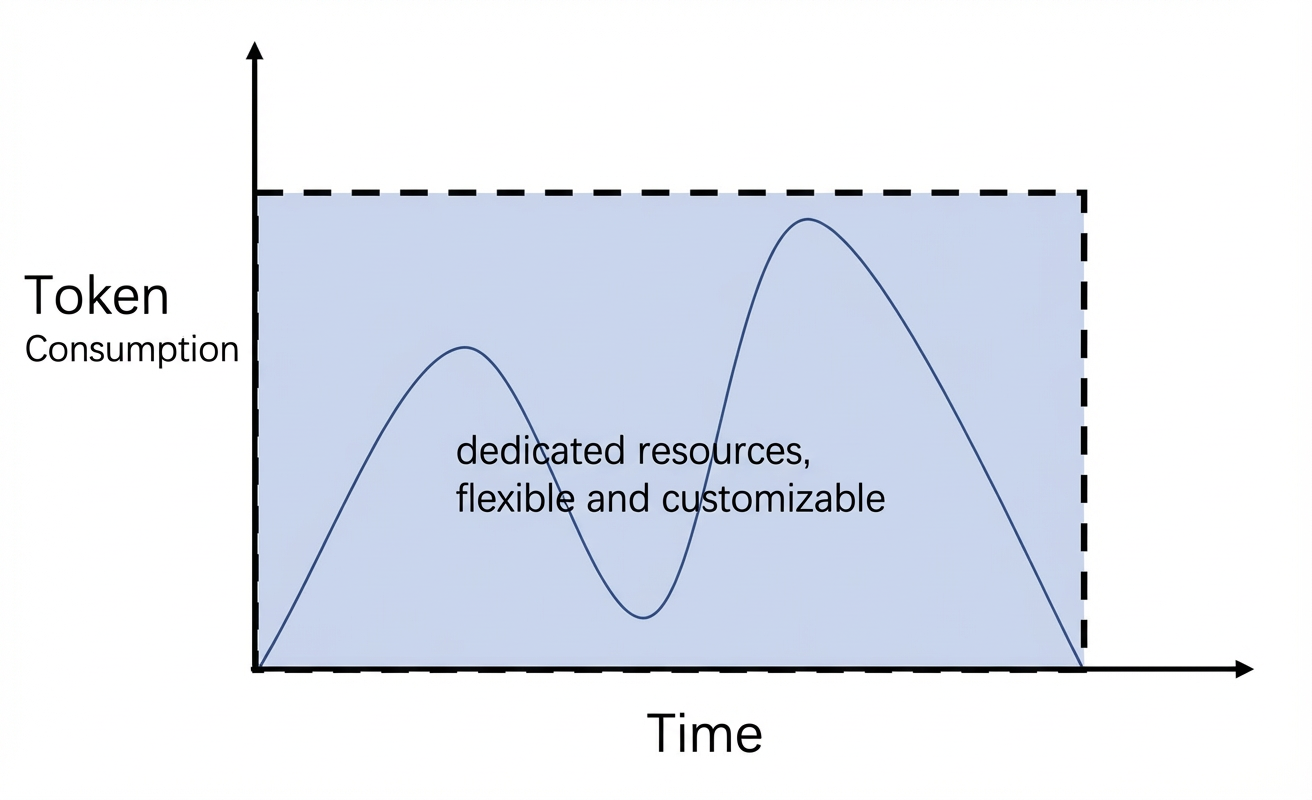
A deployment method with dedicated resources where compute power is configured based on usage duration and the number of model units. |
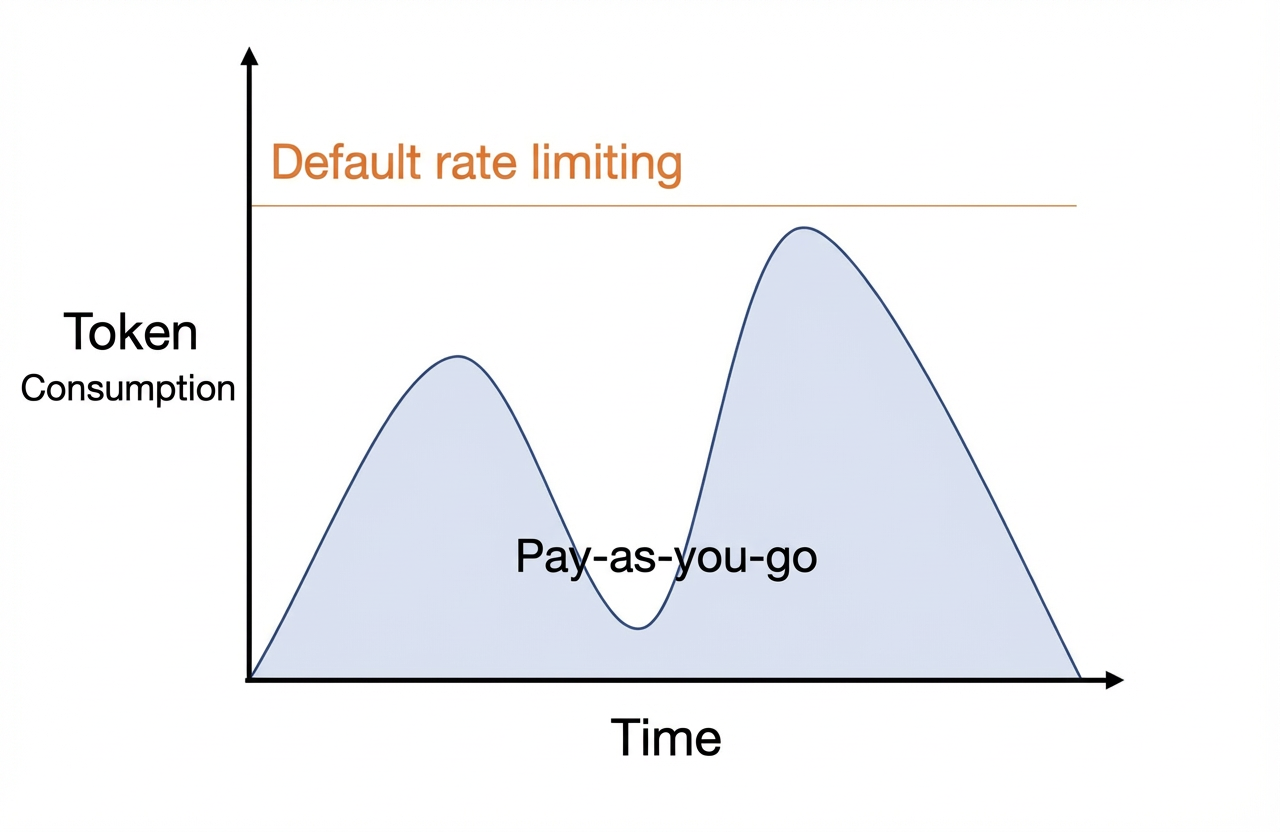
A deployment method that bills based on the number of input and output tokens for each model call. |
||
|
Advantages |
|
|
Pay only for what you use. |
||
|
Supported models |
Some preset models |
Some preset models and all fine-tuned models |
Some models fine-tuned with LoRA |
||
|
Use cases |
|
|
Validate the performance of fine-tuned models. |
||
|
Billing diagram |
|
|
|
||
|
Billing method |
Billed based on usage duration and provisioned throughput pay-as-you-go or prepaid daily subscription |
Billed based on usage duration and the number of model units pay-as-you-go or prepaid monthly subscription |
Billed based on token usage pay-as-you-go |
||
|
Scaling method |
Manually scale the provisioned throughput. |
Manually scale the number of model units. |
Submit a request in the console for manual approval. |
||
|
Limitations |
|
If a prepaid subscription is canceled within the first month, used days are billed at 1.2 times the standard daily rate (approximately the monthly rate divided by 30). |
|
||
To view token usage per model call and historical call counts, go to model monitoring (China (Beijing)).
Billing details
Provisioned throughput
cost = usage duration × (input TPM unit price × input TPM + output TPM unit price × output TPM)
Usage is billed hourly for pay-as-you-go and daily for Subscription. The respective unit prices are listed in the "1-hour duration" and "1-day duration" columns below.
-
A subscription activates upon payment and is valid for N days, expiring at 23:59 on Day N. For orders placed after 22:00, the expiration date is automatically extended by one day.
-
After a subscription expires, the service stops after a 2-hour grace period. Resources are then retained for 14 hours before being released.
-
You cannot terminate a subscription early.
-
For pay-as-you-go accounts with an overdue balance, deployed resources are retained and billing continues for 24 hours before they are automatically released.
If a model's input exceeds the maximum input token limit or the purchased TPM, calls automatically switch to the pay-as-you-go mode. This has several consequences: inference performance may decrease, rate limiting reverts to the public traffic limits of the workspace's current snapshot model, and standard pay-as-you-go fees apply.
-
In this case, the API response header contains
x-dashscope-ptu-overflow:true. -
To view TPM statistics, go to model monitoring (China (Beijing)) (China site) or (international site).
For details on refunds for scaling in or downgrading, see Refund Rules for Downgrades.
Qwen
|
Model name |
Model code |
Maximum input tokens |
Pay-as-you-go input (per 10K tokens) |
Pay-as-you-go output (per 1K tokens) |
Provisioned input (per 10K TPM/day) |
Provisioned output (per 1K TPM/day) |
|
Qwen3.7-Max-2026-05-20 |
qwen3.7-max-2026-05-20 |
256,000 |
¥28.8 |
¥8.64 |
¥345.6 |
¥103.68 |
|
Qwen3.6-Flash-2026-04-16 |
qwen3.6-flash-2026-04-16 |
128,000 |
¥2.88 |
¥1.73 |
¥34.56 |
¥20.74 |
|
Qwen3.6-Plus-2026-04-02 |
qwen3.6-plus-2026-04-02 |
128,000 |
¥4.8 |
¥2.88 |
¥57.6 |
¥34.56 |
|
Qwen3.5-Plus-2026-04-20 |
qwen3.5-plus-2026-04-20 |
128,000 |
¥1.92 |
¥1.15 |
¥23.04 |
¥13.82 |
|
Qwen3-Max-2025-09-23 |
qwen3-max-2025-09-23 |
128,000 |
¥7.68 |
¥3.08 |
¥92.16 |
¥36.96 |
|
Qwen-Flash-2025-07-28 |
qwen-flash-2025-07-28 |
128,000 |
¥0.36 |
¥0.36 |
¥4.32 |
¥4.32 |
|
Qwen-Plus-2025-12-01 |
qwen-plus-2025-12-01 |
128,000 |
¥1.92 |
standard: ¥0.48 code interpreter: ¥1.92 |
¥23.04 |
standard: ¥5.76 code interpreter: ¥23.04 |
DeepSeek
|
Model name |
Model code |
Maximum input tokens |
Pay-as-you-go input (per 10K tokens) |
Pay-as-you-go output (per 1K tokens) |
Provisioned input (per 10K TPM/day) |
Provisioned output (per 1K TPM/day) |
|
DeepSeek-v4-Pro |
deepseek-v4-pro |
256,000 |
¥43.2 |
¥8.64 |
¥518.4 |
¥103.68 |
|
DeepSeek-v3.2 |
deepseek-v3.2 |
64,000 |
¥7.2 |
¥1.08 |
¥86.4 |
¥12.96 |
|
DeepSeek-v3 |
deepseek-v3 |
64,000 |
¥7.2 |
¥2.88 |
¥86.4 |
¥34.56 |
Qwen-VL
|
Model name |
Model code |
Maximum input tokens |
Pay-as-you-go input (per 10K tokens) |
Pay-as-you-go output (per 1K tokens) |
Provisioned input (per 10K TPM/day) |
Provisioned output (per 1K TPM/day) |
|
Qwen3-VL-Plus-2025-09-23 |
qwen3-vl-plus-2025-09-23 |
128,000 |
¥2.4 |
¥2.4 |
¥28.8 |
¥28.8 |
Other models
|
Model name |
Model code |
Maximum input tokens |
Pay-as-you-go input (per 10K tokens) |
Pay-as-you-go output (per 1K tokens) |
Provisioned input (per 10K TPM/day) |
Provisioned output (per 1K TPM/day) |
|
GLM-5.1 |
glm-5.1 |
64,000 |
¥21.6 |
¥8.64 |
¥259.2 |
¥103.68 |
Pay-as-you-go (model unit)
Fee = Usage (in hours) × Number of model units × Model unit price
For pay-as-you-go, the model unit price is the hourly unit price shown in the table below. For prepaid monthly billing, the total cost is calculated as follows: number of subscription months × number of model units × monthly unit price.
-
If you cancel a prepaid purchase within the first month, you will be charged 1.2 times the daily rate (approximately the monthly rate / 30). We bill partial days as full days.
Computing resources for pay-as-you-go model units are available on a first-come, first-served basis. If a purchase fails, you will receive a full refund.
Text generation
Qwen
|
Model name |
Model code |
Unit specification |
Hourly price (CNY) Billed per minute |
Monthly price (CNY) Billed per day |
|
Qwen3.7-Plus-2026-05-26 |
qwen3.7-plus-2026-05-26 |
MU3 x 8 |
¥1,096 |
¥527,752 |
|
Qwen3.6-35B-A3B |
qwen3.6-35b-a3b |
MU8 x 1 |
¥47 |
¥22,400 |
|
MU9 x 1 |
¥51 |
¥24,600 |
||
|
Qwen3.6-27B |
qwen3.6-27b |
MU9 x 1 |
¥51 |
¥24,600 |
|
Qwen3.6-Flash-2026-04-16 |
qwen3.6-flash-2026-04-16 |
MU1 x 2 |
¥108 |
¥52,236 |
|
Qwen3.6-Plus-2026-04-02 |
qwen3.6-plus-2026-04-02 |
MU1 x 8 MU1 x 16 (PD-separated mode) |
¥432 PD-separated mode: ¥864 |
¥208,944 PD-separated mode: ¥417,888 |
|
Qwen3.5-397B-A17B |
qwen3.5-397b-a17b |
MU2 x 8 |
¥504 |
¥240,288 |
|
MU3 x 8 MU3 x 16 (PD-separated mode) |
¥1,096 PD-separated mode: ¥2,192 |
¥527,752 PD-separated mode: ¥1,055,504 |
||
|
MU6 x 16 |
¥400 |
¥193,424 |
||
|
Qwen3.5-122B-A10B |
qwen3.5-122b-a10b |
MU1 x 4 |
¥216 |
¥104,472 |
|
MU2 x 8 |
¥504 |
¥240,288 |
||
|
MU6 x 16 |
¥400 |
¥193,424 |
||
|
MU9 x 2 |
¥102 |
¥49,200 |
||
|
Qwen3.5-35B-A3B |
qwen3.5-35b-a3b |
MU1 x 2 |
¥108 |
¥52,236 |
|
MU2 x 8 |
¥504 |
¥240,288 |
||
|
MU8 x 1 |
¥47 |
¥22,400 |
||
|
MU9 x 1 |
¥51 |
¥24,600 |
||
|
Qwen3.5-27B |
qwen3.5-27b |
MU9 x 1 |
¥51 |
¥24,600 |
|
Qwen3.5-9B |
qwen3.5-9b |
MU8 x 1 |
¥47 |
¥22,400 |
|
MU9 x 1 |
¥51 |
¥24,600 |
||
|
Qwen3.5-Flash-2026-02-23 |
qwen3.5-flash-2026-02-23 |
MU1 x 2 |
¥108 |
¥52,236 |
|
Qwen3.5-Plus-2026-02-15 |
qwen3.5-plus-2026-02-15 |
MU1 x 16 (PD-separated mode) |
PD-separated mode: ¥864 |
PD-separated mode: ¥417,888 |
|
MU3 x 8 MU3 x 16 (PD-separated mode) |
¥1,096 PD-separated mode: ¥2,192 |
¥527,752 PD-separated mode: ¥1,055,504 |
||
|
Qwen3-235B-A22B-Instruct-2507 |
qwen3-235b-a22b-instruct-2507 |
MU1 x 4 |
¥216 |
¥104,472 |
|
MU2 x 8 |
¥504 |
¥240,288 |
||
|
Qwen3-Next-80B-A3B-Instruct |
qwen3-next-80b-a3b-instruct |
MU1 x 2 |
¥108 |
¥52,236 |
|
Qwen3-32B |
qwen3-32b |
MU1 x 4 |
¥216 |
¥104,472 |
|
MU6 x 4 |
¥100 |
¥48,356 |
||
|
Qwen3-30B-A3B |
qwen3-30b-a3b |
MU9 x 2 |
¥102 |
¥49,200 |
|
Qwen3-30B-A3B-Instruct-2507 |
qwen3-30b-a3b-instruct-2507 |
MU1 x 4 |
¥216 |
¥104,472 |
|
MU2 x 8 |
¥504 |
¥240,288 |
||
|
Qwen3-8B |
qwen3-8b |
MU1 x 2 |
¥108 |
¥52,236 |
|
MU2 x 2 |
¥126 |
¥60,072 |
||
|
MU5 x 1 |
¥21 |
¥10,139 |
||
|
Qwen3-4B |
qwen3-4b |
MU1 x 2 |
¥108 |
¥52,236 |
|
MU5 x 1 |
¥21 |
¥10,139 |
||
|
Qwen3-1.7B |
qwen3-1.7b |
MU1 x 2 |
¥108 |
¥52,236 |
|
MU5 x 1 |
¥21 |
¥10,139 |
||
|
Qwen3-Embedding-0.6B |
qwen3-embedding-0.6b |
MU5 x 1 |
¥21 |
¥10,139 |
|
MU6 x 1 |
¥25 |
¥12,089 |
||
|
Qwen3-MoE-Rerank-0.6B |
qwen3-moe-rerank-0.6b |
MU5 x 1 |
¥21 |
¥10,139 |
|
Qwen3-Rerank-0.6B |
qwen3-rerank-0.6b |
MU5 x 1 |
¥21 |
¥10,139 |
|
MU6 x 1 |
¥25 |
¥12,089 |
||
|
Qwen3-Max-2025-09-23 |
qwen3-max-2025-09-23 |
MU2 x 8 |
¥504 |
¥240,288 |
|
MU3 x 8 |
¥1,096 |
¥527,752 |
||
|
Qwen3-Rerank |
qwen3-rerank |
MU5 x 1 |
¥21 |
¥10,139 |
|
Qwen2.5-72B-Instruct |
qwen2.5-72b-instruct |
MU1 x 4 |
¥216 |
¥104,472 |
|
Qwen2.5-32B-Instruct |
qwen2.5-32b-instruct |
MU1 x 4 |
¥216 |
¥104,472 |
|
Qwen2.5-14B-Instruct |
qwen2.5-14b-instruct |
MU1 x 2 |
¥108 |
¥52,236 |
|
Qwen2.5-7B-Instruct |
qwen2.5-7b-instruct |
MU1 x 2 |
¥108 |
¥52,236 |
|
MU5 x 1 |
¥21 |
¥10,139 |
||
|
Qwen2.5-3B-Instruct |
qwen2.5-3b-instruct |
MU5 x 1 |
¥21 |
¥10,139 |
|
Qwen-Flash-2025-07-28 |
qwen-flash-2025-07-28 |
MU1 x 4 |
¥216 |
¥104,472 |
|
Qwen-Plus-2025-07-28 |
qwen-plus-2025-07-28 |
MU1 x 4 MU1 x 16 (PD-separated mode) |
¥216 PD-separated mode: ¥864 |
¥104,472 PD-separated mode: ¥417,888 |
|
Qwen-Plus-2025-12-01 |
qwen-plus-2025-12-01 |
MU1 x 4 |
¥216 |
¥104,472 |
GLM
|
Model name |
Model code |
Model unit |
Hourly price (CNY) Billed per minute |
Monthly price (CNY) Billed per day |
|
GLM-5 |
glm-5 |
MU3 x 16 (PD separation mode) |
¥2,192 |
¥1,055,504 |
|
GLM-4.7 |
glm-4.7 |
MU6 x 32 (PD separation mode) |
¥800 |
¥386,848 |
DeepSeek
|
Model name |
Model code |
Model unit |
Hourly rate (CNY) Billed per minute |
Monthly rate (CNY) Billed per day |
|
DeepSeek-v4-Flash |
deepseek-v4-flash |
MU1 x 8 |
¥432 |
¥208,944 |
|
DeepSeek-v3.2 |
deepseek-v3.2 |
MU2 x 16 (PD-separated mode) |
PD-separated mode: ¥1,008 |
PD-separated mode: ¥480,576 |
More models
|
Model name |
Model code |
Unit specification |
Hourly price (CNY) Billing increment: Minute |
Monthly price (CNY) Billing increment: Day |
|
MiniMax-M2.5 |
MiniMax-M2.5 |
MU1 x 16 (PD-decoupled mode) |
PD-decoupled mode: ¥864 |
PD-decoupled mode: ¥417,888 |
|
Kimi-K2.5 |
Kimi-K2.5 |
MU2 x 8 |
¥504 |
¥240,288 |
Model types:
-
Instruct - Once deployed, the model runs inference in instruct mode.
-
Thinking - Once deployed, the model runs inference in thinking mode.
Model deployment type:
-
pd-separated mode: Reduces first-token latency and improves throughput.
This deployment mode splits model inference into two computation phases, prefill and decode, and executes them on separate compute nodes.
Multimodal
Qwen-VL
|
Model name |
Model code |
Unit specification |
Hourly price (CNY) Billed per minute |
Monthly price (CNY) Billed per day |
|
Qwen3-VL-235B-A22B-Instruct |
qwen3-vl-235b-a22b-instruct |
MU1 x 4 |
¥216 |
¥104,472 |
|
Qwen3-VL-235B-A22B-Thinking |
qwen3-vl-235b-a22b-thinking |
MU1 x 4 |
¥216 |
¥104,472 |
|
Qwen3-VL-32B-Instruct |
qwen3-vl-32b-instruct |
MU2 x 8 |
¥504 |
¥240,288 |
|
Qwen3-VL-8B-Instruct |
qwen3-vl-8b-instruct |
MU1 x 2 |
¥108 |
¥52,236 |
|
Qwen3-VL-4B-Instruct |
qwen3-vl-4b-instruct |
MU1 x 2 |
¥108 |
¥52,236 |
|
Qwen3-VL-2B-Instruct |
qwen3-vl-2b-instruct |
MU5 x 1 |
¥21 |
¥10,139 |
|
Qwen3-VL-Embedding-2B |
qwen3-vl-embedding-2b |
MU5 x 1 |
¥21 |
¥10,139 |
|
Qwen3-VL-Flash-2025-10-15 |
qwen3-vl-flash-2025-10-15 |
MU1 x 4 |
¥216 |
¥104,472 |
|
Qwen3-VL-Plus-2025-09-23 |
qwen3-vl-plus-2025-09-23 |
MU1 x 4 |
¥216 |
¥104,472 |
|
Qwen-VL-Max-2025-08-13 |
qwen-vl-max-2025-08-13 |
MU6 x 4 |
¥100 |
¥48,356 |
|
Qwen-VL-OCR-2025-11-20 |
qwen-vl-ocr-2025-11-20 |
MU6 x 4 |
¥100 |
¥48,356 |
Qwen Omni
|
Model name |
Model code |
Unit specification |
Hourly price (CNY) Billed per minute |
Monthly price (CNY) Billed per day |
|
Qwen3.5-Omni-Flash |
qwen3.5-omni-flash |
MU8 x 1 |
¥47 |
¥22,400 |
|
MU9 x 1 |
¥51 |
¥24,600 |
||
|
Qwen3.5-Omni-Plus |
qwen3.5-omni-plus |
MU9 x 8 |
¥408 |
¥196,800 |
Model types:
-
Instruct - Performs inference in non-thinking mode.
-
Thinking - Performs inference in thinking mode.
-
Instruct/Thinking - You can enable or disable thinking mode during model deployment.
Text-to-speech
CosyVoice
|
Model name |
Model ID |
Unit specification |
Hourly price (CNY) |
Monthly price (CNY) |
|
cosyvoice-v3-flash |
MU5 |
¥21 |
¥10,139 |
Token-based billing
Cost = (Number of input tokens × price per input token) + (Number of output tokens × price per output token) (Minimum billing unit: 1 token)
-
Token-based billing is available only for custom models created through efficient supervised fine-tuning of the following foundation models.
Qwen
|
Foundation model |
Model code |
Input CNY/1,000 tokens |
Output CNY/1,000 tokens |
|
Qwen3-32B |
qwen3-32b |
¥0.002 |
non-thinking mode: ¥0.008 thinking mode: ¥0.02 |
|
Qwen3-14B |
qwen3-14b |
¥0.001 |
non-thinking mode: ¥0.004 thinking mode: ¥0.01 |
|
Qwen3-8B |
qwen3-8b |
¥0.0005 |
non-thinking mode: ¥0.002 thinking mode: ¥0.005 |
|
Qwen2.5-72B-Instruct |
qwen2.5-72b-instruct |
¥0.004 |
¥0.012 |
|
Qwen2.5-32B-Instruct |
qwen2.5-32b-instruct |
¥0.002 |
¥0.006 |
|
Qwen2.5-14B-Instruct |
qwen2.5-14b-instruct |
¥0.001 |
¥0.003 |
|
Qwen2.5-7B-Instruct |
qwen2.5-7b-instruct |
¥0.0005 |
¥0.001 |
Qwen-VL
|
Foundation model |
Model code |
Input CNY/1,000 tokens |
Output CNY/1,000 tokens |
|
Qwen3-VL-8B-Instruct |
qwen3-vl-8b-instruct |
¥0.0005 |
¥0.002 |
|
Qwen2.5-VL-72B-Instruct |
qwen2.5-vl-72b-instruct |
¥0.016 |
¥0.048 |
|
Qwen2.5-VL-32B-Instruct |
qwen2.5-vl-32b-instruct |
¥0.008 |
¥0.024 |
|
Qwen2.5-VL-7B-Instruct |
qwen2.5-vl-7b-instruct |
¥0.002 |
¥0.005 |
To deploy additional models, refer to this solution and choose the deployment plan that best suits your use case.
Deployment method
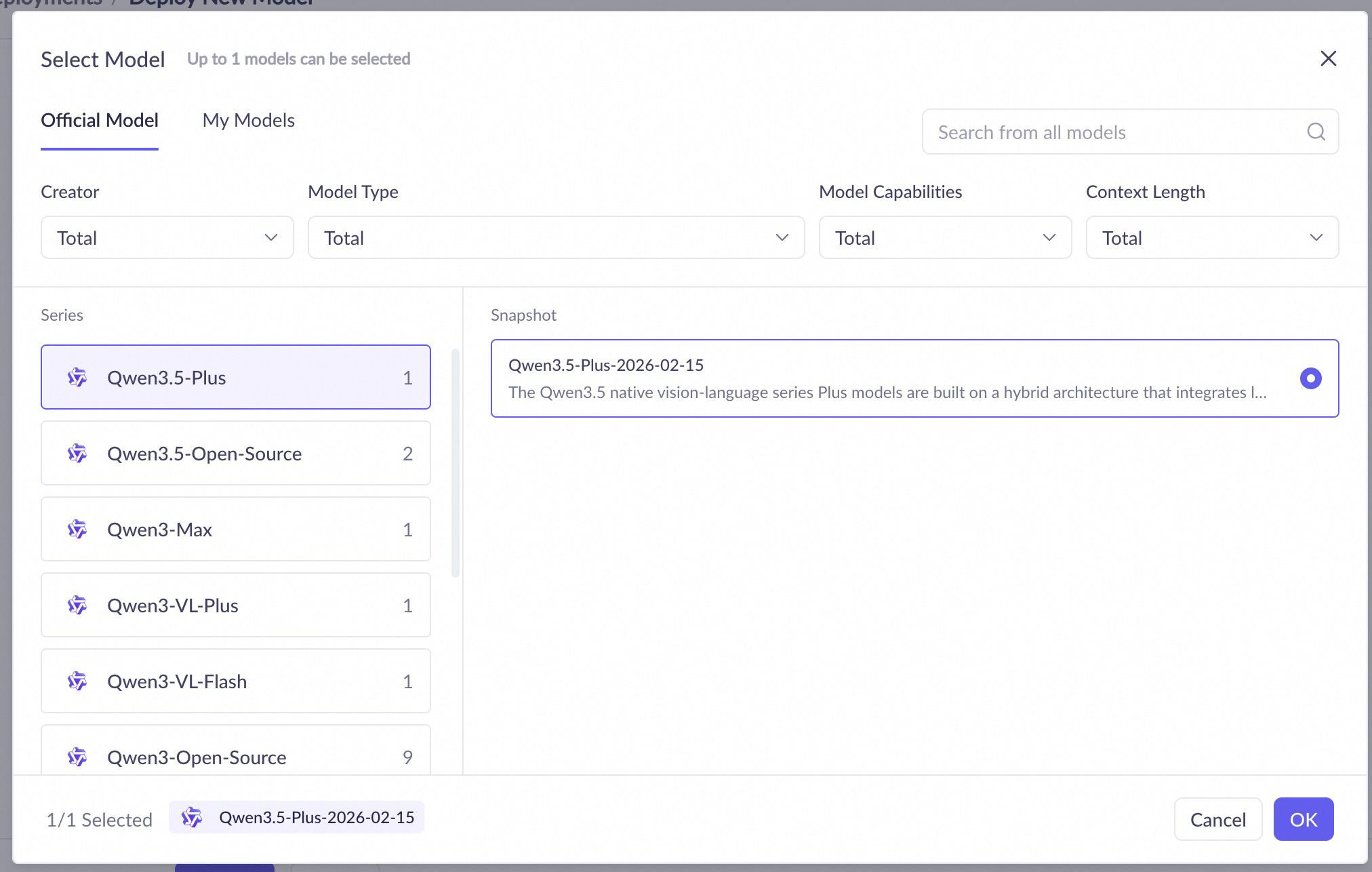
To deploy a model on the console, follow these steps:
If you receive an "insufficient permissions" error, see What do I do if I have insufficient permissions to deploy a model?
|
|
|
|
Important
Billing starts after the model deploys successfully. |
Deployment configuration
Model Unit
|
Parameter |
Description |
|
service name |
A custom name for the deployed service. |
|
Model |
The model to deploy. You can select from preset and fine-tuned models. |
|
Model Unit type |
The deployment specification. Different specifications provide different computing power and performance. |
|
number of replicas |
The initial number of replicas. This setting affects the service's concurrency. |
|
deployment template |
Specifies the deployment template, such as "Single-node deployment". Different templates correspond to different resource configurations. This parameter is available only with the Model Unit billing method. |
|
model inference mode |
For some models deployed as a Model Unit, you can configure the inference mode. The options are:
|
|
max context |
The maximum context length for the model, which varies by type. This setting is available only for certain models deployed as a Model Unit. |
|
service throttling |
Configures rate limits for the service, such as requests per minute (RPM) and tokens per minute (TPM). This setting is available only for some models deployed as a Model Unit. |
Deployment list
After a service is deployed, you can view and manage your deployed services on the deployment list page. This page lists the following:
-
Service name: The name of the deployed service. Click the name to view its deployment details.
-
Model name: The model used for the deployment.
-
Model code: A unique identifier generated when the model is deployed, used to specify the model in an API call.
-
Deployment status/Event status: The current status of the deployed service. Possible statuses include Pending, Deploying, Running, Deployment Failed, Taking Offline, Service Suspended, Stopped, Deleting, Suspended (Unsubscribed/Overdue), Restoring, Running (Resizing), and Running (Resizing Failed).
-
Billing method: The billing method for the service.
-
Deployment details: Configuration information such as model unit type and replicas.
-
Throttling details: Throttling settings for the service, such as RPM (requests per minute) and TPM (tokens per minute).
-
Service time: The creation time and expiration time of the service.
-
Actions: Available actions depend on the deployment status and billing method. These include update, monitor, scale, renew, take offline, delete, or experience.
Call a deployed model
After deploying a model, you can call it using the OpenAI-compatible API, DashScope, or the Assistant SDK.
When calling a deployed model, set the model parameter to the model code. You can find the Model Code in the deployment console (China (Beijing)).

The following code examples show how to call a fine-tuned qwen3-8b model:
A fine-tuned model has the same features as the base model, such as support for non-streaming and structured output.
For a fine-tuned model that supports deep thinking, the use of deep thinking during inference must be consistent with your fine-tuning data:
-
If your fine-tuning data includes deep thinking, enable the
enable_thinkingparameter. -
If your fine-tuning data does not include deep thinking, do not enable the
enable_thinkingparameter.
DashScope
import os
import dashscope
messages = [
{"role": "system", "content": "You are a helpful assistant."},
{"role": "user", "content": "Who are you?"},
]
response = dashscope.Generation.call(
# If the DASHSCOPE_API_KEY environment variable is not set, provide your Model Studio API key directly (e.g., api_key="sk-xxx").
api_key=os.getenv("DASHSCOPE_API_KEY"),
model="qwen3-14b-xxx-xxx", # Replace with your model code.
messages=messages,
result_format="message",
enable_thinking=False,
)
print(response)
OpenAI compatible API
import os
from openai import OpenAI
client = OpenAI(
# If the DASHSCOPE_API_KEY environment variable is not set, provide your Model Studio API key directly (e.g., api_key="sk-xxx").
api_key=os.getenv('DASHSCOPE_API_KEY'),
base_url="https://dashscope.aliyuncs.com/compatible-mode/v1",
)
completion = client.chat.completions.create(
model="qwen3-14b-xxx-xxx", # Replace with your model code.
messages=[
{"role": "system", "content": "You are a helpful assistant."},
{"role": "user", "content": "Who are you?"},
],
extra_body={"enable_thinking": False},
)
print(completion)
Service scaling
-
To scale a service with provisioned throughput (subscription), click Scaling to manually adjust the number of instances. For refund rules when you scale in, see Refund Rules for Configuration Downgrade.
-
To scale a service based on model units (subscription), click Scaling to manually adjust the number of instances.
-
By token call volume: Click the Scale Out button, fill out and submit the scale-out application form, and wait for manual review.
You can also configure an auto scaling policy by clicking the scaling configuration button in the Actions column. The policy can include scaling thresholds, minimum and maximum replica counts, and scheduled scaling.
Decommission a deployment service
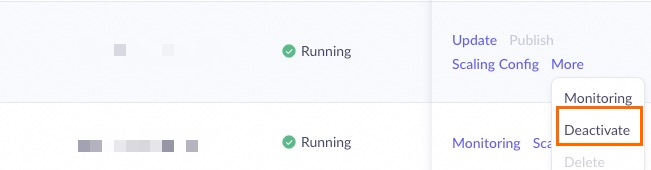
Go to the model deployment console (China (Beijing)), find the deployment service to stop, and take the corresponding action based on its billing method:
-
For pre-paid model units: Click Deactivate and confirm.
-
For pay-as-you-go: Click Delete and confirm.
Billing stops once the action is complete.

Other operations
In addition to taking services offline, you can perform the following actions in the Actions column of the deployment list page:
-
Update: Update the model version of a deployed service through a full or phased update (canary release).
-
Delete: Delete a pay-as-you-go service to stop billing.
-
Renew: Extend the service period of a prepaid service. You can also enable auto-renewal.
-
Purchase capacity pack: Purchase a capacity pack for a provisioned throughput deployment.
FAQ
Deploying your own models
You can import certain open-source models from the My Models console (China (Beijing)). For a list of supported models, see Import models.
Alternatively, you can use Alibaba Cloud Platform for AI (PAI) to deploy your own models. For instructions, see Deploy large language models in PAI.
Handling permission errors
-
If you see the error message "You Do Not Have Permissions For This Module", ensure that your account has the ModelDeploy-FullAccess permission on the permission management page for the workspace.

If the issue persists, contact your organization or IT administrator to grant the required permission or to help you check your settings.
-
If you receive an error message during deployment such as "Workspace xx does not have deployment privilege for model xx", go to the Model Studio Workspaces page and grant the workspace the required model deployment permission.
API call error:
Workspace xxx does not have deployment privilege for model xxxx.

If the permission error persists, contact your organization or IT administrator to grant the required permission or perform the operation for you.
Switching billing methods
You must release the original resource and then create a new resource with the desired billing method.
Follow these steps to ensure a smooth transition:
-
Deploy a new resource with the desired billing method.
-
Switch your API calls to the new service and test its availability.
-
Decommission and release the original resource.