Application configuration
After you create an application, the configuration page lets you combine the conversation capabilities you need. Application configuration has the following main sections: Language Selection, Voice Interaction, Understanding and Generation, Skills, and Agent.
Language selection
The service supports single-language conversations for popular languages in Europe, the Americas, and Asia. We are continuously expanding the range of supported languages and features. For more information, see Multilingual Dialogue.
Voice interaction
Configure features related to voice interaction, such as voice models and interruption methods.
Voice AI
Enable or disable speech recognition and speech synthesis, and select the models to use.
Speech recognition
You can use speech recognition (ASR) models from Alibaba Cloud Model Studio, including Fun-ASR Real-time ASR, Qwen3-ASR-Flash-Realtime, Paraformer Real-time ASR, and a lightweight ASR model for multimodal interaction.
Key features of each model:
- Fun-ASR Real-time Speech Recognition: Seamless Chinese-English switching, dialect coverage for multiple regions
- Qwen 3-ASR-Flash-Realtime: High-precision speech recognition, supporting Chinese, English, Japanese, Korean, German, French, Russian, Italian, Spanish, Portuguese, Arabic, and multiple dialects
- Paraformer Real-time Speech Recognition: Next-generation non-autoregressive end-to-end model
- Lightweight Speech Recognition for Multi-modal Interaction: Ultra-low cost, budget-friendly
Except for Qwen3-ASR-Flash-Realtime, all the listed ASR models support the custom hotword feature.
- Number of hotwords: You can create up to 10 hotword libraries, with a maximum of 500 words per library.
- Configuration method: You can add words manually or upload a file for batch additions. For file examples, see the instructions on the page.
On the application overview page, click System Settings at the top, and select Hotword Library from the dropdown menu to access the hotword configuration page.
When configuring your application, you can select and add a hotword group from the dropdown menu. The selected hotwords take effect after you publish the application.
If you pass hotwords through the API, the hotwords configured in the console no longer take effect. For more information, see the Manage Hotwords API reference.
You can also use the real-time correction feature to intervene in ASR results by uploading a word list through an API. For more information, see the ASR Result Real-time Correction API reference.
Speech synthesis
You can use speech synthesis (TTS) models from Alibaba Cloud Model Studio, including CosyVoice-Real-time TTS, Qwen3-Real-time TTS, and other TTS models. In addition to system voices, the service supports the CosyVoice Cloning/Design API (CosyVoice-v2, CosyVoice-v3-Flash, CosyVoice-v3.5-Plus, CosyVoice-v3.5-Flash), Qwen-TTS Voice Cloning API Reference (Qwen3-TTS-Voice-Cloning), and Voice Design (Qwen) (Qwen3-TTS-Voice-Design) capabilities.
- CosyVoice-Real-time TTS: CosyVoice-v2, CosyVoice-v3-Flash, CosyVoice-v3-Plus, CosyVoice-v3.5-Flash, and CosyVoice-v3.5-Plus.
- Qwen3-Real-time TTS: Qwen3-TTS-Flash-Realtime, Qwen3-TTS-instruct-Flash-Realtime, Qwen3-TTS-Voice-Design, and Qwen3-TTS-Voice-Cloning.
- Other speech synthesis models: Sambert TTS model and a lightweight TTS model for multimodal interaction.
Third-party voice models: You can integrate third-party voice models. For instructions, see Call third-party voice models.
Feature tags for each CosyVoice model in the Speech Synthesis dropdown:
- CosyVoice-v3-Plus: Best emotional expression
- CosyVoice-v3.5-Plus: Best for voice design/cloning
- CosyVoice-v3.5-Flash: Cost-effective voice design/cloning
- CosyVoice-v2: Rich voice timbres
For voice applications, enable "TTS Playback Filtering" to prevent the system from reading out parameters by configuring symbol pairs for the TTS to filter.
-
For example, if the model output is: "Good morning! [smile] It's a beautiful day. Where would you like to go? [wink]"
After configuring
[]as a filter pair, the TTS playback text becomes: "Good morning! It's a beautiful day. Where would you like to go?"
Conversation interruption
The service supports three interruption methods: interrupt at any time (full-duplex), click to interrupt (half-duplex), and long press to talk (half-duplex, mobile only).
You can select and test the conversation behavior in the console.
Semantic end-of-sentence (EOS) detection and rejection
Enable semantic EOS detection and rejection to prevent accidental interruptions and false wake-ups, creating a better voice interaction experience.
This feature is most effective in full-duplex scenarios. Enabling it may increase conversation latency.
On-device algorithms
The following on-device algorithms are available:
- Wake-on-voice: Supports the default wake word "Xiao Yun" and is ready to use on Android and iOS mobile devices. For other chip platforms, please contact our business team.
- On-device VAD: Voice activity detection (VAD) detects the presence of a voice signal. It is ready to use on mobile devices. For other chip platforms, you can use the cloud-based VAD solution or contact our business team for customization.
- AEC: Echo cancellation reduces interference from the device's own audio playback during voice interaction. The integrated voice interruption feature is ready to use on Android and iOS. For customization on other chip platforms, please contact our business team.
- Directional sound pickup: Enhances sound capture from a specific direction while suppressing or blocking sound from other directions. This feature depends on the microphone array hardware layout. For customization, please contact our business team.
Understanding and generation
Configure features related to conversation understanding and generation, such as the text generation model, prompt, and knowledge base.
Intent recognition
Disabling this feature prevents the system from triggering semantic-based functions, such as tool calls, agent calls, online search, and transitional phrases. This is suitable for low-cost, lightweight voice interaction scenarios.
Text model
Select the large language model for text generation in your conversations.
-
Recommended models: Choose from proprietary models for multimodal interaction, including a high-speed version, a standard version, and a stylized version.
- Multimodal interaction proprietary model - High-speed version: Offers faster conversation speeds, suitable for general-purpose and conversational companion scenarios, such as in children's toys and companion robots.
- Multimodal interaction proprietary model: Provides stronger instruction-following capabilities, suitable for work and learning scenarios, such as in wearable devices and educational machines.
- Multimodal proprietary model - Stylized version: Delivers enhanced stylization, suitable for role-playing scenarios, such as in children's toys.
-
Alibaba Cloud Model Studio models: You can also select text generation models from Alibaba Cloud Model Studio, such as the Qwen3.6 and Qwen3.5 series, and switch between them under "More Models". In multimodal interaction applications, you can also select "My Models".
You can test the conversation performance in the experience area on the right to choose the model that best fits your product's use case.
After enabling the Text Model toggle, click the model name area to open the Select Model dialog box. The left side of the dialog box shows the Model Series list (such as Qwen3.6-Plus, DeepSeek, etc.). After selecting one, the right side displays the main model details, and you can select the corresponding Snapshot Version (such as Qwen3.6-Plus-2026-04-02) below.
If you disable the text model, the system only outputs the intent recognition result and does not generate a reply from the large model, skills, or agents.
Welcome message
Set a welcome message for your conversation. The model uses this message to start a topic when a conversation begins. If no welcome message is set, the user must initiate the conversation.
You can configure one welcome message for testing purposes.
The Welcome Message input field supports up to 50 characters, for example Hi, I'm Xiao Yun. How are you feeling today?.
Setting a welcome message through the console is not currently supported for voice interaction applications.
Prompt
You can define a custom prompt to set the conversation style and persona.
If you do not provide a prompt, a general-purpose prompt suitable for common conversational scenarios will be used.
You can test the effect of your prompt in the experience area on the right.
This feature supports using the Template Overview and Automatic Optimization features from Alibaba Cloud Model Studio for prompts.
The prompt editor supports organizing content using ## headings (such as ##Role, ##System Conditions, ##Style). Variables are inserted using the ${variable_name} format (such as ${location}, ${date}), with a maximum limit of 8,000 characters.
You can insert custom variables into your prompt and pass values to them. The value you pass replaces the corresponding variable placeholder in the prompt.
In the Custom Variables dialog box, you can pass variable values by filling in the input parameter variable form or through the biz_params field. Each variable requires three fields: Variable Name, Description, and Default Value. Click + Add Custom Variable to add a new variable row.
Conversation variables
You can add variables to the conversation input to provide the model with additional information beyond the user's speech, such as actions, facial recognition results, time, location, weather, or surrounding environment.
Variables without a passed value are not sent to the model for processing in that conversation round.
For example, you can set variable names currentWeather (current weather) and currentPerson (the name of the person currently talking to the AI). If you pass currentWeather=36 and currentPerson=Lily, these parameters will be sent to the model along with the user's question in the current conversation round.
Context rounds
This parameter controls how many previous rounds of conversation the model considers. A value of 1 means the model will not refer to any historical conversation information when generating a reply.
The valid range is 1 to 30.
Transitional phrase
In scenarios where conversation latency may be high, such as online search or visual question answering, the large model automatically generates a transitional phrase based on the context. This reduces perceived wait times and makes the conversation feel more fluid. Examples include: "Let me check the latest news for you!" or "Okay, I'll analyze the picture for you right away!".
Knowledge base
You can configure and set retrieval settings for a knowledge base created in Alibaba Cloud Model Studio.
After enabling the knowledge base, add variables to your prompt by manually typing /.
For detailed instructions, see Create and use a knowledge base.
After enabling the Knowledge Base toggle, a blue documents button label appears in the prompt editing area, indicating that knowledge base documents have been linked to the current application.
In the prompt editing area, the reference variable for the knowledge base is ${documents}. Type "/" to insert this variable.
Long-term memory
When you enable long-term memory, the large model can analyze the conversation history to identify personal information, preferences, recent activities, and future plans. It stores this information in long-term memory and recalls it in subsequent conversations to provide a more personalized and intelligent service.
To customize memory strategies or manage memory results based on your business scenarios, see the Long-term Memory Open API reference.
NoteMemory is isolated across applications. Within the same application, a memory store is created per userid, and memory is isolated across different userids.
Online search
Because their training data is static, large models cannot answer time-sensitive questions accurately, such as stock prices or today's news.
You can enable the online search feature to allow the large model to retrieve real-time data from the web and provide up-to-date responses.
In voice interaction applications, you can also choose between Efficiency Mode and Quality Mode.
Efficiency Mode provides faster results, while Quality Mode delivers higher accuracy.
Conversation logs
If you need to save all conversation data, you can use the Alibaba Cloud EventBridge service.
For detailed instructions, see Connect to Conversation Logs.
Skills
Commands
The multimodal interaction system issues commands, which the device then executes, such as turning on a lamp or increasing the volume. For a list of available commands, see Command List.
Plugins
You can add plugins that you created in Alibaba Cloud Model Studio to enhance conversation capabilities.
-
Click Add and select the plugins you need.
-
You can select pre-built plugins from the multimodal interaction suite as needed. You can also choose plugins from the Plugin Square or add your own custom plugins.
-
Weather Query: Provides real-time and historical weather information.
-
Perpetual Calendar: Queries dates, solar terms, and holidays.
-
Stock Price Query: Retrieves real-time stock market quotes.
-
Oil Price Query: Provides the latest fuel price information.
-
Gold Price Query: Tracks price changes in the gold market.
-
Silver Price Query: Tracks real-time price changes for silver.
-
Exchange Rate Query: Provides currency exchange rate references.
-
News & Information: Delivers breaking news and answers questions about current events.
-
Route Planning: Supports getting the current location, querying place information, and planning travel routes. For example: "How do I get to the Forbidden City from here?" or "How long does it take to drive from Xixi Wetland to the Alibaba headquarters?"
-
Local Services: Supports querying and recommending a Point of Interest (POI). Recommends nearby dining and entertainment options based on your location. For example: "Are there any good Korean restaurants in Hubin Yintai?" or "Where is the nearest Haidilao?" or "How long does it take to walk from here to Aoke Square?"
In the Skills configuration tab, click to add a plugin. The Select Plugin dialog box appears, offering three plugin sources: Recommended Plugins, Plugin Marketplace, and Custom Plugins. You can also click + Create Custom Plugin to create your own.
-
MCP service
MCP Square
-
You can integrate official MCP services from Alibaba Cloud Model Studio.
In the skills configuration area on the left side of the application editing page, click the +MCP button to open the Select MCP Service panel. Browse and select the MCP service you want to add from the MCP Marketplace, then click Confirm to complete the addition.
-
Currently, only a selection of official MCP services from Alibaba Cloud Model Studio are supported. The list is as follows:
MCP service
Description
Details
Nationwide Express Logistics Query
The nationwide express query service provides a one-stop solution for e-commerce platforms, offering instant queries, route tracking, and platform monitoring to enhance logistics data capabilities.
https://bailian.console.aliyun.com/?tab=mcp#/mcp-market/detail/market-cmapi021863
Book Information Query
Query book information using a 10- or 13-digit ISBN. The service returns dozens of details, including title, author, publisher, price, publication date, impression, binding, language, and abstract.
https://bailian.console.aliyun.com/?tab=mcp#/mcp-market/detail/market-cmapi00053669
Almanac Fortune Query
Query information from the traditional calendar, including holidays, fortunes, and auspicious and inauspicious activities. This is widely used for scheduling, travel guidance, and Feng Shui assessments.
https://bailian.console.aliyun.com/?tab=mcp#/mcp-market/detail/market-cmapi00066017
Xindian-ChargeStation
This is the official charging station query service from Longshine Group's Xindian. Users can query detailed information about charging stations within a specified range of a text address or latitude/longitude coordinates. The service supports flexible distance range settings, allowing users to accurately retrieve data on charging facilities in the desired area.
https://bailian.console.aliyun.com/?tab=mcp#/mcp-market/detail/ChargeStation
Train Ticket Query
Provides three sub-services for domestic trains: train number query, remaining ticket query, and station-to-station query.
https://bailian.console.aliyun.com/?tab=mcp#/mcp-market/detail/market-cmapi011240
Horoscope Query
This data includes daily, tomorrow's, weekly, and yearly horoscopes for the twelve zodiac signs, as well as zodiac compatibility. It provides details such as affinity signs, lucky colors, lucky numbers, love advice, and brief reviews of love, work, wealth, and health fortunes. It can be used in scenarios like WeChat official accounts, mini-programs, and websites to drive traffic and increase user engagement.
https://bailian.console.aliyun.com/?tab=mcp#/mcp-market/detail/market-cmapi011529
Bazi Charting
Bazi charting is a traditional Chinese astrological tool. It analyzes the relationships between the five elements based on the eight characters (Bazi) derived from one's birth year, month, day, and hour to predict fate, personality, and fortune. It is used to seek good fortune, avoid misfortune, and interpret life paths. This tool is for reference only and should not be treated as a superstition.
https://bailian.console.aliyun.com/?tab=mcp#/mcp-market/detail/market-cmapi011212
12306 Ticket Query
Developed by the open-source community, this service provides 12306 ticket purchase information queries.
https://bailian.console.aliyun.com/?tab=mcp#/mcp-market/detail/china-railway
What to Eat Today
Developed by the open-source community, this turns your AI assistant into a personal chef, helping you plan your daily meals.
https://bailian.console.aliyun.com/?tab=mcp#/mcp-market/detail/how-to-cook
Rumor Identification
Quickly verify the authenticity of news and event information.
https://bailian.console.aliyun.com/?tab=mcp#/mcp-market/detail/rumor-identify
Custom MCP
Supports integrating custom MCPs built on the Alibaba Cloud Model Studio platform.
In the Skills configuration step of the application orchestration page, click the MCP Service area at the bottom to open the Select MCP Service panel, then click the Custom MCP tab to view or connect custom MCP services.
Click Create MCP Service to choose from the following creation methods:
- Plugin: Register using an external OpenAPI.
- Script Deployment: Enter the MCP installation script and deploy using FC resources.
- AI Gateway: Import MCP services from your enterprise AI gateway.
- Alibaba Cloud OpenAPI: Import custom Alibaba Cloud OpenAPI MCP services.
Agent
Pre-built agents
Multimodal interaction applications provide a series of agents for different scenarios. The visual understanding agent supports High-Resolution Mode. For more information, see the Call Official Agents API reference.
Voice interaction applications currently support the Voice Translation, Express Video Call, Map-based Travel, News Radio, Children's Stories, and Recording Summary agents, with more to come.
-
Video Call: Provides real-time visual understanding, suitable for devices with cameras. Click Settings on the right to configure the feature name, visual understanding model, welcome message, exit message, start command, exit command, and prompt.
-
Visual understanding model: Includes "Recommended Models" and "More Models". "Recommended Models" include an advanced version and a balanced version of visual understanding. "More Models" include multimodal models such as the Qwen3.6 and Qwen3.5 series.
- Click the settings icon to the right of an Agent (such as Video Call) to open the Configure Application panel. In addition to the visual understanding model, you can configure parameters such as welcome message, exit message, start command, exit command, and prompt. The panel also supports one-click import of prompts and variables from the understanding and generation module.
-
The Video Call, visual question answering, and Photo Translation agents support High-Resolution Mode. After enabling this mode on the application configuration page, you can pass images at the maximum resolution supported by the model.
-
-
Visual question answering: If the system detects a need for visual understanding, it automatically takes a photo and responds. This is suitable for devices with cameras. Click Settings on the right to configure the start command, prompt, and select a visual understanding model.
-
Visual understanding model: Includes "Recommended Models" and "More Models". "Recommended Models" include an advanced version and a balanced version of visual understanding. "More Models" include multimodal models such as the Qwen3.6 and Qwen3.5 series.
-
In the Configure Application panel of the Photo Q&A Agent, you can configure the following:
- Start Command: For example, "Take a photo to see what breed the cat is"
- Visual Understanding Model: Select a recommended model (Visual Understanding Premium Edition or Balanced Edition)
- System Prompt: Includes persona settings (such as "You are Xiao Yun, an AI multi-modal interaction assistant") and style settings (such as "friendly and conversational")
-
-
This agent supports IPC mode, which sends the image directly to the agent for recognition. It is suitable for image understanding functions in camera-equipped products, such as photo-based learning machines. For more information, see Access Visual Question Answering Agent via HTTP.
NoteA pass-through link is a pathway that sends a request directly to an agent, bypassing nodes like speech recognition (ASR), intent recognition, and speech synthesis (TTS). The agent's response is then returned directly.
-
-
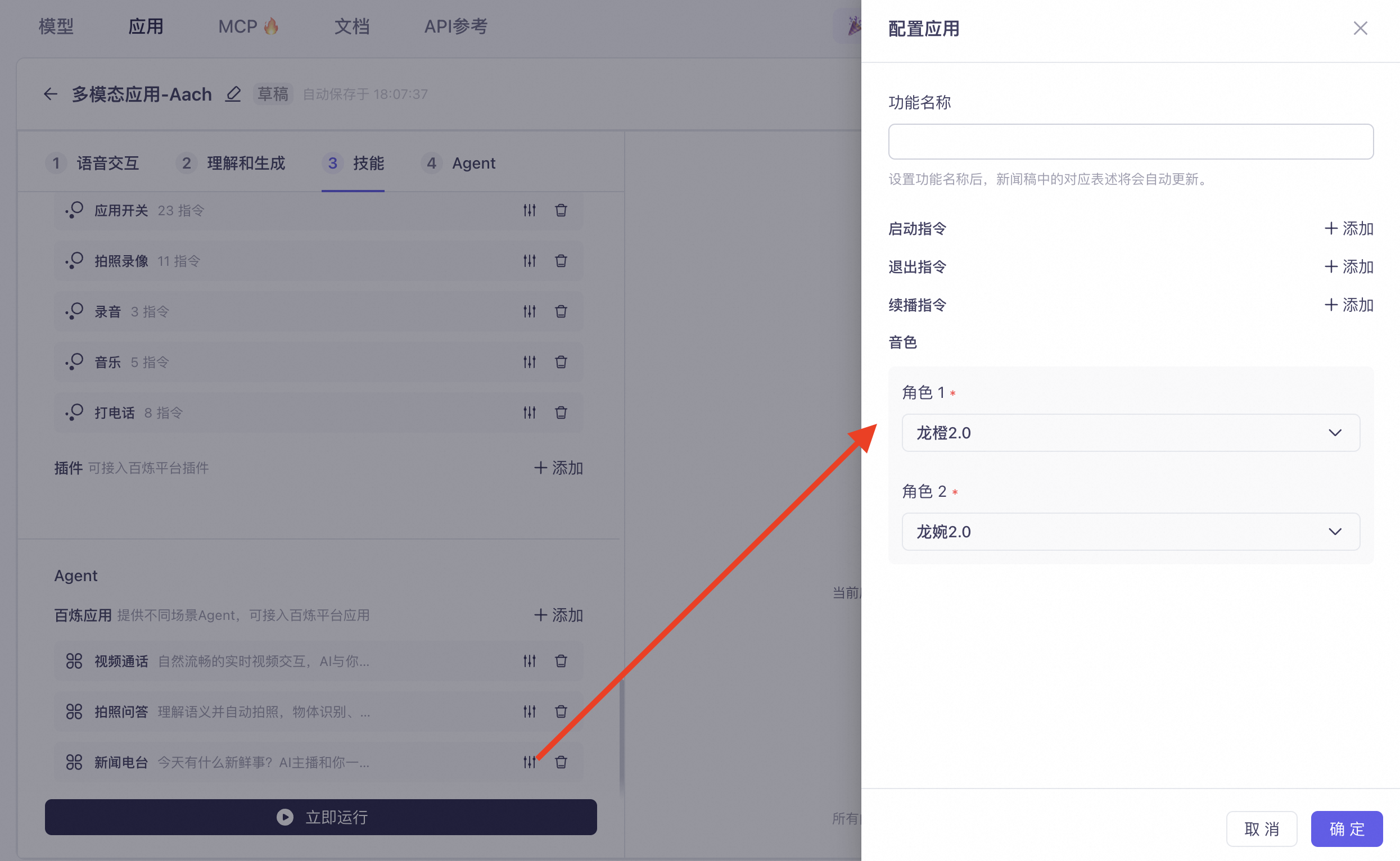
News Radio: Provides daily updates of popular news and information, featuring two interacting AI anchors. Users can interrupt and join the conversation at any time. Click Settings on the right to configure the feature name, start command, exit command, resume command, and character voice.
-
-
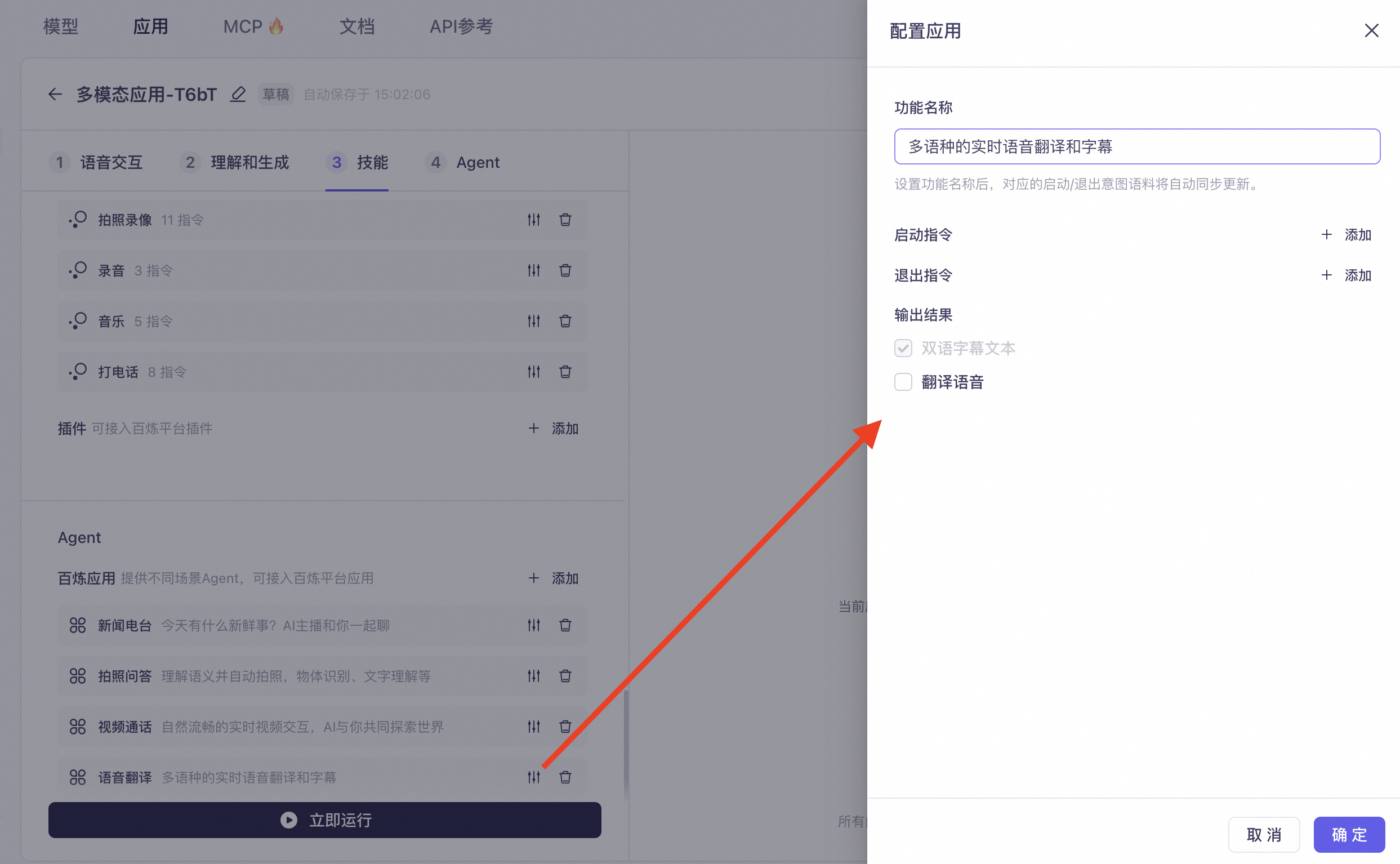
Voice Translation: Provides multi-language real-time speech recognition and outputs both voice and text translations. Click Settings on the right to configure the feature name, start command, exit command, and select the output result.
-
-
Express Video Call: A video conversation feature based on the qwen3.5-omni series realtime model. It supports voice and image input, with options for voice or text output. Click Settings on the right to configure the feature name, start command, and exit command.
- In the configuration panel, select Omni-modal Large Model Premium Edition under Model Selection, and configure the Prompt (supports custom variables).
-
Photo Translation: Exclusive to multimodal applications, this feature provides multilingual, automatic photo translation capabilities to accurately translate text in front of you. Click Settings on the right to configure the trigger command, prompt, and conversation variables. You can also one-click import prompt and variable configurations from the main conversation flow.
- In the Prompt editing area, you can organize content using
##headings, for example##Personato define the role identity (such as "You are Xiao Yun, an expert in text recognition and translation tasks"), and##Styleto define the response style (such as "friendly and conversational").
- In the Prompt editing area, you can organize content using
-
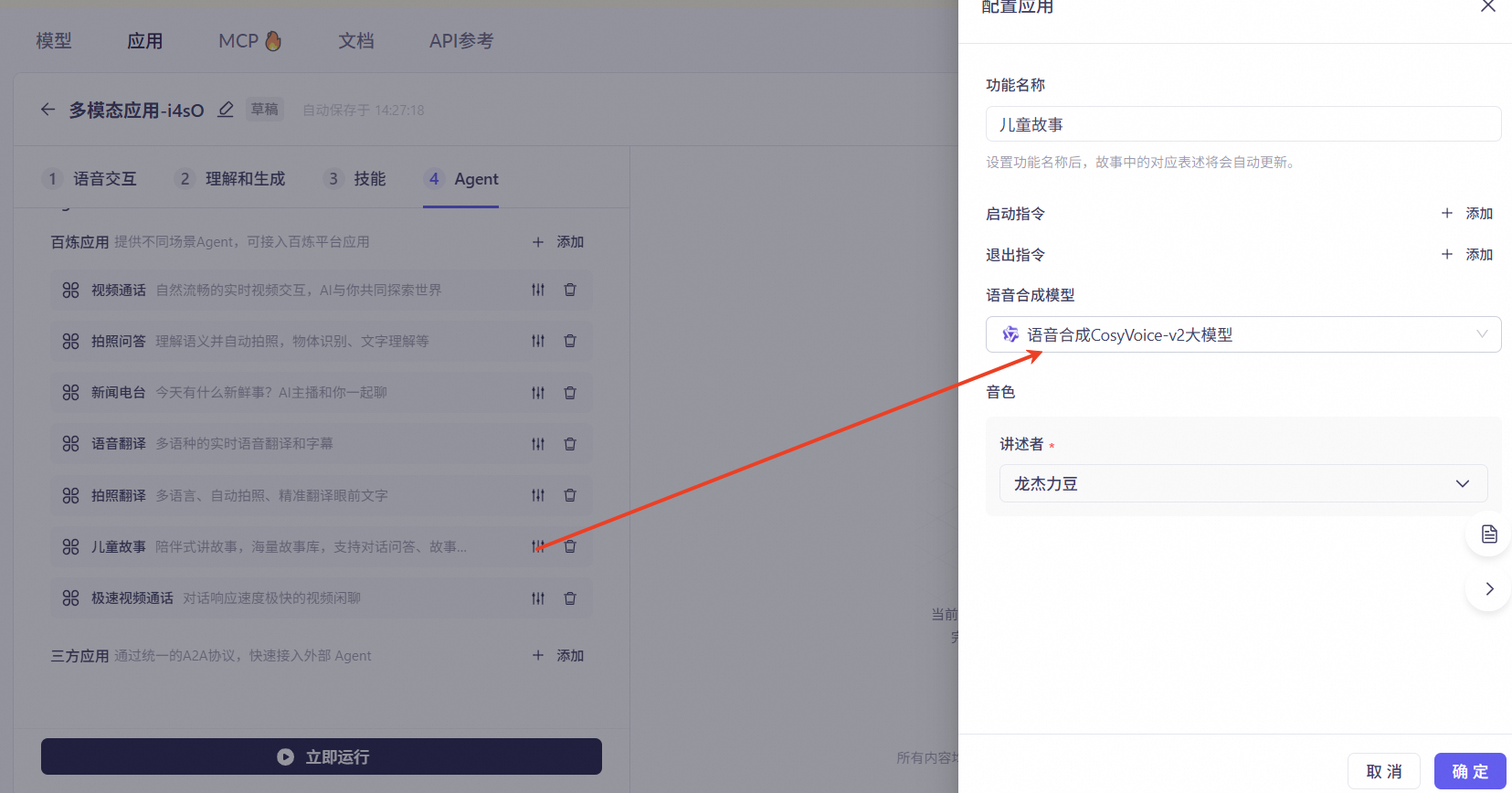
Children's Stories: A companion-style storytelling function with its own story library. It supports interactive conversation, story creation, and continuation/rewriting during storytelling. Click Settings on the right to configure the feature name, start command, exit command, speech synthesis model, and corresponding voice.
-
-
Multimodal Memo: Users can create memos and record key information using voice input. The feature supports automatic photo capture and extracts information from visual context. Memos can be queried, modified, and deleted using voice commands.
- Typical scenarios: Set schedule reminders like "remind me about the meeting at 2 PM tomorrow," set alarms like "remind me in five minutes," and memorize visual information like "remember my parking spot number" or "remember the title of this book."
- In the Agent configuration area, click Add Application. In the dialog box that appears, select the required preset Agent (such as Multi-modal Memo), and click OK. The selected application will then appear in the Agent list on the left.
-
Map-based Travel: This agent plans complex routes and provides queries and recommendations for nearby places. For example, "What's the fastest way to get to Capital Airport?" or "Recommend a nearby coffee shop with the highest rating." This agent only supports multi-turn conversations for these scenarios and does not support real-time voice navigation.
- In the Model Studio Applications area of the Agent configuration page, click + Add to open the Add Application panel. The panel provides two tabs: Recommended Applications and My Applications. Select the Agent you want to connect and click OK to complete the addition.
-
Recording Summary: Provides real-time audio transcription and summarization, extracting key information to generate meeting minutes. For example, "start real-time transcription" or "start recording and summarizing." It supports multi-turn Q&A about the recording summary, allowing you to ask about topics from a previous meeting or key points from yesterday's class. It also supports Q&A on historical content, covering both the original recording and the summary text generated by the large model.
NoteThe Q&A on historical content is available for recording tasks created after the feature went live. It does not support Q&A for previous historical tasks.
-
In the application configuration area, select the Agent tab, locate the Model Studio Applications section, open the Add Application dialog box, and select the Agent applications you want to connect in the Recommended Applications tab.
-
How to integrate:
- Create and publish an application in Tingwu - Intelligent Summary Agent, and configure the summarization capabilities as needed.
- In your multimodal application, check the Recording Summary agent and select the configured Tingwu application.
- You can set voice commands. Exit and pause commands require configuring a wake word to avoid accidental interruptions during a meeting.
- For development and integration, see the documentation: Access Tingwu Intelligent Summary Agent.
-
Click the settings icon to the right of the TINGWU - Recording Agent to open the configuration dialog box. The configuration items are divided into two sections: Real-time Recording Summary Settings (start command, exit/pause wake words, resume command) and Recording File Summary Settings (start command, exit command).
-
-
Music Radio: Recommends and randomly plays soothing instrumental music (no vocals).
- In the Recommended Applications tab of the Add Application dialog box, select the Music Radio application and click OK to complete the addition.
-
Image Generation: Suitable for various image generation scenarios such as wallpaper creation, doodling, photo enhancement, and image stylization. Currently, only the pass-through link is supported. For integration instructions, see Access Image Generation Agent via HTTP.
- In the Agent tab of the multi-modal application configuration page, locate the Model Studio Applications area. Click the + button to open the Add Application dialog box, select the desired application (such as Image Generation) in the Recommended Applications list, and click OK to complete the addition.
- Open the settings on the right to configure three image generation modes: Doodle-to-Image, Image-to-Image, and Text-to-Image, each enabled or disabled via a toggle. For example, under Text-to-Image, you can select a model (such as Text-to-Image Premium Edition) and enter a prompt (up to 800 characters).
-
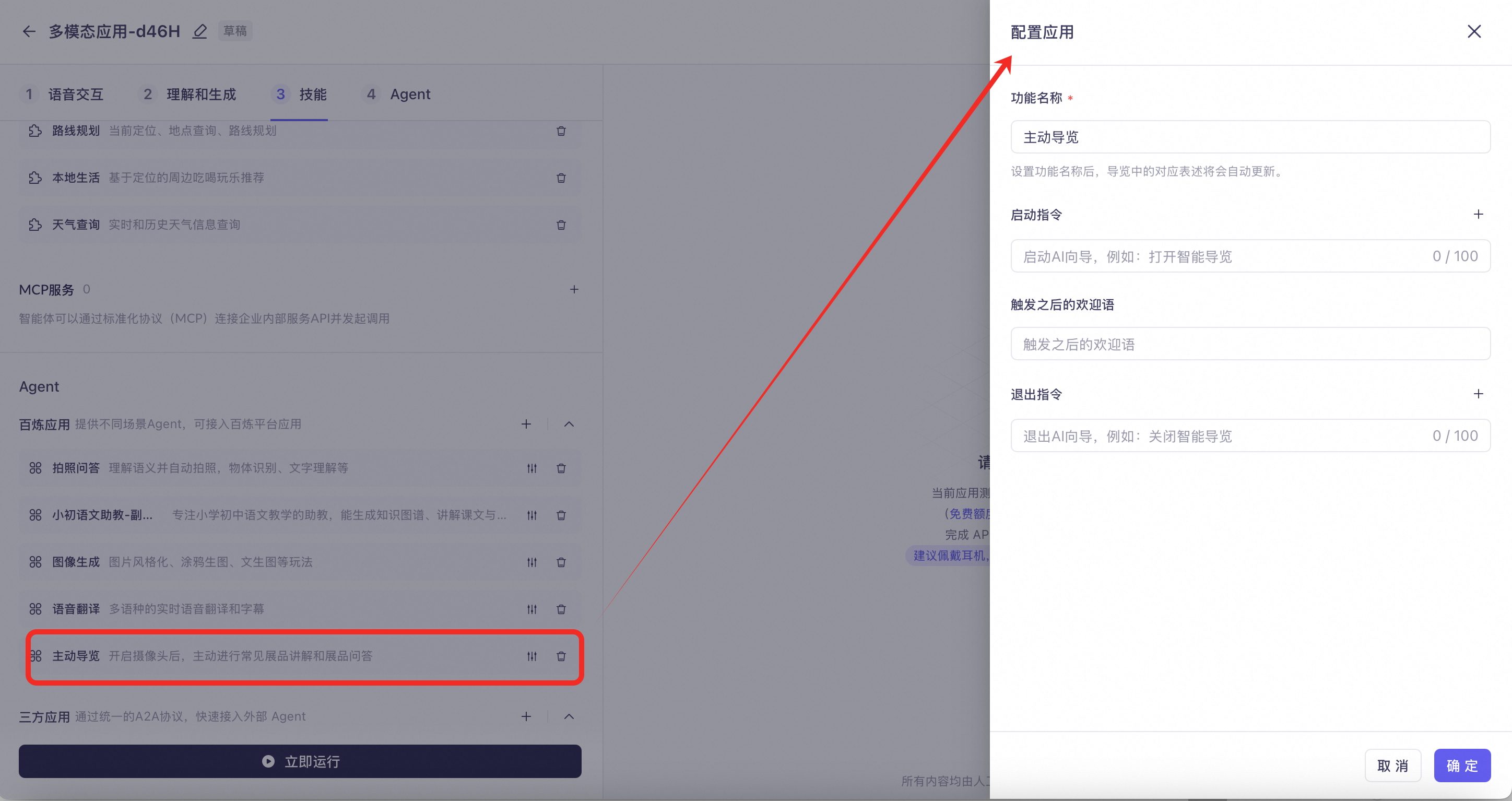
Proactive Tour Guide: The camera remains on and continuously analyzes the surroundings. When it encounters an exhibit that needs explanation, it will proactively provide an introduction. You can also ask the AI to introduce an exhibit or answer questions about it.
-
-
Proactive Companion: The camera remains on and continuously analyzes the surroundings, which will incur fees. The supported features are as follows:
- Gesture Interaction: Make a gesture in front of the camera, and the AI will quickly respond with an action, expression, or voice reply. If you gesture and speak at the same time, the spoken content takes priority.
- Greeting: Interacts with the user based on visual information (similar to a welcome message), such as commenting on their clothing, responding with praise or comfort based on their expression, showing interest in items they are holding, or engaging in random small talk.
- Proactively starting topics: Joins in activities and starts topics based on the user's context, such as painting, playing with a Rubik's cube, or cleaning the house.
- Click Proactive Companion. In the Configure Application panel on the right, you can set the Function Name, Start Command, Exit Command, and Welcome Message, and select the support capabilities to enable.
Alibaba Cloud Model Studio agents
-
You can integrate agents created on the Alibaba Cloud Model Studio platform to enhance conversation capabilities.
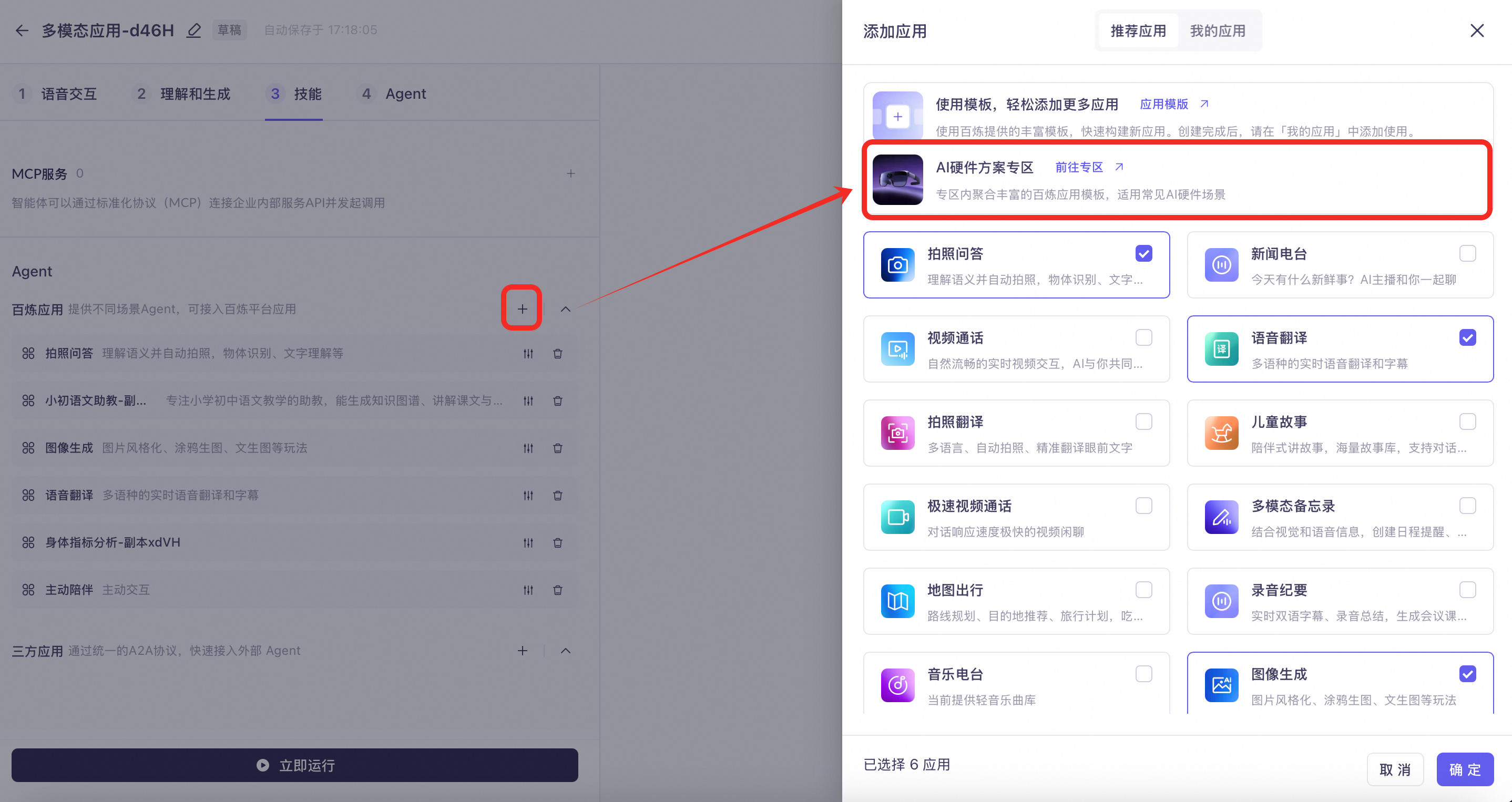
- In the Agent area of the skills configuration, click the + Add button in the upper-right corner. In the Add Application dialog box that appears, select the Model Studio applications you want to connect through the Recommended Applications or My Applications tab, and click OK to confirm.
-
You can also go to the AI Hardware Solutions Zone in the Alibaba Cloud Model Studio application square to quickly copy templates that match your business needs, such as body metric analysis for wearable devices or spoken language practice for educational scenarios. For details, see Alibaba Cloud Model Studio Recommended Application Templates.
-
-
When integrating an Alibaba Cloud Model Studio agent, you can enable the "Visual Understanding" switch on the configuration page. When a corresponding intent is recognized, the client can upload an image to the agent, enabling multimodal understanding.
- Click the configuration button to the right of the target Model Studio application. In the Configure Application panel that appears, set the Output Mode to
agent_format, and enable the Video Understanding toggle at the bottom.
- Click the configuration button to the right of the target Model Studio application. In the Configure Application panel that appears, set the Output Mode to
Third-party agents
-
You can integrate third-party agents. Integration requires the Google A2A protocol. For details, see Integrate third-party agents.
- In the upper-right corner of the application overview page, click System Settings and select Third-party Applications from the dropdown menu to access the third-party Agent configuration page.
- At the bottom of the Agent configuration page, locate the Third-party Applications area and click the + Add button. A third-party application selection panel appears. Search for and select the third-party applications you want to connect (such as Super AI Assistant), and complete the addition.
-
You can configure an agent with a different voice from the main assistant, but both voices must use the same underlying synthesis model.
- Click the audio configuration icon to the right of the Agent to open the Voice Configuration panel. After disabling the Keep application voice consistent with main chain toggle, you can separately select the Speech Synthesis Model (such as CosyVoice-v3-Flash) and Voice (such as Long Anhuan), then click OK to complete the configuration.
-
When integrating a third-party agent, you can enable "Visual Understanding" on its configuration page. If a corresponding intent is recognized, the client can upload an image to the agent to enable multimodal understanding.
- In the Third-party Applications list on the Skills tab, click the configuration icon of the target application to open the Configure Application panel, and find and enable the Video Understanding toggle.