Java SDK
This topic explains how to use the server-side Java SDK for real-time multimodal interaction with large model services in Alibaba Cloud Model Studio, including SDK installation, key APIs, and code samples.
Multimodal real-time interactive architecture
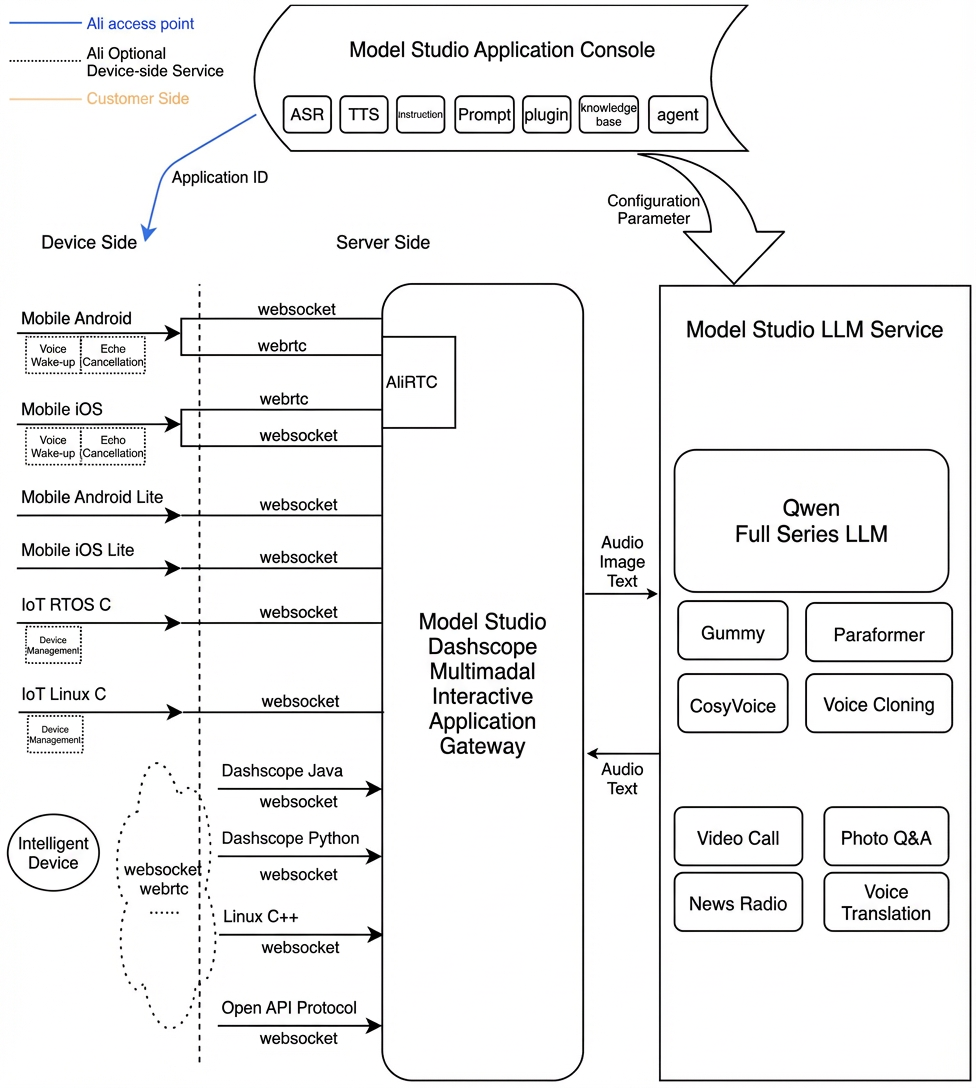
Prerequisites
Enable an Alibaba Cloud Model Studio real-time multimodal interaction application to get your workspace ID, app ID, and API key.
Environment and installation
You can integrate the official Alibaba Cloud Dashscope SDK, version 2.21.16 or later, using maven or gradle.
<dependency>
    <groupId>com.alibaba</groupId>
    <artifactId>dashscope-sdk-java</artifactId>
    <version>2.21.16</version>
</dependency>
Interaction modes
The SDK supports three interaction modes: Push2Talk, Tap2Talk, and Duplex (full-duplex).
- Push2Talk: Press and hold to speak, then release to stop (or click to start and click again to stop).
- Tap2Talk: Click to start speaking. The SDK automatically stops recording when you finish speaking.
- Duplex: Enables full-duplex interaction, allowing users to speak at any time once connected. This mode supports barge-in and is recommended for video interaction.
Audio format
Server-side integration supports only the websocket protocol.
-
Audio formats:
- Uplink supports pcm and opus audio for speech recognition.
- Downlink supports pcm and mp3 audio streams.
API
MultiModalDialog
Service entry class.
1. MultiModalDialog(MultiModalRequestParam param, MultiModalDialogCallback callback)
Initializes the service object and sets the dialog parameters and callback.
/**
 * Constructor initializes service options and creates a duplex communication API instance.
 *
 * @param param The dialog parameters.
 * @param callback The callback for handling events.
 */
public MultiModalDialog(MultiModalRequestParam param, MultiModalDialogCallback callback)
2. start
Starts the dialog service and triggers the onStarted callback. Note that the onStarted callback returns the dialogId.
/**
 * Starts the dialog service.
 */
public void start()
3. startSpeech
Notifies the server to start uploading audio. This method can only be called when the dialog is in the Listening state and is only required in Push-to-Talk mode.
/**
 * Starts uploading audio.
 */
public void startSpeech()
4. sendAudioData
Sends audio data to the server.
/**
 * Sends audio frame.
 *
 * @param audioFrame The audio frame.
 */
public void sendAudioData(ByteBuffer audioFrame)
5. stopSpeech
Notifies the server to stop uploading audio. This method is only required in Push-to-Talk mode.
/**
 * Stops uploading audio.
 */
public void stopSpeech()
6. interrupt
Notifies the server that the client is interrupting the current interaction to start speaking. The server then responds with RequestAccepted.
/**
 * Interrupts the current interaction.
 */
public void interrupt()
7. localRespondingStarted
Notifies the server that the client has started playing the TTS audio.
/**
 * Notifies the server that the client has started playing TTS audio.
 */
public void localRespondingStarted()
8. localRespondingEnded
Notifies the server that the client has finished playing the TTS audio.
/**
 * Notifies the server that the client has finished playing TTS audio.
 */
public void localRespondingEnded()
9. stop
Ends the current dialog turn.
/**
 * Ends the current dialog turn.
 */
public void stop()
10. getDialogState
Gets the current dialog state. The state is represented by the DialogState enum.
/**
 * Gets the current dialog state.
 *
 * @return The current dialog state.
 */
public State.DialogState getDialogState()
11. requestToRespond
Lets the client directly initiate Text-to-Speech synthesis from text or send other requests, like images, to the server.
/**
 * Requests a response from the server.
 *
 * @param type Response type
 * @param text Response text
 * @param updateParams Update parameters
 */
public void requestToRespond(String type, String text, MultiModalRequestParam.updateParams updateParams)
12. updateInfo
Updates information, such as dialog parameters.
/**
 * Updates information, such as dialog parameters.
 *
 * @param updateParams Update parameters
 */
public void updateInfo(MultiModalRequestParam.updateParams updateParams)
13. sendHeartBeat
Sends a heartbeat to prevent a 60-second timeout error. For scenarios requiring a persistent connection, call this method every 20 seconds.
/**
 * Sends a heartbeat to keep the connection alive.
 *
 */
public void sendHeartBeat()
MultiModalDialogCallback
Defines callbacks for multi-modal conversation events.
import com.alibaba.dashscope.multimodal.State;

/**
 * Abstract class representing callbacks for multi-modal conversation events.
 *
 * @author songsong.shao
 * @date 2025/4/27
 */
public abstract class MultiModalDialogCallback {

    /**
     * Called when the conversation is connected.
     */
    public abstract void onConnected();

    /**
     * Called when a conversation starts with a specific dialog ID.
     *
     * @param dialogId The unique identifier for the dialog.
     */
    public abstract void onStarted(String dialogId);

    /**
     * Called when a conversation stops with a specific dialog ID.
     *
     * @param dialogId The unique identifier for the dialog.
     */
    public abstract void onStopped(String dialogId);

    /**
     * Called when speech starts in a specific dialog.
     *
     * @param dialogId The unique identifier for the dialog.
     */
    public abstract void onSpeechStarted(String dialogId);

    /**
     * Called when speech ends in a specific dialog.
     *
     * @param dialogId The unique identifier for the dialog.
     */
    public abstract void onSpeechEnded(String dialogId);

    /**
     * Called when an error occurs during a conversation.
     *
     * @param dialogId The unique identifier for the dialog.
     * @param errorCode The error code.
     * @param errorMsg The error message.
     */
    public abstract void onError(String dialogId, String errorCode, String errorMsg);

    /**
     * Called when the conversation state changes.
     *
     * @param state The new state of the conversation.
     */
    public abstract void onStateChanged(State.DialogState state);

    /**
     * Called when speech audio data is available.
     *
     * @param audioData The audio data.
     */
    public abstract void onSpeechAudioData(ByteBuffer audioData);

    /**
     * Called when responding starts in a specific dialog.
     *
     * @param dialogId The unique identifier for the dialog.
     */
    public abstract void onRespondingStarted(String dialogId);

    /**
     * Called when responding ends in a specific dialog.
     *
     * @param dialogId The unique identifier for the dialog.
     * @param jsonObject The response content.
     */
    public abstract void onRespondingEnded(String dialogId, JsonObject jsonObject);

    /**
     * Called when responding content is available in a specific dialog.
     *
     * @param dialogId The unique identifier for the dialog.
     * @param content The response content.
     */
    public abstract void onRespondingContent(String dialogId, JsonObject content);

    /**
     * Called when speech content is available in a specific dialog.
     *
     * @param dialogId The unique identifier for the dialog.
     * @param content The speech content.
     */
    public abstract void onSpeechContent(String dialogId, JsonObject content);

    /**
     * Called when a request is accepted in a specific dialog.
     *
     * @param dialogId The unique identifier for the dialog.
     */
    public abstract void onRequestAccepted(String dialogId);

    /**
     * Called when the conversation closes.
     */
    public abstract void onClosed();
}
MultimodalRequestParam
Request parameter class.
All request parameters can be configured using the builder pattern. The following tables describe each parameter.
Start request parameters
Level 1 | Level 2 | Level 3 | Level 4 | Type | Required | Description |
task_group | The task group name. The value must be | |||||
task | The task name. The value must be | |||||
function | The function to call. The value must be | |||||
model | The service name. The value must be | |||||
input | workspace_id | string | Yes | The workspace ID. | ||
app_id | string | Yes | The ID of the application you created in the console. This ID determines which dialog system is used. | |||
directive | string | Yes | The directive name. The value must be | |||
dialog_id | string | No | The dialog ID. If specified, the service continues the existing conversation. | |||
parameters | upstream | type | string | Yes | The upstream type:
| |
mode | string | No | The mode used by the client. Optional values:
The default value is | |||
audio_format | string | No | The audio format. Supported formats are | |||
downstream | voice | string | No | The voice for the synthesized audio. | ||
sample_rate | int | No | The sample rate for the synthesized voice. The default is 24 kHz. | |||
intermediate_text | string | No | Controls which intermediate text is returned to the user:
You can specify multiple types, separated by a comma. The default value is | |||
audio_format | string | No | The audio format. Supported formats are | |||
client_info | user_id | string | Yes | The end user ID. This is used for user-specific handling. | ||
device | uuid | string | No | A globally unique ID for the client device. This ID must be generated by the caller and passed to the SDK. | ||
network | ip | string | No | The public IP address of the caller. | ||
location | latitude | string | No | The latitude of the caller. | ||
longitude | string | No | The longitude of the caller. | |||
city_name | string | No | The city of the caller. | |||
biz_params | user_defined_params | object | No | Custom parameters to pass through to the agent. | ||
user_defined_tokens | object | No | Custom authentication tokens to pass through to the agent. | |||
tool_prompts | object | No | Custom prompts to pass through to the agent. | |||
user_query_params | object | No | Custom parameters to pass through with the user request. | |||
user_prompt_params | object | No | Custom parameters to pass through with the user prompt. |
RequestToRespond request parameters
Level 1 | Level 2 | Level 3 | Type | Required | Description |
input | directive | string | Yes | The directive name. The value must be | |
dialog_id | string | Yes | The dialog ID. | ||
type | string | Yes | The type of interaction the service should perform:
| ||
text | string | Yes | The text to process. It can be an empty string ("") but must not be null. | ||
parameters | images | list[] | No | Information about the images to be analyzed. | |
biz_params | object | No | Same as the |
UpdateInfo request parameters
Level 1 | Level 2 | Level 3 | Type | Required | Description |
input | directive | string | Yes | The directive name. The value must be | |
dialog_id | string | No | The dialog ID. | ||
parameters | images | list[] | No | The image data. | |
client_info | status | object | No | The current status of the client. | |
biz_params | object | No | Same as the |
Dialog state (DialogState)
The voicechat service has the following states:
IDLE("Idle"), No connection is established.
LISTENING("Listening"), The bot is listening for user input. Users can send audio.
THINKING("Thinking"), The bot is processing the user's input.
RESPONDING("Responding"), The bot is generating or sending an audio reply.
LLM dialogue output
The onRespondingContent event provides the following data.
Top-level parameter | Second-level parameter | Third-level parameter | Type | Required | Description |
output | event | string | Yes | The event name, such as | |
dialog_id | string | Yes | Unique dialogue ID. | ||
round_id | string | Yes | Unique ID for the current turn. | ||
llm_request_id | string | Yes | The request ID for the LLM call. | ||
text | string | Yes | Text content for display. Each streaming event provides the full, cumulative text. | ||
spoken | string | Yes | Text content for speech synthesis. Each streaming event provides the full, cumulative text. | ||
finished | bool | Yes | Indicates whether the output is complete. | ||
extra_info | object | No | Contains additional information. Supported fields include:
|
Call sequence diagram
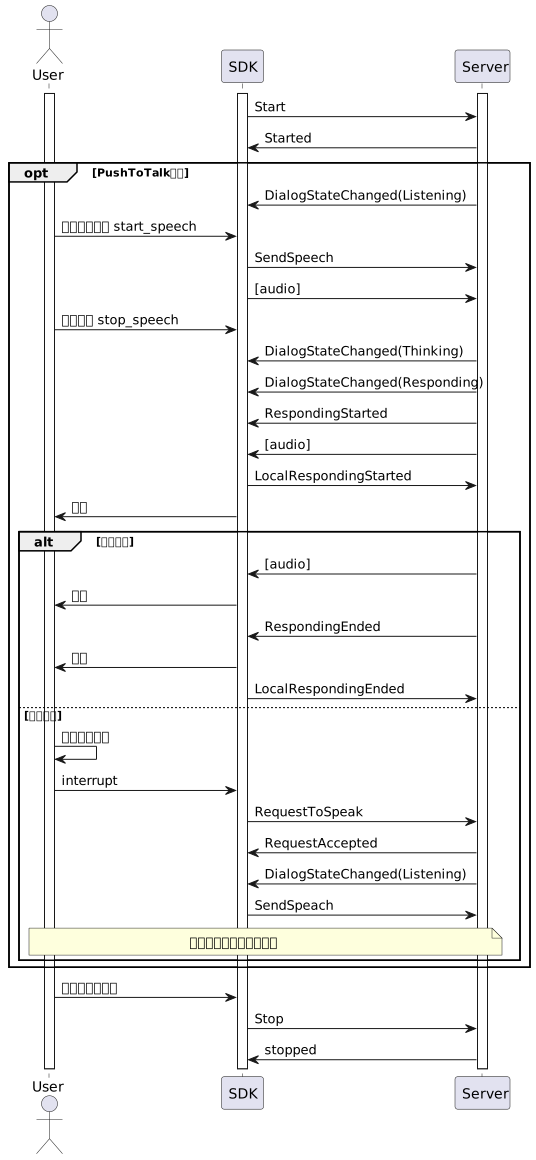
Example
1. Initialize parameters
Call the builder methods of the inner classes in MultiModalRequestParam to construct the parameters.
MultiModalRequestParam params =
        MultiModalRequestParam.builder()
            .customInput(
                MultiModalRequestParam.CustomInput.builder()
                    .build())
            .upStream(
                MultiModalRequestParam.UpStream.builder()
                    .mode("push2talk")
                    .audioFormat("pcm")
                    .build())
            .downStream(
                MultiModalRequestParam.DownStream.builder()
                    .voice("longxiaochun_v2")
                    .sampleRate(48000)
                    .build())
            .dialogAttributes(
                MultiModalRequestParam.DialogAttributes.builder().prompt("你好").build())
            .clientInfo(
                MultiModalRequestParam.ClientInfo.builder()
                    .userId("1234")
                    .device(MultiModalRequestParam.ClientInfo.Device.builder().uuid("1234").build())
                    .build())
            .apiKey("sk-9d11****************************")
            .model("multimodal-dialog")
            .build();
2. Instantiate callback
public static MultiModalDialogCallback getCallback() {
    return new MultiModalDialogCallbackImpl();
  }

  public static class MultiModalDialogCallbackImpl extends MultiModalDialogCallback {
    ...
  }
3. Createa MultiModalDialog object
conversation = new MultiModalDialog(params, getCallback());
Full example
Use a build tool such as Maven or Gradle to run this code example. Add the required dependencies, including Gson, OkHttp, RxJava, Apache Log4j, Lombok, and JUnit, to the corresponding configuration file (pom.xml for Maven or build.gradle for Gradle).
Configuration
The configuration may vary depending on the version of Maven or Gradle you use. Adjust the following examples to match your environment.
<?xml version="1.0" encoding="UTF-8"?>
<project xmlns="http://maven.apache.org/POM/4.0.0"
         xmlns:xsi="http://www.w3.org/2001/XMLSchema-instance"
         xsi:schemaLocation="http://maven.apache.org/POM/4.0.0 http://maven.apache.org/xsd/maven-4.0.0.xsd">
    <modelVersion>4.0.0</modelVersion>

    <groupId>com.alibaba.nls</groupId>
    <artifactId>bailian-demo</artifactId>
    <version>1.0-SNAPSHOT</version>
    <dependencies>
        <dependency>
            <groupId>com.alibaba</groupId>
            <artifactId>dashscope-sdk-java</artifactId>
            <version>2.20.5</version>
        </dependency>
        <dependency>
            <groupId>io.reactivex.rxjava2</groupId>
            <artifactId>rxjava</artifactId>
            <version>2.2.21</version>
        </dependency>
        <dependency>
            <groupId>org.projectlombok</groupId>
            <artifactId>lombok</artifactId>
            <version>1.18.26</version>
            <scope>compile</scope>
        </dependency>
        <dependency>
            <groupId>org.junit.jupiter</groupId>
            <artifactId>junit-jupiter-engine</artifactId>
            <version>5.10.2</version>
            <scope>test</scope>
        </dependency>
        <dependency>
            <groupId>org.junit.jupiter</groupId>
            <artifactId>junit-jupiter-api</artifactId>
            <version>5.10.2</version>
            <scope>test</scope>
        </dependency>
        <dependency>
            <groupId>org.junit-pioneer</groupId>
            <artifactId>junit-pioneer</artifactId>
            <version>1.9.1</version>
            <scope>test</scope>
        </dependency>
        <dependency>
            <groupId>io.javalin</groupId>
            <artifactId>javalin</artifactId>
            <version>4.4.0</version>
            <scope>test</scope>
        </dependency>
        <dependency>
            <groupId>com.google.code.gson</groupId>
            <artifactId>gson</artifactId>
            <version>2.8.9</version>
        </dependency>
        <dependency>
            <groupId>org.slf4j</groupId>
            <artifactId>slf4j-api</artifactId>
            <version>2.0.7</version>
        </dependency>
        <dependency>
            <groupId>org.slf4j</groupId>
            <artifactId>slf4j-simple</artifactId>
            <version>2.0.7</version>
        </dependency>
        <!--  Required by OkHttp -->
        <dependency>
            <groupId>org.jetbrains.kotlin</groupId>
            <artifactId>kotlin-stdlib-jdk8</artifactId>
            <version>1.8.21</version>
        </dependency>
        <!--  Required by OkHttp -->
        <dependency>
            <groupId>com.squareup.okio</groupId>
            <artifactId>okio</artifactId>
            <version>3.6.0</version>
        </dependency>
        <dependency>
            <groupId>com.squareup.okhttp3</groupId>
            <artifactId>mockwebserver</artifactId>
            <version>4.12.0</version>
            <scope>test</scope>
        </dependency>
        <dependency>
            <groupId>com.squareup.okhttp3</groupId>
            <artifactId>logging-interceptor</artifactId>
            <version>4.12.0</version>
        </dependency>
        <dependency>
            <groupId>com.squareup.okhttp3</groupId>
            <artifactId>okhttp-sse</artifactId>
            <version>4.12.0</version>
        </dependency>
        <dependency>
            <groupId>com.squareup.okhttp3</groupId>
            <artifactId>okhttp</artifactId>
            <version>4.12.0</version>
        </dependency>
        <!--  function call support  -->
        <dependency>
            <groupId>com.github.victools</groupId>
            <artifactId>jsonschema-generator</artifactId>
            <version>4.31.1</version>
        </dependency>
    </dependencies>
    <properties>
        <maven.compiler.source>11</maven.compiler.source>
        <maven.compiler.target>11</maven.compiler.target>
        <project.build.sourceEncoding>UTF-8</project.build.sourceEncoding>
    </properties>

</project>
plugins {
    id 'java'
}

group = 'com.test'
version = '1.0-SNAPSHOT'

repositories {
    mavenCentral()
    maven {
        url 'https://maven.aliyun.com/repository/public'
    }
    maven {
        url 'https://plugins.gradle.org/m2/'
    }
}

dependencies {
    // Dashscope SDK
    implementation 'com.alibaba:dashscope-sdk-java:2.20.5'
    // Third-party libraries
    // https://mvnrepository.com/artifact/com.google.code.gson/gson
    implementation 'com.google.code.gson:gson:2.13.1'
    // https://mvnrepository.com/artifact/io.reactivex.rxjava2/rxjava
    implementation 'io.reactivex.rxjava2:rxjava:2.2.21'
    // https://mvnrepository.com/artifact/com.squareup.okhttp3/okhttp
    implementation 'com.squareup.okhttp3:okhttp:4.12.0'          // Core OkHttp
    implementation 'com.squareup.okhttp3:logging-interceptor:4.12.0' // Logging interceptor

    // Logging dependencies
    implementation 'org.apache.logging.log4j:log4j-core:2.17.1'
    implementation 'org.apache.logging.log4j:log4j-api:2.17.1'
    // If you use the SLF4J facade
    implementation 'org.apache.logging.log4j:log4j-slf4j-impl:2.17.1'

    // Testing dependencies
    testImplementation 'org.junit.jupiter:junit-jupiter-api:5.10.0'
    testRuntimeOnly 'org.junit.jupiter:junit-jupiter-engine:5.10.0'
    testImplementation 'org.apache.logging.log4j:log4j-core:2.17.1'
    testImplementation 'org.apache.logging.log4j:log4j-slf4j-impl:2.17.1'
    testAnnotationProcessor 'org.projectlombok:lombok:1.18.30'

    // Lombok support
    implementation 'org.projectlombok:lombok:1.18.30'
    annotationProcessor 'org.projectlombok:lombok:1.18.30'
}

test {
    useJUnitPlatform()
}
Java code
package org.alibaba.speech.examples.speech_plus;
import com.alibaba.dashscope.multimodal.MultiModalDialog;
import com.alibaba.dashscope.multimodal.MultiModalDialogCallback;
import com.alibaba.dashscope.multimodal.MultiModalRequestParam;
import com.alibaba.dashscope.multimodal.State;
import com.alibaba.dashscope.utils.Constants;
import com.alibaba.dashscope.utils.JsonUtils;
import com.google.gson.Gson;
import com.google.gson.JsonArray;
import com.google.gson.JsonElement;
import com.google.gson.JsonObject;
import org.alibaba.speech.examples.speech_plus.utils.FileWriterUtil;
import org.slf4j.Logger;
import org.slf4j.LoggerFactory;
import javax.sound.sampled.AudioInputStream;
import javax.sound.sampled.AudioSystem;
import java.io.File;
import java.io.FileInputStream;
import java.io.IOException;
import java.nio.ByteBuffer;
import java.util.*;
import static java.lang.Thread.sleep;
/**
* Demonstrates how to use the MultiModalDialog class for various interaction modes,
* including push-to-talk, tap-to-talk, duplex communication, text synthesis,
* visual Q&A, and agent DJ functionality.
*
* @author songsong.shao
* @date 2025/4/28
*/
public class MultiModalDialogTestCases {
private static final Logger log = LoggerFactory.getLogger(MultiModalDialogTestCases.class);
// Constants for audio processing
private static final int AUDIO_CHUNK_SIZE = 3200; // Audio chunk size in bytes
private static final int SLEEP_INTERVAL_MS = 100; // Sleep interval in milliseconds
private static final int WAIT_TIMEOUT_MS = 2000; // Wait timeout in milliseconds
private static final int VIDEO_FRAME_INTERVAL_MS = 500;
// State management variables
private static State.DialogState currentState;
private static MultiModalDialog conversation;
private static int enterListeningTimes = 0;
private static FileWriterUtil fileWriterUtil;
private static boolean vqaUseUrl = false;
private volatile boolean isVideoStreamingActive = false;
private Thread videoStreamingThread;
// Configuration parameters - set these before running tests
public static String workspaceId = "";
public static String appId = "";
public static String dialogId = "";
public static String apiKey = "";
public static String model = "";
/**
* Tests the push-to-talk interaction mode.
* Flow: Set the mode to `push2talk`, wait for the Listening state, start speech, send audio, stop speech, and wait for the response.
*/
public void testMultimodalPush2Talk() {
log.info("############ Starting Push2Talk Test ############");
try {
// Build request parameters for push-to-talk mode
MultiModalRequestParam params = buildBaseRequestParams("push2talk");
log.debug("Request parameters: {}", JsonUtils.toJson(params));
// Initialize conversation with callback
conversation = new MultiModalDialog(params, getCallback());
conversation.start();
// Wait for the system to enter listening state
waitForListeningState();
// Start speech recognition
conversation.startSpeech();
// Send audio data from file
sendAudioFromFile("../../../../sample-data/1_plus_1.wav");
// Stop speech recognition
conversation.stopSpeech();
// Wait for conversation completion
waitForConversationCompletion(2);
// Clean up
stopConversation();
} catch (Exception e) {
log.error("Error in push2talk test: ", e);
} finally {
log.info("############ Push2Talk Test Completed ############");
}
}
/**
* Tests the tap-to-talk interaction mode.
* Flow: Set the mode to `tap2talk`, wait for the Listening state, manually start speech, send audio, and wait for the response.
*/
public void testMultimodalTap2Talk() {
log.info("############ Starting Tap2Talk Test ############");
try {
// Build request parameters for tap-to-talk mode
MultiModalRequestParam params = buildBaseRequestParams("tap2talk");
log.debug("Request parameters: {}", JsonUtils.toJson(params));
// Initialize conversation
conversation = new MultiModalDialog(params, getCallback());
conversation.start();
// Wait for listening state
waitForListeningState();
// Manually start speech (required for tap2talk mode)
conversation.startSpeech();
// Send audio data
sendAudioFromFile("../../../../sample-data/1_plus_1.wav");
// Wait for conversation completion
waitForConversationCompletion(2);
// Clean up
stopConversation();
} catch (Exception e) {
log.error("Error in tap2talk test: ", e);
} finally {
log.info("############ Tap2Talk Test Completed ############");
}
}
/**
* Tests the duplex communication interaction mode.
* Flow: Set the mode to `duplex`, wait for the Listening state, send audio, and wait for the response.
*/
public void testMultimodalDuplex() {
log.info("############ Starting Duplex Test ############");
try {
// Build request parameters for duplex mode
MultiModalRequestParam params = buildBaseRequestParams("duplex");
log.info("Request parameters: {}", JsonUtils.toJson(params));
// Initialize conversation
conversation = new MultiModalDialog(params, getCallback());
conversation.start();
// Wait for listening state
waitForListeningState();
// Send audio data directly (no manual start needed for duplex)
sendAudioFromFile("../../../../sample-data/1_plus_1.wav");
// Wait for conversation completion
waitForConversationCompletion(2);
// Clean up
stopConversation();
} catch (Exception e) {
log.error("Error in duplex test: ", e);
} finally {
log.info("############ Duplex Test Completed ############");
}
}
/**
* Tests the text synthesis feature.
* Flow: Send text for TTS and save the synthesized audio.
*/
public void testMultimodalTextSynthesizer() {
log.info("############ Starting Text Synthesizer Test ############");
try {
// Initialize file writer for audio output
fileWriterUtil = new FileWriterUtil();
// Build request parameters
MultiModalRequestParam params = buildBaseRequestParams("push2talk");
log.debug("Request parameters: {}", JsonUtils.toJson(params));
// Initialize conversation
conversation = new MultiModalDialog(params, getCallback());
conversation.start();
// Wait for listening state
waitForListeningState();
// Create output file for synthesized audio
fileWriterUtil.createFile("./test.pcm");
// Request text synthesis
String textToSynthesize = "Happiness is a skill. It's the inner peace you feel when you let go of wanting too much.";
conversation.requestToRespond("transcript", textToSynthesize, null);
// Wait for synthesis completion
waitForConversationCompletion(2);
// Finalize audio file
fileWriterUtil.finishWriting();
// Clean up
conversation.stop();
} catch (IOException e) {
log.error("File operation error in text synthesizer test: ", e);
} catch (Exception e) {
log.error("Error in text synthesizer test: ", e);
} finally {
log.info("############ Text Synthesizer Test Completed ############");
}
}
/**
* Tests the visual Q&A feature by using a URL-based image.
* Flow: Send a visual Q&A request, receive a `visual_qa` command, send an image list, and get the response.
*/
public void testMultimodalVQA() {
log.info("############ Starting VQA Test (URL-based) ############");
try {
vqaUseUrl = true;
// Build request parameters
MultiModalRequestParam params = buildBaseRequestParams("push2talk");
log.debug("Request parameters: {}", JsonUtils.toJson(params));
// Initialize conversation
conversation = new MultiModalDialog(params, getCallback());
conversation.start();
// Wait for listening state
waitForListeningState();
// Send VQA request
conversation.requestToRespond("prompt", "Take a picture and tell me what you see.", null);
// Wait for VQA processing completion
waitForConversationCompletion(3);
// Clean up
stopConversation();
} catch (Exception e) {
log.error("Error in VQA test: ", e);
} finally {
log.info("############ VQA Test Completed ############");
}
}
/**
* Tests the visual Q&A feature by using a Base64-encoded image.
* Flow: Send a visual Q&A request, receive a `visual_qa` command, send the Base64-encoded image, and get the response.
*/
public void testMultimodalVQABase64() {
log.info("############ Starting VQA Test (Base64-based) ############");
try {
vqaUseUrl = false;
// Build request parameters
MultiModalRequestParam params = buildBaseRequestParams("push2talk");
log.debug("Request parameters: {}", JsonUtils.toJson(params));
// Initialize conversation
conversation = new MultiModalDialog(params, getCallback());
conversation.start();
// Wait for listening state
waitForListeningState();
// Send VQA request
conversation.requestToRespond("prompt", "Take a picture and tell me what you see.", null);
// Wait for VQA processing completion
waitForConversationCompletion(3);
// Clean up
stopConversation();
} catch (Exception e) {
log.error("Error in VQA Base64 test: ", e);
} finally {
log.info("############ VQA Base64 Test Completed ############");
}
}
/**
* Tests the brightness adjustment feature.
* Flow: Send a brightness adjustment request and process the response.
*/
public void testMultimodalAdjustBrightness() {
log.info("############ Starting Brightness Adjustment Test ############");
try {
vqaUseUrl = true;
// Build request parameters
MultiModalRequestParam params = buildBaseRequestParams("push2talk");
log.debug("Request parameters: {}", JsonUtils.toJson(params));
// Initialize conversation
conversation = new MultiModalDialog(params, getCallback());
conversation.start();
// Wait for listening state
waitForListeningState();
// Send brightness adjustment request
conversation.requestToRespond("prompt", "Increase the brightness to 10.", null);
// The following code block demonstrates creating a status update. It is not used in this test.
JsonObject status = new JsonObject();
JsonObject bluetoothAnnouncement = new JsonObject();
bluetoothAnnouncement.addProperty("status", "stopped");
status.add("bluetooth_announcement", bluetoothAnnouncement);
MultiModalRequestParam.UpdateParams updateParams = MultiModalRequestParam.UpdateParams.builder()
.clientInfo(MultiModalRequestParam.ClientInfo.builder()
.status(status)
.build())
.build();
// Wait for processing completion
waitForConversationCompletion(2);
log.info("############ Before stopping conversation ############");
// Clean up
stopConversation();
} catch (Exception e) {
log.error("Error in brightness adjustment test: ", e);
} finally {
log.info("############ Brightness Adjustment Test Completed ############");
}
}
/**
* Tests the Agent DJ feature.
* Flow: Send a radio station request and process the response.
*/
public void testMultimodalAgentDJ() {
log.info("############ Starting Agent DJ Test ############");
try {
vqaUseUrl = false;
// Build request parameters
MultiModalRequestParam params = buildBaseRequestParams("push2talk");
log.debug("Request parameters: {}", JsonUtils.toJson(params));
// Initialize conversation
conversation = new MultiModalDialog(params, getCallback());
conversation.start();
// Wait for listening state
waitForListeningState();
// Send DJ request
conversation.requestToRespond("prompt", "Turn on the news radio station.", null);
// Wait for DJ processing completion
waitForConversationCompletion(3);
// Clean up
stopConversation();
} catch (Exception e) {
log.error("Error in Agent DJ test: ", e);
} finally {
log.info("############ Agent DJ Test Completed ############");
}
}
/**
* Tests the LiveAI feature with real-time video streaming and audio interaction.
* Flow: Set the mode to duplex, start video streaming, wait for the Listening state, connect the video channel, send audio queries, and then process responses that have visual context.
*/
public void testMultimodalLiveAI() {
log.info("############ Starting LiveAI Test ############");
try {
// Build request parameters for duplex mode
MultiModalRequestParam params = buildBaseRequestParams("duplex");
log.info("Request parameters: {}", JsonUtils.toJson(params));
// Initialize conversation
conversation = new MultiModalDialog(params, getCallback());
conversation.start();
// Start send video frame loop
startVideoFrameStreaming();
// Wait for listening state
waitForListeningState();
conversation.sendHeartBeat();
// Sends a request to connect the video channel. The service responds with a `switch_video_call_success` command.
conversation.requestToRespond("prompt", "", connectVideoChannelRequest());
// Send audio data directly (no manual start needed for duplex)
sendAudioFromFile("./src/main/resources/what_in_picture.wav");
// Wait for listening state twice
waitForListeningState();
sendAudioFromFile("./src/main/resources/what_color.wav");
// Wait for conversation completion
waitForConversationCompletion(3);
// Clean up
stopConversation();
isVideoStreamingActive = false;
if (videoStreamingThread != null && videoStreamingThread.isAlive()) {
videoStreamingThread.interrupt();
}
} catch (Exception e) {
log.error("Error in LiveAI test: ", e);
} finally {
log.info("############ LiveAI Test Completed ############");
}
}
// ==================== Helper Methods ====================
/**
* Builds base request parameters with common configuration.
* @param mode The interaction mode (push2talk, tap2talk, duplex)
* @return Configured MultiModalRequestParam
*/
private MultiModalRequestParam buildBaseRequestParams(String mode) {
return MultiModalRequestParam.builder()
.customInput(
MultiModalRequestParam.CustomInput.builder()
.workspaceId(workspaceId)
.appId(appId)
.build())
.upStream(
MultiModalRequestParam.UpStream.builder()
.mode(mode)
.audioFormat("pcm")
.build())
.downStream(
MultiModalRequestParam.DownStream.builder()
.voice("longxiaochun_v2")
.sampleRate(48000)
.build())
.clientInfo(
MultiModalRequestParam.ClientInfo.builder()
.userId("1234")
.device(MultiModalRequestParam.ClientInfo.Device.builder()
.uuid("1234")
.build())
.build())
.apiKey(apiKey)
.model(model)
.build();
}
/**
* Builds a video channel connection request for LiveAI.
* This request establishes the video streaming channel that provides visual context for AI responses.
*
* @return UpdateParams containing video channel connection configuration
*/
private MultiModalRequestParam.UpdateParams connectVideoChannelRequest(){
Map<String, String> video = new HashMap<>();
video.put("action", "connect");
video.put("type", "voicechat_video_channel");
ArrayList<Map<String, String>> videos = new ArrayList<>();
videos.add(video);
MultiModalRequestParam.BizParams bizParams = MultiModalRequestParam.BizParams.builder().videos(videos).build();
return MultiModalRequestParam.UpdateParams.builder().bizParams(bizParams).build();
}
/**
* Waits for the system to enter the Listening state.
*/
private void waitForListeningState() {
while (currentState != State.DialogState.LISTENING) {
try {
Thread.sleep(SLEEP_INTERVAL_MS);
} catch (InterruptedException e) {
Thread.currentThread().interrupt();
throw new RuntimeException("Interrupted while waiting for listening state", e);
}
}
log.info("System entered listening state");
}
/**
* Sends audio data from a file to the conversation.
* @param filePath Path to the audio file
*/
private void sendAudioFromFile(String filePath) {
File audioFile = new File(filePath);
if (!audioFile.exists()) {
log.error("Audio file not found: {}", filePath);
return;
}
try (AudioInputStream audioInputStream = AudioSystem.getAudioInputStream(audioFile)) {
byte[] audioBuffer = new byte[AUDIO_CHUNK_SIZE];
int bytesRead;
int totalBytesRead = 0;
log.info("Starting to send audio data from: {}", filePath);
// Read and send audio data in chunks
while ((bytesRead = audioInputStream.read(audioBuffer)) != -1) {
totalBytesRead += bytesRead;
// Send audio chunk to conversation
conversation.sendAudioData(ByteBuffer.wrap(audioBuffer, 0, bytesRead));
// Add small delay to simulate real-time audio streaming
Thread.sleep(SLEEP_INTERVAL_MS);
}
log.info("Finished sending audio data. Total bytes sent: {}", totalBytesRead);
} catch (Exception e) {
log.error("Error sending audio from file: {}", filePath, e);
}
}
/**
* Waits for the conversation to complete.
* @param expectedListeningTimes Expected number of listening state entries
*/
private void waitForConversationCompletion(int expectedListeningTimes) {
while (enterListeningTimes < expectedListeningTimes) {
try {
Thread.sleep(WAIT_TIMEOUT_MS);
} catch (InterruptedException e) {
Thread.currentThread().interrupt();
throw new RuntimeException("Interrupted while waiting for conversation completion", e);
}
}
log.info("Conversation completed after {} listening cycles", expectedListeningTimes);
}
/**
* Stops the conversation and cleans up resources.
*/
private void stopConversation() {
try {
if (conversation != null) {
conversation.stop();
Thread.sleep(1000); // Allow time for cleanup
}
} catch (InterruptedException e) {
Thread.currentThread().interrupt();
log.warn("Interrupted while stopping conversation");
}
}
/**
* Returns the callback implementation for handling conversation events.
* @return MultiModalDialogCallback instance
*/
public static MultiModalDialogCallback getCallback() {
return new MultiModalDialogCallbackImpl();
}
/**
* Implementation of MultiModalDialogCallback for handling various conversation events.
*/
public static class MultiModalDialogCallbackImpl extends MultiModalDialogCallback {
@Override
public void onConnected() {
log.info("WebSocket connection established");
}
@Override
public void onStarted(String dialogId) {
log.info("Dialog started with ID: {}", dialogId);
}
@Override
public void onStopped(String dialogId) {
log.info("Dialog stopped with ID: {}", dialogId);
}
@Override
public void onSpeechStarted(String dialogId) {
log.info("Speech recognition started for dialog: {}", dialogId);
}
@Override
public void onSpeechEnded(String dialogId) {
log.info("Speech recognition ended for dialog: {}", dialogId);
}
@Override
public void onError(String dialogId, String errorCode, String errorMsg) {
log.error("Error occurred - Dialog: {}, Code: {}, Message: {}", dialogId, errorCode, errorMsg);
enterListeningTimes++; // Allows the test to terminate on error
}
@Override
public void onStateChanged(State.DialogState state) {
log.info("Dialog state changed to: {}", state);
currentState = state;
if (currentState == State.DialogState.LISTENING) {
enterListeningTimes++;
log.info("Entered listening state {} times", enterListeningTimes);
}
}
@Override
public void onSpeechAudioData(ByteBuffer audioData) {
try {
// Write audio data to file if file writer is available
if (fileWriterUtil != null) {
fileWriterUtil.Writing(audioData);
}
} catch (IOException e) {
log.error("Error writing audio data to file: ", e);
throw new RuntimeException("Failed to write audio data", e);
}
}
@Override
public void onRespondingStarted(String dialogId) {
log.info("Response generation started for dialog: {}", dialogId);
if (conversation != null) {
conversation.localRespondingStarted();
}
}
@Override
public void onRespondingEnded(String dialogId, JsonObject jsonObject) {
log.info("Response generation ended for dialog: {}", dialogId);
if (conversation != null) {
conversation.localRespondingEnded();
}
}
@Override
public void onRespondingContent(String dialogId, JsonObject content) {
log.info("Response content received - Dialog: {}, Content: {}", dialogId, content);
// Handle visual Q&A commands
handleVisualQACommands(content);
}
@Override
public void onSpeechContent(String dialogId, JsonObject content) {
log.info("Speech content received - Dialog: {}, Content: {}", dialogId, content);
}
@Override
public void onRequestAccepted(String dialogId) {
log.info("Request accepted for dialog: {}", dialogId);
}
@Override
public void onClosed() {
log.info("Connection closed");
enterListeningTimes++; // Increment to trigger test completion
}
/**
* Handles visual Q&A commands from the response content.
* @param content Response content containing potential commands
*/
private void handleVisualQACommands(JsonObject content) {
if (!content.has("extra_info")) {
return;
}
JsonObject extraInfo = content.getAsJsonObject("extra_info");
if (!extraInfo.has("commands")) {
return;
}
try {
String commandsStr = extraInfo.get("commands").getAsString();
log.info("Processing commands: {}", commandsStr);
JsonArray commands = new Gson().fromJson(commandsStr, JsonArray.class);
for (JsonElement command : commands) {
JsonObject commandObj = command.getAsJsonObject();
if (commandObj.has("name")) {
String commandName = commandObj.get("name").getAsString();
if ("visual_qa".equals(commandName)) {
log.info("Visual Q&A command detected - triggering image capture");
// Send mock image data for visual Q&A
MultiModalRequestParam.UpdateParams updateParams =
MultiModalRequestParam.UpdateParams.builder()
.images(getMockImageRequest())
.build();
if (conversation != null) {
conversation.requestToRespond("prompt", "", updateParams);
}
}
}
}
} catch (Exception e) {
log.error("Error processing visual Q&A commands: ", e);
}
}
}
/**
* Creates mock image data for testing purposes.
* @return A list of image objects, which can be URL-based or Base64-encoded depending on the vqaUseUrl flag.
*/
public static List<Object> getMockImageRequest() {
List<Object> images = new ArrayList<>();
try {
JsonObject imageObject = new JsonObject();
if (vqaUseUrl) {
// Use URL-based image
imageObject.addProperty("type", "url");
imageObject.addProperty("value", "https://help-static-aliyun-doc.aliyuncs.com/assets/img/zh-CN/7043267371/p909896.png");
imageObject.addProperty("bucket", "bucketName");
imageObject.add("extra", new JsonObject());
} else {
// Use Base64-encoded image
imageObject.addProperty("type", "base64");
imageObject.addProperty("value", getLocalImageBase64());
}
images.add(imageObject);
} catch (Exception e) {
log.error("Error creating mock image data: ", e);
}
return images;
}
/**
* Converts a local image file to a Base64 string.
* @return Base64-encoded image string
*/
public static String getLocalImageBase64() {
String imagePath = "./src/main/resources/jpeg-bridge.jpg";
try (FileInputStream fileInputStream = new FileInputStream(new File(imagePath))) {
byte[] imageBytes = new byte[fileInputStream.available()];
fileInputStream.read(imageBytes);
String base64Image = Base64.getEncoder().encodeToString(imageBytes);
log.info("Successfully converted image to Base64, size: {} bytes", imageBytes.length);
return base64Image;
} catch (IOException e) {
log.error("Error converting image to Base64: {}", imagePath, e);
return null;
}
}
/**
* Starts continuous video frame streaming for LiveAI.
*/
private void startVideoFrameStreaming() {
log.info("Starting continuous video frame streaming for LiveAI...");
vqaUseUrl = false;
isVideoStreamingActive = true;
videoStreamingThread = new Thread(() -> {
try {
while (isVideoStreamingActive && !Thread.currentThread().isInterrupted()) {
Thread.sleep(VIDEO_FRAME_INTERVAL_MS);
MultiModalRequestParam.UpdateParams videoUpdate =
MultiModalRequestParam.UpdateParams.builder()
.images(getMockImageRequest())
.build();
if (conversation != null && isVideoStreamingActive) {
conversation.updateInfo(videoUpdate);
log.debug("Video frame sent to LiveAI");
}
}
} catch (InterruptedException e) {
log.info("Video streaming thread interrupted - stopping video stream");
Thread.currentThread().interrupt();
} catch (Exception e) {
log.error("Error in video streaming thread: ", e);
} finally {
log.info("Video streaming thread terminated");
}
});
videoStreamingThread.setDaemon(true);
videoStreamingThread.setName("LiveAI-VideoStreaming");
videoStreamingThread.start();
log.info("Video streaming thread started successfully");
}
/**
* Main method to run the test cases.
* Configure the required parameters before running.
*/
public static void main(String[] args) {
log.info("############ Initializing multi-modal dialog tests ############");
// Configure WebSocket API URL
Constants.baseWebsocketApiUrl = "wss://dashscope.aliyuncs.com/api-ws/v1/inference";
log.info("WebSocket API URL: {}", Constants.baseWebsocketApiUrl);
// Reset state variables
enterListeningTimes = 0;
// TODO: Configure your test parameters.
MultiModalDialogTestCases.workspaceId = "";
MultiModalDialogTestCases.appId = "";
MultiModalDialogTestCases.apiKey = "";
MultiModalDialogTestCases.model = "multimodal-dialog";
// Validate configuration
if (apiKey.isEmpty() || workspaceId.isEmpty() || appId.isEmpty()) {
log.error("Please configure workspaceId, appId, and apiKey before running tests");
return;
}
// Create test instance and run a specific test
MultiModalDialogTestCases testCases = new MultiModalDialogTestCases();
try {
// Run the desired test case
testCases.testMultimodalPush2Talk();
// Uncomment other test cases as needed:
// testCases.testMultimodalTap2Talk();
// testCases.testMultimodalDuplex();
// testCases.testMultimodalTextSynthesizer();
// testCases.testMultimodalVQA();
// testCases.testMultimodalVQABase64();
// testCases.testMultimodalAdjustBrightness();
// testCases.testMultimodalAgentDJ();
// testCases.testMultimodalLiveAI();
} catch (Exception e) {
log.error("Error running test cases: ", e);
}
log.info("############ Multi-modal dialog tests completed ############");
}
}
import java.io.File;
import java.io.FileOutputStream;
import java.io.IOException;
import java.nio.ByteBuffer;
import java.nio.channels.FileChannel;

/**
 * A file writer utility that creates files, appends data, and closes resources.
 */
public class FileWriterUtil {

    private File file;
    private FileOutputStream fos;
    private FileChannel fc;

    /**
     * Creates a new file at the specified path.
     *
     * @param filePath The path to the file.
     */
    public void createFile(String filePath) throws IOException {
        file = new File(filePath);
        if (!file.exists()) {
            file.createNewFile();
        }

        fos = new FileOutputStream(file, true);
        fc = fos.getChannel();
    }

    /**
     * Appends data to the file.
     *
     * @param data The data to append.
     */
    public void Writing(ByteBuffer data) throws IOException {
        fc.position(fc.size());
        fc.write(data);
    }

    /**
     * Closes the file streams to finalize writing.
     */
    public void finishWriting() throws IOException {
        if (fc != null) {
            fc.close();
        }

        if (fos != null) {
            fos.close();
        }
    }
}
Advanced SDK usage
VQA interaction
VQA (Visual Question Answering) combines images and voice for multimodal interaction, allowing you to send images during a conversation.
A voice or text request with a photo-taking intent triggers the "visual_qa" command.
When you receive this command, send an image as either a URL or a base64-encoded string. The image size must be less than 180 KB.
- Initiate a photo request after establishing a connection.
@Test
  void testMultimodalVQA() {
    /*
      Step 1: Send "What's in front of me?", and onRespondingContent returns the visual_qa command.
      Step 2: Send the image list.
      Step 3: Receive the conversation result for the image.
      */
    System.out.println("############ Start Test VQA ############");
    vqaUseUrl = true;

    log.debug("params: {}", JsonUtils.toJson(params));

    conversation = new MultiModalDialog(params, getCallback());

    conversation.start();
    while (currentState != State.DialogState.LISTENING) {
      try {
        sleep(100);
      } catch (InterruptedException e) {
        throw new RuntimeException(e);
      }
    }
    conversation.requestToRespond("prompt","Take a picture and tell me what you see.",null);
    // Wait for the interaction flow.
    while (enterListeningTimes < 3) {
      try {
        sleep(2000);
      } catch (InterruptedException e) {
        throw new RuntimeException(e);
      }
    }
    conversation.stop();
    try {
      sleep(1000);
    } catch (InterruptedException e) {
      throw new RuntimeException(e);
    }
    System.out.println("############ End Test VQA ############");
  }
- Handle the "visual_qa" command and upload the photo.
@Override
    public void onRespondingContent(String dialogId, JsonObject content) {
      log.info("onRespondingContent: {}, {}", dialogId, content);
      if (content.has("extra_info")) {
        JsonObject extraInfo = content.getAsJsonObject("extra_info");
        if (extraInfo.has("commands")) {
          String commandsStr = extraInfo.get("commands").getAsString();
          log.info("commandsStr: {}", commandsStr);
          //"[{\"name\":\"visual_qa\",\"params\":[{\"name\":\"shot\",\"value\":\"拍照看看\",\"normValue\":\"True\"}]}]"
          JsonArray commands = new Gson().fromJson(commandsStr, JsonArray.class);
          for (JsonElement command : commands) {
            JsonObject commandObj = command.getAsJsonObject();
            if (commandObj.has("name")) {
              String commandStr = commandObj.get("name").getAsString();
              if (commandStr.equals("visual_qa")) {
                log.info("Taking a picture!");
                MultiModalRequestParam.UpdateParams updateParams = MultiModalRequestParam.UpdateParams.builder()
                        .images(getMockOSSImage())
                        .build();
                conversation.requestToRespond("prompt","",updateParams);
              }
            }
          }
        }
      }
    }

// Upload the photo
public static List<Object> getMockOSSImage() {
    JsonObject imageObject = new JsonObject();
    JsonObject extraObject = new JsonObject();
    List<Object> images = new ArrayList<>();
    try{
      if (vqaUseUrl){
        imageObject.addProperty("type", "url");
        imageObject.addProperty("value", "https://help-static-aliyun-doc.aliyuncs.com/assets/img/zh-CN/7043267371/p909896.png");
        imageObject.addProperty("bucket", "bucketName");
        imageObject.add("extra", extraObject);
      }else {
        imageObject.addProperty("type", "base64");
        imageObject.addProperty("value", getLocalImageBase64());
      }
      images.add(imageObject);

    }catch (Exception e){
      e.printStackTrace();
    }
    return images;
  }
TTS synthesis
The SDK supports server-side audio synthesis directly from text.
You need to send a requestToRespond request when the client is in the Listening state.
If the current state is not Listening, you must first call the Interrupt API to interrupt the current playback.
  @Test
  void testMultimodalTextSynthesizer() {
    /*
      Step 1: Send text for TTS synthesis.
      Step 2: Save the synthesized TTS audio.
      */
    System.out.println("############ Start Test TextSynthesizer ############");

    conversation = new MultiModalDialog(params, getCallback());

    conversation.start();
    while (currentState != State.DialogState.LISTENING) {
      try {
        sleep(100);
      } catch (InterruptedException e) {
        throw new RuntimeException(e);
      }
    }
    try {
      fileWriterUtil.createFile("./test.pcm");
    } catch (IOException e) {
      log.error(e.getMessage());
      throw new RuntimeException(e);
    }
    conversation.requestToRespond("transcript","Happiness is a skill; it's the inner peace that comes from letting go of excessive external desires.",null);

    // Wait for the interaction flow.
    while (enterListeningTimes < 2) {
      try {
        sleep(2000);
      } catch (InterruptedException e) {
        throw new RuntimeException(e);
      }
    }
    try {
      fileWriterUtil.finishWriting();
    } catch (IOException e) {
      log.error(e.getMessage());
      throw new RuntimeException(e);
    }
    conversation.stop();

    System.out.println("############ End Test TextSynthesizer ############");
  }
Request LiveAI via WebSocket
LiveAI, an official agent from Model Studio for multimodal interaction, enables video calls. Implement video calls by sending a sequence of images through the Java SDK. We recommend using Real-Time Communication (RTC) to transmit video and audio between your server and client (web page or app). Then, send the video frames captured by the server to the SDK at a rate of one frame every 500 ms, while maintaining a real-time audio input stream.
Note: When sending images to LiveAI, only base64 encoding is supported, and each image must be smaller than 180 KB.
- LiveAI call sequence
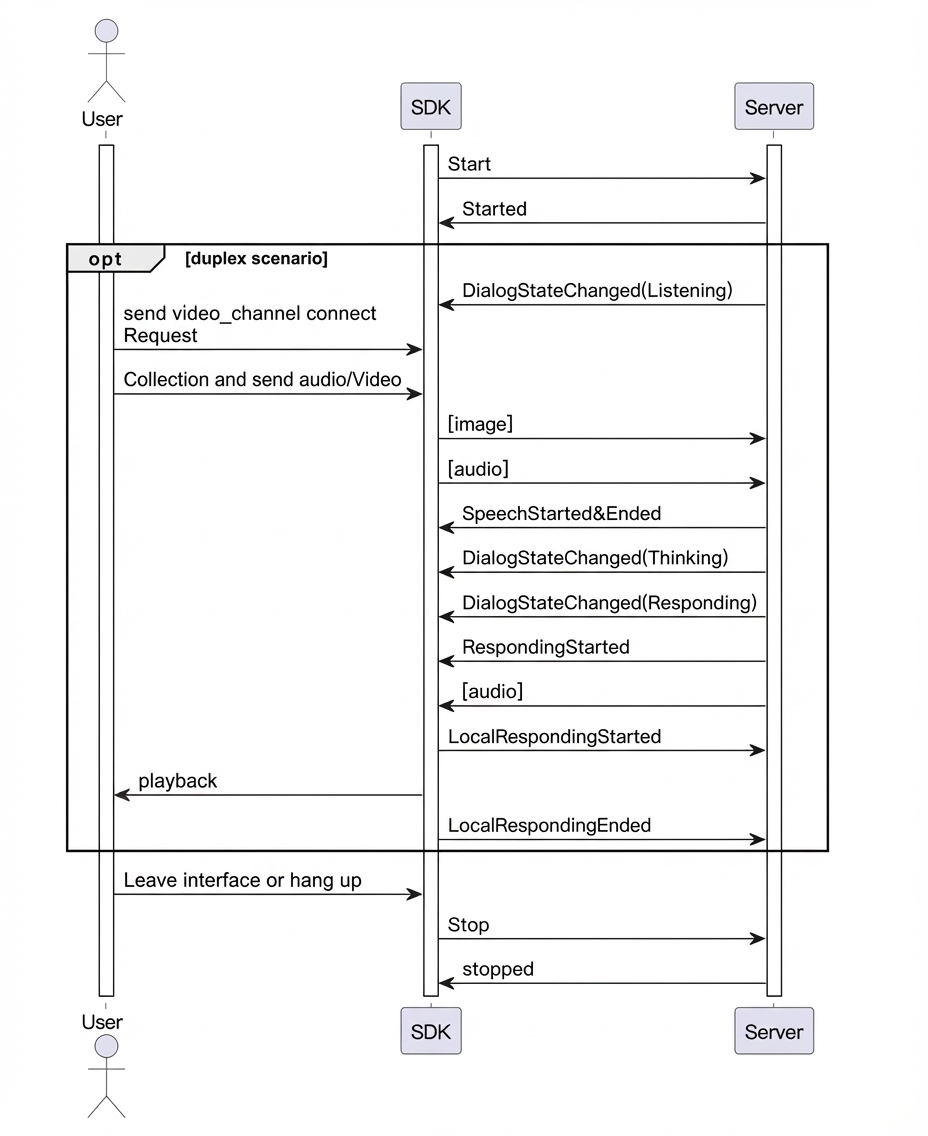
- Key code examples
For the complete code, see the GitHub sample code.
public void testMultimodalLiveAI() {
        log.info("############ Starting LiveAI Test ############");

        try {
            // Build request parameters for duplex mode
            MultiModalRequestParam params = buildBaseRequestParams("duplex");
            log.info("Request parameters: {}", JsonUtils.toJson(params));

            // Initialize conversation
            conversation = new MultiModalDialog(params, getCallback());
            conversation.start();

            // Start send video frame loop
            startVideoFrameStreaming();
            // Wait for listening state
            waitForListeningState();
            conversation.sendHeartBeat();
            // Send video channel connect request, will response command : switch_video_call_success
            conversation.requestToRespond("prompt", "", connectVideoChannelRequest());

            // Send audio data directly (no manual start needed for duplex)
            sendAudioFromFile("./src/main/resources/what_in_picture.wav");

            // Wait for listening state twice
            waitForListeningState();

            sendAudioFromFile("./src/main/resources/what_color.wav");

            // Wait for conversation completion
            waitForConversationCompletion(3);

            // Clean up
            stopConversation();

            isVideoStreamingActive = false;
            if (videoStreamingThread != null && videoStreamingThread.isAlive()) {
                videoStreamingThread.interrupt();
            }

        } catch (Exception e) {
            log.error("Error in LiveAI test: ", e);
        } finally {
            log.info("############ LiveAI Test Completed ############");
        }
    }

/**
     * Build video channel connection request for LiveAI
     *
     * @return UpdateParams containing video channel connection configuration
     */
    private MultiModalRequestParam.UpdateParams connectVideoChannelRequest(){

        Map<String, String> video = new HashMap<>();
        video.put("action", "connect");
        video.put("type", "voicechat_video_channel");
        ArrayList<Map<String, String>> videos = new ArrayList<>();
        videos.add(video);
        MultiModalRequestParam.BizParams bizParams = MultiModalRequestParam.BizParams.builder().videos(videos).build();

        return MultiModalRequestParam.UpdateParams.builder().bizParams(bizParams).build();
    }

/**
     * Start continuous video frame streaming for LiveAI
     */
    private void startVideoFrameStreaming() {
        log.info("Starting continuous video frame streaming for LiveAI...");

        vqaUseUrl = false;
        isVideoStreamingActive = true;

        videoStreamingThread = new Thread(() -> {
            try {
                while (isVideoStreamingActive && !Thread.currentThread().isInterrupted()) {
                    Thread.sleep(VIDEO_FRAME_INTERVAL_MS);

                    MultiModalRequestParam.UpdateParams videoUpdate =
                            MultiModalRequestParam.UpdateParams.builder()
                                    .images(getMockImageRequest())
                                    .build();

                    if (conversation != null && isVideoStreamingActive) {
                        conversation.updateInfo(videoUpdate);
                        log.debug("Video frame sent to LiveAI");
                    }
                }
            } catch (InterruptedException e) {
                log.info("Video streaming thread interrupted - stopping video stream");
                Thread.currentThread().interrupt();
            } catch (Exception e) {
                log.error("Error in video streaming thread: ", e);
            } finally {
                log.info("Video streaming thread terminated");
            }
        });

        videoStreamingThread.setDaemon(true);
        videoStreamingThread.setName("LiveAI-VideoStreaming");
        videoStreamingThread.start();

        log.info("Video streaming thread started successfully");
    }
Use custom prompt variables
- In the console, navigate to your project's Prompt settings to configure custom variables.
The following example defines a user_name field that represents a user nickname. The user_name variable is then inserted into the Prompt as the placeholder ${user_name}.
The Custom Variable button is located in the Available Variables area at the top of the prompt configuration page.
- Set variables in your code.
For example, set "user_name" = "Alice".
// Pass biz_params.user_prompt_params when building the request parameters.
MultiModalRequestParam.builder()
        .bizParams(
                MultiModalRequestParam.BizParams.builder()
                        .userPromptParams(setUserPromptParams())
                        .build())
        .apiKey(apiKey)
        .model(model)
        .build();
private HashMap<String, String> setUserPromptParams() {
        HashMap<String, String> promptSettings = new HashMap<>();
        promptSettings.put("user_name", "Dami");
        return promptSettings;
    }
- Request a response.
The agent uses Dear Rice to address the user in its response, for example, "Dear Rice, what is the weather like where you are today?", which indicates that the user_name variable was successfully passed and took effect in the Prompt.
Real-time ASR correction
During a conversation, ASR (Automatic Speech Recognition) results may contain errors or unexpected outputs. In addition to configuring hotwords, you can use the real-time correction feature to upload a word list and fix these errors immediately.
- Parameter description
Configure the correction word list by setting the AsrPostProcessing parameter in UpStream.
Parameter | Level 1 parameter | Level 2 parameter | Type | Description |
|---|---|---|---|---|
AsrPostProcessing | Object | The ASR correction word list. | ||
ReplaceWord[] | List | A list of replacement rules. Each | ||
source | String | The text to be replaced. | ||
target | String | The replacement text. | ||
match_mode | String | The match mode. Default: exact: Exact match. The entire recognized text must be identical to the source value. partial: Partial match. A match occurs if the source value is found as a substring within the recognized text. |
NoteTo use this feature, your Java SDK version must be 2.21.14 or later.
// Build the AsrPostProcessing object.
MultiModalRequestParam.UpStream.AsrPostProcessing asrPostProcessing =
MultiModalRequestParam.UpStream.AsrPostProcessing
.builder()
.replaceWords(Collections.singletonList(
        ReplaceWord.builder()
        .source("1 plus 1")
        .target("one plus one")
        .matchMode("partial")
        .build()
        ))
.build();
// When creating the dialog request, pass asrPostProcessing to UpStream.AsrPostProcessing.
More examples
For more examples, see the GitHub sample code.