Realtime API overview
Understand Realtime API’s protocol selection, the access methods for each model, and the AOQ SDK and Android Demo.
The Realtime API supports real-time multimodal interaction, speech recognition, speech synthesis, voice conversation, and audio and video translation. Select a transport protocol and a supported model, then open the access documentation for that model family.
Protocol selection
The Realtime API supports three transport protocols: AOQ (AI over QUIC), WebRTC, and WebSocket. Choose the protocol that best fits your business scenario.
| Dimension | AOQ | WebRTC | WebSocket |
|---|---|---|---|
Use cases | AI multimodal real-time interaction, weak-network conditions, mixed data transmission | Browser-based interaction, traditional audio and video calls | Server-side integration, rapid prototyping |
Browser compatibility | Not supported | Natively supported | Natively supported |
Integration difficulty | Low | Medium | Minimal |
Weak-network resilience | Excellent | Good | Poor |
Data types | Audio/video + text | Audio/video + text | Text/audio/image |
Connection setup speed | Fast | Slow | Slow |
Echo cancellation and noise suppression | Built-in | Built-in | None; the client must handle them |
AI scenario fit | Purpose-built for AI multimodal data characteristics | Traditional design; requires extra adaptation for AI scenarios | Basic; suitable for text-only scenarios or scenarios with low real-time requirements |
Client platform support | Mobile, desktop, and Linux. For details, see AOQ SDK downloads. | Browsers, mobile clients | All platforms (any environment that supports WebSocket) |
Token Plan | Supported | Supported | Supported |
Select a protocol based on your requirements:
- AOQ: Best for AI real-time interaction scenarios with the most demanding requirements for latency, weak-network resilience, and multimodal data transmission, especially native mobile apps. Echo cancellation and noise suppression are built in.
- WebRTC: Best for traditional audio and video call scenarios that require native browser support or already run on WebRTC infrastructure. Echo cancellation and noise suppression are built in.
- WebSocket: Best for server-side integration, rapid prototyping, and scenarios that require a minimal integration barrier. Use the DashScope SDK to quickly implement real-time voice conversation.
Model and protocol support
The following table lists the protocols supported by each model and application. Click "Supported" to open the corresponding access documentation.
| Model/application type | Model | AOQ | WebRTC | WebSocket |
|---|---|---|---|---|
qwen3.8-omni-flash-realtime, qwen3.5-omni-plus-realtime, qwen3.5-omni-flash-realtime | ||||
qwen-audio-3.1-tts-plus, qwen-audio-3.1-tts-flash, qwen-audio-3.0-tts-flash, qwen-audio-3.0-tts-plus | Unsupported | |||
CosyVoice series models | Unsupported | |||
qwen-audio-3.1-asr-flash-message, qwen-audio-3.1-asr-flash-streaming, qwen-audio-3.0-asr-flash-streaming, Fun-ASR-Realtime series models | Unsupported | |||
qwen-audio-3.1-realtime-plus, qwen-audio-3.1-realtime-flash, qwen-audio-3.0-realtime-plus, qwen-audio-3.0-realtime-flash | ||||
Qwen-Livetranslate-Realtime series models | ||||
multimodal-dialog |
NoteFor information such as model names, context windows, prices, and snapshot versions, see the Alibaba Cloud Model Studio console. For rate limits, see Rate limiting.
Prepare for access
Confirm the region and endpoint, and obtain the API Key for that region and workspace.
NoteFor first-time use, follow the console prompts to activate the service. Copy and securely store the API key immediately after creation. Manage it through environment variables; do not embed it in client code or commit it to a code repository.
For AOQ, download the AOQ SDK for the client platform.
Authentication methods
The Realtime API uses API keys for authentication. Whether you connect over AOQ, WebRTC, or WebSocket, you pass a bearer token in the Authorization HTTP request header.
WebRTC and WebSocket authenticate during connection setup. With AOQ, the AppServer authenticates with an API key when requesting connection credentials, and the client then connects with a temporary token. Data transmission over an established connection does not require re-authentication.
Connection authentication details
AOQ
AOQ uses a server-side proxy authentication model: the API key is used only on the business AppServer. The client connects with a temporary token returned by the gateway, which keeps the API key off the client.
Obtain connection credentials
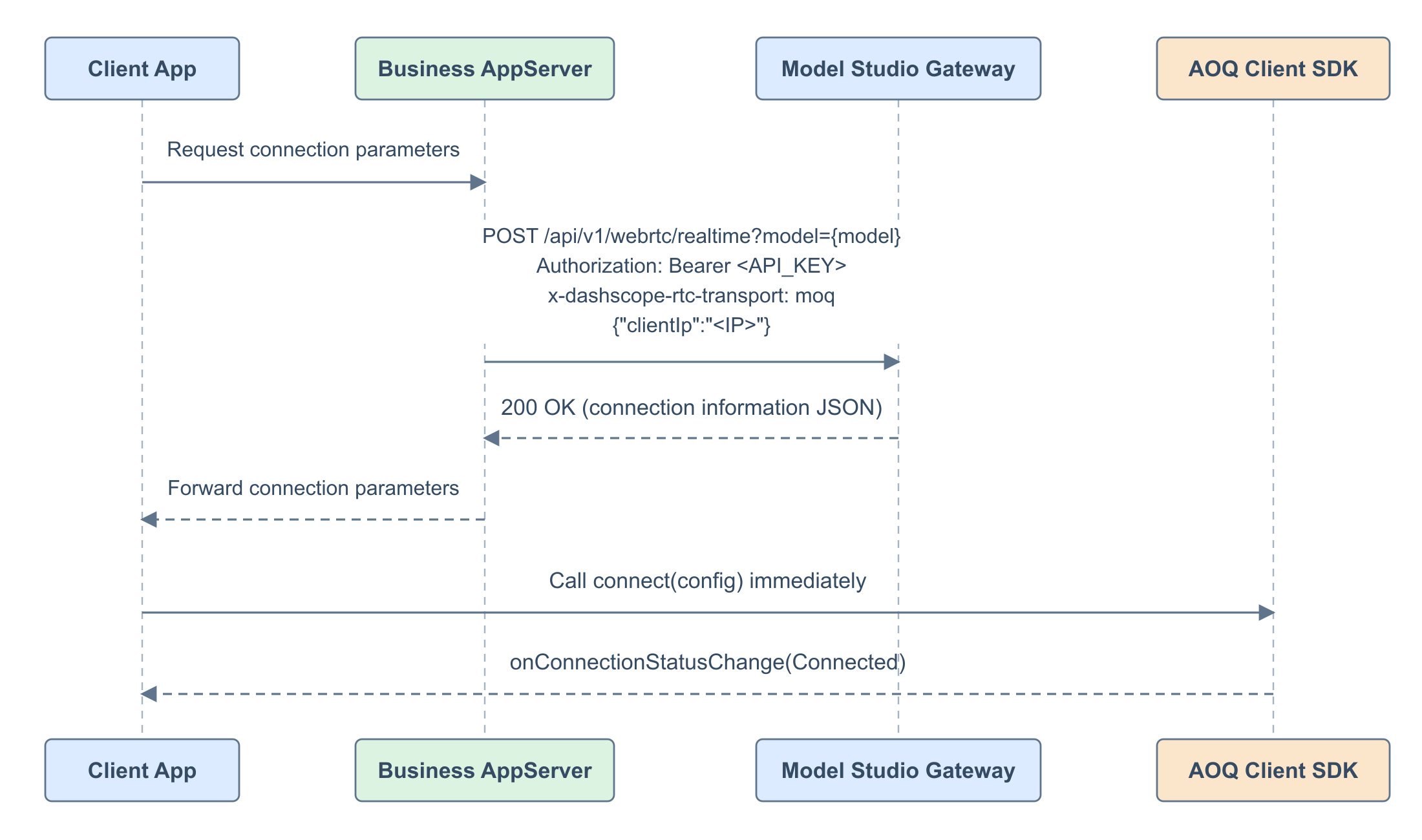
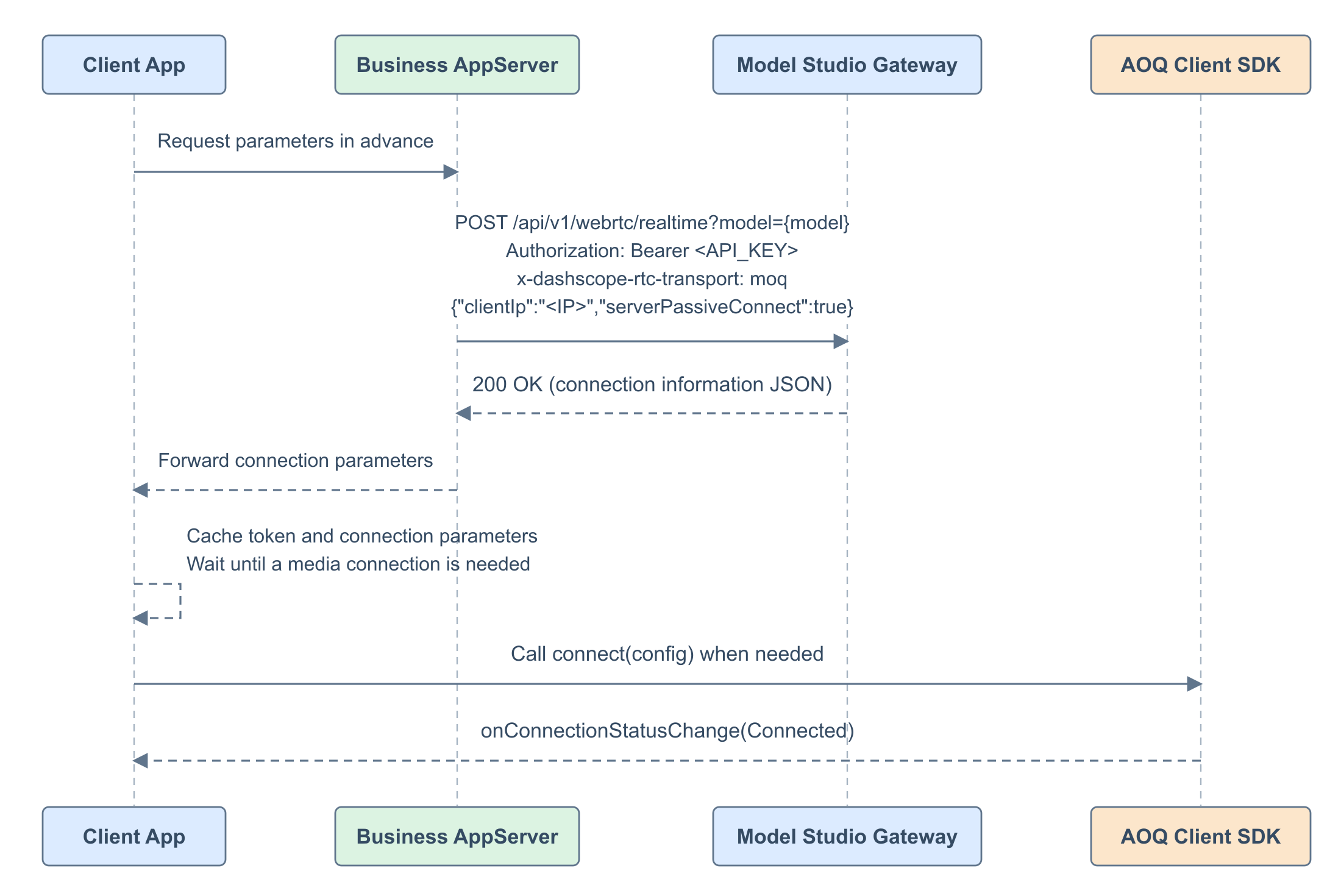
AOQ supports on-demand authentication and pre-authentication. With on-demand authentication, credentials are obtained when the application needs a connection, followed immediately by media connection setup. With pre-authentication, credentials are obtained and cached in advance, so the application can connect when needed with less time spent waiting for signaling HTTP requests.
On-demand authentication
When a media connection is needed, the AppServer requests credentials and returns them to the client, which immediately calls connect(config).
Pre-authentication
The AppServer requests credentials in advance. The client caches the complete connection parameters and calls connect(config) when a media connection is needed.
The token is valid for 5 minutes by default. Contact support to extend the validity period. Obtain new connection credentials after the token expires.
Request paths
| Model series | Connection request path |
|---|---|
| Qwen-Omni-Realtime, Qwen-Audio-Realtime, Qwen-Livetranslate-Realtime | /api/v1/webrtc/realtime |
| Qwen-Audio-TTS, CosyVoice, Qwen-Audio-ASR-Streaming, Qwen-Audio-ASR-Message, Fun-ASR-Realtime | /api/v1/webrtc/inference |
Request details
| Parameter | Location / type | Description |
|---|---|---|
| URL · | Required. Use the endpoint for the selected region and workspace. With Token Plan, |
| Query · | Required. The model ID to call. Select its connection path using the model family table above. |
| Header · | Required. Use |
| Header · | Required. Fixed to |
| Header · | Required. Fixed to |
| Body · | Optional. The client’s actual public IP address, used to select a Relay endpoint. If omitted, the request source IP address is used. |
| Body · | Optional. Set to |
The following examples use qwen3.8-omni-flash-realtime with the corresponding {endpoint} and the DASHSCOPE_API_KEY environment variable. For models that use the Inference path, change the request path to /api/v1/webrtc/inference and set the corresponding model.
On-demand request
curl -X POST \
  "https://{endpoint}/api/v1/webrtc/realtime?model=qwen3.8-omni-flash-realtime" \
  -H "Authorization: Bearer ${DASHSCOPE_API_KEY}" \
  -H "Content-Type: application/json" \
  -H "x-dashscope-rtc-transport: moq" \
  -d '{}'
Pre-authentication request
curl -X POST \
  "https://{endpoint}/api/v1/webrtc/realtime?model=qwen3.8-omni-flash-realtime" \
  -H "Authorization: Bearer ${DASHSCOPE_API_KEY}" \
  -H "Content-Type: application/json" \
  -H "x-dashscope-rtc-transport: moq" \
  -d '{"serverPassiveConnect":true}'
Response details
| Field | Type | Description and SDK mapping |
|---|---|---|
|
| Unique session ID. Set |
|
| Temporary client connection token. Set |
|
| Array of Relay endpoints for |
|
| Relay TLS certificate fingerprint. Set |
|
| Session lifetime in seconds. This is not the usable window of a prefetched token. |
|
| Hash of the workspace ID. Set |
Both modes return the same response structure. The following on-demand authentication response is an example; use the actual returned values.
{
  "sid": "<session_id>",
  "aoqTokenForClient": "<token>",
  "clientRelayEndpoints": [
    {"endpoint": "192.0.2.1", "port": 8443, "route_index": 0}
  ],
  "clientRelayCertFingerprint": "sha256/<fingerprint>",
  "sidExpiresInSecs": 7200,
  "extraInfo": {"workspaceIdHash": "<workspace_id_hash>"}
}
WebRTC
WebRTC completes the SDP exchange over an HTTP POST request, and authentication happens at this stage. The client sends the Offer SDP to the server, and the server returns the Answer SDP.
WebSocket
WebSocket has the simplest authentication: send the API key in an HTTP header when you establish the connection.
Try the demo
Use the Android Demo to try AOQ access. Scan the QR code to download the APK, then install it and configure the API Key and workspaceId. You can then try the subset of models supported by the Demo.

Best practices
- Using WebRTC with qwen3.8-omni-flash-realtime for real-time calls
- Using AOQ with qwen3.8-omni-flash-realtime for real-time calls
- Build push-to-talk voice conversations with qwen3.8-omni-flash-realtime over AOQ
- Synthesize speech with qwen-audio-3.0-tts-flash over AOQ
- Transcribe real-time speech with fun-asr-realtime over AOQ
- Build real-time voice conversations with qwen-audio-3.1-realtime-plus over AOQ
- Using WebRTC with the Multimodal Development Kit for real-time calls