RamRole: Resource Access Management (RAM) role
When CloudOps Orchestration Service (OOS) runs template tasks, it calls APIs of other Alibaba Cloud services on your behalf. These API calls require permissions that you must explicitly grant to OOS.
The following sections cover who grants permissions, permission sources, when and how to grant them, authorization methods, the RamRole field and its syntax, OOS permission policies, and how to create and authorize a RAM role and an execution creator.
Key concepts
-
A RAM role is an identity in Resource Access Management (RAM) that holds a set of permissions defined by a policy. For more information, see Overview of RAM roles.
-
When a trusted entity, such as an Alibaba Cloud service or an account, assumes a role, it temporarily acquires the permissions of that RAM role. The entity's original permissions are then replaced by those of the RAM role for all operations on Alibaba Cloud resources.
-
Permissions to create or update templates enable a RAM user to create or modify OOS template resources.
-
A template creator is a RAM user who has permissions to create and update templates.
-
Permissions to create executions enable a RAM user to create an execution from an OOS template.
-
An execution creator is a RAM user who has the permission to create an execution.
-
Temporary user permissions are temporary credentials provided by Security Token Service (STS) for a RAM user. These permissions have a limited validity period. For more information, see What is STS?
-
An execution is a running instance of a template.
-
A task execution is the active process of running a task defined within a template. It begins after an execution is successfully created.
-
A task can be triggered in two ways: an execution creator can start an execution that runs its tasks immediately until completion, or they can start an execution where tasks are triggered later by specific events or time-based conditions.
-
OOS permissions are the permissions granted to OOS to access other Alibaba Cloud services when it runs tasks in a template. By default, OOS has no permissions.
-
An execution's context is based on its template creator. An execution has a "present" creator if all its activities (task executions) are directly initiated by the template creator when the execution is created, and these activities continue until the execution reaches a final state, such as
Success. This concept becomes clearer when you consider the scenarios where a creator is "absent." -
A template creator may be "absent" during an execution in two main scenarios: templates with triggers and templates for delegated authorization. For templates with a trigger, the template creator starts an execution, but the tasks are run later in response to an event or at a scheduled time. In this case, the creator is not actively involved when the tasks run. In a delegated authorization scenario, a user who is not the template creator but has permission to run the template can create an execution. In this case, the activities are triggered by the execution creator, not the template creator. Because the execution creator and template creator can be different users, the template creator is considered "absent."
Refer to the Key concepts section for definitions used throughout this topic.
Who grants permissions
You must manually grant permissions to OOS. Permissions are not granted automatically.
Permission sources for OOS
OOS obtains permissions from two sources: the temporary permissions of the execution creator or a RAM role. Temporary permissions expire after a set period, whereas a RAM role provides stable, persistent permissions.
When permissions are granted
Permissions must be granted to OOS before an execution is created. The exact timing depends on the scenario. In a delegated authorization scenario, permissions are granted when the template is created. In other scenarios, permissions are granted when the execution is created.
Grant permissions to OOS
Choose a permission source
When OOS requires stable, non-temporary permissions, you must select a RAM role as the permission source and specify it in the template. Use a RAM role for templates where the template creator may be absent during execution. For templates where the creator is always present, you can use either a RAM role or temporary user permissions. A template creator may be absent in two scenarios: the template contains a trigger, or it is used for delegated authorization. Trigger-based executions can run for extended periods, and the validity of temporary permissions for subsequent task executions is not guaranteed. Therefore, specify a stable RAM role in the template for reliable task execution. The delegated authorization model is designed for scenarios where the execution creator and template creator are different users, allowing the execution creator to run a template without managing OOS permissions. By specifying a fixed RAM role when the template is created, the template creator provides a stable permission source that eliminates the need for the execution creator to select or confirm permissions.
Authorization methods
After choosing a permission source, grant permissions by using one of the following methods. To use temporary user permissions, select Use Existing Permissions of Current Account in the Parameter Settings step when creating an execution. The temporary permissions of the execution creator are then granted to OOS. To use a RAM role, specify it in the RamRole field of the template. The following sections describe the RamRole field and how to use it.
RamRole
Unlike temporary user permissions, a RAM role can be used as a permission source in any type of template. To configure a RAM role, use the RamRole field in the template, defined at the same level as Parameters and Tasks. When a task from this template runs, OOS assumes the specified RAM role and uses its permissions to call the required APIs of Alibaba Cloud services.
The RAM role specified in the RamRole field is valid only for the template in which it is defined. The permissions of the RAM role are active only when tasks from that template are running.
RamRole syntax
If the RamRole field is not defined, OOS defaults to temporary user permissions. If defined, the RAM role can be either fixed or variable. A variable RAM role references a parameter, and you specify the role name when you create an execution. You can also choose not to specify a RAM role and use temporary user permissions instead. A fixed RAM role is set to a specific role name. For a fixed role, OOS permissions are granted when the template is created, and the template is used for delegated authorization scenarios. For a variable role or an undefined RamRole field, permissions are granted when the execution is created.
If the RamRole is variable and the template contains a trigger, you cannot select temporary user permissions as the permission source when you create an execution.
-
Fixed RAM role
-
YAML format
FormatVersion: OOS-2019-06-01 # Required Description: "RamRole Usage" # Optional RamRole: "OOSServiceRole01" # Optional. The RAM role to assume. If you specify a role name, the role for this template is fixed. -
JSON format (see the comments in the YAML example for details)
{
"FormatVersion": "OOS-2019-06-01",
"Description": "RamRole Usage",
"RamRole": "OOSServiceRole01"
}
-
-
Variable RAM role
-
YAML format
FormatVersion: OOS-2019-06-01 # Required Description: "RamRole Usage" # Optional RamRole: "{{ramRoleNameParameter}}" # Optional. The RAM role to assume. The role is variable. You can specify the role by passing a value to the ramRoleNameParameter when you create an execution. -
JSON format (see the comments in the YAML example for details)
{
"FormatVersion": "OOS-2019-06-01",
"Description": "RamRole Usage",
"RamRole": "{{ramRoleNameParameter}}"
}
-
Manage OOS permission policies
When the permission source is a temporary user, the OOS policy matches that of the execution creator. Manage OOS permissions by assigning different policies to the execution creator. When the permission source is a RAM role, the OOS policy matches the policy attached to the RAM role. Manage OOS permissions by managing the policies attached to that role.
OOS permission policies
Different OOS templates require different permissions to call APIs. Use the GenerateExecutionPolicy API operation to get the required permissions for a template, then create a policy based on the principle of least privilege and attach it to the RAM role or execution creator. To grant full access to a specific Alibaba Cloud service, attach the FullAccess policy for that service to the RAM role or execution creator.
Step 1: Create a RAM role
-
Log on to the RAM console.
-
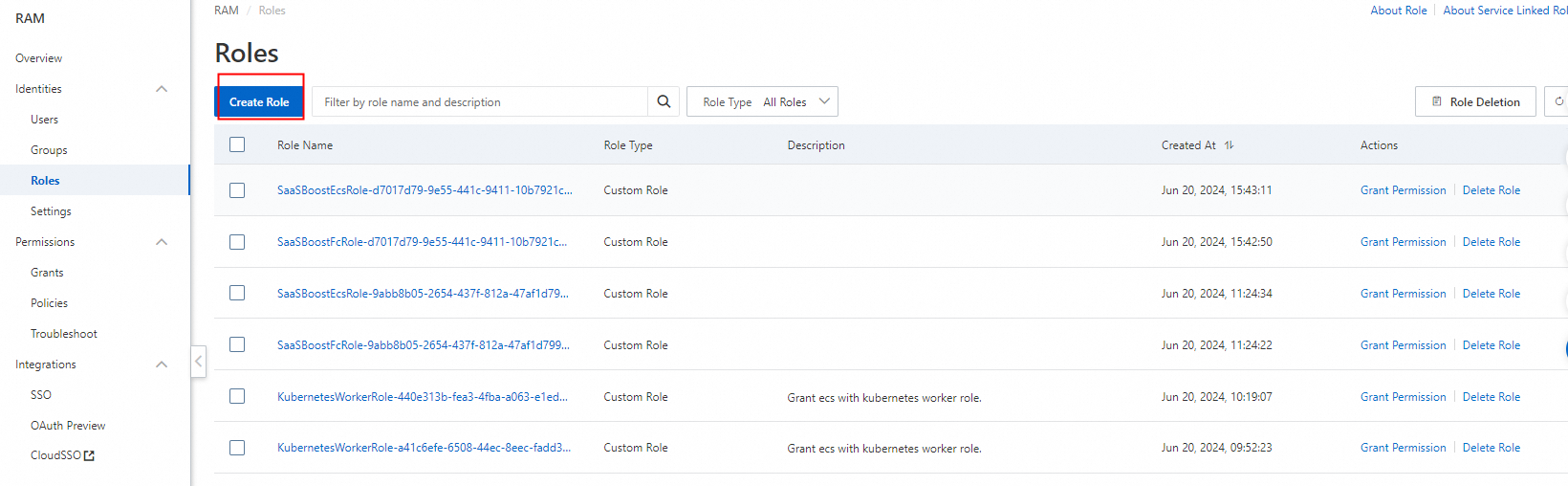
Click Create Role.
-
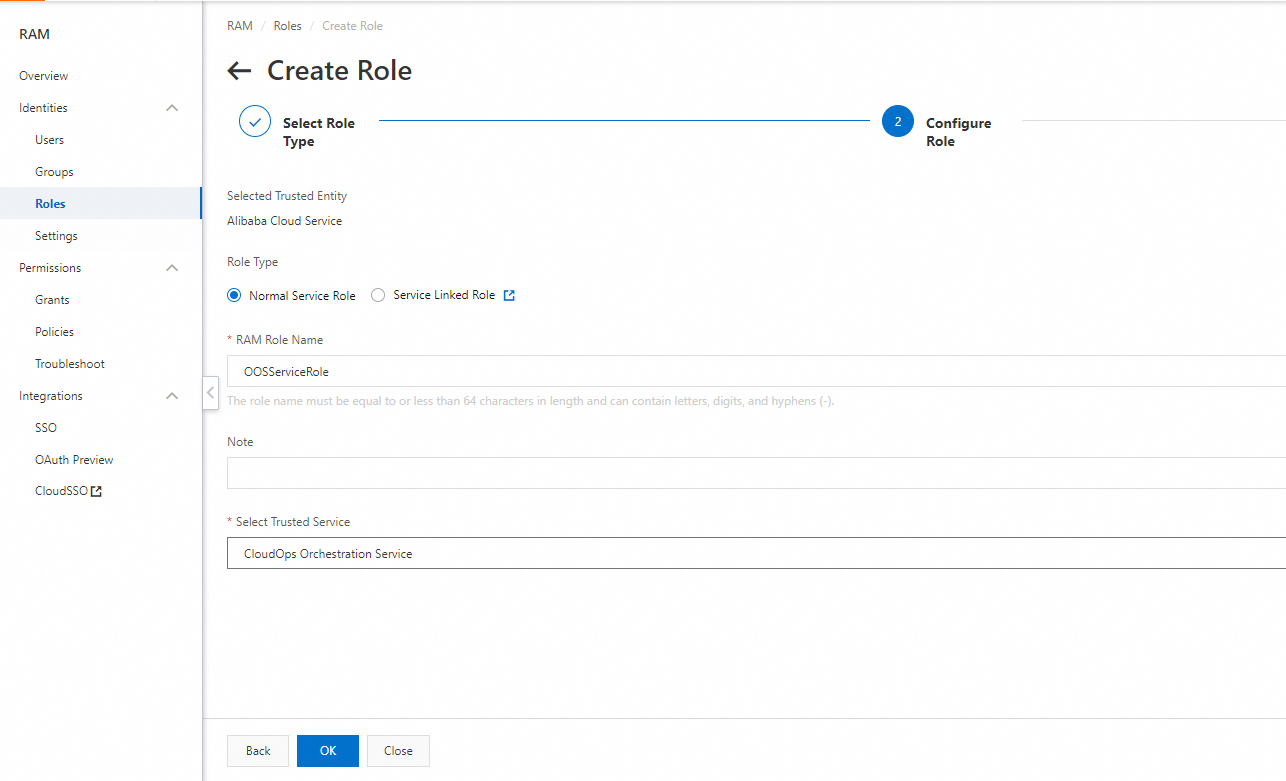
For Select Trusted Entity, choose Alibaba Cloud Service and click Next.

-
Enter a Role Name. This name must match the RAM role name specified in the
RamRolefield of your OOS template. -
For Select Trusted Service, choose CloudOps Orchestration Service.
-
Click Completed.
Step 2: Grant permissions to the RAM role
-
Log on to the RAM console.
-
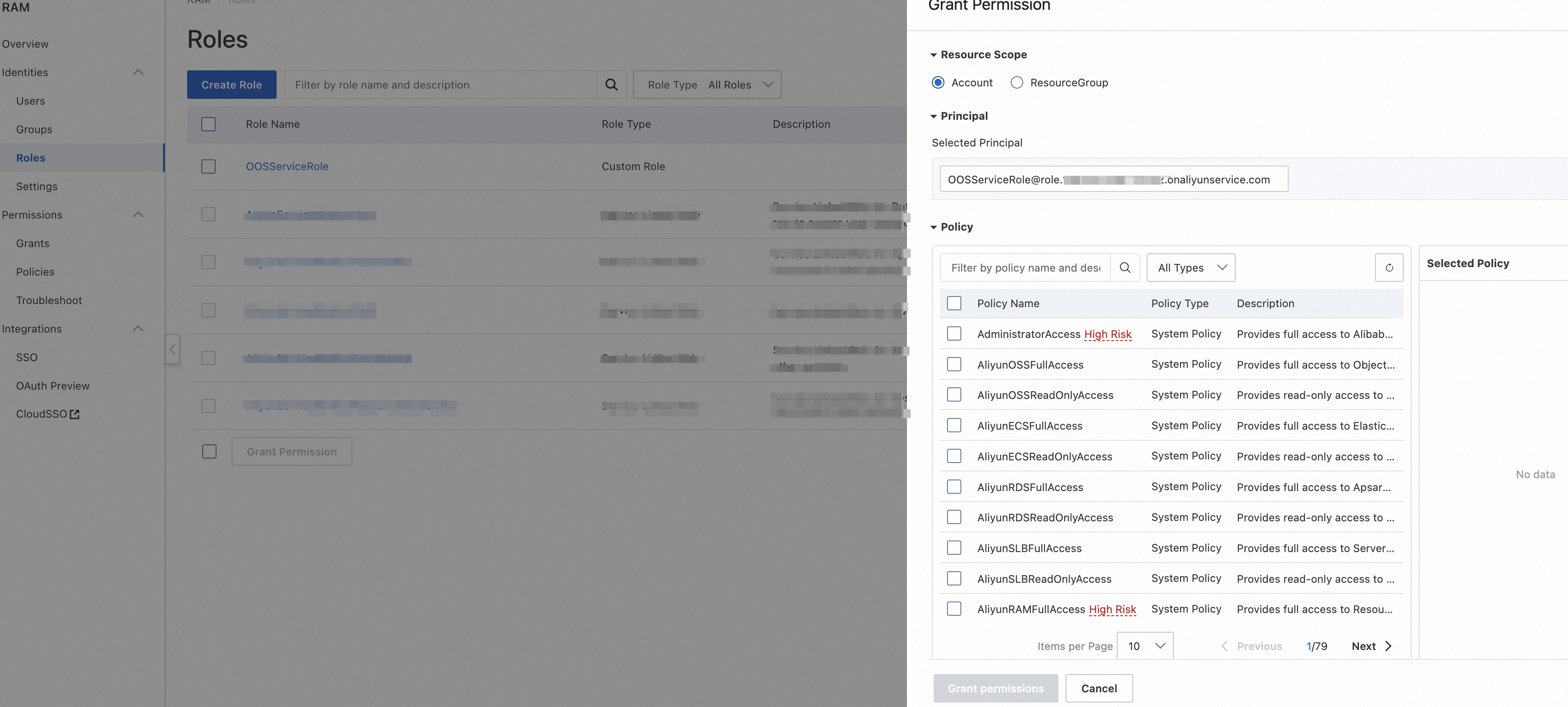
Click Grant Permission.

-
For Principal, select the role that you just created, such as OOSServiceRole. Select permissions based on the requirements of the CloudOps Orchestration Service (OOS) template. For example, if you want to use a CloudOps Orchestration Service (OOS) template to perform operations such as creating, destroying, starting, and stopping ECS instances, you can select the FullAccess permission for the ECS service.
-
Click OK.
The permissions are granted to the RAM role.
Step 3: Grant permissions to the execution creator
-
Log on to the RAM console.
-
Click Grant Permission.

-
For Principal, select Execution Creator (the Alibaba Cloud account that you use to create the execution), such as testoos@example.com. Select permissions based on the requirements of the CloudOps Orchestration Service (OOS) template. For example, if you want to use a CloudOps Orchestration Service (OOS) template to perform operations on ECS, such as creating, destroying, starting, and stopping instances, you can select the FullAccess permission for ECS.
-
Click OK.
The permissions are granted to the execution creator.
