Configure an RDS data source
This topic describes how to configure an RDS data source and the precautions that apply.
Configure an RDS data source
ApsaraDB RDS (Relational Database Service, RDS) is a ready-to-use, stable, reliable, and elastically scalable online database service provided by Alibaba Cloud ( Learn about RDS ).
Before you purchase an RDS instance
-
OpenSearch currently supports RDS for MySQL (versions 5.5, 5.6, 5.7, and 8.0).
-
The RDS instance that you purchase must be a regular instance of the High-availability Edition (dual-node). RDS MySQL Basic Edition and three-node Enterprise Edition are not high-availability editions and are not supported.
-
The RDS instance can be accessed and used only if it belongs to the Alibaba Cloud account that you are currently logged on with and resides in the same region as the OpenSearch application.
-
RDS clone instances are supported when the RDS instance is of the High-availability Edition.
-
Index rebuilding fails for unsupported RDS instances and for RDS instances that do not meet the related limits.
-
RDS data sources support only VPC networks.
-
DRDS data sources are not supported.
-
Authorization: You must authorize OpenSearch to obtain RDS data. If you have configured an IP address whitelist, OpenSearch adds the IP addresses that it uses to your whitelist. If you do not select the authorization option, Connect Data is not highlighted.
Supported features
-
Pulling full data from specified database tables (by manual or scheduled index rebuilding).
-
Horizontal merging of data from one or more data source tables. The source tables must have identical schemas and identical data source plug-in configurations, and their primary key values must be unique (duplicate primary key values are overwritten). The following two scenarios are mainly supported:
-
An application table is configured with one data source that contains multiple source tables.
-
An application table is configured with multiple data sources, each containing one or more source tables.
-
-
Data source field conversion plug-ins.
-
Supported data synchronization methods:
-
Automatic synchronization.
-
Self-purchased DTS real-time synchronization.
-
No automatic synchronization.
-
-
Filter conditions (for full data).
-
Matching database table names by using the wildcard
*.
-
If you select Automatic Synchronization as the data synchronization method, an internal service provided by OpenSearch is enabled to subscribe to the binlogs of the database and synchronize incremental data. Note that changes made on your side, such as deleting database tables, changing access permissions, purging binlogs, or changing the database password, may prevent OpenSearch from subscribing to and synchronizing the binlogs of the configured tables. In this case, OpenSearch assumes no responsibility for incremental data that cannot be synchronized. Make sure that you fully understand the potential impacts and take necessary precautions before you perform such operations.
-
If you select Automatic Synchronization, OpenSearch makes its best effort to ensure the stability of the synchronization service but does not guarantee synchronization latency. For latency-sensitive businesses, we recommend that you use a DTS data subscription instance (DTS real-time synchronization) as the synchronization method.
Limits
-
Only RDS binlogs in full mode are supported.
-
Only the RDS High-availability Edition and Cluster Edition are supported.
-
Supported RDS database versions: 5.5, 5.6, 5.7, and 8.0.
-
For RDS 5.6, we recommend that you increase the thresholds of the loose_max_execution_time and loose_max_statement_time parameters as appropriate to prevent errors similar to the following during index rebuilding: Query execution was interrupted, max_statement_time exceeded.
-
The RDS instance can be accessed and used only if it belongs to the Alibaba Cloud account that you are currently logged on with and resides in the same region as the OpenSearch application.
-
After an RDS data source is configured for a Standard Edition application, incremental data cannot be pushed by using SDKs or API operations.
-
(Regions outside the Chinese mainland) Data source filter conditions are not supported for RDS data sources of Standard Edition applications.
-
The replace into syntax is not supported.
-
The truncate and drop commands are not supported. Use the delete command to delete data.
-
RDS clone instances are supported when the RDS instance is of the High-availability Edition.
-
The RDS access password cannot contain the
%character. Otherwise, index rebuilding tasks fail. -
Access by using an RDS privileged account is not supported. (Otherwise, the connection to RDS fails.)
-
Merging field columns across different database source table schemas is not supported.
-
Replica client and replica slave without binlogs are not supported. For information about how to check and enable binlogs, see this document.
Precautions
-
RDS can be accessed over an internal network or the Internet. OpenSearch does not charge any traffic fees for obtaining data from RDS.
-
OpenSearch can pull full data only from the primary database. We recommend that you rebuild indexes to import full data during off-peak hours based on your business workload.
-
Time types such as datetime and timestamp in RDS tables are automatically converted to milliseconds. Set the type of the corresponding application table fields to TIMESTAMP.
-
The RDS endpoint is enabled by default. A public endpoint must be applied for manually. Access over the Internet is available only after the application for the public endpoint is approved.
-
(Full) documents that do not meet the data source filter conditions are filtered out, and documents with the same primary key values in the corresponding application table are also deleted.
-
If no incremental data is generated on the data source side for a long period of time (15 days or longer), data synchronization may become abnormal. In this case, manually perform index rebuilding or an offline change to resolve the issue.
-
To synchronize data from an RDS data source by using OpenSearch, you must add the IP address ranges of OpenSearch servers to the RDS whitelist. The following table lists the IP address ranges for each region:
Region
IP address range
China (Hangzhou)
100.104.190.128/26,100.104.241.128/26
China (Beijing)
100.104.16.192/26,100.104.179.0/26
China (Shanghai)
100.104.37.0/26,100.104.46.0/26
China (Shenzhen)
100.104.87.192/26,100.104.132.192/26
China (Qingdao)
100.104.240.128/26,100.104.111.128/26
China (Zhangjiakou)
100.104.155.192/26,100.104.238.64/26
Germany
100.104.127.0/26,100.104.35.192/26
US
100.104.193.128/26,100.104.119.128/26
Singapore
100.104.58.192/26,100.104.74.192/26
Account authorization
Recommendations for connecting to and using MySQL 5.7/8.0:
-
When you connect to MySQL 5.7 or later, you must authorize access to the RDS instance and enter the account and password. Choose the account and password carefully when you connect for the first time.
-
[Ensure account permissions] Make sure that the account has permissions to view all tables in the database (a limit of the upstream DTS service) so that show create table
*. * can be executed correctly. Otherwise, issues may occur in real-time synchronization. -
[Minimize account permission changes] The OpenSearch real-time task is also a MySQL client. Account changes prevent the current real-time task from consuming data normally and also affect the creation of new versions. If you change the account or password, you must delete the instance and reconnect the database.
-
The minimum RDS permissions that OpenSearch requires are:
-
The show create table permission.
-
The REPLICATION SLAVE or REPLICATION CLIENT permission.
-
binlog_row_image is set to FULL.
-
binlog_format is set to ROW.
-
FAQ
-
To configure an RDS data source for an application in the console by using a RAM user, you must grant permissions to the RAM user. Otherwise, the message Failed to connect to the RDS service. Try again later is displayed. For more information, see Create and authorize a RAM user (make sure that the Alibaba Cloud account has created the OpenSearch service-linked role).
-
The RDS access password cannot contain the
%character. Otherwise, index rebuilding tasks fail. (Error message: Illegal hex characters in escape (%) pattern.) -
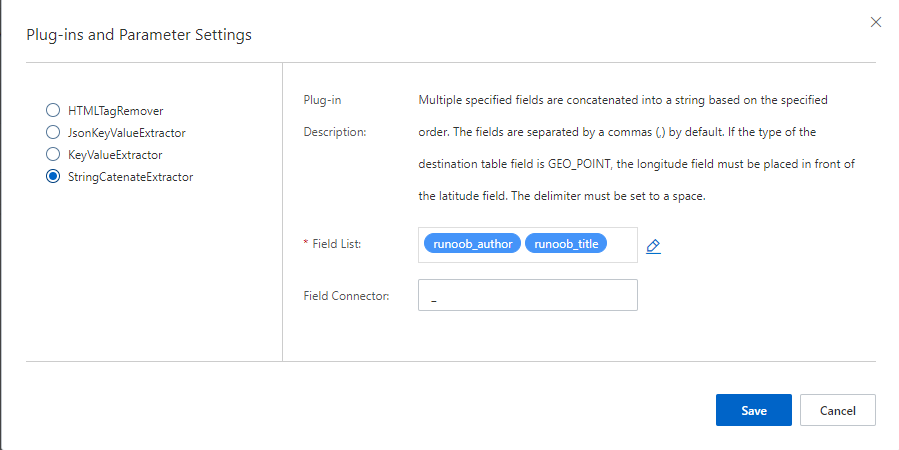
The system requires that primary key values in an application table be unique. If primary key values are duplicated across sharded tables, they are overwritten. You can use the StringCatenateExtractor data source plug-in to concatenate multiple field values. Set the source fields to
pk,$table(replace pk with the primary key field of the RDS table; $table is a default system variable that indicates the name of the corresponding database table and can be used only when sharded tables are configured by using a wildcard), and set the delimiter to-(customizable). For example, if the RDS table ismy_table_0and the primary key field value is123456, the new primary key value after concatenation is123456-my_table_0. -
To filter data based on fields of the date or datetime type in a database table, assuming that the field name is createtime, the time format in the data source filter condition must be
createtime>'2018-03-01 00:00:00'. If you use a format such ascreatetime>'2018-3-1 00:00:00', an error is reported.
Process of configuring an RDS data source
-
Configure an RDS data source when you quickly build an application.
-
For an existing application, you can modify the data source by using "Offline change" on the application details page.
Configuration steps and precautions in the console
-
Select the RDS data source and click Create Database.
-
After you enter the RDS information, click the Connect button.
Parameter
Description
Instance ID
The ID (not the name) of the RDS database instance, which you can obtain in the RDS console (case-sensitive). Read-only instances are not supported. Example of the instance ID format: rm-bp19b4g5n11111111
Database name
The name of the database to connect to in the instance (case-insensitive).
Username
The read-only username of the database, which is used to obtain the database table schemas and full data (case-sensitive, with read-only permissions).
Password
The password of the read-only username.
OpenSearch attempts to connect and displays a result message based on the situation:
Message
Solution
The RDS instance does not exist in the current region of the current user
Check whether the instance ID is correct and make sure that the RDS instance resides in the same region as the OpenSearch application. If the error persists when these conditions are met, submit a ticket
Failed to connect to the RDS service
Check whether the RDS connection information is correct, including the instance ID, database name, username, and password
The table does not exist in the current RDS database
Check whether the table name is correct and whether the table actually exists in the RDS database
-
After the data source connection is established, the following page appears. Select the tables and click the right arrow to save them to the selected list on the right.
In the Select Data Source dialog box, first select the data source type on the RDS, ODPS, POLARDB, or DRDS tab, then select the target database in the Select Database section. After you select the tables, click OK.
-
Select or enter the names of the tables to access in the database (case-sensitive).
-
Sharding rules in the table_* format are supported, for example, table_a and table_b.
-
-
Configure field mappings by selecting the database fields to pull. Click OK to complete the application creation.
If an OpenSearch application field has the same name as a data source field, they are mapped automatically. Otherwise, click + Add Data to add the mapping manually.
-
On this page, you can add database fields to be mapped and synchronized.
-
In the content conversion section of this page, you can add data source plug-ins. For information about how to use the plug-ins, click here.
-
-
Configure filter conditions for the RDS data source.
For the data table
test_table_1, DTS Data Subscription Instance is selected as the data synchronization method. You can click Edit or Delete in the Actions column to manage added data sources, click + Add Data to add more data tables, and set data source filter conditions in the Filter Conditions section.-
You can also configure multiple data sources for an OpenSearch application table, but the schemas and configurations of these tables must be identical.
-
The filter conditions configured for an RDS data source ensure that only records that meet the conditions are pulled. For more information, see Data source filter conditions.
-