Build a RAG solution with OpenSearch Vector Search Edition and DeepSeek
This topic describes how to use the modular services of AI Search Open Platform to build a Retrieval-Augmented Generation (RAG) solution with OpenSearch Vector Search Edition and DeepSeek.
How it works
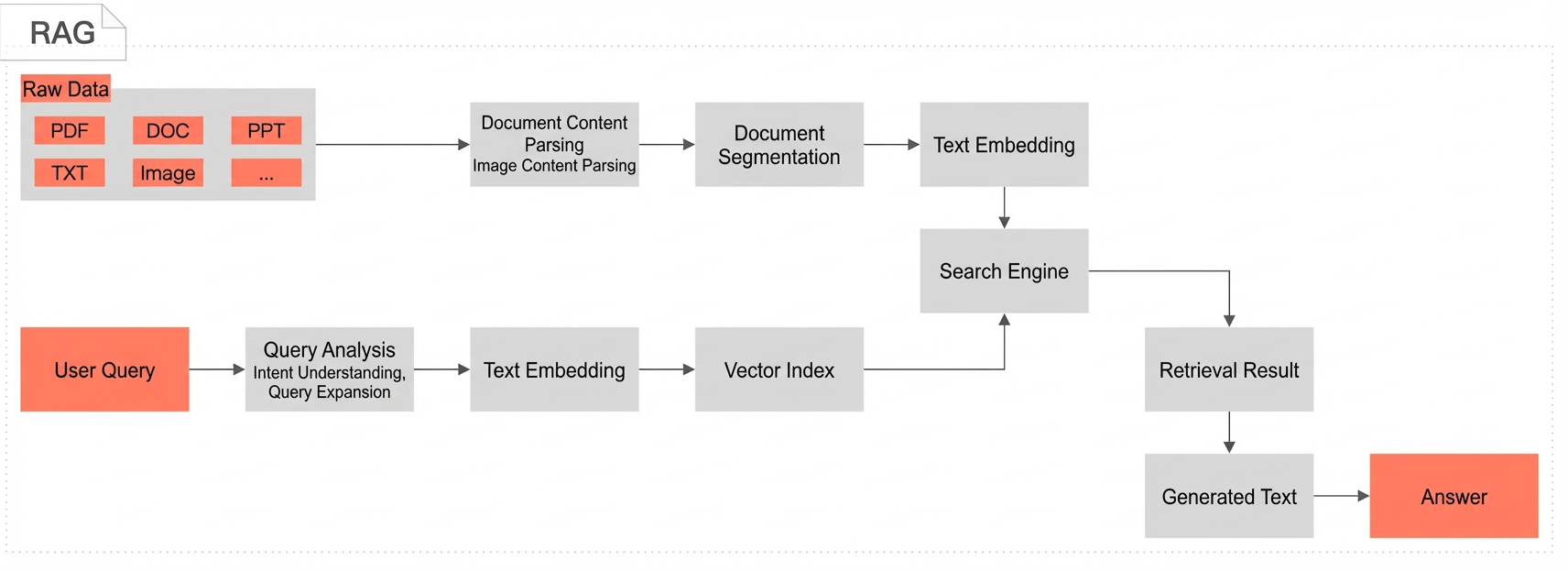
Retrieval-Augmented Generation (RAG) is an artificial intelligence method that combines retrieval and generation techniques to improve the relevance, accuracy, and diversity of generated content. To generate a response, RAG first retrieves the most relevant passages from an external data source or knowledge base. It then feeds these passages, along with the original input, to a Large Language Model (LLM) to guide the model in generating more precise and informative answers. This approach allows the model to generate responses based not only on its internal parameters and training data but also on the latest external or domain-specific information, improving response accuracy.
Use cases
-
Intelligent customer service: Automatically generates accurate replies by retrieving relevant information from an enterprise knowledge base.
-
Conversational search: Provides a more intelligent and natural interactive experience by combining user input with external knowledge bases.
-
Knowledge graph enhancement: Expands the model's knowledge scope by using external knowledge bases, increasing the depth and breadth of Q&A sessions.
-
Personalized recommendation: Generates personalized content recommendations based on user history and preferences.
Solution overview
Product introduction
-
OpenSearch Vector Search Edition: Developed by Alibaba, OpenSearch Vector Search Edition is a large-scale, distributed vector search engine. It supports multiple vector retrieval algorithms and delivers excellent performance with high precision. It enables cost-effective index building and retrieval at scale. Indexes support horizontal scaling and merging, stream-based index construction, query-while-ingesting, and real-time data updates.
-
AI Search Open Platform: Focused on intelligent search and RAG scenarios, AI Search Open Platform provides algorithm services from the AI search pipeline as modular components. It includes document parsing, document splitting, text embedding, query analysis, retrieval, reranking, performance evaluation, and LLM services. Developers can flexibly choose component services to build their search applications.
-
DeepSeek: DeepSeek is a popular inference model that can significantly improve its reasoning capabilities with a small amount of labeled data. It excels at complex tasks such as mathematics, coding, and natural language inference.
Solution steps
-
Activate services
-
Create an OpenSearch Vector Search Edition instance.
-
Activate the AI Search Open Platform service.
-
-
Build and test the RAG development pipeline
-
Select services on AI Search Open Platform and download the generated code.
-
Adapt the local environment and test the RAG development pipeline.
-
Run the document processing script
-
Process your business data by using AI Search Open Platform services, including document parsing, document splitting, and text embedding.
-
Write the processed data to the OpenSearch Vector Search Edition storage engine.
-
-
Run the online Q&A script
-
The text embedding model converts the input query into a query vector.
-
The system sends the query vector to OpenSearch Vector Search Edition to retrieve documents and then deduplicates the results.
-
The deduplicated results are reranked and scored.
-
The system calls the DeepSeek model service to generate a final answer by summarizing the retrieved results.
-
-
-
Prerequisites
1. Create an OpenSearch Vector Search Edition instance
-
Purchase an OpenSearch Vector Search Edition instance.
-
To configure your instance, see Hybrid search best practices.
-
OpenSearch Vector Search Edition instances are deployed in a VPC. You cannot directly access an instance in a VPC from your local machine or the public network using the API domain name. To enable access, you must configure an IP whitelist. For details, see Configure a public network IP whitelist.
-
After you configure the IP whitelist, the settings take about one minute to take effect.
2. Activate the AI Search Open Platform service
-
Activate the AI Search Open Platform service.
-
Obtain the service endpoint and authentication credentials. For details, see Obtain service endpoints and Manage API keys. Log on to the AI Search Open Platform console. Go to the Service Marketplace page and click Activate Now in the blue banner at the top to activate the service. After activation, click API Keys in the left-side navigation pane to get your API key.
-
AI Search Open Platform is currently available only in the China (Shanghai) region.
-
AI Search Open Platform supports service calls over the public network and through VPC endpoints. You can also call services across regions through a VPC. Users in the China (Shanghai), China (Hangzhou), China (Shenzhen), China (Beijing), China (Zhangjiakou), and China (Qingdao) regions can call AI Search Open Platform services through a VPC endpoint.
Procedure
1. Select services and download code
Select the algorithm services and development framework for your RAG pipeline based on your knowledge base and business needs.
-
Log on to the AI Search Open Platform console.
-
In the left-side navigation pane, choose Scenario Center, select RAG Scenario - Online Q&A for Knowledge Base, and then click Enter on the right.
-
On the scenario development page, you can select the services you need from the dropdown lists based on the service information and your business requirements. For this example, select OpenSearch Vector Search Edition as the search engine and DeepSeek-R1-Distilled Qwen 14B as the LLM.
The service selection table includes nine stages: Document content parsing, Image content parsing, Document splitting, Text embedding, Text sparse vectorization, Query analysis, Search engine, Reranking service (BGE reranking model), and Large Language Model. You can switch services for each stage by using the dropdown lists. After you have made your selections, click Configuration complete. Go to code query.
-
You can view detailed information about each service on the Service Details page. On the Scenario Center > RAG Scenario - Online Q&A for Knowledge Base > Service Details page, under the Retrieval Service category, four services are available. The Search Engine category includes Alibaba Cloud Elasticsearch (ID:
aliyun-elasticsearch) and OpenSearch Vector Search Edition (ID:ops-vector-service). The Reranking Service category includes the BGE reranking model (ID:ops-bge-reranker-larger) and OpenSearch Text Rank-001 (ID:ops-text-reranker-001). -
LLMs: AI Search Open Platform provides a variety of Large Language Model services, including the full DeepSeek model series (R1/V3 and 7B/14B distilled versions) and the Qwen series (Qwen, Qwen-Turbo, Qwen-Plus, Qwen-Max), for various scenarios.
-
After selecting the services, click Configuration complete. Go to code query to get the complete script code.
-
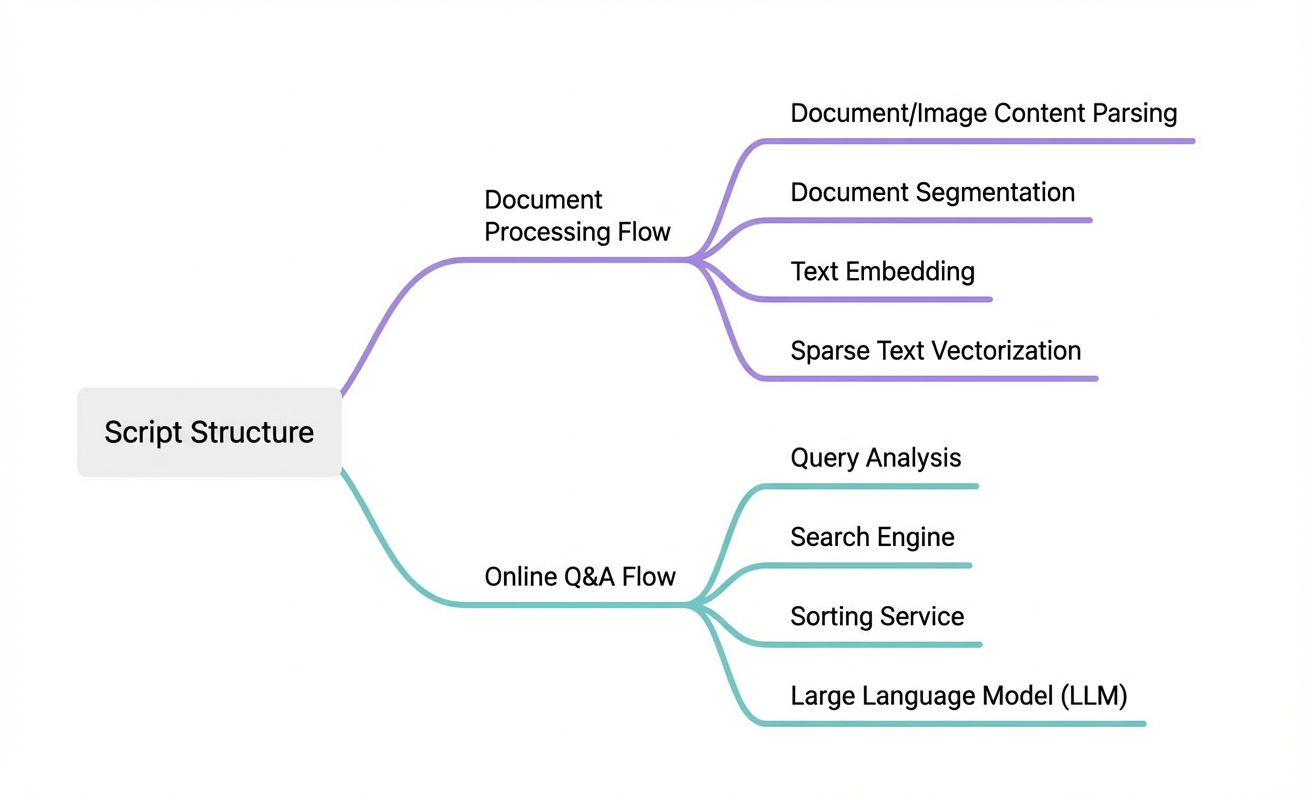
The code is divided into two parts based on the RAG pipeline's runtime flow: Document processing workflow and Online Q&A workflow.
-
First, select your development framework. Then, under Code Query, view the Document processing workflow and Online Q&A workflow. For each, click Copy Code or Download File to save the code to your local machine.
-
AI Search Open Platform provides four development frameworks. This topic uses the Python SDK as an example.
-
Java SDK
-
Python SDK
-
If your application already uses the LangChain framework, select LangChain.
-
If your application already uses the LlamaIndex framework, select LlamaIndex.
2. Adapt the environment and test the RAG pipeline
After downloading the "Document processing workflow" and "Online Q&A workflow" code files to your local machine, you can run the scripts in your local Python environment to test the results.
2.1. Prepare the environment
-
Make sure you are using Python 3.7 or later.
-
Configure your Python development environment and install the required dependencies.
# pip install alibabacloud_searchplat20240529
# pip install alibabacloud_ha3engine_vector
2.2. Configure parameters
You need to add your instance information to both the "Document processing workflow" and "Online Q&A workflow" scripts.
-
AI Search Open Platform configuration
# AI Search Open Platform configuration
api_key = "OS-xxx"
aisearch_endpoint = "default-7l5.platform-cn-shanghai.opensearch.aliyuncs.com"
workspace_name = "default"
service_id_config = {
    "rank": "ops-bge-reranker-larger",
    "text_embedding": "ops-text-embedding-001",
    "text_sparse_embedding": "ops-text-sparse-embedding-001",
    "llm": "deepseek-r1",
    "query_analyze": "ops-query-analyze-001"
}|
Parameter |
Description |
|
api_key |
Your API key. For details, see Manage API keys. |
|
aisearch_endpoint |
The service endpoint. For details, see Obtain service endpoints.
|
|
workspace_name |
The name of the workspace. If you have not created a new workspace, use the default value, |
|
service_id_config |
The IDs of the services you selected on the service selection page.
|
-
OpenSearch Vector Search Edition configuration
# OpenSearch Vector Search Edition configuration
os_vectorstore_host = "ha-cn-xxx.public.ha.aliyuncs.com"
os_vectorstore_instance_id = "ha-cn-xxx"
os_vectorstore_table_name = "ha-cn-xxx_xxx"
os_vectorstore_user_name = "xxx"
os_vectorstore_user_password = "xxx"|
Parameter |
Description |
|
os_vectorstore_host |
The API endpoint of your OpenSearch Vector Search Edition instance. For instructions on how to obtain it, see Instance Management. |
|
os_vectorstore_instance_id |
The ID of your OpenSearch Vector Search Edition instance. For instructions on how to obtain it, see Instance Management. |
|
os_vectorstore_table_name |
The name of the table in your OpenSearch Vector Search Edition instance. |
|
os_vectorstore_user_name |
The username for your OpenSearch Vector Search Edition instance. |
|
os_vectorstore_user_password |
The password for your OpenSearch Vector Search Edition instance. |
In the "Document processing workflow" code, you need to set the document fields in the add2DocumentFields section. Ensure these fields match the fields configured in your OpenSearch Vector Search Edition instance.
# Initialize the HA3 engine client
os_vector_store = client.Client(os_vector_store_config)
try:
    # Outer structure for pushing documents. You can add structures for document operations.
    # Supports one or more document operation contents within the structure.
    documentArrayList = []
    for doc in doc_list:
        sorted_sparse_embedding_result = sorted(doc['sparse_embedding'], key=attrgetter('token_id'))
        token_ids = [sparse_embedding.token_id for sparse_embedding in sorted_sparse_embedding_result]
        token_wights = [sparse_embedding.weight for sparse_embedding in sorted_sparse_embedding_result]
        add2DocumentFields = {
            "id": doc['id'],  # primary key
            "content": doc['content'],
            "vector": doc['embedding'],
            "sparse_indices": token_ids,
            "sparse_values": token_wights
        }
        documentArrayList.append(add2DocumentFields)
        # ...
except Exception as e:
    # ...
The fields in OpenSearch Vector Search Edition must correspond to the fields in add2DocumentFields. These include: id (INT64, primary key), vector (FLOAT, vector field), sparse_indices (UINT32), sparse_values (FLOAT), and content (STRING, requires data preprocessing).
2.3. Test the solution
-
Document processing
Run the document processing workflow script. This script performs tasks such as document parsing, document splitting, text embedding, and writing the vectors to the search engine. Note that the template code uses sample data (OpenSearch product documentation). To process your own knowledge base, replace the document_url with the link to your document.
# Input document URL. The sample document is the OpenSearch product documentation.
document_url = "https://help.aliyun.com/zh/open-search/search-platform/product-overview/introduction-to-search-platform?spm=a2c4g.11186623.0.0.7ab93526WDzQ8z"
After running the code, if you see the "text-embedding done" message, it means the data was successfully written during the document processing stage.
DEBUG:urllib3.connectionpool:http://default-7l5.platform-cn-shanghai.opensearch.aliyuncs.com:80 "POST /v3/openapi/workspaces/default/image-analyze/ops-image-analyze-o
DEBUG:urllib3.connectionpool:http://default-7l5.platform-cn-shanghai.opensearch.aliyuncs.com:80 "GET /v3/openapi/workspaces/default/image-analyze/ops-image-analyze-oc
image analyze ://gw.alicdn.com/tfs/TB1GxwdSXXXXXa.aXXXXXXXXXX-65-70.gif
https://gw.alicdn.com/tfs/TB1GxwdSXXXXXa.aXXXXXXXXXX-65-70.gif is not analyzable.
image analyze ://img.alicdn.com/tfs/TB1..50QpXXXX7XpXXXXXXXXXX-40-40.png
DEBUG:urllib3.connectionpool:http://default-7l5.platform-cn-shanghai.opensearch.aliyuncs.com:80 "GET /v3/openapi/workspaces/default/image-analyze/ops-image-analyze-oc
DEBUG:urllib3.connectionpool:http://default-7l5.platform-cn-shanghai.opensearch.aliyuncs.com:80 "POST /v3/openapi/workspaces/default/image-analyze/ops-image-analyze-o
DEBUG:urllib3.connectionpool:http://default-7l5.platform-cn-shanghai.opensearch.aliyuncs.com:80 "GET /v3/openapi/workspaces/default/image-analyze/ops-image-analyze-oc
DEBUG:urllib3.connectionpool:http://default-7l5.platform-cn-shanghai.opensearch.aliyuncs.com:80 "GET /v3/openapi/workspaces/default/image-analyze/ops-image-analyze-oc
DEBUG:urllib3.connectionpool:http://default-7l5.platform-cn-shanghai.opensearch.aliyuncs.com:80 "GET /v3/openapi/workspaces/default/image-analyze/ops-image-analyze-oc
DEBUG:urllib3.connectionpool:http://default-7l5.platform-cn-shanghai.opensearch.aliyuncs.com:80 "GET /v3/openapi/workspaces/default/image-analyze/ops-image-analyze-oc
text-embedding done
DEBUG:urllib3.connectionpool:Starting new HTTP connection (1): ha-cn-m414281sb01.public.ha.aliyuncs.com:80
OS write response:  {"status":"OK","code":200}
DEBUG:urllib3.connectionpool:http://ha-cn-m414281sb01.public.ha.aliyuncs.com:80 "POST /update/wulongcha/actions/bulk HTTP/1.1" 200 0
DEBUG:alibabacloud_credentials.provider.refreshable:Shutting down executor...
Process finished with exit code 0-
Online Q&A
Run the online Q&A script. Ask a question about the sample document (OpenSearch product documentation), such as "What are the product advantages of AI Search Open Platform?". The LLM will begin its inference process and provide an answer.
/Library/Frameworks/Python.framework/Versions/3.12/bin/python3 /Users/chenjiantao/PycharmProjects/pythonProject/23.py
DEBUG:asyncio:Using selector: KqueueSelector
DEBUG:urllib3.connectionpool:Starting new HTTP connection (1): default-7l5.platform-cn-shanghai.opensearch.aliyuncs.com:80
DEBUG:urllib3.connectionpool:http://default-7l5.platform-cn-shanghai.opensearch.aliyuncs.com:80 "POST /v3/openapi/workspaces/default/query-analyze/ops-query-analyze-0
query analysis rewrite result:What are the product advantages of AI Search Open Platform?
Final answer from the LLM:  <think>Okay, I need to answer the user's question: "What are the product advantages of AI Search Open Platform?" Based on the provided information, I need to extract relevant details from multiple articles to formulate a detailed and organized answer.
First, I see the first article is titled "Product Advantages," which lists four main advantages. The first one is...-
If you see a timeout error when calling the
get_text_generation_asyncmethod, you can increase the timeout value in the AI Search Open Platform client configuration. Example:protocol="http",read_timeout=20000,connect_timeout=20000# Generate AI Search Open Platform client config = Config(bearer_token=api_key, endpoint=aisearch_endpoint, protocol="http",read_timeout=20000,connect_timeout=20000) ops_client = Client(config=config) -
The script reranks the retrieved documents. In the sample script,
top_kis set to 8. You can change the value ofrerank_top_kto adjust the number of documents returned after reranking. The corresponding code snippet is:# Step 3: Rerank the deduplicated retrieved documents rerank_top_k = 8 score_results = await ops_client.get_document_rank_async(workspace_name, service_id_config["rank"], GetDocumentRankRequest(remove_duplicate_results)) rerank_results = [remove_duplicate_results[item.index] for item in score_results.body.result.scores[:rerank_top_k]]