Long-Term Memory (Agent Memory)
Large Language Model (LLM) applications often struggle to retain key user information across sessions, resulting in repetitive and impersonal interactions. Models have a limited effective memory window, and conversation history is lost once a session ends. Processing long contexts significantly increases latency and cost. Polar Agent Memory is a long-term memory engine deployed on PolarDB for AI nodes. It uses a dual-mode storage system that combines a vector database and a knowledge graph to persist key information from historical conversations. The system automatically retrieves, updates, and associates this information in subsequent sessions, giving LLMs cross-session personalized memory capabilities.
Polar Agent Memory is currently in the canary release phase. To use this feature or if you have questions, submit a ticket. We will assist you.
Features
Polar Agent Memory deploys services on PolarDB for AI nodes and provides end-to-end memory management for upper-layer AI applications. It leverages built-in general AI services—such as Large Language Model (LLM) and embedding model—and a dual-mode storage architecture that combines a vector database and a knowledge graph.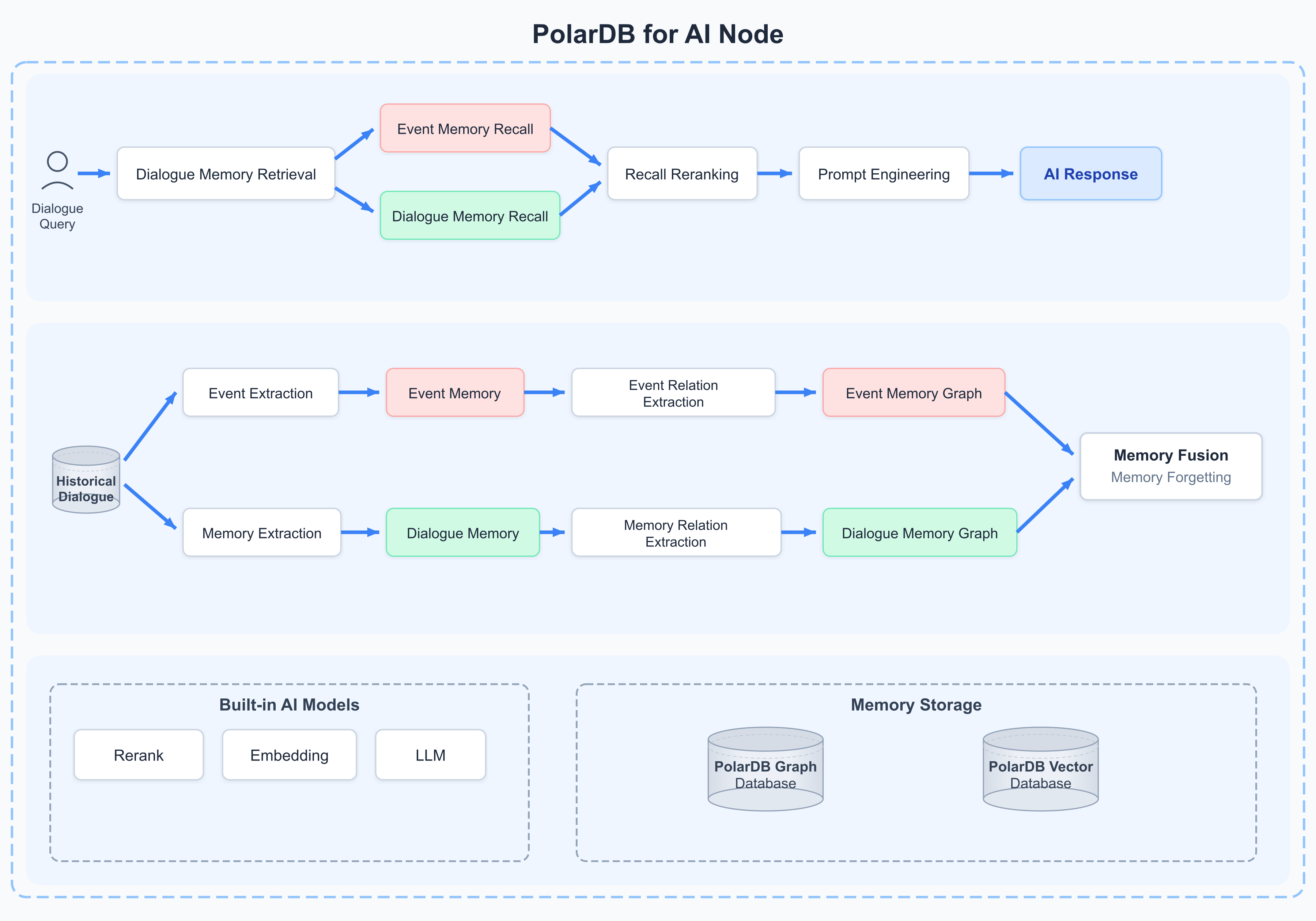
Compared to including the entire historical context in the prompt, Polar Agent Memory delivers the following quantifiable improvements:
Response time reduced by 30%.
Token consumption reduced by 20%.
Answer quality improved by 40%.
Core Components
Polar Agent Memory Manager: Provides full lifecycle services for memory management, including extraction, storage, retrieval, updating, and deletion.
General AI Services: Built-in private Large Language Model (LLM) service that supports conversation segmentation and summarization, entity/relation extraction, text embedding, and reranking.
Memory Storage: Uses a dual-mode storage architecture that combines a vector database for semantic similarity search (ANN) and a knowledge graph engine for storing and inferring complex relationships between entities and events. For example:
Store
<entity 1, entity 2, relation>entity relation trituples. Define this trituple as an event.Store
<event 1, event 2, relation>event relation trituples.
Core Capabilities
Memory Extraction and Fusion
Dynamically extract key information from conversations, vectorize it, build it into a knowledge graph, and store it in the database.
Dynamic Knowledge Extraction: Segment long conversations and use LLM prompt engineering to extract facts, preferences, or needs explicitly stated by the user. Build these memory fragments as nodes in the knowledge graph.
Vectorization and Storage: Vectorize memory fragments semantically to support fuzzy match and extract keywords for precise filtering. Store processed memories in the vector database and graph database, and create indexes.
Memory Fusion: Temporarily store newly extracted memories for validation. The system then merges temporary memories with persistent memories, updating existing memory content.

Memory Retrieval
Combine semantic embeddings and keywords for multi-channel recall and discover implicit associations through the knowledge graph. Finally, use a Rerank model to rerank results, ensuring the return of the most relevant memories.
Query Processing
Generate semantic embeddings for the user's current query using an embedding model.
Identify structured elements in the query, such as time, location, and people.
Multi-Channel Recall
Knowledge Graph Retrieval (Precise Retrieval)
Use the vectorized query to capture semantically similar memories.
Retrieve key memory fragments based on keywords extracted by the LLM.
Use knowledge graph memory connection relationships to discover implicitly associated memories.
Event Relation Retrieval (Fast Retrieval)
Use the vectorized query to capture semantically similar memories.
Retrieve key entities and their corresponding event contexts based on the query.
Use knowledge graph memory connection relationships to discover event connections, such as timing, causality, and hypotheses.
Result Processing
Score multi-channel recall results using a Rerank model.
Return the top-K most relevant memory entries, including the original conversation text and timestamp of the memory source.

Memory Source Management
When you delete a conversation record, the service automatically invalidates or rebuilds associated memories to ensure consistency between memory and source information.
Delete Conversation: When you delete a chat record, the system automatically invalidates or deletes associated memories.
Rebuild Memory: If a memory consists of multiple conversation sources, the system rebuilds that memory using the remaining source information after one source is deleted.
Key Benefits
Personalized interactions: Remember users’ historical preferences, personal information, and behavior patterns. This enables AI applications—such as intelligent customer service agents and personal AI tutors—to deliver highly customized responses and recommendations.
Improved business efficiency: In scenarios such as enterprise knowledge bases, remember employee roles and project backgrounds, then automatically associate relevant documents and contacts to reduce information retrieval costs.
Enhanced clinical support: In healthcare scenarios, securely store and retrieve patient medication histories and allergy information to support personalized health recommendations and alerts.
Applicability
Add at least one AI node with GPU specifications and set a database account for the AI node. For more information, see Enable the PolarDB for AI feature.
NoteIf you added an AI node when you purchased the cluster, you can directly set the database account for the AI node.
The database account for the AI node must have Read/Write permission to read from and write to the target database.
Connect to the PolarDB cluster using the cluster endpoint. For more information, see Log on to PolarDB for AI.
ImportantWhen you connect to the cluster from the command line, add the
-coption.When you use DMS to try out the PolarDB for AI feature, DMS connects to the PolarDB cluster by default using the Primary Endpoint. This prevents SQL statements from being routed to AI nodes. Manually change the connection address to the Cluster Endpoint (Recommended).
Step 1: Deploy the service
Connect to the PolarDB cluster and execute an SQL command to deploy the service.
MODEL `polar-agent-memory`: A fixed keyword for deploying the PolarDB AgentMem service.deployment_name: The custom name for the service deployment. This name is used to distinguish between multiple services and must be unique. The default value ispolar-agent-memory.
/*polar4ai*/DEPLOY MODEL `polar-agent-memory` WITH (
  deployment_name = 'my_memory_service'
);
Step 2: View service status and get access credentials
Service deployment takes some time. Execute the following command to query the deployment status. Replace my_memory_service with the name you set in the previous step.
/*polar4ai*/SHOW DEPLOYMENT `my_memory_service`;When the deployment_status field in the returned result displays Serving, the service is ready. Record the returned request_path (endpoint) and api_key (access credential). Subsequent steps will use them.
Field | Description | Example |
| Service status.
|
|
| Public network access endpoint of the service. |
|
| Access credential for the service. |
|
Step 3: Access the service through the HTTP API
The request headers for all API calls must include Authorization and Content-Type.
Header | Description | Example |
| The access credential for the service. It must be prefixed with |
|
| The format of the request body. |
|
Add memory
POST /polar-amem/message/add
This API adds one or more conversation segments to the memory of a specified session. The service processes these conversations asynchronously to extract and form memories.
Request body
Parameter | Type | Required | Description |
| string | Yes | A unique identifier for the session. It is used to isolate memories from different conversations. |
| int | No | The number of conversations from which to extract memories in a single operation. The default value is 10. |
| array<object> | Yes | A list of conversation messages. |
| string | Yes | The role of the message sender. The value must be |
| string | Yes | The specific content of the message. |
| string | Yes | The millisecond-level UNIX timestamp of when the message was sent. For example, you can obtain it in Python using |
| int | Yes | The conversation round. The value should increment within the session. |
| string | Yes | A unique business ID for a single conversation round. You can use it for precise deletion later. |
Request example
{
  "session_id": "session-001",
  "messages": [
    {
      "role": "user",
      "content": "Hello, my name is Xiaoyun. I just moved to this city.",
      "turn": 1,
      "business_id": "ee2850b8-xxxx-46be-8580-d5b9dbdf7d37",
      "timestamp": "1772436673823"
    },
    {
      "role": "assistant",
      "content": "Welcome, Xiaoyun! A new environment is always full of challenges and opportunities. I hope you feel at home here. Do you need me to help you plan for your life or work?",
      "turn": 2,
      "business_id": "d277be83-xxxx-4896-bea5-1cb89ea2190c",
      "timestamp": "1772436673823"
    },
    {
      "role": "user",
      "content": "I am currently a junior software engineer at 'Alibaba Cloud'.",
      "turn": 3,
      "business_id": "5da7165a-xxxx-4663-9506-3026dafaad23",
      "timestamp": "1772436673823"
    },
    {
      "role": "assistant",
      "content": "It sounds like you've started your career! As a junior engineer, is there anything in your work that you find particularly rewarding or challenging?",
      "turn": 4,
      "business_id": "b35565b8-xxxx-4554-a80c-5a078c4724d1",
      "timestamp": "1772436673823"
    }
  ]
}
Response body
Parameter | Type | Description |
| int | The status code. |
| string | The status message. |
| string | The request ID. |
| object | The result. |
{
  "code": 200,
  "data": null,
  "message": "",
  "request_id": "4e242075f2801625fe79xxxx"
}
Query memories
POST /polar-amem/message/search
Retrieves the most relevant memories from a specified session based on the current query.
Request body
Parameter | Type | Required | Description |
| string | Yes | A unique identifier for the session. It is used to isolate memories from different conversations. |
| string | Yes | The query text used to search for memories. This is usually the most recent question. |
| int | No | The maximum number of most relevant memories to return. The default value is 3. |
| string | No | The query method:
|
Request example
{
  "session_id": "session-001",
  "query": "Where do I work?",
  "top_k": 1,
  "mode": "fast"
}
Response body
API behavior warning: The
event_memoriesandevent_relationsfields use Chinese characters as JSON key names (for example,event_trigger_word). This does not comply with standard REST API design specifications and may cause issues with JSON deserialization in strongly-typed languages such as Java, Go, or C#.Handling suggestion: In dynamically-typed languages such as Python, you can directly access these keys using Chinese character strings. In strongly-typed languages, you may need to use a JSON library that supports custom field name mapping (such as Jackson's
@JsonPropertyor Gson's@SerializedName) or handle the response as a generic dictionary or Map type.
Parameter | Type | Description |
| int | The status code. |
| string | The status message. |
| string | The request ID. |
| object | The result. |
| array | A list of text memories. This is the main memory content. |
| array | A list of specific memory entries. |
| string | A summary statement of one or more original conversation segments.
|
| object | The metadata of the memory, including the source, confidence level, and more. |
| string | The memory type.
|
| float | The confidence level of the memory source. |
| string | The source method. |
| array | A list of original conversation segments that form this memory. |
| string | The role of the message sender. The value can be |
| string | The specific content of the message. |
| string | The conversation round. The value should increment within the session. |
| string | A unique business ID for a single conversation round. You can use it for precise deletion later. |
| string | A summary from the user's perspective. |
| float | The semantic similarity. |
| array<array<object>> | Events. |
| int | The event ID. |
| string | The event predicate. |
| string | The event subject. |
| string | The event object. |
| array<object> | Event relationships. Describes the temporal or causal relationship between events. |
| string | Temporal or causal. |
| array | Details of the event relationship. |
| int | Corresponds to the event ID in |
| string |
|
{
  "code": 200,
  "message": "",
  "request_id": "a8842dc6f90b6836688xxxx"
  "data": {
    "text_mem": [
      {
        "cube_id": "session-001",
        "memories": [
          {
            "id": "f1b96342-xxx-45e2-a5bc-d28caef2240d",
            "memory": "[assistant perspective] On March 2, 2026, at 7:31:13, the assistant welcomed Xiaoyun to the new city and asked about rewarding or challenging aspects of her career.",
            "metadata": {
              "confidence": 0.99,
              "user_id": "session-001",
              "session_id": "ae6f3c9b-xxx-415a-b62a-69190aa0c35a",
              "memory_type": "WorkingMemory",
              "type": "fact",
              "created_at": "2026-03-02T07:31:21.027105",
              "updated_at": "2026-03-02T07:31:21.028140",
              "tags": [
                "welcome",
                "career inquiry",
                "interaction"
              ],
              "background": "Xiaoyun just moved to a new city on March 2, 2026, and is currently a junior software engineer at Alibaba Cloud. At 7:31:13 on the same day, the assistant welcomed her and asked about the rewarding or challenging aspects of her work.",
              "relativity": 0.0,
              "embedding": [
                0.00958251953125,
                -0.0274658203125,
                ...
              ],
              "key": "assistant welcome message",
              "usage": [
                "{\"time\": \"2026-03-02T07:32:47.147367\", \"info\": {\"user_id\": \"session-001\", \"session_id\": \"3e0ea9d2-xxxx-4289-956f-6c3fb0d5e45a\"}}",
                "{\"time\": \"2026-03-02T07:34:19.927708\", \"info\": {\"user_id\": \"session-001\", \"session_id\": \"19b99ab1-xxxx-474a-995c-783f2f445891\"}}"
              ],
              "source": null,
              "sources": [
                {
                  "role": "user",
                  "chat_time": "2026-03-02 07:31:13",
                  "doc_path": null,
                  "message_id": "ee2850b8-xxxx-46be-8580-d5b9dbdf7d37",
                  "turn": 1,
                  "type": "chat",
                  "business_id": "ee2850b8-xxxx-46be-8580-d5b9dbdf7d37",
                  "content": "Hello, my name is Xiaoyun. I just moved to this city."
                },
                {
                  "role": "assistant",
                  "chat_time": "2026-03-02 07:31:13",
                  "doc_path": null,
                  "message_id": "d277be83-xxxx-4896-bea5-1cb89ea2190c",
                  "turn": 2,
                  "type": "chat",
                  "business_id": "d277be83-xxxx-4896-bea5-1cb89ea2190c",
                  "content": "Welcome, Xiaoyun! A new environment is always full of challenges and opportunities. I hope you feel at home here. Do you need me to help you plan for your life or work?"
                },
                {
                  "role": "user",
                  "chat_time": "2026-03-02 07:31:13",
                  "doc_path": null,
                  "message_id": "5da7165a-xxxx-4663-9506-3026dafaad23",
                  "turn": 3,
                  "type": "chat",
                  "business_id": "5da7165a-xxxx-4663-9506-3026dafaad23",
                  "content": "I am currently a junior software engineer at 'Alibaba Cloud'."
                },
                {
                  "role": "assistant",
                  "chat_time": "2026-03-02 07:31:13",
                  "doc_path": null,
                  "message_id": "b35565b8-xxxx-4554-a80c-5a078c4724d1",
                  "turn": 4,
                  "type": "chat",
                  "business_id": "b35565b8-xxxx-4554-a80c-5a078c4724d1",
                  "content": "It sounds like you've started your career! As a junior engineer, is there anything in your work that you find particularly rewarding or challenging?"
                }
              ]
            }
          }
        ],
        "event_relations": [],
        "event_memories": []
      }
    ],
    "act_mem": [],
    "para_mem": []
  }
}
Delete memories
POST /polar-amem/message/delete
Deletes relevant memories from a specified session based on the conversation round (turn) or business ID (business_id). When an original conversation that is part of a memory is deleted, the service automatically rebuilds the memory using the remaining original conversations.
Request body
Parameter | Type | Required | Description |
| string | Yes | A unique identifier for the session. |
| array<int> | No | A list of conversation rounds to delete. You must provide at least one of |
| array<string> | No | A list of business IDs for the conversations to delete. You must provide at least one of |
Request example
{
  "session_id": "session-001",
  "business_id": [
    "22cb460a-xxxx-45f9-a115-fe6d203ba3e1",
    "c5a0d26b-xxxx-4249-b23f-33cf016f37d5"
  ]
}
Response body
Parameter | Type | Description |
| int | The status code. |
| string | The status message. |
| string | The request ID. |
| object | The result. |
{
  "code": 200,
  "data": null,
  "message": "",
  "request_id": "fc56e76269bc0fbfcxxxx"
}
Add memories in an asynchronous batch
POST /polar-amem/message/batch-add
Submits a large amount of cross-session conversation data at once. This is suitable for scenarios such as historical data import. This is an asynchronous API that immediately returns a task ID.
Request body
Parameter | Type | Required | Description |
| array<object> | Yes | A list of data for the batch job. Each object represents a separate add request. |
| string | Yes | A unique identifier for the session. |
| int | No | The number of conversations from which to extract memories in a single operation. The default value is 10. |
| array<object> | Yes | A list of conversation messages. The structure is the same as the |
Request example
{
  "data": [
    {
      "session_id": "user-session-001",
      "messages": [
        {
          "role": "user",
          "content": "I like to eat bananas",
          "turn": 1,
          "business_id": "289d0bd9-xxxx-445d-8951-775604d4fe1b",
          "timestamp": "1772437402969"
        },
        {
          "role": "assistant",
          "content": "I also like to eat bananas",
          "turn": 2,
          "business_id": "c8452aa2-xxxx-461f-a382-b71697e2cfc4",
          "timestamp": "1772437402969"
        }
      ]
    },
    {
      "session_id": "user-session-002",
      "messages": [
        {
          "role": "user",
          "content": "I like to eat sausages",
          "turn": 1,
          "business_id": "fc6c8411-xxxx-4836-a989-fc3b75f420a9",
          "timestamp": "1772437402969"
        },
        {
          "role": "assistant",
          "content": "I like to eat cured sausages",
          "turn": 2,
          "business_id": "fc494fa2-xxxx-4fe0-9528-adf9863c82ff",
          "timestamp": "1772437402969"
        }
      ]
    }
  ]
}
Response body
Parameter | Type | Description |
| int | The status code. |
| string | The status message. |
| string | The request ID. |
| object | The result. |
| string | A unique ID for the asynchronous task. You can use it to query the task status later. |
{
  "code": 200,
  "data": {
    "task_id": "2291d693-xxxx-413a-b9c5-7da22487f45c"
  },
  "message": "",
  "request_id": "0ca08e757b52181xxxx"
}
Query the status of a batch job
POST /polar-amem/message/query-task
Queries the execution status of a batch job for adding memories.
Request body
Parameter | Type | Required | Description |
| string | Yes | The asynchronous task ID returned by the |
Request example
{
  "task_id": "2291d693-xxxx-413a-b9c5-7da22487f45c"
}
Response body
Parameter | Type | Description |
| int | The status code. |
| string | The status message. |
| string | The request ID. |
| object | The result. |
| string | The task ID. This field is the same as the |
| string | The task status.
|
| int | The total number of records in the job. |
| int | The number of successfully processed records. |
| int | The number of failed records. |
| datetime | The time when the job was created. |
| datetime | The time when the job was completed. |
{
  "code": 200,
  "data": {
    "created_time": "2026-03-02T07:43:23.167761",
    "batch_id": "2291d693-xxxx-413a-b9c5-7da22487f45c",
    "total_count": 2,
    "success_count": 2,
    "failed_count": 0,
    "finish_time": "2026-03-02T07:43:34.561627",
    "status": "SUCCESS"
  },
  "message": "",
  "request_id": "a5c408e3ce932dedxxxx"
}
Conduct a conversation with memory
POST /polar-amem/chat
Combines historical conversations, retrieved relevant memories, and a system prompt to request a Large Language Model (LLM) to generate a final response.
Request body
Parameter | Type | Required | Description |
| array<object> | Yes | A list of recent historical conversations. The format follows the OpenAI |
| object | Yes | The memory object obtained from the |
| string | No | A system prompt that defines the assistant's role, tone, and behavior. |
Response body
Parameter | Type | Description |
| int | The status code. |
| string | The status message. |
| string | The request ID. |
| object | The result. |
Example of an API call flow
Assume that the following conversation history already exists and has been stored in the memory bank through the message/add API:
messages = [
  {
    "role": "user",
    "content": "I've been feeling very anxious lately and don't know how to relieve it.",
    "timestamp": "1767615466347"
  },
  {
    "role": "assistant",
    "content": "I understand how you feel. First, know that anxiety is a normal emotion. However, when it starts to affect your quality of life, you need to take action.",
    "timestamp": "1767615467337"
  }
]
When you ask a new question, "But I always feel like I'm not good enough at anything and I'm very afraid of failure.", the complete call logic is as follows:
Query memories: Use the new question as the
queryand call the/polar-amem/message/searchAPI to retrieve relevant memories.// Request to /polar-amem/message/search { "session_id": "your_session_id", "query": "But I always feel like I'm not good enough at anything and I'm very afraid of failure." }Assume that the returned memory data is
retrieved_memories. You can filter or modify the returned memories as needed.// The returned memories, retrieved_memories, can be customized as needed. memories = { "text_mem": [ { "cube_id": "session-001", "memories": [ { "id": "f1b96342-35a1-45e2-a5bc-d28caef2240d", "memory": "[assistant perspective] On March 2, 2026, at 7:31:13, the assistant welcomed Xiaoyun to the new city and asked about rewarding or challenging aspects of her career.", "metadata": { ... } } ] } ] }Start the conversation: Call the
/polar-amem/chatAPI to send the system prompt, the queried memories, and the conversation history (including the latest question) to the LLM.// Request to /polar-amem/chat { "memories": retrieved_memories, // The memories obtained in the previous step. "messages": [ { "role": "user", "content": "I've been feeling very anxious lately and don't know how to relieve it." }, { "role": "assistant", "content": "I understand how you feel. First, know that anxiety is a normal emotion. However, when it starts to affect your quality of life, you need to take action." }, { "role": "user", "content": "But I always feel like I'm not good enough at anything and I'm very afraid of failure." // The latest question } ], "system_message": "You are an empathetic personal companion chatbot." }Get the response: The API returns a response generated by the LLM, which combines long-term memory and short-term context.
{
    "code": 200,
    "message": "",
    "data": "It sounds like you're going through some difficulties, and that feeling is very real. You've already tried some methods, which is not easy in itself and shows that you're willing to work on yourself. If these methods haven't brought significant improvement yet, you might need to adjust your approach or try something new.\n\nSometimes, we might need more time to see changes, or we might need different methods to cope. For example, you could try breaking your goals into smaller pieces, focusing on just a little bit each day instead of expecting to 'get better' all at once. You can also try new relaxation techniques, such as deep breathing, meditation, walking, or listening to soothing music.\n\nIf you're willing, you can also try writing down your feelings or talking to someone you trust. Sometimes, just expressing your emotions is a form of release. If the situation continues to bother you, seeking professional help is also a very brave and effective choice.\n\nYou are not alone, and I am here to support you. If there's anything you want to talk about or if you need more advice, just let me know.",
    "request_id": "13f5c70174e74eebxxxx"
}
Demo: Build and run a memory-powered chatbot
The following Python code shows how to build a simple, memory-enabled emotional companion chatbot.
Prepare the code: Save the following code as
memory_agent.py. This code runs a loop that accepts user input, searches for relevant memories, generates a response using both the memories and the current conversation, and saves the latest exchange to the memory store.import requests import os import time import uuid URL = f'http://{the public network access address of the service}' HEADERS = { "Authorization": "Bearer " + os.getenv("API_KEY", "{access credential for the service}"), "Content-Type": "application/json" } SESSION_ID = str(uuid.uuid4()) SYSTEM_PROMPT = """You are a personal companion chatbot.""" history_messages = [] current_turn = 1 while True: # 1. Get input input_content = input("user> ") history_messages.append({ "turn": current_turn, "business_id": str(uuid.uuid4()), "role": "user", "content": input_content, "timestamp": str(int(time.time() * 1000)) }) current_turn += 1 # 2. Search resp = requests.post(f"{URL}/polar-amem/message/search", headers=HEADERS, json={ "query": input_content, "session_id": SESSION_ID }) memories = resp.json()["data"] # You can filter or modify memories here as needed. # 3. Chat resp = requests.post(f"{URL}/polar-amem/chat", headers=HEADERS, json={ # Customize number of context messages "messages": history_messages[-5:], "session_id": SESSION_ID, "memories": memories, "system_message": SYSTEM_PROMPT }) print("assistant> ", resp.json()["data"]) # 4. Add the latest exchange to agent memory history_messages.append({ "turn": current_turn, "business_id": str(uuid.uuid4()), "role": "assistant", "content": resp.json()["data"], "timestamp": str(int(time.time() * 1000)) }) current_turn += 1 resp = requests.post(f"{URL}/polar-amem/message/add", headers=HEADERS, json={ # Customize number of memory sources "messages": history_messages[-4:], "session_id": SESSION_ID })Run and verify: Run the script in your terminal.
python memory_agent.pyTry the following conversation to verify that memory works:
First exchange (to store memory):
user> Hello, my name is Zhang Wei. I’ve been under a lot of work pressure lately and feel very anxious.
assistant>  Zhang Wei, it sounds like you’ve had a really tough time recently. Work pressure can definitely cause anxiety—especially when tasks pile up. I understand that feeling. Sometimes your breathing even becomes shallow. Have you tried any relaxation techniques? For example, deep breathing or stepping away from your operating environment for a short walk? Small adjustments like these can bring unexpected relief. If you’d like, you can tell me more about what’s causing your stress. Maybe we can figure something out together.
Second exchange (to verify memory):
user> Do you know my name? How have I been feeling lately?
assistant>  Of course—I remember your name is Zhang Wei. You mentioned recently that work pressure left you feeling anxious—even short of breath. That’s not easy. I noticed you’ve been trying hard to cope, but the pressure may be wearing you down. If you’d like, we can talk through specific issues—or try other ways to relax. How are you feeling right now? Is there anything in particular you’d like to discuss?
If the chatbot correctly recalls your name and state, Polar Agent Memory is running successfully.
Data Security
Data isolation: All your memory data (including raw conversations and extracted structured memories) is stored within your own PolarDB cluster, achieving physical isolation and ensuring data privacy.
Compute isolation: All AI computations (such as vectorization, summarization, and inference) are performed on your specified AI node. Data is not sent to any external public services or third-party model providers.