Build an LLM-driven dedicated chatbot using RDS for PostgreSQL
The arrival of ChatGPT has demonstrated the potential of large language models (LLMs) and generative artificial intelligence in many fields. These fields include content writing, image generation, code optimization, and information search. LLMs have become powerful tools for individuals and businesses, evolving into super applications and creating new ecosystems. This topic describes how to build a dedicated chatbot using ApsaraDB RDS for PostgreSQL.
You can join the RDS for PostgreSQL plugin exchange DingTalk group (ID: 103525002795) to ask questions, exchange ideas, provide feedback, and obtain more information about plugins.
Background
More enterprises and individuals want to use LLMs and generative AI to build AI-powered products for their specific domains. LLMs perform well on general problems, but they have limitations when dealing with specialized knowledge and real-time information. This is because of their training data and how they generate responses. In the information age, businesses frequently update their knowledge bases. These vertical-domain knowledge bases, which include documents, images, and audio/video files, might be private or confidential. To build a domain-specific AI product on an LLM, a business must continuously train the model with its own knowledge base.
Two common methods are available:
Fine-tuning: Provide new datasets to fine-tune the weights of an existing model. You can continuously update the input to adjust the output and achieve the desired result. This method is suitable for small datasets or for training on specific task types or styles. However, the training cost is high.
Prompt-tuning: Adjust the input prompts instead of modifying the model weights to adjust the output. Compared with fine-tuning, prompt-tuning has lower computing costs, requires fewer resources and less training time, and is more flexible.
The advantages of building a chatbot on ApsaraDB RDS for PostgreSQL are as follows:
ApsaraDB RDS for PostgreSQL has a pgvector plugin. You can use it to convert real-time content or domain-specific knowledge into vector embeddings. Storing these embeddings in ApsaraDB RDS for PostgreSQL speeds up vector searches. This improves the Q&A accuracy for your private data.
As an advanced open source transactional processing (TP) engine, ApsaraDB RDS for PostgreSQL handles both online user interactions and data storage tasks at the same time. For example, it can manage conversation history, interaction records, and chat timestamps. The versatility of ApsaraDB RDS for PostgreSQL simplifies the process of building private business services and lightens the architecture.
The pgvector plugin is widely used in the developer community and in open source PostgreSQL databases. Tools such as the ChatGPT Retrieval Plugin also quickly added support for PostgreSQL. This shows that ApsaraDB RDS for PostgreSQL has strong ecosystem support and a broad application base for vector retrieval, offering users many tools and resources.
This topic uses the open source vector index plugin for ApsaraDB RDS for PostgreSQL, pgvector, and the embedding capabilities of OpenAI to show you how to build a dedicated chatbot.
Quick start
Alibaba Cloud provides a template in Cloud Architect Design Tools (CADT). This template comes with a pre-deployed ECS instance and an ApsaraDB RDS for PostgreSQL database, with all necessary packages pre-installed. This helps you quickly get started with your dedicated chatbot. To try it out, go to the CADT console and see Build an enterprise-grade dedicated chatbot using a large language model and ApsaraDB RDS for PostgreSQL.
Prerequisites
An RDS PostgreSQL instance that meets the following conditions has been created:
The instance runs PostgreSQL 14 or later.
The minor engine version of the instance is 20230430 or later.
NoteFor more information, see Upgrade the major engine version and Update the minor engine version.
The dedicated chatbot in this topic is based on the open source pgvector plugin for ApsaraDB RDS for PostgreSQL. Make sure you fully understand its usage and basic concepts. For more information, see pgvector user guide.
The dedicated chatbot in this topic uses OpenAI capabilities. Make sure you have a
Secret API Keyand that your network environment can access OpenAI. The code examples in this topic are deployed on an ECS instance in the Singapore region.The sample code in this topic uses Python. Make sure you have a Python development environment. This example uses Python
3.11.4and PyCharm2023.1.2.
Related concepts
Embedding
Embedding is the process of mapping high-dimensional data to a low-dimensional representation. In machine learning and natural language processing (NLP), embedding is often used to represent discrete symbols or objects as points in a continuous vector space.
In NLP, word embedding is a common technique. It maps words to real-number vectors so that computers can better understand and process text. Through word embedding, the semantic and grammatical relationships between words can be represented in the vector space.
OpenAI provides an Embeddings feature.
Implementation principles
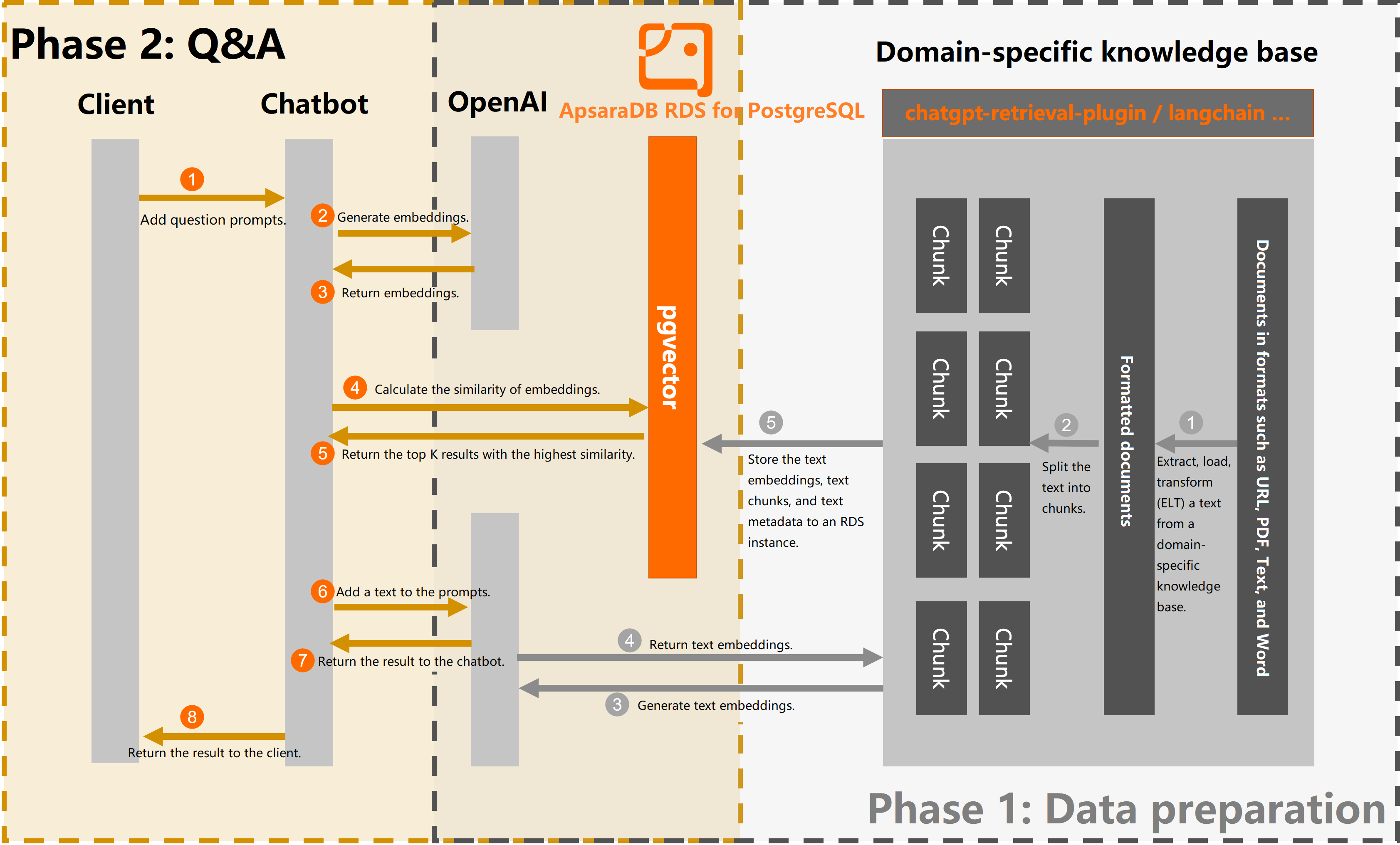
The process of building the dedicated chatbot has two phases:
Phase 1: Data preparation
Extract and chunk information from the knowledge base: Extract relevant text from the domain knowledge base and process it into chunks. This can include splitting long text into paragraphs or sentences, or extracting keywords or entities. This process helps organize and manage the knowledge base content.
Call an LLM interface to generate embeddings: Use an interface provided by an LLM, such as OpenAI, to input the text chunks and generate corresponding text embeddings. These embeddings capture the semantic and contextual information of the text and provide a basis for later search and matching.
Store embedding information: Store the generated text embeddings, text chunks, and associated metadata in the ApsaraDB RDS for PostgreSQL database.
Phase 2: Q&A
A user asks a question.
Create an embedding for the question using the embedding interface provided by OpenAI.
Use pgvector to filter for document chunks in the ApsaraDB RDS for PostgreSQL database that have a similarity score above a certain threshold and return the results.
The following flowchart shows the process:
Procedure
Phase 1: Data preparation
This topic uses the text content from the Create an RDS for PostgreSQL instance document as an example. The content is split and stored in an ApsaraDB RDS for PostgreSQL database. You must prepare your own domain-specific knowledge base.
The key to the data preparation phase is to convert domain-specific knowledge into text embeddings and to store and match this information effectively. Using the powerful semantic understanding capabilities of LLMs, you can obtain high-quality answers and suggestions related to your specific domain. Some current open source frameworks, such as LangChain and OpenAI's open source ChatGPT Retrieval Plugin, allow you to easily upload and parse knowledge base files in formats such as URL, Markdown, PDF, and Word. Both LangChain and the ChatGPT Retrieval Plugin already support PostgreSQL with the pgvector extension as their backend vector database. This makes integration with your ApsaraDB RDS for PostgreSQL instance easy. With this integration, you can complete the data preparation for your domain knowledge base in Phase 1. You can also fully use the vector indexing and similarity search features of pgvector for efficient text matching and queries.
Create a test database. This example uses
rds_pgvector_test.CREATE DATABASE rds_pgvector_test;Connect to the test database and create the pgvector plugin.
CREATE EXTENSION IF NOT EXISTS vector;Create a test table to store the knowledge base content. This example uses
rds_pg_help_docs.CREATE TABLE rds_pg_help_docs ( id bigserial PRIMARY KEY, title text, -- Document title description text, -- Description doc_chunk text, -- Document chunk token_size int, -- Token count of the document chunk embedding vector(1536)); -- Text embedding informationCreate an index on the embedding column to optimize and accelerate queries.
CREATE INDEX ON rds_pg_help_docs USING ivfflat (embedding vector_cosine_ops) WITH (lists = 100);NoteFor more information about creating an index on a vector column, see pgvector user guide.
In PyCharm, create a project, open the Terminal, and run the following command to install the required dependencies.
pip install openai psycopg2 tiktoken requests beautifulsoup4 numpyCreate a
.pyfile to split the knowledge base document and store it in the database. This example usesknowledge_chunk_storage.py. The sample code is as follows:NoteIn the sample code below, the custom splitting method only splits the knowledge base document by a fixed number of characters. You can use methods provided by open source frameworks such as LangChain and OpenAI's open source ChatGPT Retrieval Plugin for splitting. The quality of the documents in the knowledge base and the chunking results have a significant impact on the final output.
import openai
import psycopg2
import tiktoken
import requests
from bs4 import BeautifulSoup

EMBEDDING_MODEL = "text-embedding-ada-002"
tokenizer = tiktoken.get_encoding("cl100k_base")

# Connect to the RDS for PostgreSQL database
conn = psycopg2.connect(database="<database_name>",
                        host="<instance_endpoint>",
                        user="<username>",
                        password="<password>",
                        port="<port>")
conn.autocommit = True

# OpenAI API key
openai.api_key = '<Secret API Key>'

# Custom splitting method (for example only)
  def get_text_chunks(text, max_chunk_size):
    chunks_ = []
    soup_ = BeautifulSoup(text, 'html.parser')

    content = ''.join(soup_.strings).strip()

    length = len(content)
    start = 0
    while start < length:
        end = start + max_chunk_size
        if end >= length:
            end = length

        chunk_ = content[start:end]
        chunks_.append(chunk_)

        start = end

    return chunks_


# Specify the web page to split
url = 'https://help.aliyun.com/document_detail/148038.html'

response = requests.get(url)
if response.status_code == 200:
    # Get the web page content
    web_html_data = response.text
    soup = BeautifulSoup(web_html_data, 'html.parser')
    # Get the title (H1 tag)
    title = soup.find('h1').text.strip()

    # Get the description (content of the p tag with class='shortdesc')
    description = soup.find('p', class_='shortdesc').text.strip()

    # Split and store
    chunks = get_text_chunks(web_html_data, 500)
    for chunk in chunks:
        doc_item = {
            'title': title,
            'description': description,
            'doc_chunk': chunk,
            'token_size': len(tokenizer.encode(chunk))
        }

        query_embedding_response = openai.Embedding.create(
            model=EMBEDDING_MODEL,
            input=chunk,
        )

        doc_item['embedding'] = query_embedding_response['data'][0]['embedding']

        cur = conn.cursor()
        insert_query = '''
        INSERT INTO rds_pg_help_docs
            (title, description, doc_chunk, token_size, embedding) VALUES (%s, %s, %s, %s, %s);
        '''

        cur.execute(insert_query, (
            doc_item['title'], doc_item['description'], doc_item['doc_chunk'], doc_item['token_size'],
            doc_item['embedding']))

        conn.commit()

else:
    print('Failed to fetch web page')
Run the Python program.
Log on to the database and run the following command to check whether the knowledge base content has been split and stored as vector data.
SELECT * FROM rds_pg_help_docs;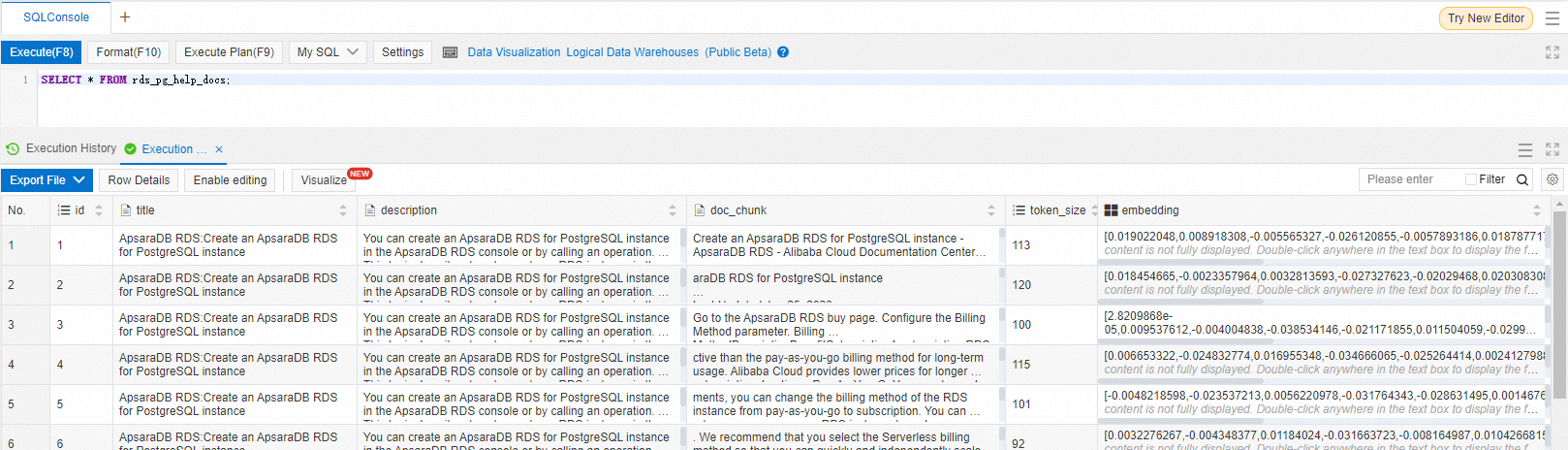
Phase 2: Q&A
In the Python project, create a
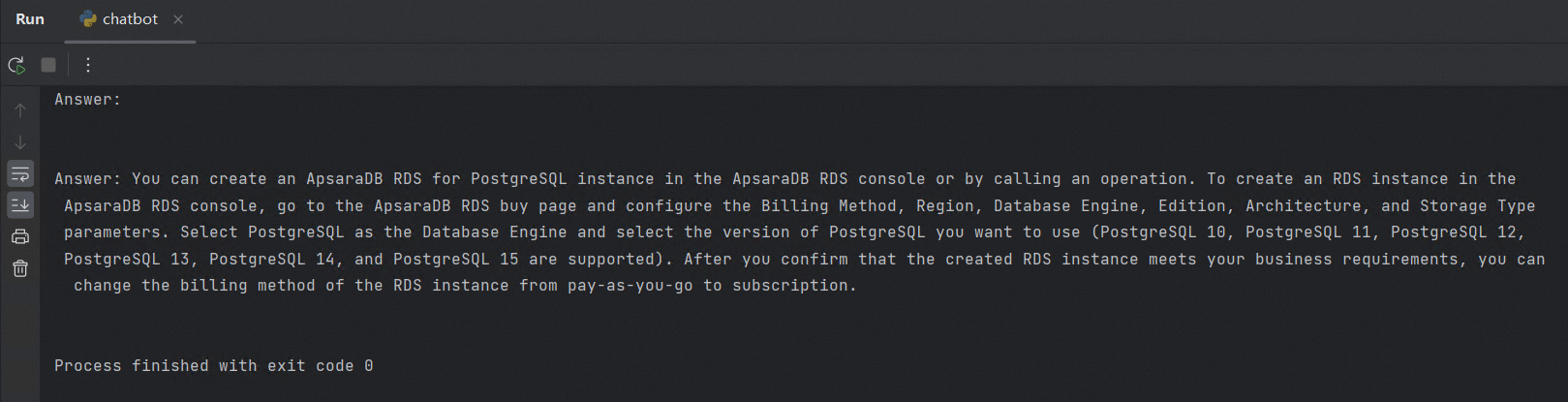
.pyfile to create a question, compare its similarity with the knowledge base content in the database, and return the result. This example useschatbot.py.import openai import psycopg2 from psycopg2.extras import DictCursor GPT_MODEL = "gpt-3.5-turbo" EMBEDDING_MODEL = "text-embedding-ada-002" GPT_COMPLETIONS_MODEL = "text-davinci-003" MAX_TOKENS = 1024 # OpenAI API key openai.api_key = '<Secret API Key>' prompt = 'How to create an RDS for PostgreSQL instance' prompt_response = openai.Embedding.create( model=EMBEDDING_MODEL, input=prompt, ) prompt_embedding = prompt_response['data'][0]['embedding'] # Connect to the RDS for PostgreSQL database conn = psycopg2.connect(database="<database_name>", host="<instance_endpoint>", user="<username>", password="<password>", port="<port>") conn.autocommit = True def answer(prompt_doc, prompt): improved_prompt = f""" Answer the following question based on the provided document and steps: (1) First, analyze the content of the document to see if it is relevant to the question. (2) Second, use only the content from the document for the reply. Be as detailed as possible and output in markdown format. (3) Finally, if the question is not related to RDS for PostgreSQL, reply with "I am not very knowledgeable about topics other than RDS for PostgreSQL." Document: \"\"\" {prompt_doc} \"\"\" Question: {prompt} """ response = openai.Completion.create( model=GPT_COMPLETIONS_MODEL, prompt=improved_prompt, temperature=0.2, max_tokens=MAX_TOKENS ) print(f"{response['choices'][0]['text']}\n") similarity_threshold = 0.78 max_matched_doc_counts = 8 # Filter out document chunks with a similarity greater than a certain threshold using pgvector similarity_search_sql = f''' SELECT doc_chunk, token_size, 1 - (embedding <=> '{prompt_embedding}') AS similarity FROM rds_pg_help_docs WHERE 1 - (embedding <=> '{prompt_embedding}') > {similarity_threshold} ORDER BY id LIMIT {max_matched_doc_counts}; ''' cur = conn.cursor(cursor_factory=DictCursor) cur.execute(similarity_search_sql) matched_docs = cur.fetchall() total_tokens = 0 prompt_doc = '' print('Answer: \n') for matched_doc in matched_docs: if total_tokens + matched_doc['token_size'] <= 1000: prompt_doc += f"\n---\n{matched_doc['doc_chunk']}" total_tokens += matched_doc['token_size'] continue answer(prompt_doc,prompt) total_tokens = 0 prompt_doc = '' answer(prompt_doc,prompt)After you run the Python program, a corresponding answer appears in the run window, similar to the following:
NoteYou can optimize the splitting method and the question prompt to obtain more accurate and complete answers. This topic provides an example only.
Summary
If a dedicated knowledge base is not connected, OpenAI's answer to the question "How do I create an RDS for PostgreSQL instance?" is often irrelevant to Alibaba Cloud. For example:
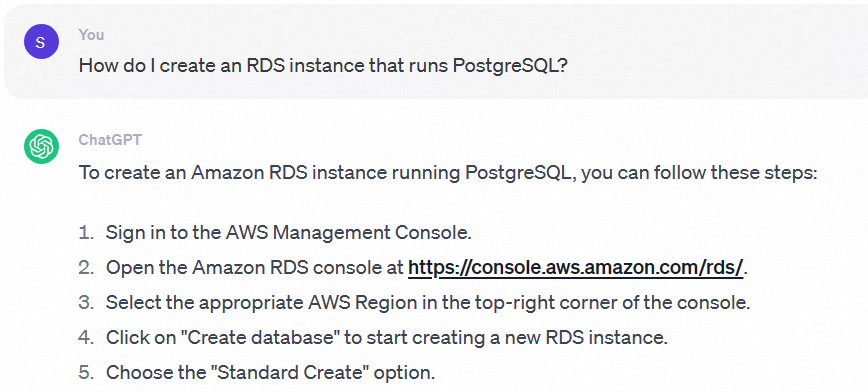
After connecting to the dedicated knowledge base stored in the ApsaraDB RDS for PostgreSQL database, the answer to the question "How do I create an RDS for PostgreSQL instance?" will be specific to Alibaba Cloud's ApsaraDB RDS for PostgreSQL.
Based on the preceding example, it is clear that ApsaraDB RDS for PostgreSQL is fully capable of building an LLM-based knowledge base for a vertical domain.