CreateTask
Description: Creates a service-based task.
Endpoint: /rpa/openapi/raas/task/CreateTask
Method: POST
Usage notes:
Task queue limits: The maximum number of pending tasks is 100 per
robotand 1,000 perrobot group. If these limits are exceeded, the API call to create a task fails.Request parameters must be passed in the request body.
This API supports idempotent calls. For more information, see Idempotent Call.
Limitations:
For details about API call limits, see Call limits.
Request parameters:
Parameter | Type | Required | Example | Description |
AppId | String | Yes | 2e8e34bf-****-****-****-e1d0add3d95e |
Note Unlike local robots, which have application permission restrictions, a service-based task can run any RPA application within the tenant. |
AppParams | Array of JSON. Serialization format: simple | No | [{"name":"param1","value":""},{"name":"param2","value":""}] | The input parameters that are required to run the application. The maximum size is 40 KB. |
AllocateMode | String | No | auto |
|
PackId | String | No | bv2XPrDl |
|
RobotId | String | No | 11DC81******4E463B1E538436035653 |
|
TaskPriority | Integer | No | 85 | The task priority. An integer from 1 to 100, where 100 is the highest priority. The default value is 50. |
CallbackUrl | String | No | http://example.callback.com/example | The callback URL. You must provide a full URL that supports HTTP or HTTPS. Callbacks are sent as POST requests only. The RPA service initiates callback requests. Ensure network connectivity between the RPA service and your callback URL. The system retries a failed callback up to three times. You can view the callback results on the Task Details page in the |
AppVersion | String | No | 1.0.0 | The version of the application to run.
|
Callback details:
If you specify a valid HTTP or HTTPS callback URL when you create a task, the system triggers a callback when the task status changes. The system retries a failed callback up to three times.
If your callback API requires authentication, we recommend that you use HTTPS and pass a token in the query string of the URL. For example: https://example.callback.com/example?token=12345.
In a callback request, the
Content-Typeheader isapplication/x-www-form-urlencoded.Callbacks are sent as POST requests only, with the payload in the request body.
The body of the callback request has the following structure:
Parameter | Type | Example | Description |
taskId | String | 537a6966-****-****-****-f80976e2f5a6 | The task ID. |
taskStatus | String | complete | The new status of the task. Valid values:
|
taskResult | String | cnBh5pyN5******L5py65Zmo5Lq6 |
|
Example body:
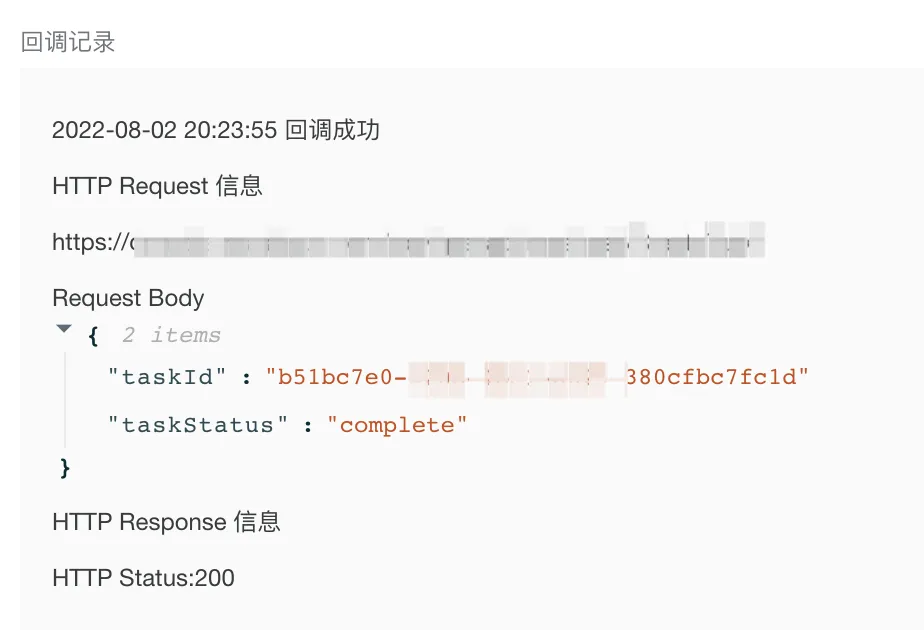
taskId=537a6966-****-****-****-f80976e2f5a6&taskStatus=running&taskResult=cnBh5pyN5Yqh******65Zmo5Lq6You can view callback records initiated by the RPA service in the RPA console under Service-based Robots > Task Management > Task Details, as shown in the following figure.
Response parameters:
For information about the common response structure, see API Reference overview. The following table describes the fields in the data object.
Parameter | Type | Example | Description |
TaskId | String | 48bb0d07-****-****-****-cbe75d646bb5 | The task ID. |
Request example:
POST /rpa/openapi/raas/task/CreateTask?<common_request_parameters> HTTP/1.1Host: console-rpa.aliyun.comContent-Type: application/json{ "AllocateMode": "auto", "AppId": "0925860d-b652-****-****-****-446d0cdb2ff5", "PackId": "nO5494bS", "TaskPriority": 39}Response example:
{
	"requestId": "95ea6575-****-****-****-4f949626b3fd",
	"success": true,
	"code": 0,
	"msg": "Success",
	"msgCode": "result.success",
	"data": {
		"TaskId": "cde18c63-****-****-****-8623299a0116"
	},
	"pager": null,
	"instanceId": null
}