Usage
When automating tasks, in addition to entering text, you may also need to use hotkeys or key combinations.
Programmatic development mode
For browser operations (for example, in Chrome), use input_hotkeys.
For window operations (for example, in a Windows application), use input_hotkeys.
Visual development mode
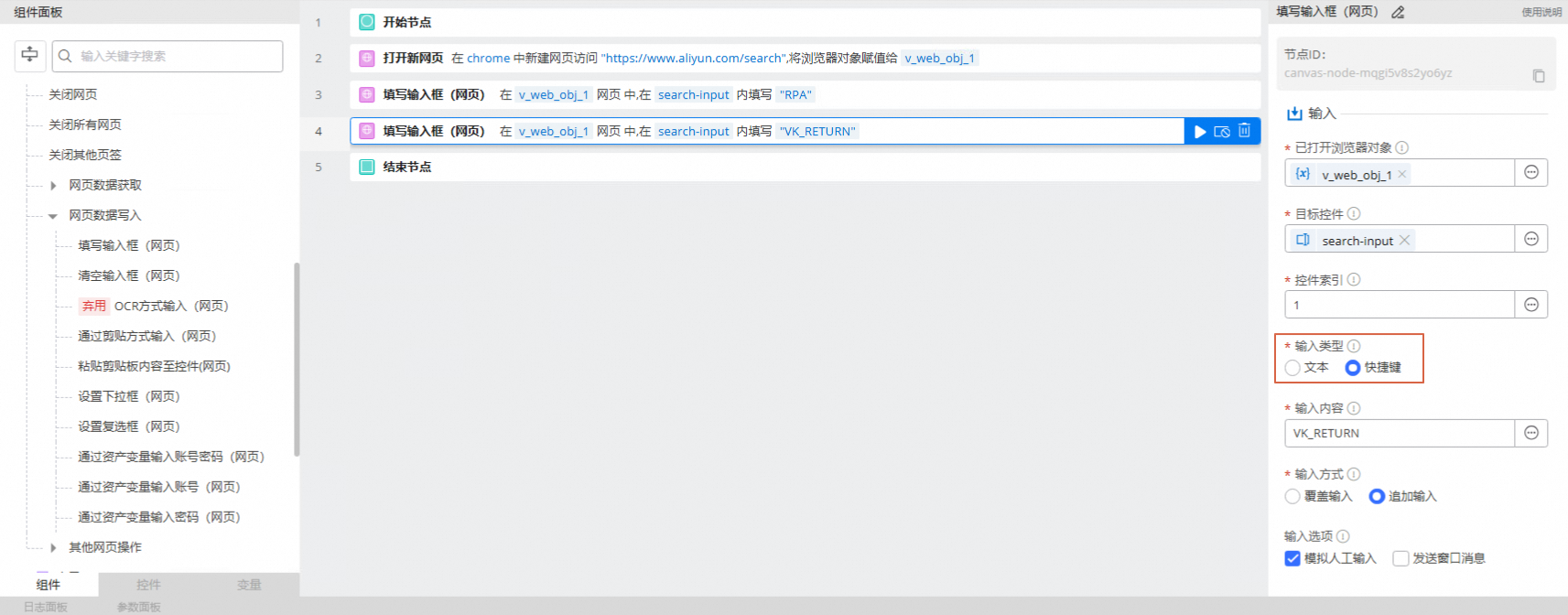
For browser operations, select 'hotkey' as the input type in the fill input box (web page) component.
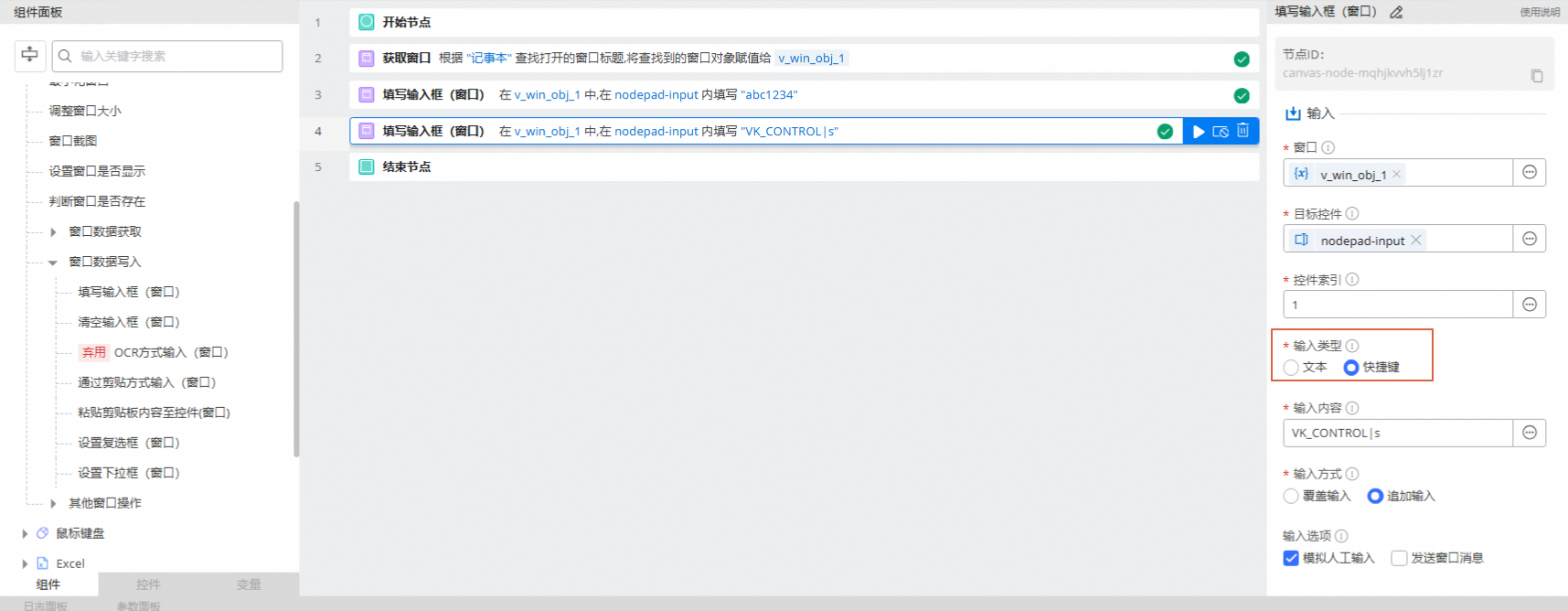
For window operations, select 'hotkey' as the input type in the fill input box (window) component.
Examples
Browser operation: This example shows how to search for "RPA" in the Alibaba Cloud search box and press the return key to submit, instead of clicking the search button.
Code-based development
from rpa.core import *
from rpa.utils import *
import rpa4 as rpa # Use the V4 engine

def start():
    page = rpa.app.chrome.create("https://www.aliyun.com/search")
    # 'search-input' is the control name for the search text box
    page.input_text_simulated("search-input","RPA")
    # 'VK_RETURN' is the virtual-key code for the return key
    page.input_hotkeys("search-input","VK_RETURN")
Visual development
Window operation: This example shows how to enter text in Notepad and then press the Ctrl+S hotkey to save the file.
Code-based development
from rpa.core import *
from rpa.utils import *
import rpa4 as rpa # Use the V4 engine

def start():
    # Get an open Notepad window
    wnd = rpa.ui.win32.catch("Notepad", mode="substr")
    # Enter text into the edit area of Notepad
    wnd.input_text("nodepad-input", "abc1234")
    # Use Ctrl+S to save
    wnd.input_hotkeys("nodepad-input", "VK_CONTROL|s")
Visual development
Virtual-key codes
Use in combination
Combine virtual key codes with the pipe symbol |:
Combination | Result |
VK_CONTROL|a | Ctrl + A |
VK_MENU|a | Alt + A |
VK_SHIFT|a | Shift + A |
VK_LWIN|r | WIN + R |
VK_CONTROL|VK_SHIFT|s | Ctrl + Shift + S |
Virtual Key Code List
Virtual-key code | Corresponding key |
VK_LBUTTON | Left mouse button |
VK_RBUTTON | Right mouse button |
VK_CANCEL | Control-break processing |
VK_MBUTTON | Middle mouse button (three-button mouse) |
VK_XBUTTON1 | X1 mouse button |
VK_XBUTTON2 | X2 mouse button |
VK_BACK | BACKSPACE key |
VK_TAB | TAB key |
VK_CLEAR | CLEAR key |
VK_RETURN | ENTER key |
VK_SHIFT | SHIFT key |
VK_CONTROL | CTRL key |
VK_MENU | ALT key |
VK_PAUSE | PAUSE key |
VK_CAPITAL | CAPS LOCK key |
VK_KANA | IME Kana mode |
VK_HANGUEL | IME Hanguel mode (retained for compatibility; use VK_HANGUL) |
VK_HANGUL | IME Hangul mode |
VK_JUNJA | IME Junja mode |
VK_FINAL | IME final mode |
VK_HANJA | IME Hanja mode |
VK_KANJI | IME Kanji mode |
VK_ESCAPE | ESC key |
VK_CONVERT | IME conversion |
VK_NONCONVERT | IME nonconversion |
VK_ACCEPT | IME accept |
VK_MODECHANGE | IME mode change request |
VK_SPACE | SPACEBAR key |
VK_PRIOR | PAGE UP key |
VK_NEXT | PAGE DOWN key |
VK_END | END key |
VK_HOME | HOME key |
VK_LEFT | LEFT ARROW key |
VK_UP | UP ARROW key |
VK_RIGHT | RIGHT ARROW key |
VK_DOWN | DOWN ARROW key |
VK_SELECT | SELECT key |
VK_PRINT | PRINT key |
VK_EXECUTE | EXECUTE key |
VK_SNAPSHOT | PRINT SCREEN key |
VK_INSERT | INS key |
VK_DELETE | DEL key |
VK_HELP | HELP key |
0 | 0 key |
1 | 1 key |
2 | 2 key |
3 | 3 key |
4 | 4 key |
5 | 5 key |
6 | 6 key |
7 | 7 key |
8 | 8 key |
9 | 9 key |
a | A key |
b | B key |
c | C key |
d | D key |
e | E key |
f | F key |
g | G key |
h | H key |
i | I key |
j | J key |
k | K key |
l | L key |
m | M key |
n | N key |
o | O key |
p | P key |
q | Q key |
r | R key |
s | S key |
t | T key |
u | U key |
v | V key |
w | W key |
x | X key |
y | Y key |
z | Z key |
VK_LWIN | Left Windows key (Natural keyboard) |
VK_RWIN | Right Windows key (Natural keyboard) |
VK_APPS | Application key (Natural keyboard) |
VK_SLEEP | Computer Sleep key |
VK_NUMPAD0 | Numeric keypad 0 key |
VK_NUMPAD1 | Numeric keypad 1 key |
VK_NUMPAD2 | Numeric keypad 2 key |
VK_NUMPAD3 | Numeric keypad 3 key |
VK_NUMPAD4 | Numeric keypad 4 key |
VK_NUMPAD5 | Numeric keypad 5 key |
VK_NUMPAD6 | Numeric keypad 6 key |
VK_NUMPAD7 | Numeric keypad 7 key |
VK_NUMPAD8 | Numeric keypad 8 key |
VK_NUMPAD9 | Numeric keypad 9 key |
VK_MULTIPLY | Multiply key |
VK_ADD | Add key |
VK_SEPARATOR | Separator key |
VK_SUBTRACT | Subtract key |
VK_DECIMAL | Decimal key |
VK_DIVIDE | Divide key |
VK_F1 | F1 key |
VK_F2 | F2 key |
VK_F3 | F3 key |
VK_F4 | F4 key |
VK_F5 | F5 key |
VK_F6 | F6 key |
VK_F7 | F7 key |
VK_F8 | F8 key |
VK_F9 | F9 key |
VK_F10 | F10 key |
VK_F11 | F11 key |
VK_F12 | F12 key |
VK_F13 | F13 key |
VK_F14 | F14 key |
VK_F15 | F15 key |
VK_F16 | F16 key |
VK_F17 | F17 key |
VK_F18 | F18 key |
VK_F19 | F19 key |
VK_F20 | F20 key |
VK_F21 | F21 key |
VK_F22 | F22 key |
VK_F23 | F23 key |
VK_F24 | F24 key |
VK_NUMLOCK | NUM LOCK key |
VK_SCROLL | SCROLL LOCK key |
VK_LSHIFT | Left SHIFT key |
VK_RSHIFT | Right SHIFT key |
VK_LCONTROL | Left CONTROL key |
VK_RCONTROL | Right CONTROL key |
VK_LMENU | Left ALT key |
VK_RMENU | Right ALT key |
VK_BROWSER_BACK | Browser Back key |
VK_BROWSER_FORWARD | Browser Forward key |
VK_BROWSER_REFRESH | Browser Refresh key |
VK_BROWSER_STOP | Browser Stop key |
VK_BROWSER_SEARCH | Browser Search key |
VK_BROWSER_FAVORITES | Browser Favorites key |
VK_BROWSER_HOME | Browser Start and Home key |
VK_VOLUME_MUTE | Volume Mute key |
VK_VOLUME_DOWN | Volume Down key |
VK_VOLUME_UP | Volume Up key |
VK_MEDIA_NEXT_TRACK | Next Track key |
VK_MEDIA_PREV_TRACK | Previous Track key |
VK_MEDIA_STOP | Stop Media key |
VK_MEDIA_PLAY_PAUSE | Play/Pause Media key |
VK_LAUNCH_MAIL | Start Mail key |
VK_LAUNCH_MEDIA_SELECT | Start Media Select key |
VK_LAUNCH_APP1 | Start Application 1 key |
VK_LAUNCH_APP2 | Start Application 2 key |
VK_OEM_1 | Used for miscellaneous characters; it varies by keyboard. |
VK_OEM_PLUS | For any country/region, the "+" key |
VK_OEM_COMMA | For any country/region, the "," key |
VK_OEM_MINUS | For any country/region, the "-" key |
VK_OEM_PERIOD | For any country/region, the "." key |
VK_OEM_2 | Used for miscellaneous characters; it varies by keyboard. |
VK_OEM_3 | Used for miscellaneous characters; it varies by keyboard. |
VK_OEM_4 | Used for miscellaneous characters; it varies by keyboard. |
VK_OEM_5 | Used for miscellaneous characters; it varies by keyboard. |
VK_OEM_6 | Used for miscellaneous characters; it varies by keyboard. |
VK_OEM_7 | Used for miscellaneous characters; it varies by keyboard. |
VK_OEM_8 | Used for miscellaneous characters; it varies by keyboard. |
VK_OEM_102 | The angle bracket key or the backslash key on the RT 102-key keyboard |
VK_PROCESSKEY | IME PROCESS key |
VK_PACKET | Used to pass Unicode characters as if they were keystrokes. It is the low-order word of a 32-bit virtual-key value used for non-keyboard input methods. For more information, see the remarks for KEYBDINPUT, SendInput, WM_KEYDOWN, and WM_KEYUP. |
VK_ATTN | Attn key |
VK_CRSEL | CrSel key |
VK_EXSEL | ExSel key |
VK_EREOF | Erase EOF key |
VK_PLAY | Play key |
VK_ZOOM | Zoom key |
VK_NONAME | Reserved |
VK_PA1 | PA1 key |
VK_OEM_CLEAR | Clear key |