OCR for Chinese ID card recognition
1. Component introduction
Required preceding component: None
Recommended subsequent component: Conditional Branch. You can use a conditional branch to check if the OCR call succeeded and to determine the subsequent flow.
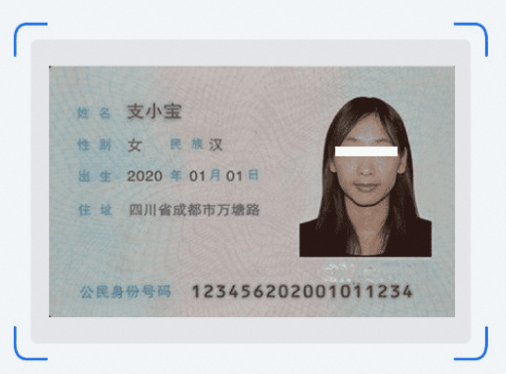
Use this component to recognize various fields on the front and back of a Chinese ID card using OCR (example).
2. Inputs
For more information about each input, see the help text on the component's panel in the application flow editor.
3. Outputs
For more information about each output, see the help text on the component's panel in the application flow editor.
3.1. Key API return results
This output returns a dictionary of key results from the API call. The following table describes the key-value pairs in the dictionary.
Key |
Key description |
Value data type |
type |
Type (face or back) |
String |
name |
Name (front) |
String |
sex |
Gender (front) |
String |
ethnicity |
Ethnicity (front) |
String |
birthDate |
Date of birth (front) |
String |
address |
Address (front) |
String |
idNumber |
ID number (front) |
String |
issueAuthority |
Issuing authority (back) |
String |
validPeriod |
Validity period (back) |
String |
3.2. Error information
This output returns the error code and error message as a string. For more information, see the Alibaba Cloud OCR Error Center.
https://next.api.aliyun.com/document/ocr-api/2021-07-07/errorCode
4. Component usage example
4.1. Component configuration example
For AI engine, select Alibaba Cloud OCR.
In the Path of the image file to recognize field, enter the path of the image file. The following figure shows an example.
Keep the default values for the advanced options.
4.2. Example execution result
5. Flow example
5.1. Build the flow
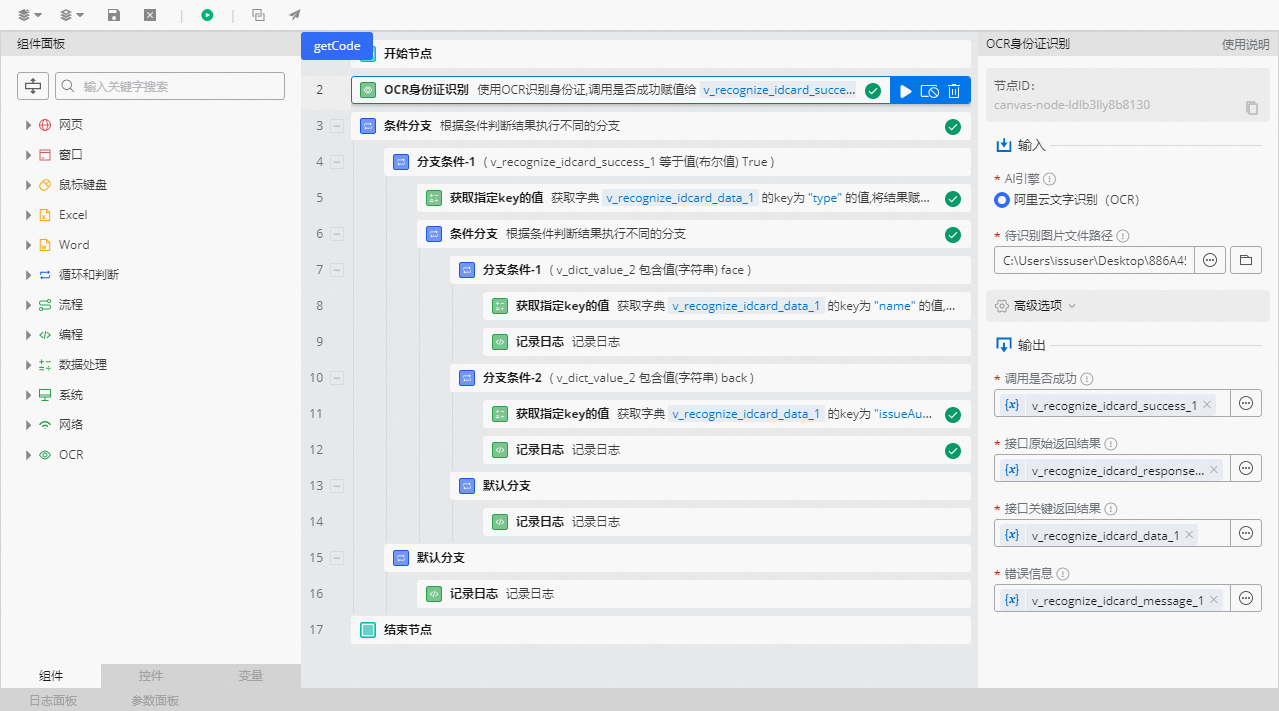
Use the OCR for Chinese ID card recognition component to select the path of the image file to recognize.
Use the Conditional Branch component to determine if the OCR call succeeded. Set the branch condition so that v_recognize_table_success_1 equals the Boolean value True.
In the branch for a failed call, use the Log Record component to print the error message.
In the branch for a successful call, use the Get Value of Specified Key component to retrieve the value of the type key from the v_recognize_table_data_1 results dictionary. The type key indicates the side of the ID card: 'face' for the front and 'back' for the back.
Use the Conditional Branch component to check the side of the ID card. Set one branch condition for when the type variable equals the string 'face' to identify the front side. Add another branch condition for when the type variable equals the string 'back' to identify the back side.
In branch condition 1 (the 'face' branch), use the Get Value of Specified Key component to retrieve the value of a specified key from the v_recognize_table_data_1 results dictionary. For example, retrieve the value of the name key.
Use the Log Record component to print the recognized key value.
In branch condition 2 (the 'back' branch), use the Get Value of Specified Key component to retrieve the values of specified keys, such as issueAuthority and validPeriod, from the v_recognize_table_data_1 results dictionary.
Use the Log Record component to print the recognized key values.
In the default branch, use the Log Record component to record the value of v_recognize_table_data_1.
5.2. Execution result
As shown in the following figure, after the OCR component call succeeds, the recognition results are displayed in the log panel.