Click mouse
1. Component Introduction
Prerequisites: None
Use this component to simulate a mouse click.
2. Inputs
For more information about the input parameters, see the component's help text in the ROS Visual Editor.
3. Outputs
For more information about the output parameters, see the component's help text in the ROS Visual Editor.
4. Component usage example
4.1. Configuration example
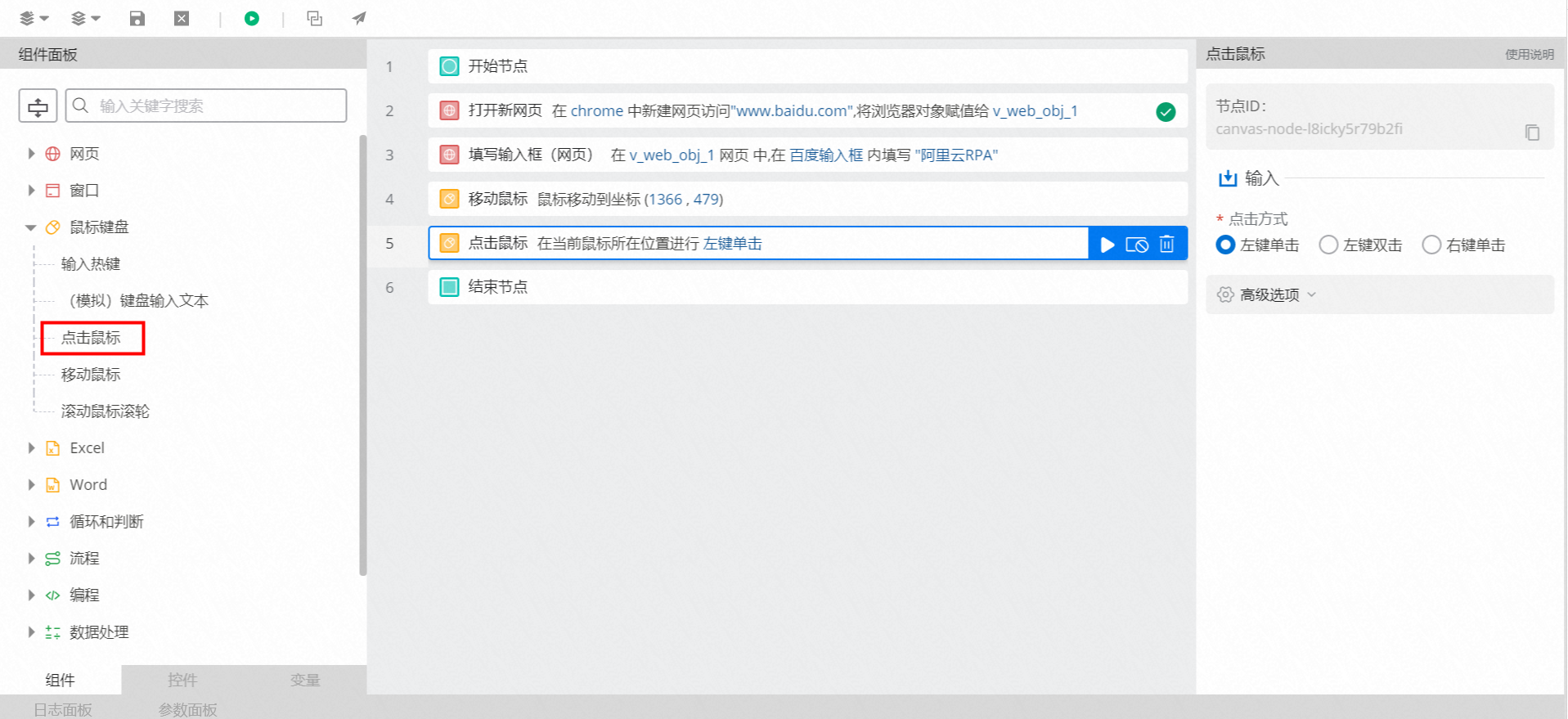
Set Click type to Left-click. This is the default option.
Keep the default values for the advanced options.
4.2. Example execution results
None
5. Example flow
Setup flow
Use the Open new web page component to open Baidu in a Chrome browser.
Use the Fill in input box (Web) component to enter "Alibaba Cloud RPA" into the search box.
Use the Move mouse component to move the mouse pointer to the Baidu Search button.
Use the Click mouse component to click the Baidu Search button.
Result
The flow opens Baidu in a Chrome browser and searches for "Alibaba Cloud RPA", as shown in the following figure.