Execute JS
1. Overview
Prerequisites: Open New Web Page or Get Opened Web Page
This component executes a JavaScript script on a specified web page. It supports Chrome, Edge, and Internet Explorer (IE) browsers.
2. Inputs
For details on each input, refer to the component panel in the visual editor.
3. Outputs
For details on each output, refer to the component panel in the visual editor.
4. Usage example
4.1. Configuration example
In the
opened browser objectfield, select v_web_obj_1, which is the output from a prerequisite component (Open New Web Page or Get Opened Web Page).In the
JavaScript scriptfield, enteralert("Alibaba Cloud RPA test").Keep the default values for the advanced options.
4.2. Result
The component pops up an alert box in the Chrome browser.
5. Example flow
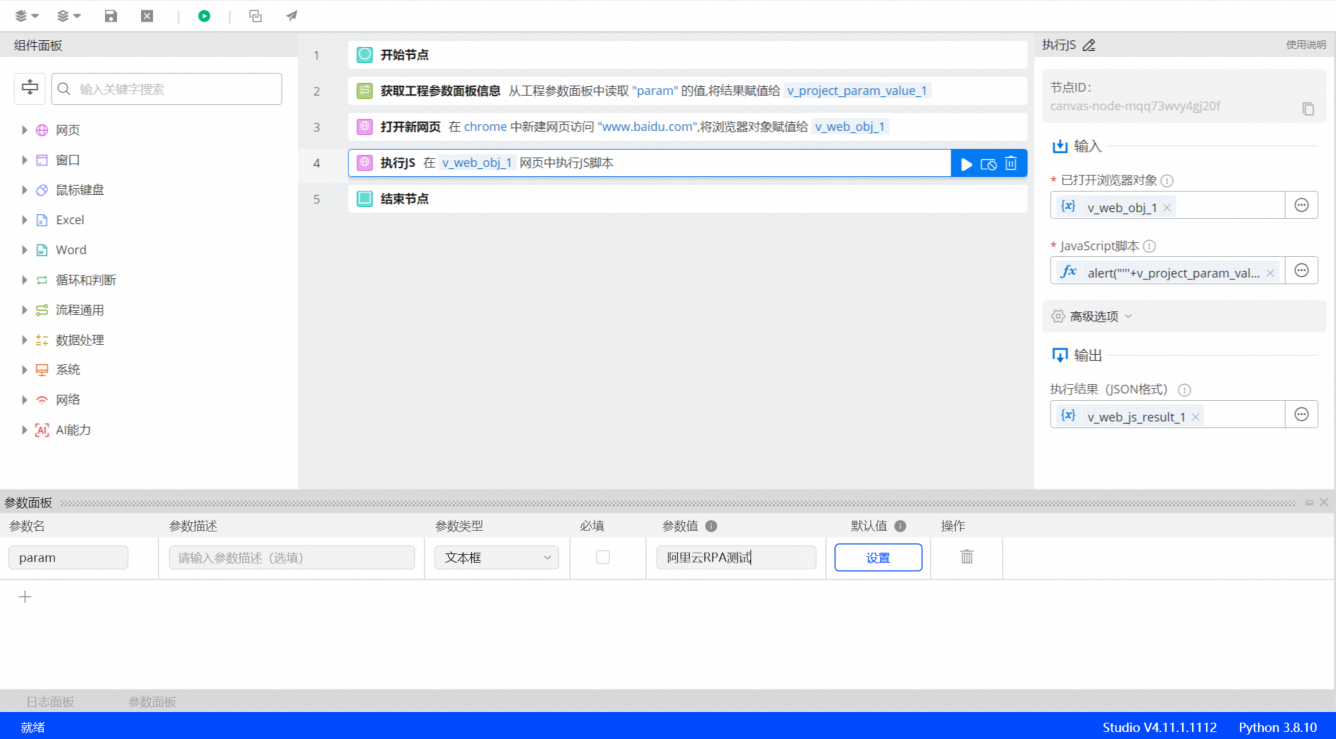
Build the flow
In the Get Project Panel Information component, enter the name of the specified parameter from the parameter panel.
Use the Open New Web Page component to open a Chrome browser and navigate to Baidu.
In the Execute JS component, in the JavaScript script field, use the expression editor to enter
alert("'''+v_project_param_value_1+'''").
Result
The flow opens the Baidu page in a Chrome browser and pops up an alert box on the page. The text for the alert box is retrieved from the parameter panel.