Close
close()
Description
Close the browser object
Code sample: rpa.app.se360.SE360Tab.close
# This method requires the Alibaba Cloud RPA se360 extension to be installed and enabled.
# Call this method on an SE360Tab instance object.
# Example:
page = rpa.app.se360.create('www.aliyun.com')
page.close()
Navigate
navigate(url, wait=True, timeout=100)
Description
Navigates to a specified link.
Parameters
url<string> The URL to open.
wait<bool>Whether to wait for the load to complete.
timeout<int>The timeout period. Default: 100 s.
Code sample - rpa.app.se360.SE360Tab.navigate
# Note: This method requires the se360 extension for Alibaba Cloud RPA to be installed and enabled.
# Call this method on an SE360Tab instance object.
# Code example:
url = 'www.aliyun.com'
page = rpa.app.se360.create(url)
page.navigate('help.aliyun.com/document_detail/175379.html')
Back
back(wait=True, timeout=100)
Method Description
browser back button
Parameters
wait<bool> - Specifies whether to wait for loading to complete.
timeout<int> The timeout period. Defaults to 100s.
Example: RPA.app.se360.SE360Tab.back
# Requires the Alibaba Cloud RPA se360 plugin to be installed and enabled.
# Must be called on an SE360Tab instance.
# Code example:
url = 'www.aliyun.com'
page = rpa.app.se360.create(url)
page.navigate('help.aliyun.com/document_detail/175379.html')
page.back()
Foreword
forward(wait=True, timeout=100)
Method
Forward
Parameters
wait<bool>Specifies whether to wait until loading is complete.
timeout<int>The timeout period. Default: 100s.
Example: rpa.app.se360.SE360Tab.forward-
# Note: This method requires the Alibaba Cloud RPA se360 extension to be installed and enabled.
# You must call this method on an SE360Tab instance object.
# Code sample:
url = 'www.aliyun.com'
page = rpa.app.se360.create(url)
page.navigate('help.aliyun.com/document_detail/175379.html')
page.back()
page.forward()
Activate
activate()
Description
Activation page
Sample call: rpa.app.se360.SE360Tab.activate
# Note: The Alibaba Cloud RPA se360 extension must be installed and enabled to use this method.
# Call this method on an SE360Tab instance object.
# Code example:
url = 'www.aliyun.com'
page = rpa.app.se360.create(url)
page.activate()
URL
url()
Method
Obtain the URL.
Return value
Returns a url<str>
Code sample: rpa.app.se360.SE360Tab.url
# Requires the se360 extension for Alibaba Cloud RPA to be installed and enabled.
# Must be called on an SE360Tab instance object.
# Code example:
page = rpa.app.se360.create('www.aliyun.com')
url = page.url()
UI term extraction
title()
Method
Get the title.
Response parameters
Returns the title<str>
Code example
# Requires the Alibaba Cloud RPA se360 extension to be installed and enabled.
# Call this method on an SE360Tab instance.
# Code example:
page = rpa.app.se360.create('www.aliyun.com')
title = page.title()
Reload
reload(bypass_cache=False, wait=True, timeout=100)
Description
Refresh this page.
Parameters
bypass_cache<bool>Specifies whether to bypass the cache.
wait<bool>Whether to wait until loading is complete.
timeout<int>The timeout in seconds. Defaults to 100.
Example: rpa.app.se360.SE360Tab.reload
# This method requires the se360 extension for Alibaba Cloud RPA to be installed and enabled.
# Call this method on an SE360Tab instance object.
# Code example:
page = rpa.app.se360.create('www.aliyun.com')
page.reload()
wait_load_completed
wait_load_completed(timeout=100)
Description
Waits for the page to load.
Parameters
timeout<int>The timeout period, in seconds. Defaults to 100.
Sample call: rpa.app.se360.SE360Tab.wait_load_completed
# Requires the se360 extension for Alibaba Cloud RPA to be installed and enabled.
# Call this method on an SE360Tab instance.
# Code example:
page = rpa.app.se360.create('www.aliyun.com')
page.wait_load_completed()
get_cookie
get_cookie()
Method description
Gets all cookies for the current website.
Return value
Returns all cookies for the current website.<list>
Code Sample: rpa.app.se360.SE360Tab.get_cookie
# Note: This method requires the se360 extension for Alibaba Cloud RPA to be installed and enabled.
# Call this method on an SE360Tab instance.
# Code example:
page = rpa.app.se360.create('www.aliyun.com')
cookie = page.get_cookie()
Copy
copy()
Method description
Copy the current page.
Return value
Indicates whether the operation was successful.<bool>
Example: rpa.app.se360.SE360Tab.copy
# Notes:
# 1. This method requires the Alibaba Cloud RPA se360 extension to be installed and enabled.
# 2. This method only executes the copy command. You must first select the content.
# 3. This method copies the content to the clipboard.
# The following code sample shows how to select text by double-clicking a cell and then copy it:
page = rpa.app.se360.create('https://help.aliyun.com/document_detail/175379.html')
page.double_click('queryClientViews-se360')
page.copy()
Paste
paste()
Description
Paste on the current page.
Return value
Indicates whether the operation was successful.<boolean>
Sample code: rpa.app.se360.SE360Tab.paste
# Notes:
# 1. This method requires the Alibaba Cloud RPA se360 extension to be installed and enabled.
# 2. This method only pastes. Use another method to select the destination area first.
# 3. This method pastes the latest content from the clipboard into the target area.
# The following code shows how to copy a cell's content, click the search box, and then paste:
page = rpa.app.se360.create('https://help.aliyun.com/document_detail/175379.html')
page.double_click('queryClientViews-se360')
page.copy()
page.click('document-search-box-se360')
page.paste()
Cut
cut()
Description
Cuts from the current page.
Return value
Indicates whether the operation was successful<boolean>
Sample code - rpa.app.se360.SE360Tab.cut-
# Notes:
# 1. To use this method, the Alibaba Cloud RPA se360 extension must be installed and enabled.
# 2. This method only performs a cut operation. Content must be selected first using other methods. (This action has no effect if the content is not cuttable.)
# 3. This method writes the cut content to the system clipboard.
# Code example: First, manually open the Baidu home page and enter some text in the input box.
# The script then double-clicks the input box to select the text and performs the cut operation.
page = rpa.app.se360.catch('www.baidu.com',mode='url')
page.double_click('Baidu input box-se360')
page.cut()
execute_js
execute_js(code, element=None, index=1, timeout=10)
Description
Execute JS code
Parameters
code<str>The JavaScript code to execute.
element<str>The element in whose domain the JavaScript is executed, for cross-domain operations.
index<int>The index of the control to select when multiple are found.
timeout<int>The timeout period.
Return value
Execution result: a JSON string<str>
Example: rpa.app.se360.SE360Tab.execute_js
# Note: This method requires the se360 extension for Alibaba Cloud RPA to be installed and enabled.
# Call this method on an SE360Tab instance.
# Code example:
js_code = """
    function test(){
    var div1 = document.getElementById("su").getAttribute('%s');
    return(div1)
    } ;
result = test() ;
console.log(result) ;
alert(result);
return result;
"""%'value'

url = 'www.baidu.com'
page = rpa.app.se360.create(url)

value = page.execute_js(js_code)
print(value)
Table
table(value, type='index', return_type='text', parent_element=None)
Method
Get tables
Parameters
type<str>Match type
Optional:
index: Matches by index.
text: Matches by text content.
html: Matches by HTML content.
return_type<str>The return type.
Options:
text: The text format.html: The html format.
Return value
Returns the matched table as a two-dimensional array or an HTML<list>.
Call Sample: rpa.app.se360.SE360Tab.table
# Notes:
# 1. To use this method, you must install and enable the se360 extension for Alibaba Cloud RPA.
# 2. This method retrieves a `table` element from the web page by its index (starting from 1) or a regular expression.
# The following example retrieves the first table on the web page (the first `table` tag in the HTML source):
page = rpa.app.se360.create('https://help.aliyun.com/document_detail/175379.html')
table_data = page.table(1)
Scroll
scroll(height=0, element=None, index=1, parent_element=None, timeout=10, direction='top')
Description
Scroll the page.
Parameters
height<int>Specifies the height to scroll the page. If omitted, the page scrolls to the bottom.
element<str>The control.
index<int>Index of the control to select if multiple controls match.
parent_element<Element>The parent element.
timeout<int>The timeout duration.
direction<str>Specifies the direction of the scrollbar.
options:
left: scroll left
top: scroll down
Sample call: rpa.app.se360.SE360Tab.scroll
# Notes:
# 1. This method requires the Alibaba Cloud RPA se360 extension to be installed and enabled.
# 2. This method scrolls the page to the bottom if called without parameters or with a parameter set to 0.
# Code example:
page = rpa.app.se360.create('https://help.aliyun.com/document_detail/175379.html')
page.scroll()
# To scroll a specific element on the page, such as a list, pass parameters such as `height` and `element`. For example:
page.scroll(height=200, element='scroll_list_bar', index=1, parent_element=None, timeout=10, direction='top')
The control to record is the scrolling list itself.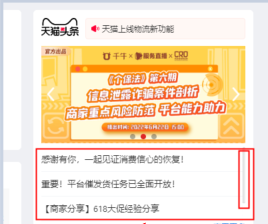
Download by URL
download_by_url(url, path, wait=True, complete_timeout=120)
Method Description
To download a file from a URL, first go to se360://settings/ and deselect "Ask where to save each file before downloading".
Parameters
url<str>The download URL for the file.
path<str>The destination path for the file.
complete_timeout<int>The timeout for the operation.
wait<bool>Whether to wait for completion.
Sample: rpa.app.se360.SE360Tab.download_by_url
# The se360 extension for Alibaba Cloud RPA must be installed and enabled.
# Code example: This code downloads the file to the specified path.
url = 'www.cninfo.com.cn'
page = rpa.app.se360.create(url)
download_url = 'www.cninfo.com.cn/new/announcement/download?bulletinId=1209275224&announceTime=2021-02-10'
download_path = r'D:\Alibaba-SW.pdf'
page.download_by_url(download_url,download_path)
get_element_by_name
get_element_by_name(element, index=1, parent_element=None, timeout=10)
Method
GetObject
Parameters
element<str>The control.
index<int>The index of the control, used when multiple are found.
parent_element<Element>The parent element.
timeout<int>Timeout duration.
Return value
Returns a control object<Element>.
Example: rpa.app.se360.SE360Tab.get_element_by_name
# Notes:
# 1. This method requires the se360 extension for Alibaba Cloud RPA to be installed and enabled.
# 2. Use the capture control feature to capture the elements on the page.
# Code example:
url = 'https://www.baidu.com/'
page = rpa.app.se360.create(url)
element = page.get_element_by_name('Baidu_Search_Button-se360')
text = element.text()
get_element_by_css
get_element_by_css(css, index=1, parent_element=None, timeout=10)
Description
Retrieves a control using a CSS expression.
Parameters
css<str>CSS selector
index<int>The index of the control to use if multiple exist.
parent element<str>The parent element.
timeout<int>The time limit.
Return value
Returns an <Element>
Code sample: rpa.app.se360.SE360Tab.get_element_by_css
# Notes:
# 1. This method requires the se360 extension for Aliyun RPA to be installed and enabled.
# 2. This method locates an element using a standard css selector.
# Code example:
url = 'https://help.aliyun.com/document_detail/175379.html'
page = rpa.app.se360.create(url)
css_selector = "span.lake-fontsize-11" # Represents a <span> tag with a class value of 'lake-fontsize-11'.
element = page.get_element_by_css(css_selector)
text = element.text()
Count
count(element, parent_element=None)
Method
Get the number of controls.
Parameters
element<str>The UI control
parent_element<str>The parent element.
Code sample: rpa.app.se360.SE360Tab.count
# Notes:
# 1. To use this method, install and enable the Alibaba Cloud RPA se360 extension.
# 2. Use this method to count matching controls that have been captured.
# Code example:
url = 'www.aliyun.com'
page = rpa.app.se360.create(url)
element_count = page.count('Login button-se360')
wait_loaded
wait_loaded(element, index=1, parent_element=None, timeout=10, ignore_error=True)
Description
Wait for the control to load.
Parameters
element<str>Specifies the control.
index<int>The index of the control to use when multiple controls are present.
parent_element<str>The parent element.
timeout<int>Timeout period.
ignore_error<bool>Whether to ignore errors.
Code sample: rpa.app.se360.SE360Tab.wait_loaded
# Notes:
# 1. This method requires the se360 extension for Alibaba Cloud RPA to be installed and enabled.
# 2. Before using this method, ensure you have captured the page element using the capture control feature.
# Code example:
page = rpa.app.se360.create('www.taobao.com')
flag = page.wait_loaded('Taobao logo')
wait_disappear
wait_disappear(element, index=1, parent_element=None, timeout=10)
Description
Wait for the control to disappear
Parameters
element<str>the control element
index<int>The index of the control to use when multiple matches are found.
parent_element<str>The parent control.
timeout<int>The timeout period.
Example: rpa.app.se360.SE360Tab.wait_disappear
# Notes:
# 1. To use this method, you must install and enable the se360 extension for Alibaba Cloud RPA.
# 2. Before using this method, ensure you have captured the page element using capture control.
# Code example:
page = rpa.app.se360.create('www.taobao.com')
page.wait_disappear('Taobao logo')
handle_javascript_dialog
handle_javascript_dialog(value='ok', text=None)
Description
Handling JavaScript pop-ups
Parameters
value<str>The dialog box handling action.
Optional:
OK: Click OK.
Cancel: Click Cancel.
text<str>The text to enter in the pop-up box.
Code sample: rpa.app.se360.SE360Tab.handle_javascript_dialog
# Notes:
# 1. This method requires the se360 extension for Alibaba Cloud RPA to be installed and enabled.
# Code example:
url = 'www.baidu.com'
page = rpa.app.se360.create(url)
page.execute_js('alert("Alibaba Cloud RPA_TEST")')
page.handle_javascript_dialog()
Click
click(element, index=1, parent_element=None, simulate=True, button='left', offset_x=0, offset_y=0, move_mode="with-track", speed_mode="uniform", timeout=10)
Description
Click.
Parameters
element<str>The control.
index<int>The index of the control to use when multiple are found.
parent_element<str>The parent element.
simulate<bool>Specifies whether to simulate a click.
button<str>Specifies the mouse button.
Options:
left: Left button
right: Right button
offset_x<int>Horizontal offset.
offset_y<int>The vertical offset
move_mode<str>The movement mode of the mouse during the click. This parameter applies only when simulate is set to True.
Optional:
without-track: The cursor instantly moves to the control and clicks it.with-track: The cursor follows a simulated, human-like path to the control and then clicks it.
speed_mode<str>The speed mode for mouse movement. This parameter only takes effect when simulate is set to True and move_mode is set to with-track.
uniform: uniform motion
timeout<int>The timeout duration.
Example: rpa.app.se360.SE360Tab.click
# Notes:
# 1. This method requires the Alibaba Cloud RPA se360 extension to be installed and enabled.
# 2. Before using this method, ensure the page element has been captured using the capture control feature.
# 3. If `simulate` is set to `True`, a simulated click is performed. The target page element must be visible on the screen.
# 4. If `simulate` is set to `False`, the method sends a click command directly to the element.
# Code example:
url = 'www.aliyun.com'
page = rpa.app.se360.create(url)
page.click('Login button-se360')
(Deprecated) input_text
input_text(element, value, index=1, parent_element=None, simulate=True, replace=True, sent_raw=False, wait_mili_seconds=20, timeout=10)
Description
Enters text into a control.
For client versions 4.10.3.1033 and later, we recommend using input_text_simulated or input_text_directed.
This method remains functional and does not affect existing automated processes.
Parameters
element<str> The name of the control.
value<str> The text to enter.
index<int> The index of the control to use if multiple controls with the same name are found.
parent_element<str> The parent control object.
simulate<bool> Specifies whether to use simulated input.
replace<bool> Specifies whether to clear existing content before entering text.
sent_raw<bool> Specifies whether to send raw keystrokes. This parameter is only effective in non-simulated mode.
wait_mili_seconds<int> The interval between characters in milliseconds. This parameter is only effective for simulated input. The default is 20 and the maximum is 100. Setting this value too high might cause a timeout.
timeout<int> The timeout in seconds for finding the control.
Code sample: rpa.app.se360.SE360Tab.input_text
# Notes:
# 1. This method requires the se360 extension for Aliyun RPA to be installed and enabled.
# 2. Before using this method, ensure the page element has been captured using the Capture Control feature.
url = 'www.aliyun.com'
page = rpa.app.se360.create(url)
page.input_text('search-input','RPA')
input_text_simulated
input_text_simulated(element, value, index=1, mode='native', parent_element=None, replace=True, keystroke_interval=20, timeout=10)
Description
Simulates typing text into a control.
This feature is available in Alibaba Cloud RPA client 4.10.3.1033 and later.
Parameters
element<str>The name of the control.
value<str>The text to enter.
index<int>The index of the control to use if multiple matches are found.
mode<str>The input mode. The supported values are native, cdp, and driver.
native: Uses the operating system interface to enter the text.cdp: Uses the browser extension to simulate typing.driver: Uses the driver to simulate keyboard input.ImportantThe
drivermode supports only uppercase and lowercase English letters, numbers, and special characters. Chinese characters are not supported.ImportantTo use the
drivermode, you must run the Alibaba Cloud RPA client as an administrator.
parent_element<str>The parent control object.
replace<bool>Specifies whether to clear the existing content before entering text.
keystroke_interval<int>The interval between keystrokes in milliseconds. The default is 20, and the maximum is 100. A large value might cause a timeout.
timeout<int>The timeout in seconds for finding the control.
Code sample
# This method requires the se360 extension for Alibaba Cloud RPA to be installed and enabled.
# Before using this method, you must capture the page element by using the capture control feature.

url = 'www.aliyun.com'
page = rpa.app.se360.create(url)

page.input_text_simulated('search-input','Alibaba Cloud RPA')
input_text_directed
input_text_directed(element, value, index=1, parent_element=None, replace=True, timeout=10)
Description
Enters text by modifying the HTML attributes of an element.
This feature is available in client 4.10.3.1033 and later.
This method is fast, but its compatibility depends on the front-end implementation of the web page.
We recommend using input_text_simulated for better compatibility.
Parameters
element<str>The name of the element.
value<str>The text to enter.
index<int>The index of the element to use if multiple elements are found.
parent_element<str>The selector for the parent element.
replace<bool>Specifies whether to clear the existing content.
timeout<int>The maximum time in seconds to wait for the element.
Code sample
# Notes:
# 1. This method requires that the Alibaba Cloud RPA se360 extension is installed and enabled.
# 2. Before using this method, ensure you have captured the page element with the capture element feature.

url = 'www.aliyun.com'
page = rpa.app.se360.create(url)

page.input_text_directed('search-input','Alibaba Cloud RPA')
input_hotkeys
input_hotkeys(element, value, index=1, parent_element=None, timeout=10)
Description
Sends a hotkey. For details, see input_hotkey usage and a list of virtual key codes.
Parameters
element<str>The target control.
value<str>The virtual key code to send.
index<int>The index of the target control to use when multiple matches are found.
parent_element<str>The parent control to search within.
timeout<int>The timeout in seconds.
download_by_element
download_by_element(path, element, index=1, parent_element=None, wait=True, suffix=None, complete_timeout=120)
Description
Download a file using a control and wait for the download to complete (To enable this, go to se360://settings/ and deselect "Ask where to save each file before downloading").
Parameters
path<str>The save path for the file.
element<str>Specifies the control.
index<int>The index of the control to use if multiple controls match.
parent_element<Element>The parent element.
complete_timeout<int>The timeout period for completion.
wait<bool>Whether to wait for completion.
suffix<str> The filename suffix.
Optional:
datetime: The date and time, in YYYY-MM-DD HH:MM format.
date: The date, in YYYY-MM-DD format.
Code Sample: rpa.app.se360.SE360Tab.download_by_element
# Notes:
# 1. The se360 extension for Aliyun RPA must be installed and enabled.
# 2. Before using this method, capture the download button on the page using capture control and verify that it is available.
# Code example:
url = 'http://www.cninfo.com.cn/new/disclosure/detail?plate=hke&orgId=9900042435&stockCode=09988&announcementId=1209275224'
page = rpa.app.se360.create(url)
download_path = r'D:\Alibaba-SW-Public-Disclosure.pdf'
page.download_by_element(download_path,'Announcement-Download-se360')
Upload
upload(element, file, index=1, parent_element=None, timeout=10)
Description
Upload File
Parameters
element<str>The control.
file<str>Path to the file to upload.
index<int>The index of the control to use if multiple exist.
parent_element<str>The parent element.
timeout<int>Timeout duration.
Example: rpa.app.se360.SE360Tab.upload
# Notes:
# 1. Requires the se360 extension for Alibaba Cloud RPA to be installed and enabled.
# 2. Before using this method, use capture control to capture the page's upload button and verify that it is available.
# Code example:
url = 'https://duguang.aliyun.com/experience?type=standard&subtype=idcard#intro'
page = rpa.app.se360.create(url)
upload_path = r'D:\2_Test_File_Archive\ID_card_OCR.jpg'
page.upload('upload-image-se360',upload_path)
Text
text(element=None, index=1, parent_element=None, timeout=10)
Description
Get text
Parameters
element<str>The control
index<int>The index of the control to select when multiple are found.
parent_element<str>The parent control.
timeout<int>The timeout period.
Return value
Returns the text from a specified control, or all text from the browser if no control is specified.<str>
Code sample- rpa.app.se360.SE360Tab.text-
# Notes:
# 1. Before using this method, ensure the se360 extension for Alibaba Cloud RPA is installed and enabled.
# 2. Before using this method, ensure the page element has been captured using the capture element feature.
# Code example:
url = 'https://help.aliyun.com/document_detail/175379.html'
page = rpa.app.se360.create(url)
text = page.text(element='网页底部-售前咨询-se360')
HTML
html(element=None, index=1, parent_element=None, timeout=10)
Method
Get HTML
Parameters
element(string): Specifies the control.
index<int>The index of the control to select when multiple controls match.
parent_element<str> The parent element.
timeout<int>The timeout period.
Return value
Returns the HTML of a specified control, or the HTML of the entire browser if no control is specified.<string>
Code example: rpa.app.se360.SE360Tab.html
# Notes:
# 1. The se360 extension for Alibaba Cloud RPA must be installed and enabled.
# 2. The page element must be captured using capture control.
# Code example:
url = 'https://help.aliyun.com/document_detail/175379.html'
page = rpa.app.se360.create(url)
html = page.html('page footer-pre-sales consultation-se360')
Value
value(element, index=1, parent_element=None, timeout=10)
Description
Get Value
Parameters
element<str>The control
index<int>The index of the control to use when multiple controls match.
parent_element<str>The parent element.
timeout<int>The timeout duration.
Example: rpa.app.se360.SE360Tab.value
# Notes:
# 1. The se360 extension for Alibaba Cloud RPA must be installed and enabled.
# 2. Before using this method, ensure the page element has been captured using the Capture Control feature.
# Code example:
url = 'https://help.aliyun.com/document_detail/175379.html'
page = rpa.app.se360.create(url)
value = page.value('Page footer - Pre-sales consultation-se360')
Option
option(element, text, index=1, parent_element=None, type='match', timeout=10)
Method
Select an option from the drop-down list.
Parameter
control<str>The control.
text<string>The text of the option.
index<int>The index of the control to select when multiple are found.
type<str>Matching type.
Options:
fuzzy match
exact match
regex match
parent_element<str>The parent element.
timeout<int>Timeout interval.
Example: rpa.app.se360.SE360Tab.option
# Notes:
# 1. Ensure the se360 extension for Alibaba Cloud RPA is installed and enabled.
# 2. Use capture control to capture a standard drop-down list (an HTML `select` element).
# 3. Ensure the drop-down list contains the specified text option.
# Code example:
url = 'https://kyfw.12306.cn/otn/leftTicket/init'
page = rpa.app.se360.create(url)

page.option('drop-down-list-se360','00:00--06:00')
get_checked_state
get_checked_state(element, index=1, parent_element=None, timeout=10)
Description
Getting the checked state
Parameters
element<str>The control.
index<int>The index of the control to use when multiple are found.
parent_element<str>The parent element.
timeout<int>The timeout duration
Return value
Returns the checked state<boolean>
Example: rpa.app.se360.SE360Tab.get_checked_state
# Notes:
# 1. The Alibaba Cloud RPA se360 extension must be installed and enabled.
# 2. Ensure the page element is captured using capture control before use.
# Code example:
url = 'https://kyfw.12306.cn/otn/leftTicket/init'
page = rpa.app.se360.create(url)
check_state = page.get_checked_state('checkbox-bullet-train-se360')
set_checked_state
set_checked_state(element, value=True, index=1, parent_element=None, timeout=10)
Method
Set the checked state.
Parameters
element<str>The target control.
value<bool>Set to true to select this option, or false to deselect it.
index<int>The index of the control to select if more than one is found.
parent_element<str>The parent control.
timeout<int>The timeout duration.
Code sample: rpa.app.se360.SE360Tab.set_checked_state
# Notes:
# 1. This method requires the se360 extension for Alibaba Cloud RPA to be installed and enabled.
# 2. Before using this method, capture the page element using the capture control feature.
# Code example:
url = 'https://kyfw.12306.cn/otn/leftTicket/init'
page = rpa.app.se360.create(url)
page.set_checked_state('checkbox-bullet-train-se360', value=True)
Parameter
attr(element, attrname, index=1, parent_element=None, timeout=10)
Method
Get Properties
Parameters
element<str>The control.
index<int>The index of the control to use when multiple are found.
parent_element<str>The parent element.
timeout<int>Timeout period.
Return value
The attribute value (string)
Sample code: rpa.app.se360.SE360Tab.attr
# Notes:
# 1. The se360 extension for Alibaba Cloud RPA must be installed and enabled.
# 2. Ensure you have captured the page element using capture control before running this method.
# Code example:
url = 'https://help.aliyun.com/document_detail/175379.html'
page = rpa.app.se360.create(url)
attribute = page.attr('login button-se360','class')
process_alert
process_alert(option='ok', element=None, simulate=True, index=1, parent_element=None, timeout=10)
Description
Dialog Box Click
Parameters
value<str>Specifies the action to take on the dialog box.
Optional:
OK: Click OK.
cancel: Click Cancel.
element<str>The element to click. If omitted, the browser pop-up is clicked.
simulate<boolean>Whether to simulate the operation.
index<int>The index of the control to select if multiple are found.
Parent element<Element>
timeout<int>The timeout period.
Code sample: rpa.app.se360.SE360Tab.process_alert
# Notes:
# 1. This method requires the Alibaba Cloud RPA se360 extension to be installed and enabled.
# 2. This method only handles `confirm` or `alert` dialogs.
# Code example:
url = 'https://help.aliyun.com/document_detail/175379.html'
page = rpa.app.se360.create(url)
page.execute_js('alert("alert box")')
page.process_alert()
process_prompt
process_prompt(text, option='ok', element=None, simulate=True, index=1, parent_element=None, timeout=10)
Description
Enter text in the input box and click.
Parameters
text<str>The input.
option string Clicks the input box.
Optional:
OK: Click OK.
Cancel: Click Cancel.
element<str>The element to click. If omitted, the dialog box in the browser is clicked by default.
simulate<bool>Whether to simulate the request.
index<int>The index of the control to select when multiple controls match.
parent_element<Element> The parent element
timeout<int>The timeout duration.
Code sample: rpa.app.se360.SE360Tab.process_prompt
# Notes:
# 1. This method requires the Alibaba Cloud RPA se360 extension to be installed and enabled.
# 2. This method only handles prompt dialogs.
# Code example:
url = 'https://help.aliyun.com/document_detail/175379.html'
page = rpa.app.se360.create(url)
page.execute_js('prompt("Please enter content:","")')
page.process_prompt('RPA_TEST')
POS
pos(element, index=1, parent_element=None, timeout=10)
Description
Get control coordinates
Parameters
element<str>The control.
index<int>The index of the control to use if multiple are found.
parent_element<str>The parent element.
timeout<int>The timeout period.
Code Sample: rpa.app.se360.SE360Tab.pos
# Notes:
# 1. This method requires the se360 extension for Alibaba Cloud RPA to be installed and enabled.
# 2. The returned coordinates are the page element's position relative to the screen's top-left corner, which means they will change if the browser window is moved.
# Code example:
url = 'https://help.aliyun.com/document_detail/175379.html'
page = rpa.app.se360.create(url)
pos = page.pos('Login button-se360')
Screenshot
screenshot(element, file, index=1, parent_element=None, timeout=10)
Description
screenshot
Parameters
element<str>The control.
file<str>The path where the screenshot is saved.
index<int>The index of the control to select if multiple matches are found.
parent_element<str>The parent element.
timeout<int>The timeout period.
Example: rpa.app.se360.SE360Tab.screenshot
# Notes:
# 1. Ensure the se360 extension for Alibaba Cloud RPA is installed and enabled.
# 2. Ensure the page element has been captured using the capture control feature.
# Code example:
url = 'https://help.aliyun.com/document_detail/175379.html'
page = rpa.app.se360.create(url)
save_path = r'D:\Alibaba_Cloud_Footer_Screenshot.jpg'
page.screenshot('page-footer-pre-sales-consultation-se360',save_path)
mouse_move
mouse_move(element, index=1, parent_element=None, timeout=10)
Method description
Hover
Parameters
element<str>
index<int>The index used to select a control when multiple are found.
parent_element<str>The parent element.
timeout<int>The timeout period.
Example: rpa.app.se360.SE360Tab.mouse_move
# Notes:
# 1. To use this method, the se360 extension for Alibaba Cloud RPA must be installed and enabled.
# 2. Before using this method, ensure you have captured the page element using the capture control feature.
# Code sample:
url = 'https://help.aliyun.com/document_detail/175379.html'
page = rpa.app.se360.create(url)
page.mouse_move('page_footer-pre-sales_consultation-se360')
Isvisible
isvisible(element, index=1, parent_element=None, timeout=10)
Description
Indicates whether the control is visible.
Parameters
element<str>The control.
index<int>The index of the control to use when multiple controls match.
parent element<str>The parent element
timeout<int>The timeout period.
Return value
Checks if the control is visible.<bool>
Sample code: rpa.app.se360.SE360Tab.isvisible
# Notes:
# 1. This method requires the Alibaba Cloud RPA se360 extension to be installed and enabled.
# 2. Before using this method, ensure the page element has been captured using the capture control feature.
# 3. This method checks the visibility property of a page element. If the element does not exist, the method throws a control timeout exception.
# This example opens a web page, uses JavaScript to make a page element invisible, and then calls the method:
url = 'www.baidu.com'
page = rpa.app.se360.create(url)
js = """
function set_display(){
    var div1 = document.getElementById("su");
    div1.style.display = "none";
};
set_display()
"""
page.execute_js(js)

flag = page.isvisible('Baidu Search-se360')
Drag
drag(element, x=0, y=0, speed_mode='uniform', index=1, parent_element=None, timeout=10)
Description
Drags an element by a specified offset.
Parameters
element<str>The element.
x<int> The offset on the x-axis.
y<int>y-axis offset.
speed_mode<str>The drag speed mode.
uniform: Drags at a constant speed.
fast-slow-pause: Simulates human-like dragging with acceleration, deceleration, and a final pause for alignment.
index<int>The index of the control to use when multiple are found.
parent_element<str> The parent control.
timeout<int>Timeout duration.
Sample code: rpa.app.se360.SE360Tab.drag-
# Notes:
# 1. This method requires the Alibaba Cloud RPA se360 extension to be installed and enabled.
# 2. Before using this method, ensure you have captured the page element using the capture control feature.
# Code example:
url = 'https://help.aliyun.com/document_detail/175379.html'
page = rpa.app.se360.create(url)
page.drag('login button-se360',x=-500,y=100)
(Deprecated) clear_input
clear_input(element, index=1, parent_element=None, timeout=10)
Description
Clears an input box.
For client versions 4.10.3.1033 and later, use clear_input_simulated or clear_input_directed.
This method remains functional and does not affect existing automation workflows.
Parameters
element<str>The name of the control to clear.
index<int>The index of the control to use if multiple matches are found.
parent_element<str>The parent object of the target control.
timeout<int>The maximum time in seconds to wait for the control.
Code sample
# Notes:
# 1. This method requires the se360 extension for Alibaba Cloud RPA to be installed and enabled.
# 2. Before calling this method, ensure you have captured the target page element by using the capture control feature.
url = 'www.aliyun.com'
page = rpa.app.se360.create(url)
page.clear_input('search-input')
clear_input_simulated
clear_input_simulated(element, index=1, parent_element=None, mode = 'native', timeout=10):
Description
Clears an input box by simulating user input.
This feature is available in Alibaba Cloud RPA client 4.10.3.1033 and later.
Parameters
element<str>The element name.
index<int>The index of the element to use when multiple matches are found.
parent_element<str>The parent element object.
mode<str>The input mode. Valid options are native, cdp, and driver.
native: Uses the operating system interface to clear the content.cdp: Uses the browser extension to clear the content.driver: Uses the driver to clear the content by simulating keyboard actions.ImportantThe
drivermode requires you to run the Alibaba Cloud RPA client with administrator privileges.
timeout<int>The time in seconds to wait for the element.
Code sample
# Notes:
# 1. This method requires the Alibaba Cloud RPA se360 extension to be installed and enabled.
# 2. Before using this method, ensure you have captured the page element with the element capture feature.
# This example enters text into an input box and then clears it.

url = 'www.aliyun.com'
page = rpa.app.se360.create(url)
page.input_text_simulated('search-input','Alibaba Cloud RPA')
page.clear_input_simulated('search-input')
clear_input_directed
clear_input_directed(element, index=1, parent_element=None, timeout=10)
Description
Clears the content of an input element by modifying its HTML attributes.
This feature is available in Aliyun RPA client version 4.10.3.1033 and later.
This method executes quickly, but its success is not guaranteed because it depends on the frontend implementation of the target web page.
For better compatibility, use clear_input_simulated.
Parameters
element<str>The name of the element.
index<int>The index of the element to use when multiple matches are found.
parent_element<str>A locator for the parent element.
timeout<int>The element search timeout, in seconds.
Example
# Notes:
# 1. This method requires that the se360 extension for Aliyun RPA is installed and enabled.
# 2. Before using this method, capture the page element with the element capture feature.
#
# Code example:
# 1. Simulate entering text into the input field.
# 2. Clear the input field.

url = 'www.aliyun.com'
page = rpa.app.se360.create(url)
page.input_text_simulated('search-input','Aliyun RPA')
page.clear_input_directed('search-input')