Basic SPL syntax
SLS Processing Language (SPL) processes raw log data through multi-level pipelines to extract structured information, manipulate fields, and filter results.
SPL overview
SPL extracts structured information, manipulates fields, and filters raw data. SLS chains multiple pipeline levels: the first applies index filter conditions, and subsequent levels run SPL instructions to produce the final output. SQL users can compare approaches in Comparison of use cases for SPL and SQL.
How it works
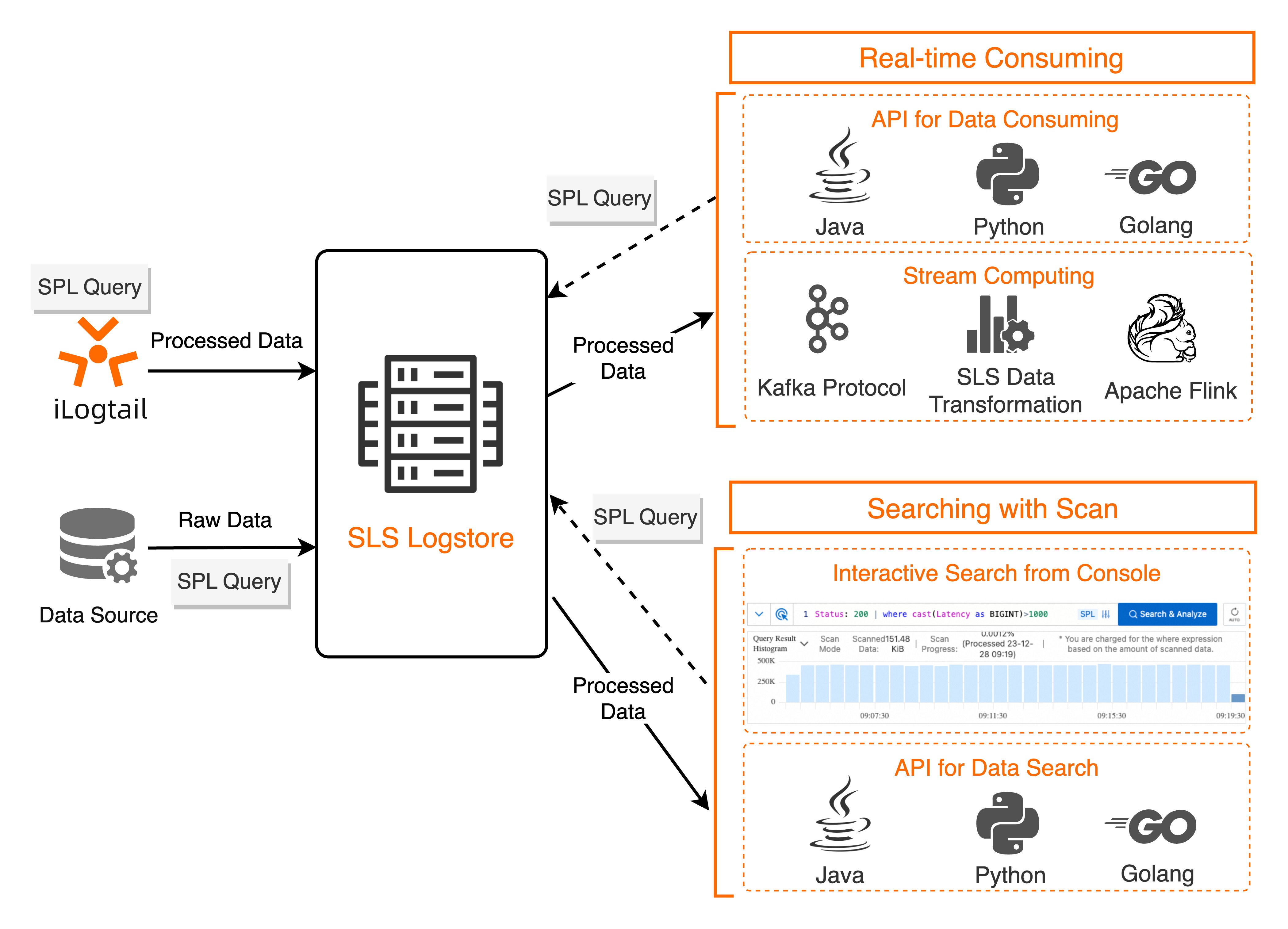
SPL integrates with Logtail data collection, ingest processor, rule-based data consumption, data transformation (new version), and Scan-based query.
For more information about the SPL functions in each use case, see General reference.
Limitations
|
Category |
Limit |
Logtail data collection |
Write Processor |
Real-time consumption |
Data Transformation (New) |
Scan query |
|
SPL complexity |
Number of script pipeline levels |
16 |
16 |
16 |
16 |
16 |
|
Script length |
64 KB |
64 KB |
10 KB |
10 KB |
64 KB |
|
|
SPL runtime |
Runtime memory size Important
Resolve issues using Fault handling. |
50 MB |
1 GB |
1 GB |
1 GB |
2 GB |
|
Runtime timeout Important
Resolve issues using Fault handling. |
1 second |
5 seconds |
5 seconds |
5 seconds |
2 seconds |
SPL syntax
SPL statements
SPL statements chain multi-level data processing steps, connected by pipelines (|) and terminated by semicolons (;).
-
Syntax
<data-source> | <spl-expr> | <spl-expr> ; -
Parameters
Parameter
Description
Example
data-source
An SLS Logstore or an SPL-defined dataset. For more information about SPL data sources in different scenarios, see General reference.
* | project status, body;|
The SPL pipeline operator. Passes the output of the preceding instruction as input to the next.
spl-expr
An SPL instruction expression. For more information, see SPL syntax.
Data source
Data source definitions vary by feature type in SLS.
|
Feature type |
Input from Logstore index filtering |
Case-sensitive field names |
Full-text field __line__ |
Best practices |
|
Logtail collection |
Not supported. Use |
Sensitive |
Not supported |
|
|
Ingest Processor |
Not supported. Use |
Sensitive |
Not supported |
|
|
Real-time consumption |
Not supported. Use |
Sensitive |
Not supported |
|
|
Data transformation (new version) |
Not supported. Use |
Sensitive |
Not supported |
|
|
Scan and query |
Supported. Index filtering runs first, then SPL processes the filtered results. Example: |
Not sensitive |
Supported |
SPL instruction expressions
For more information about the instructions supported by SPL, see SPL instructions and functions.
Instruction expression syntax
cmd -option=<option> -option ... <expression>, ... as <output>, ...Parameters
|
Parameter |
Description |
|
cmd |
The instruction name. |
|
option |
Two types:
|
|
expression |
Required. The processing logic applied to the data source. No parameter name needed, but order must match the instruction definition. Expression types:
|
|
output |
Output fields from the processing result. Example: |
Syntax symbols
SPL uses the following syntax symbols.
|
Symbol |
Description |
Example |
|
* |
Placeholder for Logstore data used as SPL input. |
Filter and classify access logs by status code and output the results.
|
|
. |
Indicates an SPL keyword when used as the first character of a statement. |
|
|
| |
Introduces an SPL instruction expression. Syntax: |
|
|
; |
Terminates an SPL statement. Optional for single statements or the last statement in a multi-statement block. |
|
|
'...' |
Encloses string constants. |
|
|
"..." |
Encloses field names and field name patterns. |
|
|
-- |
Single-line comment. |
|
|
/*...*/ |
Multi-line comment. |
|
|
$ |
References a named dataset. Syntax: |
SPL data types
SPL supports the following log field data types.
|
Type category |
Type name |
Type description |
|
Basic numeric types |
BOOLEAN |
Boolean. |
|
TINYINT |
8-bit integer. |
|
|
SMALLINT |
16-bit integer. |
|
|
INTEGER |
32-bit integer. |
|
|
BIGINT |
64-bit integer. |
|
|
HUGEINT |
128-bit integer. |
|
|
REAL |
32-bit floating-point. |
|
|
DOUBLE |
64-bit floating-point. |
|
|
TIMESTAMP |
UNIX timestamp with nanosecond precision. |
|
|
DATE |
Date in YYYY-MM-DD format. |
|
|
VARCHAR |
Variable-length character string. |
|
|
VARBINARY |
Variable-length binary. |
|
|
Structured numeric types |
ARRAY |
Array. Access elements with For example, |
|
MAP |
Dictionary. Keys must be basic numeric types; values can be any type. Access elements with For example, |
|
|
JSON type |
JSON |
JSON. |
For more information about data type conversions during SPL data processing, see General reference.