High-precision timestamps (nanosecond-level) and global sorting
This topic describes how SLS uses high-precision, nanosecond-level timestamps to globally sort your data, providing a more precise and reliable chronological view of your logs.
Global sorting and high-precision timestamps
SLS now supports high-precision timestamps and performs global sorting directly at the nanosecond level.
To support this feature while maintaining backward compatibility, an optional Time_ns field is added to the following PB format. When you enable the high-precision timestamp feature, this new field stores the nanosecond portion of the log time, leaving the original Time field unmodified.
message Log{
    required uint32 Time = 1;// UNIX Time Format
    message Content
    {
        required string Key = 1;
        required string Value = 2;
    }
    repeated Content Contents = 2;
    optional fixed32 Time_ns = 4;
}
SLS performs global sorting by using a nanosecond-level timestamp derived from combining the Time and Time_ns fields. In the console, query results are displayed in chronological order.
In the query results, the time column displays timestamps with nanosecond precision, such as 16:25:58.916216600. The nine digits after the decimal point represent the nanosecond part.
How it works
When logs are written to SLS, they may be distributed across different shards. During a query, SLS uses an inverted index and the stored high-precision time information to filter logs that match the query conditions and time range within each shard. An intermediate node then performs the final global sorting on these filtered logs before returning the results.
-
Write
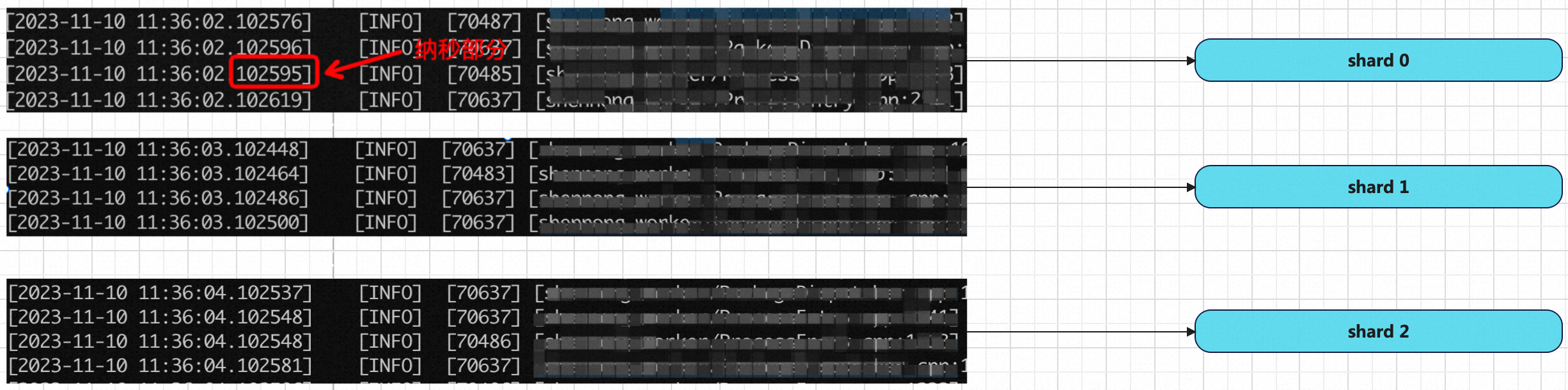
-
Query
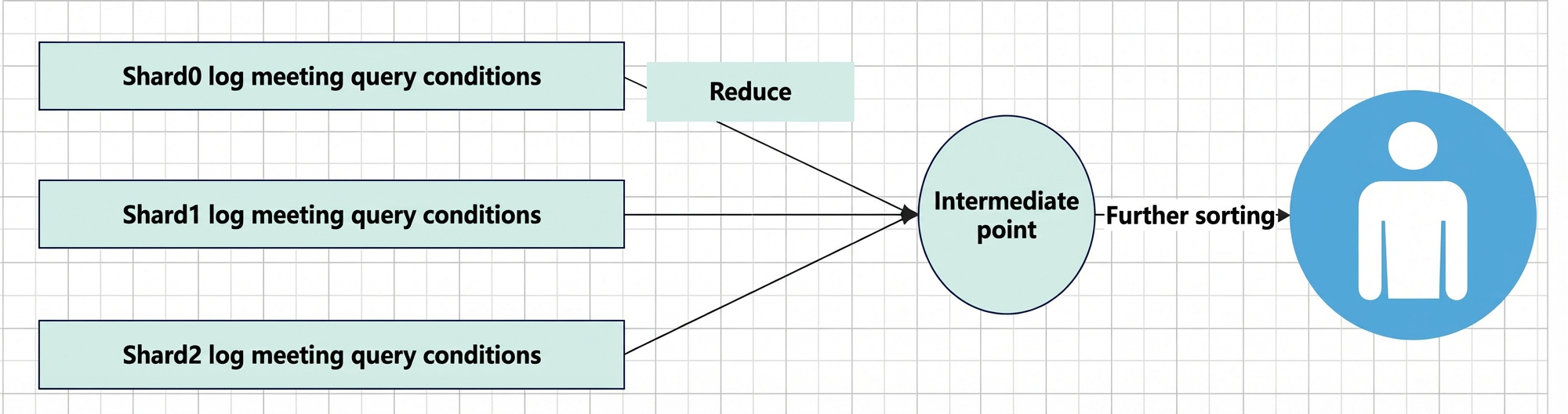
Usage notes
-
Logtail
Supported in Logtail 1.8 and later.
Enable global sorting and nanosecond timestamps
Global sorting is crucial for many business scenarios. To use this feature, you must configure both data writing and data querying. You can write data using Logtail or an SDK.
Write data
-
Logtail
Logtail collects logs from files and standard output on servers or in containers without modifying your application. Logtail version 1.8 and later supports nanosecond-level high-precision timestamps. For detailed instructions, see Use a nanosecond-level timestamp to collect logs. To learn how to install or upgrade Logtail, see Install Logtail on a Linux server.
-
Installation command
./logtail.sh install {region} -
Upgrade command
./logtail.sh upgradeYou can use the
-vparameter with either command to specify a version, for example:./logtail.sh upgrade -v 1.8.7
-
-
SDK
The Go SDK, C++ SDK, Java SDK, and Python SDK support writing logs with nanosecond-level timestamps. For other languages, submit a ticket.
The following code examples show how to write logs with nanosecond-level timestamps. You can parse the correct nanosecond part from your logs and pass it as required by your business logic. During queries, the system uses the combined second and nanosecond values to perform global sorting.
Python
ImportantThe Python SDK supports nanosecond precision and is available on the official PyPI repository. If you are in the Chinese mainland and the command
pip install -U aliyun-log-python-sdkdoes not fetch the latest version with nanosecond support, you can specify the version directly:pip install -U aliyun-log-python-sdk==0.8.11.def put_log_with_nano(): logitemList = [] for i in range(30): contents = [ ('DeviceIP', 11.22.xx.xx) ] logItem = LogItem() nano_time = time.time_ns() sec_time = int(nano_time / 1000000000); nano_time_part = nano_time % 1000000000; logItem.set_time(sec_time) logItem.set_time_nano_part(nano_time_part) logItem.set_contents(contents) logitemList.append(logItem) request = PutLogsRequest(_project, _logstore, logitems=logitemList) res = client.put_logs(request) res.log_print()Java
ImportantUse the latest version of the Aliyun Log Java SDK to avoid errors. For version information, see Aliyun Log Java SDK.
package com.aliyun.openservices.log;

import com.aliyun.openservices.log.common.LogItem;
import com.aliyun.openservices.log.exception.LogException;

import java.util.ArrayList;
import java.util.List;

public class ClientDemo {
    public static void main(String[] args) {
        Client client = new Client("cn-hangzhou.log.aliyuncs.com", "accessKeyId", "accessKeySecret");
        List<LogItem> logItems = new ArrayList<LogItem>();
        for (int i = 0; i < 10; i++) {
            LogItem logItem = new LogItem();
            // set time in second
            logItem.SetTime((int)(System.currentTimeMillis() / 1000));
            // set nano time
            logItem.SetTimeNsPart((int)(System.nanoTime() % 1000000000));
            logItem.PushBack("hello", "world");
            logItem.PushBack("test", "sls");
            logItems.add(logItem);
        }
        try{
            client.PutLogs("test-project", "test-logstore", "test-topic", logItems, "127.0.0.1");
        }catch(LogException e)
        {
            e.printStackTrace();
        }

    }
}
Go
import (
	"time"

	sls "github.com/aliyun/aliyun-log-go-sdk"
	"github.com/golang/protobuf/proto"
)

func main() {
	client := sls.CreateNormalInterface("cn-hangzhou.log.aliyuncs.com", "accessKeyId", "accessKeySecret", "")

	lg := &sls.LogGroup{
		Logs: []*sls.Log{
			{
				// time in seconds
				Time: proto.Uint32(uint32(time.Now().Unix())),
				// nano time
				TimeNs: proto.Uint32(uint32(time.Now().UnixNano() % 1e9)),
				Contents: []*sls.LogContent{
					{
						Key:   proto.String("hello"),
						Value: proto.String("world"),
					},
					{
						Key:   proto.String("test"),
						Value: proto.String("sls"),
					},
				},
			},
		},
	}
	err := client.PutLogs("test-project", "test-logstore", lg)
	if err != nil {
		panic(err)
	}
}
Query data
-
Console
The SLS console automatically optimizes the display of high-precision timestamps, formatting them to show millisecond, microsecond, or nanosecond precision as appropriate.
-
Microsecond format
In the SLS console's query results, the time column displays timestamps with microsecond precision, for example, 10:19:31.407356, where the six digits after the decimal point represent the microsecond part.
-
Nanosecond format
Similarly, for nanosecond precision, the time column displays nine digits after the decimal point, as in 16:25:58.916216600.
-
-
SDK
The following Python example retrieves up to 100 log entries that match the specified query within the time range of [1696743635 s, 1696743635 s +10 ns). The results are returned in reverse chronological order.
New parameter descriptions:
-
When
accurate_queryis set totrue, an accurate query is performed. If set tofalse, sorting is only guaranteed at the minute level. -
The
from_time_nano_partandto_time_nano_partparameters are combined withfromTimeandtoTimerespectively to define a nanosecond-level time range for the query. SLS filters for logs that match the query conditions within this nanosecond range and returns them sorted by their nanosecond timestamps.def query_log_with_nano(): query = "LEVEL:ERROR" req = GetLogsRequest(_project, _logstore, fromTime=1696743635, toTime=1696743635, query=query, line=100, reverse=True, accurate_query=True, from_time_nano_part=0, to_time_nano_part = 10) res = client.get_logs(req) res.log_print()