Query and analyze logs using SQL statements
You can connect to Log Service with clients such as JDBC, Python MySQLdb, or the MySQL command-line tool to query and analyze data using SQL statements. This topic describes the connection process for these clients.
Prerequisites
You have created an access key for an Alibaba Cloud account or a RAM user. For more information, see access key.
If you use the access key of a RAM user, the RAM user must belong to the Alibaba Cloud account that owns the Project and must have read permissions on the Project. For instructions on how to grant permissions, see Policy Assistant.
You have configured data collection for the source LogStore. For more information, see Data Collection Overview.
Background
MySQL is a popular relational database. Many software applications support the MySQL transfer protocol and SQL syntax to retrieve data from MySQL. To meet the diverse requirements of different business scenarios and systems for querying and analyzing logs, you can also use Log Service as a MySQL database. You can connect to Log Service using standard MySQL connection tools and use standard SQL syntax to compute and analyze logs. Clients that support the MySQL transfer protocol include the MySQL client, JDBC, and MySQL Connector/Python. For information about converting Log Service query and analysis statements to SQL statements, see Query and analysis syntax.
Use cases:
Use Log Service as a data source for visualization tools such as DataV, Tableau, or Grafana.
Connect to Log Service in a Java or Python program using JDBC or MySQL Connector/Python to query and analyze data.
The following table compares Log Service with a MySQL database.
Log Service | MySQL |
Project | database |
LogStore | table |
index | table fields |
Log Service does not support pagination when querying and analyzing logs with SQL statements.
JDBC access
-
Create a Maven project and add the JDBC dependency to the pom.xml file:
<dependency>
 <groupId>mysql</groupId>
 <artifactId>mysql-connector-java</artifactId>
 <version>5.1.49</version>
</dependency>
You can use MySQL syntax to connect to Log Service in any program that supports a MySQL connector, such as JDBC or Python's MySQLdb. The following code provides a JDBC example:
ImportantThe
WHEREclause must contain the__date__or__time__field to specify the time range for the query. The__date__field is of the TIMESTAMP type, and the__time__field is of the BIGINT type. Examples:__date__ > '2017-08-07 00:00:00' and __date__ < '2017-08-08 00:00:00'__time__ > 1502691923 and __time__ < 1502692923
/**
* Created by mayunlei on 2017/6/19.
*/
import com.mysql.jdbc.*;
import java.sql.*;
import java.sql.Connection;
import java.sql.Statement;
/**
* Created by mayunlei on 2017/6/15.
*/
public class CollectTest {
 public static void main(String args[]){
     // The endpoint, which includes the Project name and the private network endpoint of Log Service. Replace with your actual endpoint.
     final String endpoint = "trip-demo.cn-hangzhou-intranet.log.aliyuncs.com";
     // The default port for JDBC access is 10005.
     final String port = "10005";
     // The Log Service Project name.
     final String project = "trip-demo";
     // The Log Service Logstore name.
     final String logstore = "ebike";
     // This example obtains the AccessKey ID and AccessKey Secret from environment variables.
     final String accessKeyId = System.getenv("ALIBABA_CLOUD_ACCESS_KEY_ID");
     final String accessKey = System.getenv("ALIBABA_CLOUD_ACCESS_KEY_SECRET");
     Connection conn = null;
     Statement stmt = null;
     try {
         // Step 1: Load the JDBC driver.
         Class.forName("com.mysql.jdbc.Driver");
         // Step 2: Create a connection.
         conn = DriverManager.getConnection("jdbc:mysql://"+endpoint+":"+port+"/"+project+"?useSSL=false",accessKeyId,accessKey);
         // Step 3: Create a statement.
         stmt = conn.createStatement();
         // Step 4: Define a query statement to query the number of logs that meet the condition op = 'unlock' on October 11, 2017.
         String sql = "select count(1) as pv from "+logstore+"  " +
                 "where     __date__  >=  '2017-10-11 00:00:00'   " +
                 "     and  __date__  <   '2017-10-12 00:00:00'" +
                 " and     op ='unlock'";
         // Step 5: Execute the query.
         ResultSet rs = stmt.executeQuery(sql);
         // Step 6: Extract the query result.
         while(rs.next()){
             // Retrieve by column name
             System.out.print("pv:");
             // Get the pv value from the result.
             System.out.print(rs.getLong("pv"));
             System.out.println();
         }
         rs.close();
     } catch (ClassNotFoundException e) {
         e.printStackTrace();
     } catch (SQLException e) {
         e.printStackTrace();
     } catch (Exception e) {
         e.printStackTrace();
     } finally {
         if (stmt != null) {
             try {
                 stmt.close();
             } catch (SQLException e) {
                 e.printStackTrace();
             }
         }
         if (conn != null) {
             try {
                 conn.close();
             } catch (SQLException e) {
                 e.printStackTrace();
             }
         }
     }
 }
}
Parameter
Description
Required
Example
project
Target project name.
Yes
trip-demo
endpoint
The internal endpoint of SLS.
Yes
ap-southeast-1-intranet.log.aliyuncs.com
port
JDBC access port. Fixed value: 10005.
Yes
10005
accessId
Your AccessKey ID.
Yes
LT*******************KX
accessKey
Your AccessKey secret.
Yes
-
Query data.

MySQL Connector/Python access
In a command-line tool, run the following command as an administrator to install mysql-connector-python.
pip install mysql-connector-python # For Python 2
pip3 install mysql-connector-python # For Python 3
Create a
mysqlQuery.pyfile and specify the following parameters based on your requirements.ImportantThe
WHEREclause must contain the__date__or__time__field to specify the time range for the query. The__date__field is of the TIMESTAMP type, and the__time__field is of the BIGINT type. Examples:__date__ > '2017-08-07 00:00:00' and __date__ < '2017-08-08 00:00:00'__time__ > 1502691923 and __time__ < 1502692923
import mysql.connector
import os


def main():
    # User name
    user = os.environ.get('ALIBABA_CLOUD_ACCESS_KEY_ID', '')
    # Password
    password = os.environ.get('ALIBABA_CLOUD_ACCESS_KEY_SECRET', '')
    # endpoint
    host = 'cn-chengdu-intranet.log.aliyuncs.com'
    # Database name (Project name)
    project = 'aliyun-test-project'
    # Port
    port = 10005
    # Table name (LogStore name)
    logstore = 'logstore-test'
    print("collect database start ")
    # Connect to the database
    cnx = mysql.connector.connect(host=host, user=user, password=password, database=project, port=port)
    print("collect database success ")
    # Create a cursor object
    cursor = cnx.cursor()

    # Execute a query
    query = "select count(1) as pv from " + logstore + " where __date__  >=  '2024-05-27 00:00:00' and  __date__  <   '2024-05-31 00:00:00'"
    print("query data success")
    cursor.execute(query)
    print("query data success")
    # Retrieve the query result
    for (column1) in cursor:
        print("{}".format(column1))

    # Close the cursor and connection
    cursor.close()
    cnx.close()


if __name__ == '__main__':
    main()
Parameter
Description
Required
Example
project
The name of the destination Project.
Yes
trip-demo
LogStore
The name of the destination LogStore.
Yes
logtore-test
endpoint
The private network endpoint.
Yes
cn-hangzhou-intranet.log.aliyuncs.com
port
The port. The value is fixed at 10005.
Yes
10005
user
Your AccessKey ID. Using a RAM user's access key is recommended for security.
Yes
LT*******************KX
password
Your AccessKey Secret, used to sign requests for verification.
Yes
aaw************************Qf
Run the following command to query data.
python mysqlQuery.py # For Python 2
python3 mysqlQuery.py # For Python 3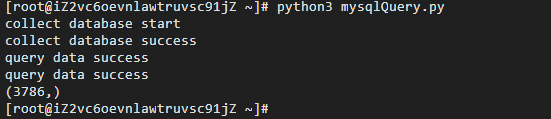
ECS instance access
Connect to Log Service.
mysql -h my-project.host -uuser -ppassword -P portExample:
mysql -h my-project.cn-hangzhou-intranet.log.aliyuncs.com -ubq****mo86kq -p4f****uZP -P 10005Parameter
Description
host
The Log Service endpoint must include the Project name in the format
Project name.private network endpoint. For example, my-project.cn-hangzhou-intranet.log.aliyuncs.com.Only private network endpoints (for the Alibaba Cloud classic network and VPC) are supported. For more information, see private network.
port
The port number, which is fixed at 10005.
user
Your AccessKey ID. Using a RAM user's access key is recommended for security.
password
Your AccessKey Secret, used to sign requests for verification.
my-project
The name of the Project.
ImportantA single connection can only access one Project at a time.
Switch the database context to your Project.
use my-project;Query data.
ImportantThe
WHEREclause must contain the__date__or__time__field to specify the time range for the query. The__date__field is of the TIMESTAMP type, and the__time__field is of the BIGINT type. Examples:__date__ > '2017-08-07 00:00:00' and __date__ < '2017-08-08 00:00:00'__time__ > 1502691923 and __time__ < 1502692923
select count(1) as pv from my-logstore where __date__ >= '2024-05-27 00:00:00' and __date__ < '2024-05-31 00:00:00'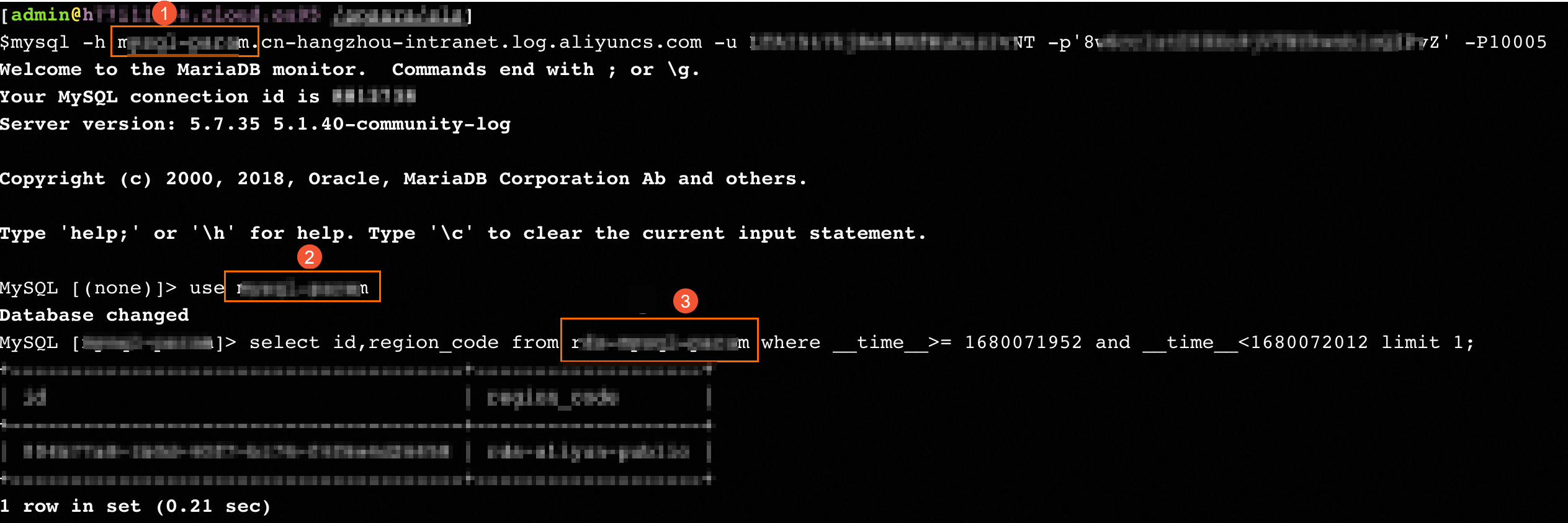
The Project is specified in both the host parameter (-h) and the use statement.
The LogStore is specified as the table name in the select statement.
Query and analysis syntax
Filtering syntax
NoteThe WHERE clause must contain the __date__ or __time__ field to specify the time range for the query. The __date__ field is of the TIMESTAMP type, and the __time__ field is of the BIGINT type. Examples:
__date__ > '2017-08-07 00:00:00' and __date__ < '2017-08-08 00:00:00'
__time__ > 1502691923 and __time__ < 1502692923
The following table describes the WHERE filter syntax.
Semantics
Example
Description
String search
key = "value"
Queries the tokenized results.
Fuzzy string search
key has 'valu*'
key like 'value_%'
Queries the fuzzy-matched tokenized results.
Numeric comparison
num_field > 1
Comparison operators include >, >=, =, <, and <=.
Logical operations
and or not
For example, a = "x" and b = "y" or a = "x" and not b = "y".
full-text search
__line__ ="abc"
For a full-text search, use the reserved key __line__.
Computation syntax
Computation operators are supported. For more information, see Analysis syntax.
SQL-92 syntax
The filtering syntax and computation syntax can be combined to form the SQL-92 syntax.
status>200 |select avg(latency),max(latency) ,count(1) as c GROUP BY method ORDER BY c DESC LIMIT 20The preceding Log Service query can be rewritten as the following standard SQL-92 query by including the time condition in the WHERE clause:
select avg(latency),max(latency) ,count(1) as c from sample-logstore where status>200 and __time__>=1500975424 and __time__ < 1501035044 GROUP BY method ORDER BY c DESC LIMIT 20