Create an AccessKey
An AccessKey is required for identity verification when you call the Visual Intelligence API. This topic describes how to create an AccessKey for an Alibaba Cloud account and a Resource Access Management (RAM) user.
Consulting Services
For questions about the Visual Intelligence API, contact us through our DingTalk group. Search for group number 23109592 to join. The group is open to enterprise users, service providers, and developers.
Background information
An AccessKey is used to create API requests that call features of the Visual Intelligence API. An AccessKey consists of an AccessKey ID and an AccessKey secret.
AccessKey ID: Identifies the user.
AccessKey secret: A key used to authenticate the user. Keep your AccessKey secret confidential.
Your AccessKey is a critical credential. Keep your AccessKey ID and AccessKey secret secure. If your AccessKey is compromised, rotate it immediately.
Because Alibaba Cloud accounts present a high security risk, we recommend that you use a Resource Access Management (RAM) user for operations.
If you have questions about API access, API usage, or other issues related to the AI capabilities of the Visual Intelligence API, join our DingTalk group by searching for the ID 23109592.
Create an AccessKey for an Alibaba Cloud account
Log on to the console with your Alibaba Cloud account.
-
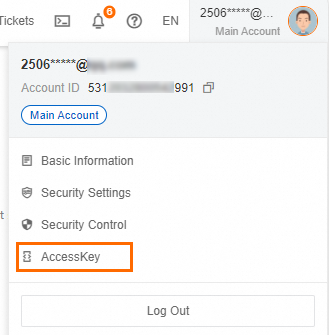
Hover over the profile picture in the upper-right corner and click AccessKey.
-
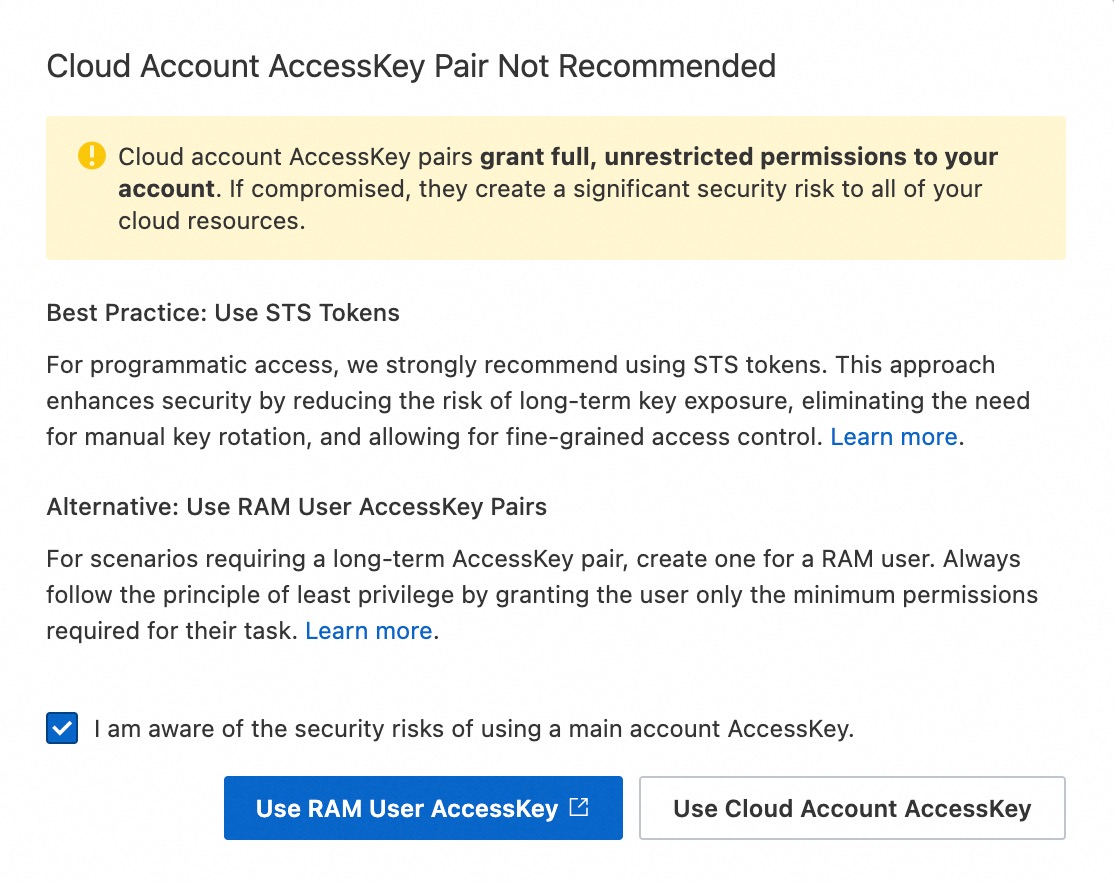
In the Cloud Account AccessKey Pair Not Recommended dialog box, review the risks of creating an AccessKey pair for your Alibaba Cloud account. To proceed, select I am aware of the security risks of using a main account AccessKey, and click Use Cloud Account AccessKey.
-
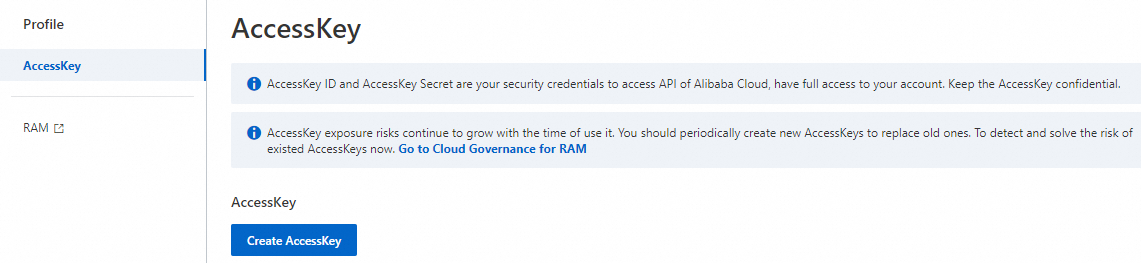
On the AccessKey page, click Create AccessKey.
 Note
NoteAn Alibaba Cloud account can have a maximum of two AccessKey pairs. One is for regular use, and the other is created for rotation to replace the old one.
Complete the security authentication as prompted.
Create an AccessKey for a RAM user
An AccessKey for a RAM user must be created by the root user of the Alibaba Cloud account.
Console
-
Log on to the RAM console.
-
In the left-side navigation pane, choose .
-
Find the target RAM user and click its username.
-
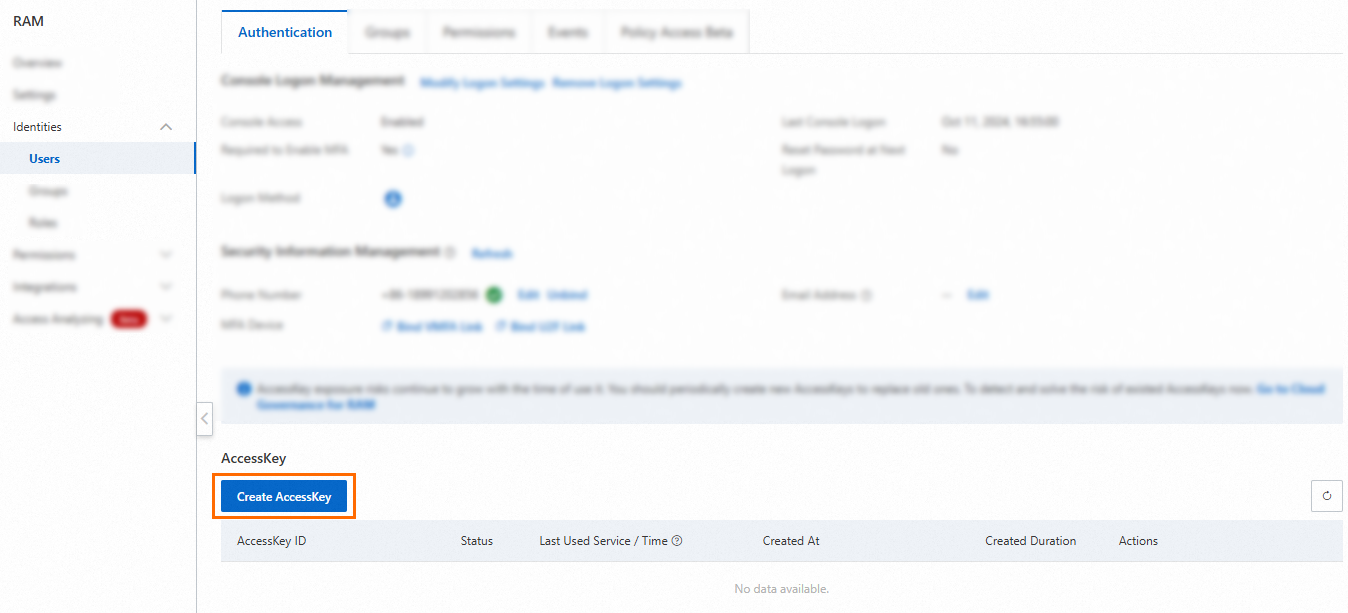
On the AccessKey tab, click Create AccessKey.
 Note
NoteEach RAM user can have a maximum of two AccessKey pairs. One is for regular use, and the other is created for rotation to replace the old one.
-
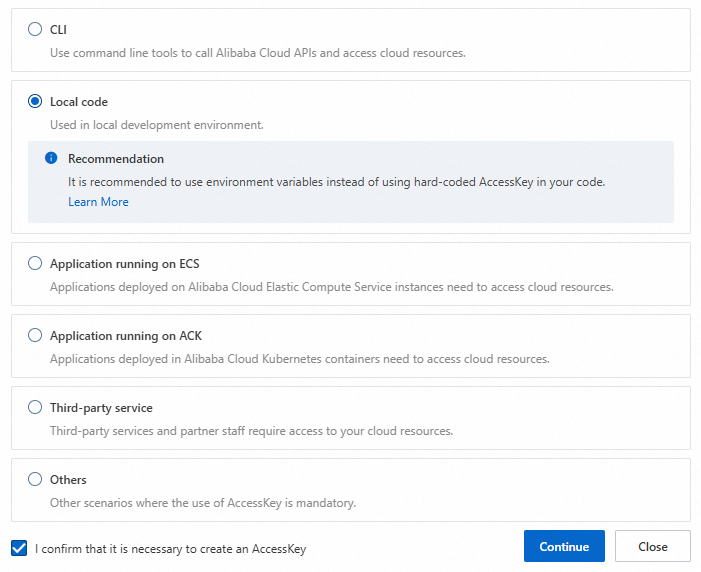
In the dialog box that appears, review the use cases and suggestions for using AccessKey pairs. We recommend that you select a more suitable credential solution. If you must create an AccessKey pair, select a use case, select I confirm that it is necessary to create an AccessKey, and click Continue. This choice is for data collection purposes and does not affect the permissions or properties of the created AccessKey pair.
-
Complete the security verification as prompted.
-
In the Create AccessKey dialog box, save the AccessKey ID and AccessKey secret, and click OK.
(Optional) Configure AccessKey Network Access Control: You can restrict the source IP addresses for API requests that use the AccessKey pair. This improves security by restricting access to the AccessKey pair to trusted network environments. We recommend that you identify the network environment where the AccessKey pair is used, and click Go to Settings. For more information, see Configure an AccessKey pair-level policy for a RAM user.
 Important
To reduce the risk of leaks, the AccessKey secret is displayed only once when you create it. You cannot retrieve it later. Make sure to store it securely.

API
Call the CreateAccessKey operation to create an AccessKey pair and specify the following parameter:
-
UserPrincipalName: The logon name of the RAM user to which the AccessKey pair belongs. The format is test@example.onaliyun.com. You can find the logon name of the RAM user in the RAM console.
To reduce the risk of leaks, the AccessKey secret is displayed only when you call the CreateAccessKey operation. You cannot retrieve it later. Make sure to store it securely.
References
For more information about AccessKeys, see AccessKey management.