
万相2.7-图生视频模型接受 多模态输入 (文本/图像/音频/视频),支持 首帧生视频、首尾帧生视频、视频续写(首视频片段续写/首视频片段+尾帧续写) 三大任务。
- 基础设置:支持整数级视频时长(2~15 秒)、指定视频分辨率(720P/1080P)、智能改写prompt、添加水印。
- 音频能力:支持自动配音或上传音频,实现声画同步。
- 多镜头叙事:可生成包含多个镜头的视频,镜头切换时保持主体一致。
快速开始
| 输入提示词 | 输入首视频片段(2秒) | 输入尾帧图像 | 输出视频(12秒,续写10秒) |
男人低头向下看到地上的木箱,他弯下腰,小心翼翼打开箱盖,他紧盯着箱内的东西,嘴唇颤抖的微微张开,皱着眉头,眼睛微微张大,露出惊恐的表情。 |  |
调用前,先获取与配置 API Key,再配置API Key到环境变量。通过SDK调用,请安装DashScope SDK。
Python SDK
重要请确保 DashScope Python SDK版本不低于 1.25.16,再运行以下代码。
若版本过低,可能会触发 "url error, please check url!" 等错误。请参考安装SDK进行更新。
# -*- coding: utf-8 -*-
from http import HTTPStatus
from dashscope import VideoSynthesis
import dashscope
import os

# 以下为北京地域URL,各地域的URL不同,获取URL:https://help.aliyun.com/zh/model-studio/image-to-video-general-api-reference
dashscope.base_http_api_url = 'https://{WorkspaceId}.cn-beijing.maas.aliyuncs.com/api/v1'

# 若没有配置环境变量,请用百炼API Key将下行替换为:api_key="sk-xxx"
# 各地域的API Key不同。获取API Key:https://help.aliyun.com/zh/model-studio/get-api-key
api_key = os.getenv("DASHSCOPE_API_KEY")

media = [
    {
        "type": "first_clip",
        "url": "https://help-static-aliyun-doc.aliyuncs.com/file-manage-files/zh-CN/20260414/cqcbkw/wan2.7-i2v-video-continuation.mp4"
    },
    {
        "type": "last_frame",
        "url": "https://help-static-aliyun-doc.aliyuncs.com/file-manage-files/zh-CN/20260414/mrwahg/wan2.7-i2v-video-continuation.webp"
    }
]

def sample_sync_call():
    print('----sync call, please wait a moment----')
    rsp = VideoSynthesis.call(
        api_key=api_key,
        model="wan2.7-i2v-2026-04-25",
        media=media,
        resolution="720P",
        duration=12,
        watermark=True,
        prompt="男人低头向下看到地上的木箱,他弯下腰,小心翼翼打开箱盖,他紧盯着箱内的东西,嘴唇颤抖的微微张开,皱着眉头,眼睛微微张大,露出惊恐的表情。",
    )
    if rsp.status_code == HTTPStatus.OK:
        print(rsp.output.video_url)
    else:
        print('Failed, status_code: %s, code: %s, message: %s' %
              (rsp.status_code, rsp.code, rsp.message))

if __name__ == '__main__':
    sample_sync_call()
Java SDK
重要请确保 DashScope Java SDK版本不低于 2.22.14,再运行以下代码。
若版本过低,可能会触发 "url error, please check url!" 等错误。请参考安装SDK进行更新。
// Copyright (c) Alibaba, Inc. and its affiliates.

import com.alibaba.dashscope.aigc.videosynthesis.VideoSynthesis;
import com.alibaba.dashscope.aigc.videosynthesis.VideoSynthesisParam;
import com.alibaba.dashscope.aigc.videosynthesis.VideoSynthesisResult;
import com.alibaba.dashscope.exception.ApiException;
import com.alibaba.dashscope.exception.InputRequiredException;
import com.alibaba.dashscope.exception.NoApiKeyException;
import com.alibaba.dashscope.utils.Constants;
import com.alibaba.dashscope.utils.JsonUtils;

import java.util.ArrayList;
import java.util.List;

public class Image2Video {

    static {
        // 以下为华北2(北京)地域的URL。请将 {WorkspaceId} 替换为您的百炼业务空间ID,各地域的URL不同。
        Constants.baseHttpApiUrl = "https://{WorkspaceId}.cn-beijing.maas.aliyuncs.com/api/v1";
    }

    // 若没有配置环境变量,请用百炼API Key将下行替换为:apiKey="sk-xxx"
    // 各地域的API Key不同。获取API Key:https://help.aliyun.com/zh/model-studio/get-api-key
    static String apiKey = System.getenv("DASHSCOPE_API_KEY");

    public static void syncCall() {
        VideoSynthesis videoSynthesis = new VideoSynthesis();
        final String prompt = "男人低头向下看到地上的木箱,他弯下腰,小心翼翼打开箱盖,他紧盯着箱内的东西,嘴唇颤抖的微微张开,皱着眉头,眼睛微微张大,露出惊恐的表情。";
        List<VideoSynthesisParam.Media> media = new ArrayList<VideoSynthesisParam.Media>(){{
            add(VideoSynthesisParam.Media.builder()
                    .url("https://help-static-aliyun-doc.aliyuncs.com/file-manage-files/zh-CN/20260414/cqcbkw/wan2.7-i2v-video-continuation.mp4")
                    .type("first_clip")
                    .build());
            add(VideoSynthesisParam.Media.builder()
                    .url("https://help-static-aliyun-doc.aliyuncs.com/file-manage-files/zh-CN/20260414/mrwahg/wan2.7-i2v-video-continuation.webp")
                    .type("last_frame")
                    .build());
        }};
        VideoSynthesisParam param =
                VideoSynthesisParam.builder()
                        .apiKey(apiKey)
                        .model("wan2.7-i2v-2026-04-25")
                        .prompt(prompt)
                        .media(media)
                        .watermark(true)
                        .duration(12)
                        .resolution("720P")
                        .build();
        VideoSynthesisResult result = null;
        try {
            System.out.println("---sync call, please wait a moment----");
            result = videoSynthesis.call(param);
        } catch (ApiException | NoApiKeyException e){
            throw new RuntimeException(e.getMessage());
        } catch (InputRequiredException e) {
            throw new RuntimeException(e);
        }
        System.out.println(JsonUtils.toJson(result));
    }

    public static void main(String[] args) {
        syncCall();
    }
}
curl
步骤1:创建任务获取任务IDcurl --location 'https://{WorkspaceId}.cn-beijing.maas.aliyuncs.com/api/v1/services/aigc/video-generation/video-synthesis' \
-H 'X-DashScope-Async: enable' \
-H "Authorization: Bearer $DASHSCOPE_API_KEY" \
-H 'Content-Type: application/json' \
-d '{
"model": "wan2.7-i2v-2026-04-25",
"input": {
"prompt": "男人低头向下看到地上的木箱,他弯下腰,小心翼翼打开箱盖,他紧盯着箱内的东西,嘴唇颤抖的微微张开,皱着眉头,眼睛微微张大,露出惊恐的表情。",
"media": [
{
"type": "first_clip",
"url": "https://help-static-aliyun-doc.aliyuncs.com/file-manage-files/zh-CN/20260414/cqcbkw/wan2.7-i2v-video-continuation.mp4"
},
{
"type": "last_frame",
"url": "https://help-static-aliyun-doc.aliyuncs.com/file-manage-files/zh-CN/20260414/mrwahg/wan2.7-i2v-video-continuation.webp"
}
]
},
"parameters": {
"resolution": "720P",
"duration": 12,
"prompt_extend": true,
"watermark": true
}
}'
将{task_id}完整替换为上一步接口返回的task_id的值。task_id查询有效期为24小时,并请将{WorkspaceId}替换为真实的业务空间ID。
curl -X GET https://{WorkspaceId}.cn-beijing.maas.aliyuncs.com/api/v1/tasks/{task_id} \
--header "Authorization: Bearer $DASHSCOPE_API_KEY"
video_url有效期24小时,请及时下载视频。
{
    "request_id": "c1209113-8437-424f-a386-xxxxxx",
    "output": {
        "task_id": "966cebcd-dedc-4962-af88-xxxxxx",
        "task_status": "SUCCEEDED",
        "video_url": "https://dashscope-result-sh.oss-accelerate.aliyuncs.com/xxx.mp4?Expires=xxx",
         ...
    },
    ...
}
适用范围
- 各地域支持的模型有所差异,且资源相互独立。各地域支持的模型请参见百炼控制台。
- 调用时,确保模型、Endpoint URL 和 API Key 均属于同一地域,跨地域调用将会失败。
说明示例代码适用于北京地域。
核心能力
首帧生视频
支持模型:wan2.7系列模型。
参数设置:media 数组中的 type 字段支持以下两种组合,素材组合详见如何输入素材。
- 首帧:设置
type为first_frame,模型自动为视频配音。 - 首帧+音频:设置
type为first_frame和driving_audio,模型依据音频驱动视频生成(如口型同步、动作卡点)。
| 输入提示词 | 输入首帧图像 | 输出视频 |
一幅都市奇幻艺术的场景。一个充满动感的涂鸦艺术角色。一个由喷漆所画成的少年,正从一面混凝土墙上活过来。他一边用极快的语速演唱一首英文rap,一边摆着一个经典的、充满活力的说唱歌手姿势。场景设定在夜晚一个充满都市感的铁路桥下。灯光来自一盏孤零零的街灯,营造出电影般的氛围,充满高能量和惊人的细节。视频的音频部分完全由rap构成,没有其他对话或杂音。 | 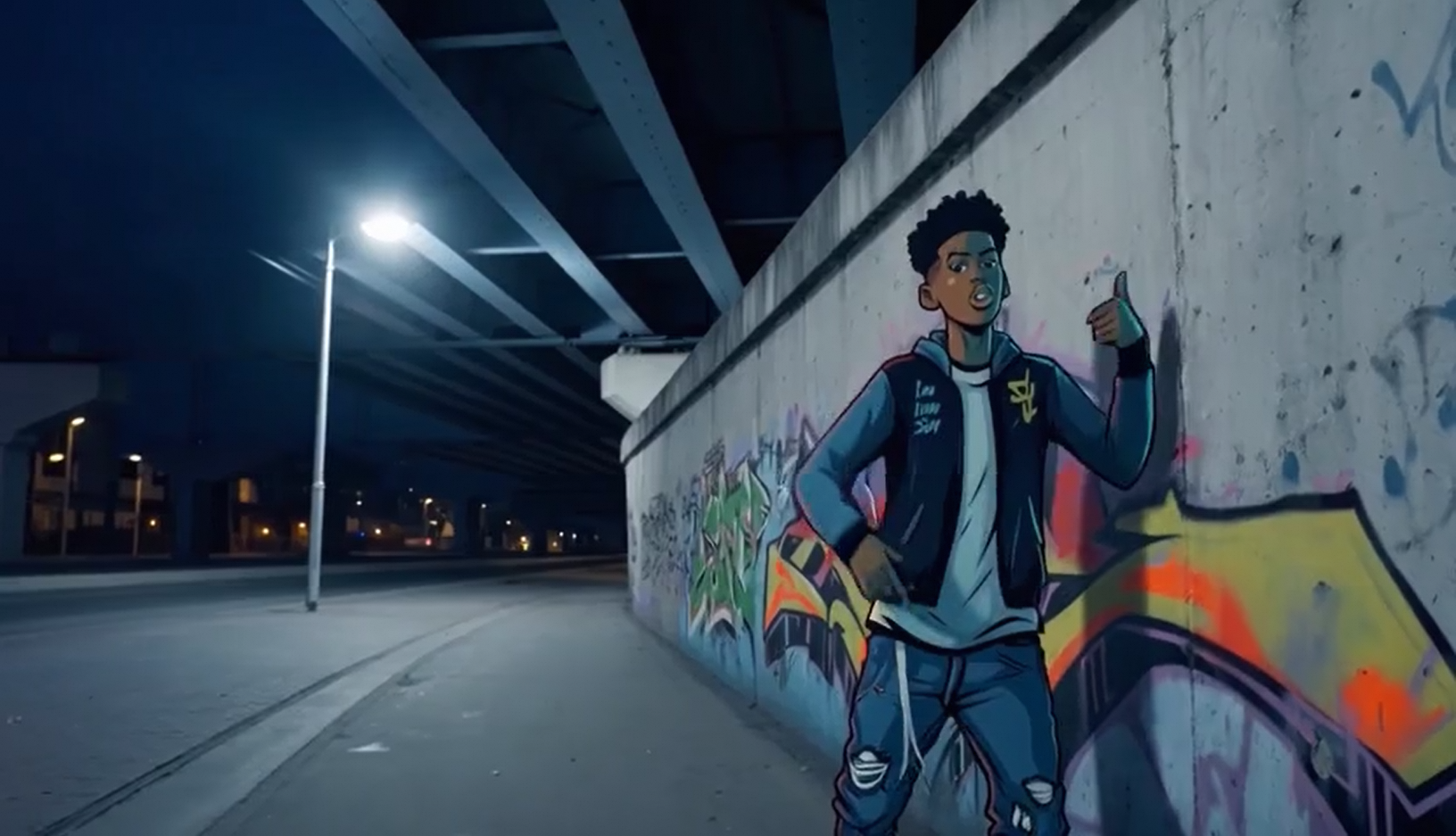 输入音频: |
Python SDK
请确保 DashScope Python SDK版本不低于
1.25.16,可参考 安装SDK 进行更新。
# -*- coding: utf-8 -*-
from http import HTTPStatus
from dashscope import VideoSynthesis
import dashscope
import os

# 以下为北京地域URL,各地域的URL不同,获取URL:https://help.aliyun.com/zh/model-studio/image-to-video-general-api-reference
dashscope.base_http_api_url = 'https://{WorkspaceId}.cn-beijing.maas.aliyuncs.com/api/v1'

# 若没有配置环境变量,请用百炼API Key将下行替换为:api_key="sk-xxx"
# 各地域的API Key不同。获取API Key:https://help.aliyun.com/zh/model-studio/get-api-key
api_key = os.getenv("DASHSCOPE_API_KEY")

media = [
    {
        "type": "first_frame",
        "url": "https://help-static-aliyun-doc.aliyuncs.com/file-manage-files/zh-CN/20250925/wpimhv/rap.png"
    },
    {
        "type": "driving_audio",
        "url": "https://help-static-aliyun-doc.aliyuncs.com/file-manage-files/zh-CN/20250925/ozwpvi/rap.mp3"
    }
]

def sample_sync_call():
    print('----sync call, please wait a moment----')
    rsp = VideoSynthesis.call(
        api_key=api_key,
        model="wan2.7-i2v-2026-04-25",
        media=media,
        resolution="720P",
        duration=10,
        watermark=True,
        prompt="一幅都市奇幻艺术的场景。一个充满动感的涂鸦艺术角色。一个由喷漆所画成的少年,正从一面混凝土墙上活过来。他一边用极快的语速演唱一首英文rap,一边摆着一个经典的、充满活力的说唱歌手姿势。场景设定在夜晚一个充满都市感的铁路桥下。灯光来自一盏孤零零的街灯,营造出电影般的氛围,充满高能量和惊人的细节。视频的音频部分完全由rap构成,没有其他对话或杂音。",
    )
    if rsp.status_code == HTTPStatus.OK:
        print(rsp.output.video_url)
    else:
        print('Failed, status_code: %s, code: %s, message: %s' %
              (rsp.status_code, rsp.code, rsp.message))

if __name__ == '__main__':
    sample_sync_call()
Java SDK
请确保 DashScope Java SDK版本不低于
2.22.14,可参考 安装SDK 进行更新。
// Copyright (c) Alibaba, Inc. and its affiliates.

import com.alibaba.dashscope.aigc.videosynthesis.VideoSynthesis;
import com.alibaba.dashscope.aigc.videosynthesis.VideoSynthesisParam;
import com.alibaba.dashscope.aigc.videosynthesis.VideoSynthesisResult;
import com.alibaba.dashscope.exception.ApiException;
import com.alibaba.dashscope.exception.InputRequiredException;
import com.alibaba.dashscope.exception.NoApiKeyException;
import com.alibaba.dashscope.utils.Constants;
import com.alibaba.dashscope.utils.JsonUtils;

import java.util.ArrayList;
import java.util.List;

public class Image2Video {

    static {
        // 以下为华北2(北京)地域的URL。请将 {WorkspaceId} 替换为您的百炼业务空间ID,各地域的URL不同。
        Constants.baseHttpApiUrl = "https://{WorkspaceId}.cn-beijing.maas.aliyuncs.com/api/v1";
    }

    // 若没有配置环境变量,请用百炼API Key将下行替换为:apiKey="sk-xxx"
    // 各地域的API Key不同。获取API Key:https://help.aliyun.com/zh/model-studio/get-api-key
    static String apiKey = System.getenv("DASHSCOPE_API_KEY");

    public static void syncCall() {
        VideoSynthesis videoSynthesis = new VideoSynthesis();
        final String prompt = "一幅都市奇幻艺术的场景。一个充满动感的涂鸦艺术角色。一个由喷漆所画成的少年,正从一面混凝土墙上活过来。他一边用极快的语速演唱一首英文rap,一边摆着一个经典的、充满活力的说唱歌手姿势。场景设定在夜晚一个充满都市感的铁路桥下。灯光来自一盏孤零零的街灯,营造出电影般的氛围,充满高能量和惊人的细节。视频的音频部分完全由rap构成,没有其他对话或杂音。";
        List<VideoSynthesisParam.Media> media = new ArrayList<VideoSynthesisParam.Media>(){{
            add(VideoSynthesisParam.Media.builder()
                    .url("https://help-static-aliyun-doc.aliyuncs.com/file-manage-files/zh-CN/20250925/wpimhv/rap.png")
                    .type("first_frame")
                    .build());
            add(VideoSynthesisParam.Media.builder()
                    .url("https://help-static-aliyun-doc.aliyuncs.com/file-manage-files/zh-CN/20250925/ozwpvi/rap.mp3")
                    .type("driving_audio")
                    .build());
        }};
        VideoSynthesisParam param =
                VideoSynthesisParam.builder()
                        .apiKey(apiKey)
                        .model("wan2.7-i2v-2026-04-25")
                        .prompt(prompt)
                        .media(media)
                        .watermark(true)
                        .duration(10)
                        .resolution("720P")
                        .build();
        VideoSynthesisResult result = null;
        try {
            System.out.println("---sync call, please wait a moment----");
            result = videoSynthesis.call(param);
        } catch (ApiException | NoApiKeyException e){
            throw new RuntimeException(e.getMessage());
        } catch (InputRequiredException e) {
            throw new RuntimeException(e);
        }
        System.out.println(JsonUtils.toJson(result));
    }

    public static void main(String[] args) {
        syncCall();
    }
}
curl
步骤1:创建任务获取任务IDcurl --location 'https://{WorkspaceId}.cn-beijing.maas.aliyuncs.com/api/v1/services/aigc/video-generation/video-synthesis' \
-H 'X-DashScope-Async: enable' \
-H "Authorization: Bearer $DASHSCOPE_API_KEY" \
-H 'Content-Type: application/json' \
-d '{
"model": "wan2.7-i2v-2026-04-25",
"input": {
"prompt": "一幅都市奇幻艺术的场景。一个充满动感的涂鸦艺术角色。一个由喷漆所画成的少年,正从一面混凝土墙上活过来。他一边用极快的语速演唱一首英文rap,一边摆着一个经典的、充满活力的说唱歌手姿势。场景设定在夜晚一个充满都市感的铁路桥下。灯光来自一盏孤零零的街灯,营造出电影般的氛围,充满高能量和惊人的细节。视频的音频部分完全由rap构成,没有其他对话或杂音。",
"media": [
{
"type": "first_frame",
"url": "https://help-static-aliyun-doc.aliyuncs.com/file-manage-files/zh-CN/20250925/wpimhv/rap.png"
},
{
"type": "driving_audio",
"url": "https://help-static-aliyun-doc.aliyuncs.com/file-manage-files/zh-CN/20250925/ozwpvi/rap.mp3"
}
]
},
"parameters": {
"resolution": "720P",
"duration": 10,
"prompt_extend": true,
"watermark": true
}
}'
将{task_id}完整替换为上一步接口返回的task_id的值。task_id查询有效期为24小时,并请将{WorkspaceId}替换为真实的业务空间ID。
curl -X GET https://{WorkspaceId}.cn-beijing.maas.aliyuncs.com/api/v1/tasks/{task_id} \
--header "Authorization: Bearer $DASHSCOPE_API_KEY"
video_url有效期24小时,请及时下载视频。
{
    "request_id": "c1209113-8437-424f-a386-xxxxxx",
    "output": {
        "task_id": "966cebcd-dedc-4962-af88-xxxxxx",
        "task_status": "SUCCEEDED",
        "video_url": "https://dashscope-result-sh.oss-accelerate.aliyuncs.com/xxx.mp4?Expires=xxx",
         ...
    },
    ...
}
首尾帧生视频
支持模型:wan2.7系列模型。
参数设置:media 数组中的 type 字段支持以下两种组合,素材组合详见如何输入素材。
- 首帧+尾帧:设置
type为first_frame和last_frame,模型自动为视频配音。 - 首帧+尾帧+音频:设置
type为first_frame、last_frame和driving_audio,模型依据音频驱动视频生成。
| 输入提示词 | 输入首帧图像 | 输入尾帧图像 | 输出视频 |
清晨太阳刚刚升起,在南瓜地里面,有一颗小南瓜上面挂着露珠,突然小南瓜"咔擦"一声,出现了裂缝,从裂缝中透出金光,小南瓜伴随着金光裂开,出现一团白雾,一只小兔子在南瓜裂开的南瓜中央出现。 |  |  |
Python SDK
请确保 DashScope Python SDK版本不低于
1.25.16,可参考 安装SDK 进行更新。
# -*- coding: utf-8 -*-
from http import HTTPStatus
from dashscope import VideoSynthesis
import dashscope
import os

# 以下为北京地域URL,各地域的URL不同,获取URL:https://help.aliyun.com/zh/model-studio/image-to-video-general-api-reference
dashscope.base_http_api_url = 'https://{WorkspaceId}.cn-beijing.maas.aliyuncs.com/api/v1'

# 若没有配置环境变量,请用百炼API Key将下行替换为:api_key="sk-xxx"
# 各地域的API Key不同。获取API Key:https://help.aliyun.com/zh/model-studio/get-api-key
api_key = os.getenv("DASHSCOPE_API_KEY")

media = [
    {
        "type": "first_frame",
        "url": "https://help-static-aliyun-doc.aliyuncs.com/file-manage-files/zh-CN/20260414/welyei/wan2.7-i2v-first-frame.webp"
    },
    {
        "type": "last_frame",
        "url": "https://help-static-aliyun-doc.aliyuncs.com/file-manage-files/zh-CN/20260414/zongha/wan2.7-i2v-last-frame.webp"
    }
]

def sample_sync_call():
    print('----sync call, please wait a moment----')
    rsp = VideoSynthesis.call(
        api_key=api_key,
        model="wan2.7-i2v-2026-04-25",
        media=media,
        resolution="720P",
        duration=15,
        watermark=True,
        prompt="清晨太阳刚刚升起,在南瓜地里面,有一颗小南瓜上面挂着露珠,突然小南瓜\u201c咔擦\u201d一声,出现了裂缝,从裂缝中透出金光,小南瓜伴随着金光裂开,出现一团白雾,一只小兔子在南瓜裂开的南瓜中央出现。",
    )
    if rsp.status_code == HTTPStatus.OK:
        print(rsp.output.video_url)
    else:
        print('Failed, status_code: %s, code: %s, message: %s' %
              (rsp.status_code, rsp.code, rsp.message))

if __name__ == '__main__':
    sample_sync_call()
Java SDK
请确保 DashScope Java SDK版本不低于
2.22.14,可参考 安装SDK 进行更新。
// Copyright (c) Alibaba, Inc. and its affiliates.

import com.alibaba.dashscope.aigc.videosynthesis.VideoSynthesis;
import com.alibaba.dashscope.aigc.videosynthesis.VideoSynthesisParam;
import com.alibaba.dashscope.aigc.videosynthesis.VideoSynthesisResult;
import com.alibaba.dashscope.exception.ApiException;
import com.alibaba.dashscope.exception.InputRequiredException;
import com.alibaba.dashscope.exception.NoApiKeyException;
import com.alibaba.dashscope.utils.Constants;
import com.alibaba.dashscope.utils.JsonUtils;

import java.util.ArrayList;
import java.util.List;

public class Image2Video {

    static {
        // 以下为华北2(北京)地域的URL。请将 {WorkspaceId} 替换为您的百炼业务空间ID,各地域的URL不同。
        Constants.baseHttpApiUrl = "https://{WorkspaceId}.cn-beijing.maas.aliyuncs.com/api/v1";
    }

    // 若没有配置环境变量,请用百炼API Key将下行替换为:apiKey="sk-xxx"
    // 各地域的API Key不同。获取API Key:https://help.aliyun.com/zh/model-studio/get-api-key
    static String apiKey = System.getenv("DASHSCOPE_API_KEY");

    public static void syncCall() {
        VideoSynthesis videoSynthesis = new VideoSynthesis();
        final String prompt = "清晨太阳刚刚升起,在南瓜地里面,有一颗小南瓜上面挂着露珠,突然小南瓜\u201c咔擦\u201d一声,出现了裂缝,从裂缝中透出金光,小南瓜伴随着金光裂开,出现一团白雾,一只小兔子在南瓜裂开的南瓜中央出现。";
        List<VideoSynthesisParam.Media> media = new ArrayList<VideoSynthesisParam.Media>(){{
            add(VideoSynthesisParam.Media.builder()
                    .url("https://help-static-aliyun-doc.aliyuncs.com/file-manage-files/zh-CN/20260414/welyei/wan2.7-i2v-first-frame.webp")
                    .type("first_frame")
                    .build());
            add(VideoSynthesisParam.Media.builder()
                    .url("https://help-static-aliyun-doc.aliyuncs.com/file-manage-files/zh-CN/20260414/zongha/wan2.7-i2v-last-frame.webp")
                    .type("last_frame")
                    .build());
        }};
        VideoSynthesisParam param =
                VideoSynthesisParam.builder()
                        .apiKey(apiKey)
                        .model("wan2.7-i2v-2026-04-25")
                        .prompt(prompt)
                        .media(media)
                        .watermark(true)
                        .duration(15)
                        .resolution("720P")
                        .build();
        VideoSynthesisResult result = null;
        try {
            System.out.println("---sync call, please wait a moment----");
            result = videoSynthesis.call(param);
        } catch (ApiException | NoApiKeyException e){
            throw new RuntimeException(e.getMessage());
        } catch (InputRequiredException e) {
            throw new RuntimeException(e);
        }
        System.out.println(JsonUtils.toJson(result));
    }

    public static void main(String[] args) {
        syncCall();
    }
}
curl
步骤1:创建任务获取任务IDcurl --location 'https://{WorkspaceId}.cn-beijing.maas.aliyuncs.com/api/v1/services/aigc/video-generation/video-synthesis' \
-H 'X-DashScope-Async: enable' \
-H "Authorization: Bearer $DASHSCOPE_API_KEY" \
-H 'Content-Type: application/json' \
-d '{
"model": "wan2.7-i2v-2026-04-25",
"input": {
"prompt": "清晨太阳刚刚升起,在南瓜地里面,有一颗小南瓜上面挂着露珠,突然小南瓜"咔擦"一声,出现了裂缝,从裂缝中透出金光,小南瓜伴随着金光裂开,出现一团白雾,一只小兔子在南瓜裂开的南瓜中央出现。",
"media": [
{
"type": "first_frame",
"url": "https://help-static-aliyun-doc.aliyuncs.com/file-manage-files/zh-CN/20260414/welyei/wan2.7-i2v-first-frame.webp"
},
{
"type": "last_frame",
"url": "https://help-static-aliyun-doc.aliyuncs.com/file-manage-files/zh-CN/20260414/zongha/wan2.7-i2v-last-frame.webp"
}
]
},
"parameters": {
"resolution": "720P",
"duration": 15,
"prompt_extend": false,
"watermark": true
}
}'
将{task_id}完整替换为上一步接口返回的task_id的值。task_id查询有效期为24小时,并请将{WorkspaceId}替换为真实的业务空间ID。
curl -X GET https://{WorkspaceId}.cn-beijing.maas.aliyuncs.com/api/v1/tasks/{task_id} \
--header "Authorization: Bearer $DASHSCOPE_API_KEY"
视频续写
支持模型:wan2.7系列模型。
对输入的首段视频进行内容续写。生成结果包含原始输入片段,其时长计入总生成时长。例如:输入2秒视频,输出设为 12 秒,则最终生成 12 秒视频(原始 2 秒 + 续写 10 秒)。
参数设置:media 数组中的 type 字段支持以下两种组合,素材组合详见如何输入素材。
- 首视频片段:设置
type为first_clip,续写视频。 - 首视频片段+尾帧续写:设置
type为first_clip和last_frame,在续写首视频的同时控制视频结束状态与尾帧一致。
首视频片段续写
| 输入提示词 | 输入首视频片段(2秒) | 输出视频(12秒,续写10秒) |
面包师端上刷好的面包,将刷子放到一旁,镜头跟随面包师,去斜后方的烤炉进行烤制,面包师关上烤炉门,他站在烤炉旁边,看着正在烤炉里的面包,闻了闻面包的香气,说:"so good"。 |
首视频片段+尾帧续写
| 输入提示词 | 输入首视频片段(2秒) | 输入尾帧图像 | 输出视频(12秒,续写10秒) |
男人低头向下看到地上的木箱,他弯下腰,小心翼翼打开箱盖,他紧盯着箱内的东西,嘴唇颤抖的微微张开,皱着眉头,眼睛微微张大,露出惊恐的表情。 | |
Python SDK
请确保 DashScope Python SDK版本不低于
1.25.16,可参考 安装SDK 进行更新。
# -*- coding: utf-8 -*-
from http import HTTPStatus
from dashscope import VideoSynthesis
import dashscope
import os

# 以下为北京地域URL,各地域的URL不同,获取URL:https://help.aliyun.com/zh/model-studio/image-to-video-general-api-reference
dashscope.base_http_api_url = 'https://{WorkspaceId}.cn-beijing.maas.aliyuncs.com/api/v1'

# 若没有配置环境变量,请用百炼API Key将下行替换为:api_key="sk-xxx"
# 各地域的API Key不同。获取API Key:https://help.aliyun.com/zh/model-studio/get-api-key
api_key = os.getenv("DASHSCOPE_API_KEY")

media = [
    {
        "type": "first_clip",
        "url": "https://help-static-aliyun-doc.aliyuncs.com/file-manage-files/zh-CN/20260414/rptnhd/wan2.7-i2v-video-continuation-2.mp4"
    }
]

def sample_sync_call():
    print('----sync call, please wait a moment----')
    rsp = VideoSynthesis.call(
        api_key=api_key,
        model="wan2.7-i2v-2026-04-25",
        media=media,
        resolution="720P",
        duration=12,
        watermark=True,
        prompt="面包师端上刷好的面包,将刷子放到一旁,镜头跟随面包师,去斜后方的烤炉进行烤制,面包师关上烤炉门,他站在烤炉旁边,看着正在烤炉里的面包,闻了闻面包的香气,说:\u201cso good\u201d。",
    )
    if rsp.status_code == HTTPStatus.OK:
        print(rsp.output.video_url)
    else:
        print('Failed, status_code: %s, code: %s, message: %s' %
              (rsp.status_code, rsp.code, rsp.message))

if __name__ == '__main__':
    sample_sync_call()
Java SDK
请确保 DashScope Java SDK版本不低于
2.22.14,可参考 安装SDK 进行更新。
// Copyright (c) Alibaba, Inc. and its affiliates.

import com.alibaba.dashscope.aigc.videosynthesis.VideoSynthesis;
import com.alibaba.dashscope.aigc.videosynthesis.VideoSynthesisParam;
import com.alibaba.dashscope.aigc.videosynthesis.VideoSynthesisResult;
import com.alibaba.dashscope.exception.ApiException;
import com.alibaba.dashscope.exception.InputRequiredException;
import com.alibaba.dashscope.exception.NoApiKeyException;
import com.alibaba.dashscope.utils.Constants;
import com.alibaba.dashscope.utils.JsonUtils;

import java.util.ArrayList;
import java.util.List;

public class Image2Video {

    static {
        Constants.baseHttpApiUrl = "https://{WorkspaceId}.cn-beijing.maas.aliyuncs.com/api/v1";
    }

    static String apiKey = System.getenv("DASHSCOPE_API_KEY");

    public static void syncCall() {
        VideoSynthesis videoSynthesis = new VideoSynthesis();
        final String prompt = "面包师端上刷好的面包,将刷子放到一旁,镜头跟随面包师,去斜后方的烤炉进行烤制,面包师关上烤炉门,他站在烤炉旁边,看着正在烤炉里的面包,闻了闻面包的香气,说:\u201cso good\u201d。";
        List<VideoSynthesisParam.Media> media = new ArrayList<VideoSynthesisParam.Media>(){{
            add(VideoSynthesisParam.Media.builder()
                    .url("https://help-static-aliyun-doc.aliyuncs.com/file-manage-files/zh-CN/20260414/rptnhd/wan2.7-i2v-video-continuation-2.mp4")
                    .type("first_clip")
                    .build());
        }};
        VideoSynthesisParam param =
                VideoSynthesisParam.builder()
                        .apiKey(apiKey)
                        .model("wan2.7-i2v-2026-04-25")
                        .prompt(prompt)
                        .media(media)
                        .watermark(true)
                        .duration(12)
                        .resolution("720P")
                        .build();
        VideoSynthesisResult result = null;
        try {
            System.out.println("---sync call, please wait a moment----");
            result = videoSynthesis.call(param);
        } catch (ApiException | NoApiKeyException e){
            throw new RuntimeException(e.getMessage());
        } catch (InputRequiredException e) {
            throw new RuntimeException(e);
        }
        System.out.println(JsonUtils.toJson(result));
    }

    public static void main(String[] args) {
        syncCall();
    }
}
curl
步骤1:创建任务获取任务IDcurl --location 'https://{WorkspaceId}.cn-beijing.maas.aliyuncs.com/api/v1/services/aigc/video-generation/video-synthesis' \
-H 'X-DashScope-Async: enable' \
-H "Authorization: Bearer $DASHSCOPE_API_KEY" \
-H 'Content-Type: application/json' \
-d '{
"model": "wan2.7-i2v-2026-04-25",
"input": {
"prompt": "面包师端上刷好的面包,将刷子放到一旁,镜头跟随面包师,去斜后方的烤炉进行烤制,面包师关上烤炉门,他站在烤炉旁边,看着正在烤炉里的面包,闻了闻面包的香气,说:so good。",
"media": [
{
"type": "first_clip",
"url": "https://help-static-aliyun-doc.aliyuncs.com/file-manage-files/zh-CN/20260414/rptnhd/wan2.7-i2v-video-continuation-2.mp4"
}
]
},
"parameters": {
"resolution": "720P",
"duration": 12,
"prompt_extend": false,
"watermark": true
}
}'
将{task_id}完整替换为上一步接口返回的task_id的值。task_id查询有效期为24小时,并请将{WorkspaceId}替换为真实的业务空间ID。
curl -X GET https://{WorkspaceId}.cn-beijing.maas.aliyuncs.com/api/v1/tasks/{task_id} \
--header "Authorization: Bearer $DASHSCOPE_API_KEY"
如何输入素材
通过 media 数组传入素材,每个元素需指定 type和 url,每种 type 在 media 数组中最多出现一次。
说明仅支持以下特定的素材组合,传入其他组合将报错。
// 组合一:首帧,自动配音
{
  "media": [
    { "type": "first_frame", "url": "https://example.com/image.jpg" }
  ]
}

// 组合二:首帧+驱动音频,自定义音频
{
  "media": [
    { "type": "first_frame", "url": "https://example.com/image.jpg" },
    { "type": "driving_audio", "url": "https://example.com/audio.mp3" }
  ]
}
// 组合一:首帧+尾帧,自动配音
{
  "media": [
    { "type": "first_frame", "url": "https://example.com/image1.jpg" },
    { "type": "last_frame", "url": "https://example.com/image2.jpg" }
  ]
}

// 组合二:首帧+尾帧+驱动音频,自定义音频
{
  "media": [
    { "type": "first_frame", "url": "https://example.com/image1.jpg" },
    { "type": "last_frame", "url": "https://example.com/image2.jpg" },
    { "type": "driving_audio", "url": "https://example.com/audio.mp3" }
  ]
}
// 组合一:首视频片段
{
  "media": [
    { "type": "first_clip", "url": "https://example.com/video.mp4" }
  ]
}

// 组合二:首视频片段+尾帧
{
  "media": [
    { "type": "first_clip", "url": "https://example.com/video.mp4" },
    { "type": "last_frame", "url": "https://example.com/last_image.jpg" }
  ]
}
输入图像
-
图像数量:首帧 (
type=first_frame)最多传入 1 张;尾帧 (type=last_frame)最多传入 1 张。 -
输入方式:
-
公网URL:支持HTTP或HTTPS协议。示例:https://xxxx/xxx.png。
-
临时URL:支持OSS协议,必须通过上传文件获取临时 URL。示例:oss://dashscope-instant/xxx/xxx.png。
-
Base64 编码字符串:遵循
data:{MIME_type};base64,{base64_data}的格式,其中:-
{base64_data}:图像文件经过 Base64 编码后的字符串。
-
{MIME_type}:图像的媒体类型,需与文件格式对应。
图像格式
MIME Type
JPEG
image/jpeg
JPG
image/jpeg
PNG
image/png
BMP
image/bmp
WEBP
image/webp
-
-

输入音频
-
音频数量:音频 (
type=driving_audio)最多传入 1 个。 -
输入方式:
- 公网URL:支持HTTP或HTTPS协议。示例:https://xxxx/xxx.mp3。
- 临时URL:支持OSS协议,必须通过上传文件获取临时 URL。示例:oss://dashscope-instant/xxx/xxx.mp3。
输入视频
-
视频数量:首视频片段 (
type=first_clip)最多传入 1 个。 -
输入方式:
- 公网URL:支持HTTP或HTTPS协议。示例:https://xxxx/xxx.mp4。
- 临时URL:支持OSS协议,必须通过上传文件获取临时 URL。示例:oss://dashscope-instant/xxx/xxx.mp4。
输出视频
-
视频数量:1个。
-
输出视频规格:不同模型支持的输出规格有所差异,详见适用范围。
-
输出视频URL有效期:24小时。
-
输出视频尺寸:由输入首帧/首视频片段和设置的分辨率
resolution决定。模型会保持输入素材(首帧图像或首视频片段)的原始宽高比,在该比例下将总像素数缩放至
resolution对应的目标值附近,并自动微调宽高为 16 的整数倍。
计费与限流
API文档
常见问题
Q: wan2.7-i2v与wan2.6-i2v及早期系列模型有什么区别?
A:相比wan2.6-i2v及早期系列模型,wan2.7-i2v 新增了以下能力:
- 支持首帧生视频、首尾帧生视频、视频续写三大任务(早期模型仅支持首帧生视频)。
- 通过 media 数组统一传入图像、音频、视频等多模态素材(早期模型仅支持通过 img_url 传入图像)。
Q:wan2.7模型如何制作多镜头视频?
A:在 prompt 中指定镜头结构即可,支持以下方式:
- 直接指定:在 prompt 中写明"生成多镜头视频"。
- 分镜或时间戳:按时间段描述每个镜头,例如"第1个镜头全景,男孩边唱rap边跳舞"、"第1个镜头全景[1-5秒] 男孩边唱rap边跳舞,第2个镜头全景[6-10秒] 镜头切换至观众欢呼"。
- 如未明确指定镜头类型,模型将根据 prompt 内容自行判断。
Q:为什么不能直接设置视频宽高比(如 16:9)?
A:当前API不支持直接指定视频宽高比,只能通过 resolution 参数设置分辨率。
resolution 控制的是视频的总像素数量,而非固定比例。模型会保持输入首帧图像或首视频片段的近似原始宽高比,并微调宽高为 16 的整数倍以满足视频编码要求。