Enterprise multi-account
This topic explains the key concepts of the enterprise multi-account management service. A diagram is included to illustrate these concepts.
-
To use the Enterprise multi-account feature, you must have an enterprise account, which is an Alibaba Cloud account that has completed enterprise identity verification. For more information, see enable the enterprise multi-account management service. The concepts in this topic apply only to the Enterprise multi-account feature.
-
Only enterprise accounts that have enabled the enterprise multi-account management service can view and use the features on the My Enterprise menu. The features available to an enterprise account are determined by the roles granted to the account. For more information about how to grant permissions, see Modify account permissions.
-
Typically, enterprise accounts and individual accounts have the same features. The following diagram focuses on the management capabilities of a management account in the enterprise multi-account service.
-
In addition to the enterprise multi-account management service, Alibaba Cloud provides the Resource Directory feature for multi-account resource management scenarios. For more information, see Other enterprise multi-account services.
Key concepts
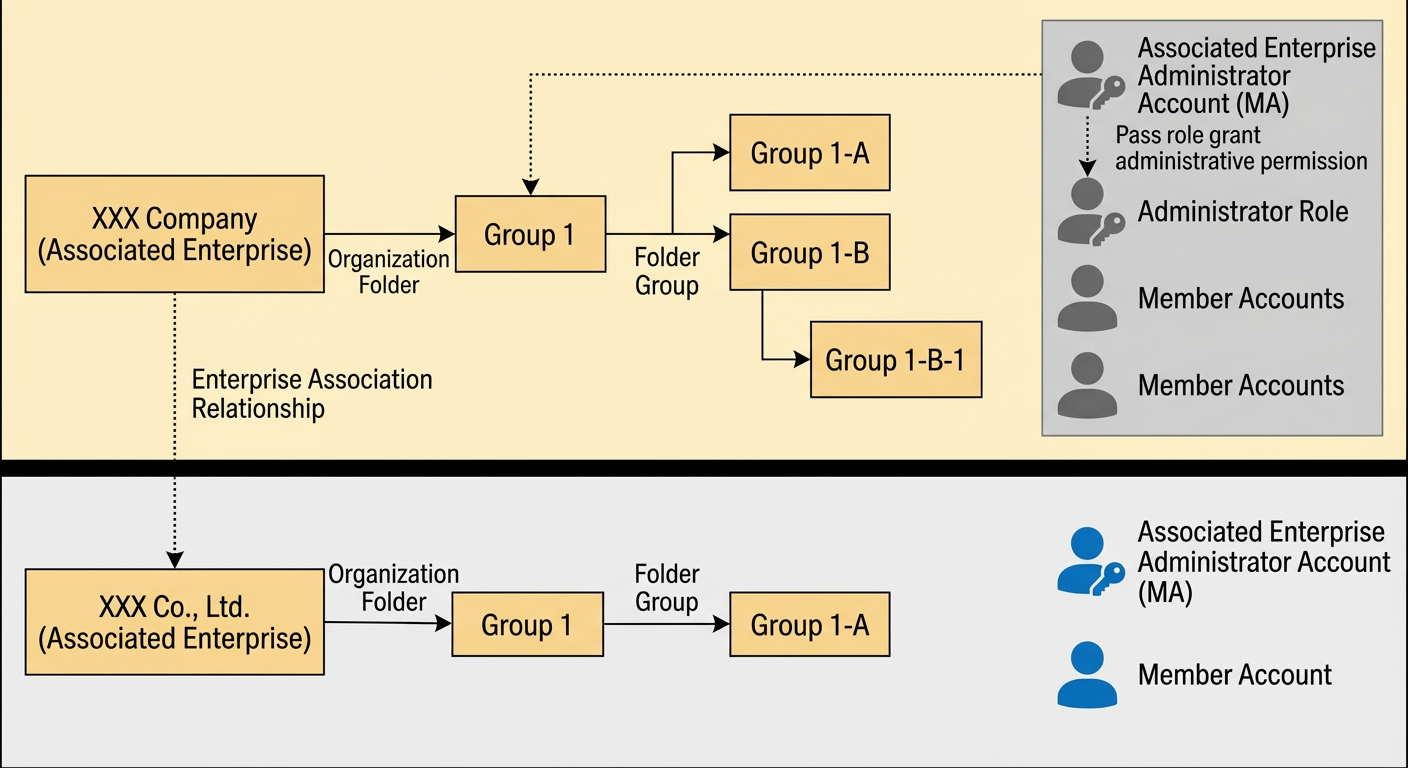
The following diagram of an organizational structure illustrates concepts such as enterprise, enterprise relationship, organization folder, and account.
|
Category |
Description |
|
Enterprise |
An enterprise is also known as an entity. In the Chinese mainland, an enterprise is a type of organization registered with and licensed by the industrial and commercial administration authorities in accordance with Chinese law. It is uniquely identified by a Unified Social Credit Code. In the enterprise multi-account management service, an enterprise specifically refers to an entity that has provided relevant proof and has been approved by Alibaba Cloud. |
|
Enterprise relationship |
An enterprise relationship is an association established between enterprises. Different enterprise relationships come with different benefits. When one enterprise invites another to establish a partnership, the administrator account of the invited enterprise must confirm and agree to the invitation to create the association. |
|
Group enterprise |
The enterprise that sends the invitation is the group company. The administrator of the inviting enterprise is the Management Account (MA) of the group company. |
|
Associated enterprise |
The invited enterprise is the associated enterprise. The administrator of the invited enterprise is the administrator of that associated enterprise and has management permissions for it. |
|
Organization folder |
The organization folder lets you centrally manage the accounts of associated enterprises. You can set up a tree structure for parent and subsidiary companies, departments, projects, and production environments. This allows for hierarchical account management. You can also place accounts in specific organization nodes to let the administrator of that node manage related information. |
|
Organization node |
Each node in an organization folder is an organization node. Each organization node has exactly one parent node and can have zero or more child nodes. |
|
Management Account (MA) |
A Management Account (MA) is an Alibaba Cloud account that has completed Enterprise Real-Name Authentication. It holds the highest management permissions on the Alibaba Cloud website. You can use an MA to enable the enterprise multi-account management service. After the service is enabled, the MA becomes the super administrator of the service. It manages enterprises, organization folders, permissions, and member accounts. An MA has the following characteristics:
|
|
Permissions of a Management Account (MA) |
When an enterprise account enables the enterprise multi-account management service, it gains full management permissions for its own account and the following permissions:
An MA can grant one or more of these permissions to the MAs of other enterprises with which it has established a relationship. |
|
Member account |
In an enterprise, all accounts other than the MA are called member accounts. The MA can create member accounts, invite member accounts to join an organization, remove member accounts from an organization, modify member account information, and grant permissions to member accounts. Each member account can join only one organization node. |
|
Administrator role |
A type of role. The permissions associated with an administrator role are effective within the scope managed by the authorized account. For example, if account UID1 is granted the administrator role Role001, the account gains the permissions associated with Role001. The scope of these permissions covers all accounts in the organization folder of UID1 and its sub-folders. Note
After a member account is granted an administrator role, it gains management permissions but remains a member account. |
|
Member role |
A type of role. The permissions associated with a member role are effective only for the authorized account itself. For example, if account UID1 is granted the member role Role002, account UID1 gains the permissions associated with Role002. |
|
Role authorization |
The procedure of an administrator granting permissions to an account. When you grant permissions to an account, you can only grant roles that correspond to those permissions. |
Limits
The enterprise multi-account management service has the following limits:
|
Category |
Limit |
Upgrade methods |
Description |
|
Enterprise MA |
1 |
N/A |
An enterprise has one and only one MA. |
|
Maximum level of an organization folder |
5 |
N/A |
The maximum number of levels in an organization folder. |
|
Number of organization nodes in an enterprise |
1,000 |
N/A |
The maximum number of organization nodes in an enterprise. |
|
Number of accounts an enterprise can manage |
50 |
Contact your service manager |
The maximum number of accounts an enterprise administrator can manage. |
|
Number of roles an enterprise can create |
20 |
Contact your service manager |
The maximum number of roles an enterprise can create. |
|
Number of permissions that can be associated with a role |
50 |
Contact your service manager |
The maximum number of permissions that can be associated with a role. |
|
Number of roles that can be granted to an account |
10 |
Contact your service manager |
The maximum number of roles that can be granted to an account. |
|
Number of accounts that can be granted a role |
50 |
Contact your service manager |
The maximum number of accounts that can be granted a role. |
Other enterprise multi-account services
Alibaba Cloud also provides the Resource Directory service, which allows enterprise users to manage resources across multiple accounts. The following table compares the features of these two services. You can choose the service that best fits your business scenario.
|
Service |
Features |
|
Enterprise multi-account management service (or Enterprise Account Center) |
Manage bills, invoices, and costs for multiple Alibaba Cloud accounts within the same enterprise with a single click. Easily create and manage multiple Alibaba Cloud accounts. This service does not involve managing cloud resources within the accounts. |
|
Resource Directory |
Primarily used to manage cloud resources, implement isolation, and ensure compliance across multiple accounts. In Resource Directory, you can create resource accounts or invite Alibaba Cloud accounts to build a multi-account organizational structure. After you enable Resource Directory, you can also enable CloudSSO to manage identities and permissions for multiple accounts in your resource directory. |