Use Terraform to associate a deployment set with a node pool
Distributing Container Service for Kubernetes (ACK) node pool instances across different physical servers improves service availability and disaster recovery by limiting the impact of a single host failure. You can use Terraform to create a node pool associated with an Elastic Compute Service (ECS) deployment set, ensuring the underlying ECS nodes are physically isolated across multiple hosts.
You can run the sample code in this topic with a few clicks. Click here to run the sample code.
Limitations
Before you start, note the following hard constraints:
-
Creation time only: Associate a deployment set with a node pool only when you create the node pool. Existing node pools cannot be updated to use a deployment set.
-
One deployment set per node pool: Each node pool can be associated with only one deployment set.
-
No spot instances: Node pools associated with a deployment set do not support spot instances.
-
No manual instance management: Add or remove ECS instances in a deployment set only by scaling the associated node pool. Manual adds and removes are not supported. For more information, see Create and manage node pools.
-
Quota: Each deployment set supports up to 20 ECS instances per zone. The maximum for a region is
20 × number of zones in the region. This limit cannot be increased, but you can request a higher quota for the total number of deployment sets in the Quota Center console. -
Instance resources: Insufficient instance inventory in a zone may cause ECS instance creation or start failures. Wait and retry if this happens.
Prerequisites
Before you begin, ensure that you have:
-
A Terraform runtime environment set up using one of the following options:
-
Terraform Explorer: an online Terraform environment provided by Alibaba Cloud. No installation required. Suitable for low-overhead testing and debugging.
-
Create resources with Terraform: Terraform is pre-installed and configured with your identity credentials. Suitable for quick access without local setup.
-
Create a Terraform template: integrates Terraform templates with ROS to manage resources across Alibaba Cloud, AWS, or Azure.
-
Install and configure Terraform: suitable for unstable network environments or custom development setups.
Terraform 0.12.28 or later is required. Run
terraform --versionto check your version. -
-
Sufficient ECS quota in the deployment set and adequate inventory for the specified instance types. By default, each deployment set can contain up to 20 ECS instances per zone. For more information, see Manage ECS quotas.
-
An Create an AccessKey for the Create a RAM user user you log on as.
Use a RAM user with limited permissions rather than your Alibaba Cloud root account. This reduces the blast radius if credentials are compromised.
-
The following RAM policy attached to your RAM user. This policy allows the RAM user to create, view, and delete virtual private clouds (VPCs), vSwitches, deployment sets, and ACK clusters. For details on granting permissions, see Manage RAM user permissions.
{
    "Version": "1",
    "Statement": [
        {
            "Effect": "Allow",
            "Action": [
                "vpc:CreateVpc",
                "vpc:CreateVSwitch",
                "cs:CreateCluster",
                "vpc:DescribeVpcAttribute",
                "vpc:DescribeVSwitchAttributes",
                "vpc:DescribeRouteTableList",
                "vpc:DescribeNatGateways",
                "cs:DescribeTaskInfo",
                "cs:DescribeClusterDetail",
                "cs:GetClusterCerts",
                "cs:CheckControlPlaneLogEnable",
                "cs:CreateClusterNodePool",
                "cs:DescribeClusterNodePoolDetail",
                "cs:ModifyClusterNodePool",
                "vpc:DeleteVpc",
                "vpc:DeleteVSwitch",
                "cs:DeleteCluster",
                "cs:DeleteClusterNodepool",
                "ecs:CreateDeploymentSet",
                "ecs:DescribeDeploymentSets",
                "ecs:ModifyDeploymentSetAttribute",
                "ecs:DeleteDeploymentSet"
            ],
            "Resource": "*"
        }
    ]
}
Background
A deployment set is an ECS feature that distributes instances across different physical servers in a zone. When a physical server goes down, only the instances on that server are affected — not all instances in the deployment set. By associating a deployment set with an ACK node pool, you ensure that the underlying ECS nodes are spread across multiple physical hosts. You can then use pod affinity rules to schedule application pods onto different nodes for host-level isolation.
Deployment sets are supported on both ACK dedicated clusters and ACK managed clusters.
For more information, see Deployment sets.
Deployment strategies
The strategy variable in the Terraform configuration controls how instances are distributed. Valid values are Availability, AvailabilityGroup, and LowLatency. Node pool deployment sets use the high availability strategy (Availability) by default.
The strategy you choose affects which ECS instance families are compatible. To check which instance families support a given strategy, call DescribeDeploymentSetSupportedInstanceTypeFamily.
Instance family compatibility
The following table lists the instance families supported by each deployment strategy.
|
Deployment strategy |
Supported instance families |
|
High availability strategy or high availability group strategy |
g8a, g8i, g8y, g7se, g7a, g7, g7h, g7t, g7ne, g7nex, g6, g6e, g6a, g5, g5ne, sn2ne, sn2, sn1; c8a, c8i, c8y, c7se, c7, c7t, c7nex, c7a, c6, c6a, c6e, c5, ic5, sn1ne; r8a, r8i, r8y, r7, r7se, r7t, r7a, r6, r6e, r6a, re6, re6p, r5, re4, se1ne, se1; hfc8i, hfg8i, hfr8i, hfc7, hfg7, hfr7, hfc6, hfg6, hfr6, hfc5, hfg5; d3c, d2s, d2c, d1, d1ne, d1-c14d3, d1-c8d3; i3g, i3, i2, i2g, i2ne, i2gne, i1; ebmg5, ebmc7, ebmg7, ebmr7, sccgn6, scch5, scch5s, sccg5, sccg5s; e, t6, xn4, mn4, n4, e4, n2, n1; gn6i |
|
Low latency strategy |
g8a, g8i, g8ae, g8y; c8a, c8i, c8ae, c8y; ebmc8i, ebmg8i, ebmr8i; r8a, r8i, r8ae, r8y; ebmc7, ebmg7, ebmr7 |
Required resources
The resources in this example incur charges. Release the resources when you no longer need them.
The Terraform configuration creates the following resources in order:
-
alicloud_vpc — a VPC for the cluster network
-
alicloud_vswitch (×2 sets) — node vSwitches and Terway pod vSwitches in each zone
-
alicloud_ecs_deployment_set — the deployment set that enforces physical host isolation
-
alicloud_cs_managed_kubernetes — an ACK managed cluster
-
alicloud_cs_kubernetes_node_pool — a node pool that references the deployment set ID
The node pool's deployment_set_id field links it to the deployment set. This is the key configuration that triggers physical host distribution for all nodes in the pool.
Create a node pool with a deployment set
-
Create the Terraform configuration file using the following template:
provider "alicloud" { region = var.region_id } variable "region_id" { type = string default = "cn-shenzhen" } variable "name" { default = "tf-example" } variable "strategy" { default = "Availability" description = "The deployment strategy. Valid values: Availability, AvailabilityGroup, LowLatency." } variable "cluster_spec" { type = string description = "The cluster specifications of kubernetes cluster,which can be empty. Valid values:ack.standard : Standard managed clusters; ack.pro.small : Professional managed clusters." default = "ack.pro.small" } # Specify the zones of vSwitches. variable "availability_zone" { description = "The availability zones of vswitches." default = ["cn-shenzhen-c", "cn-shenzhen-e", "cn-shenzhen-f"] } # The CIDR blocks used to create vSwitches. variable "node_vswitch_cidrs" { type = list(string) default = ["172.16.0.0/23", "172.16.2.0/23", "172.16.4.0/23"] } # The CIDR blocks used to create Terway vSwitches. variable "terway_vswitch_cidrs" { type = list(string) default = ["172.16.208.0/20", "172.16.224.0/20", "172.16.240.0/20"] } # Specify the ECS instance types of worker nodes. variable "worker_instance_types" { description = "The ecs instance types used to launch worker nodes." default = ["ecs.g6.2xlarge", "ecs.g6.xlarge"] } # Specify a password for the worker node. variable "password" { description = "The password of ECS instance." default = "Test123456" } # Specify the cluster add-on components (Terway, csi-plugin, csi-provisioner, logtail-ds, nginx-ingress-controller, arms-prometheus, ack-node-problem-detector). variable "cluster_addons" { type = list(object({ name = string config = string })) default = [ { "name" = "terway-eniip", "config" = "", }, { "name" = "logtail-ds", "config" = "{\"IngressDashboardEnabled\":\"true\"}", }, { "name" = "nginx-ingress-controller", "config" = "{\"IngressSlbNetworkType\":\"internet\"}", }, { "name" = "arms-prometheus", "config" = "", }, { "name" = "ack-node-problem-detector", "config" = "{\"sls_project_name\":\"\"}", }, { "name" = "csi-plugin", "config" = "", }, { "name" = "csi-provisioner", "config" = "", } ] } # Specify the prefix of the name of the ACK managed cluster. variable "k8s_name_prefix" { description = "The name prefix used to create managed kubernetes cluster." default = "tf-ack" } variable "vpc_name" { default = "tf-vpc" } variable "nodepool_name" { default = "default-nodepool" } # The default resource names. locals { k8s_name_terway = substr(join("-", [var.k8s_name_prefix, "terway"]), 0, 63) } # The VPC. resource "alicloud_vpc" "default" { vpc_name = var.vpc_name cidr_block = "172.16.0.0/12" } # The node vSwitches. resource "alicloud_vswitch" "vswitches" { count = length(var.node_vswitch_cidrs) vpc_id = alicloud_vpc.default.id cidr_block = element(var.node_vswitch_cidrs, count.index) zone_id = element(var.availability_zone, count.index) } # The pod vSwitches. resource "alicloud_vswitch" "terway_vswitches" { count = length(var.terway_vswitch_cidrs) vpc_id = alicloud_vpc.default.id cidr_block = element(var.terway_vswitch_cidrs, count.index) zone_id = element(var.availability_zone, count.index) } # Create a deployment set. resource "alicloud_ecs_deployment_set" "default" { strategy = var.strategy domain = "Default" granularity = "Host" deployment_set_name = var.name description = "example_value" } # The ACK managed cluster. resource "alicloud_cs_managed_kubernetes" "default" { name = local.k8s_name_terway # The ACK cluster name. cluster_spec = var.cluster_spec # Create an ACK Pro cluster. worker_vswitch_ids = split(",", join(",", alicloud_vswitch.vswitches.*.id)) # The vSwitches used by the node pool. Specify one or more vSwitch IDs. The vSwitches must reside in the zone specified by availability_zone. pod_vswitch_ids = split(",", join(",", alicloud_vswitch.terway_vswitches.*.id)) # The vSwitches used by pods. new_nat_gateway = true # Specify whether to create a NAT gateway when the ACK cluster is created. Default value: true. service_cidr = "10.11.0.0/16" # The pod CIDR block. If you set the cluster_network_type parameter to flannel, this parameter is required. The pod CIDR block cannot be the same as the VPC CIDR block or the CIDR blocks of other ACK clusters in the VPC. You cannot change the pod CIDR block after the cluster is created. Maximum number of hosts in the cluster: 256. slb_internet_enabled = true # Specify whether to create an Internet-facing SLB instance for the API server of the cluster. Default value: false. enable_rrsa = true control_plane_log_components = ["apiserver", "kcm", "scheduler", "ccm"] # The control plane logs. dynamic "addons" { # Component management. for_each = var.cluster_addons content { name = lookup(addons.value, "name", var.cluster_addons) config = lookup(addons.value, "config", var.cluster_addons) } } } # The regular node pool. # deployment_set_id links this node pool to the deployment set created above. # All nodes in this pool are distributed across separate physical hosts, as defined by the strategy. # You can associate a deployment set with a node pool only when you create the node pool. resource "alicloud_cs_kubernetes_node_pool" "default" { cluster_id = alicloud_cs_managed_kubernetes.default.id # The ACK cluster name. node_pool_name = var.nodepool_name # The node pool name. vswitch_ids = split(",", join(",", alicloud_vswitch.vswitches.*.id)) # The vSwitches used by the node pool. Specify one or more vSwitch IDs. The vSwitches must reside in the zone specified by availability_zone. instance_types = var.worker_instance_types instance_charge_type = "PostPaid" runtime_name = "containerd" desired_size = 2 # The expected number of nodes in the node pool. password = var.password # The password that is used to log on to the cluster by using SSH. install_cloud_monitor = true # Specify whether to install the CloudMonitor agent on the nodes in the cluster. system_disk_category = "cloud_essd" system_disk_size = 100 image_type = "AliyunLinux" deployment_set_id = alicloud_ecs_deployment_set.default.id data_disks { # The data disk configuration of the node. category = "cloud_essd" # The disk category. size = 120 # The disk size. } } -
Initialize the Terraform runtime environment:
terraform initA successful initialization returns output similar to:
Terraform has been successfully initialized! You may now begin working with Terraform. Try running "terraform plan" to see any changes that are required for your infrastructure. All Terraform commands should now work. If you ever set or change modules or backend configuration for Terraform, rerun this command to reinitialize your working directory. If you forget, other commands will detect it and remind you to do so if necessary. -
Create the resources:
terraform applyWhen prompted, type
yesto confirm. A successful apply returns output similar to:Do you want to perform these actions? Terraform will perform the actions described above. Only 'yes' will be accepted to approve. Enter a value: yes ... Apply complete! Resources: 10 added, 0 changed, 0 destroyed.Resources: 10 addedconfirms that all required resources — including the VPC, vSwitches, deployment set, ACK cluster, and node pool — were provisioned.
Verify the result
Verify with Terraform
Run the following command to inspect the Terraform state:
terraform show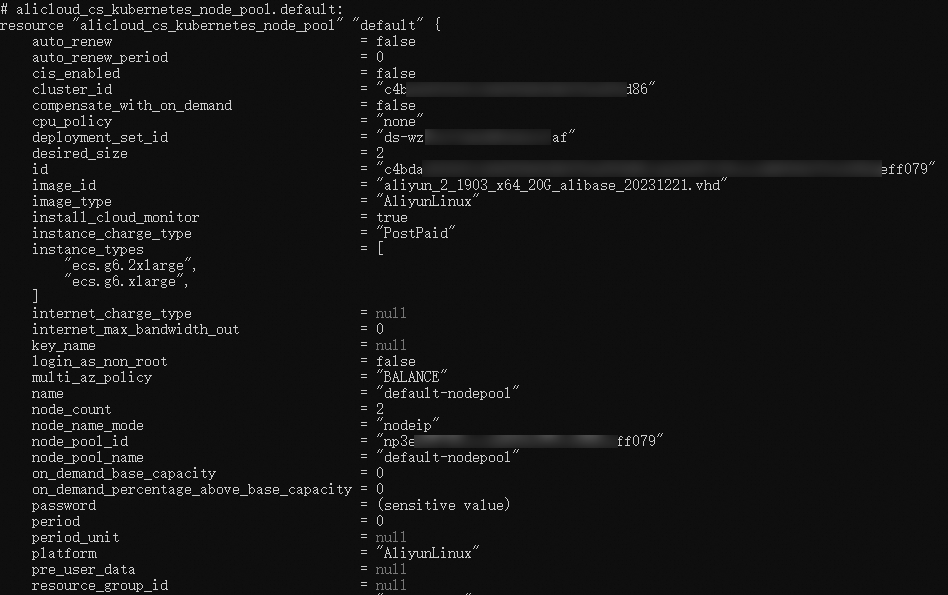
In the output, find the alicloud_cs_kubernetes_node_pool.default resource and confirm that deployment_set_id matches the ID of alicloud_ecs_deployment_set.default. This confirms that the node pool is linked to the correct deployment set.
Verify in the ACK console
In the ACK console, go to the Node Pools page and find the node pool you created. Click Edit in the Actions column to view the associated deployment set.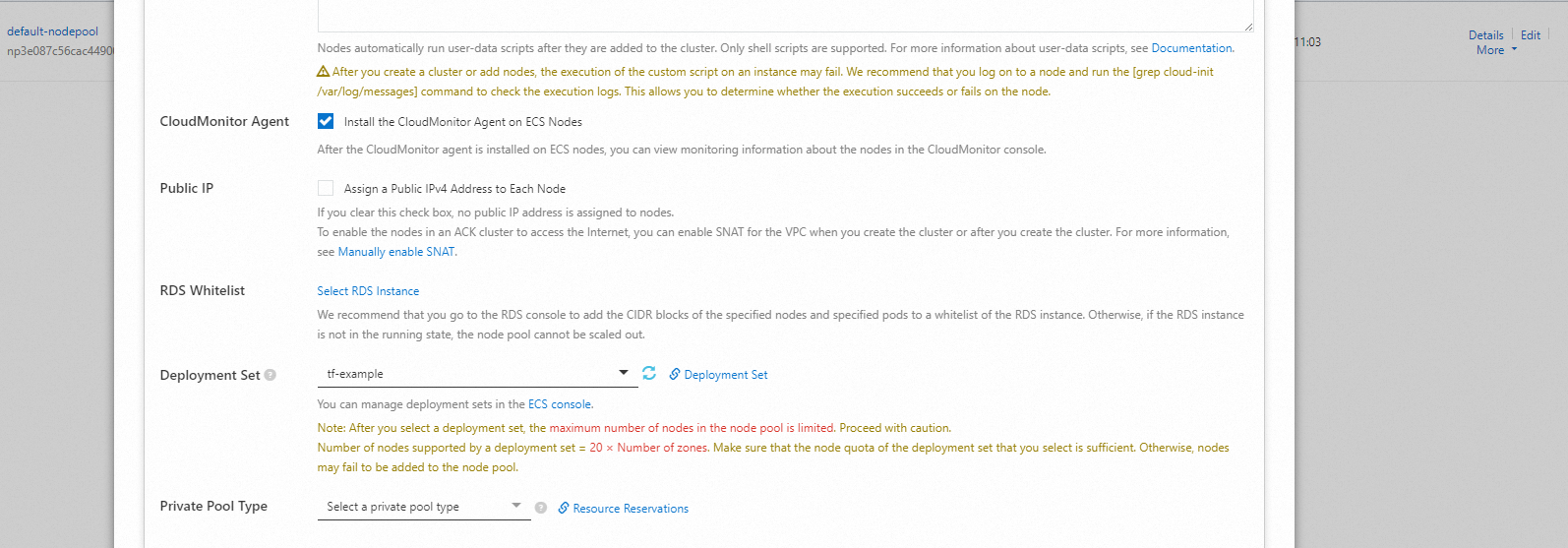
Clean up resources
When you no longer need the resources, run the following command to release them:
terraform destroyFor more information about the terraform destroy command, see Common Terraform commands.
Example
You can run the sample code in this topic with a few clicks. Click here to run the sample code.
Sample code
What's next
-
To learn how to control the distribution of ECS instances in a node pool, see Best practices for associating deployment sets with node pools.
-
Terraform is available as a managed service in ROS. To deploy Terraform templates in the ROS console, see Create a Terraform stack.