Access Alibaba Cloud services over VPN
1 Scenario Overview
Besides accessing compute resources within a VPC, customers often need to access other types of cloud services, such as OSS, SLS, Model Studio, and big data computing services.
From a networking perspective, Alibaba Cloud services fall into three categories:
Services deployed inside a customer's VPC, such as RDS, use standard VPC private IP addresses. Customers can plan these private IP addresses and communicate using standard VPC internal networking or cross-VPC designs.
Services not deployed inside a customer's VPC, such as OSS, are assigned IP addresses from Alibaba Cloud's public address range (100.64.0.0/10) instead of standard VPC private IP addresses. These services are directly accessible from the customer's VPC but do not support private IP address planning or management.
Services that are available only through public IP addresses, such as the Model Studio platform. These services do not have private IP addresses.
In this scenario, a customer's on-premises data center (IDC) must access both VPC-deployed and non-VPC-deployed cloud services over a dedicated connection.
2 Solution
2.1 Customer Requirements
Connect the IDC or office network to the cloud quickly and securely.
Enable systems outside Alibaba Cloud, such as those in an IDC or office, to access Alibaba Cloud services such as databases or Object Storage Service over a private network instead of the public internet. The following table compares the different methods for accessing cloud services.
2.2 Architecture
2.2.1 Common Cloud Service Access Methods
Cloud Service Access Method | Internet access | Private Network Access |
High-quality access for complex applications |
|
|
Stronger security for enterprise applications |
|
|
Enterprises now require their IT applications to reduce costs and increase efficiency. |
| |
2.2.2 Cloud Service Deployment Models
Cloud services deployed inside a VPC are provided through ENIs or similar mechanisms. Their IP addresses belong to the CIDR block of the VPC's vSwitch. After you establish a connection between the dedicated line and the VPC, these services are directly accessible without additional configuration.
Cloud services accessed through private IP addresses typically use IPs from the 100.64.0.0/10 range, which are not part of the VPC's CIDR block.
Cloud services accessed through PrivateLink (PVL) are integrated into the VPC through the PrivateLink service, which provides VPC-native IP addresses. For a list of Alibaba Cloud services that support PrivateLink integration, see Alibaba Cloud services integrated with PrivateLink.
2.2.3 Cloud Service Access Architecture
You can use IPsec-VPN to connect an on-premises data center to a cloud VPC. IPsec-VPN uses the IPsec protocol to provide encrypted site-to-site communication, which securely links on-premises data centers with Alibaba Cloud VPCs. It is widely used in hybrid cloud networking and leased line disaster recovery scenarios.
Note: Although a VPN provides a fast, secure, and efficient connection between an IDC and the cloud, you should use a dedicated line for scenarios that require high bandwidth and stable quality.
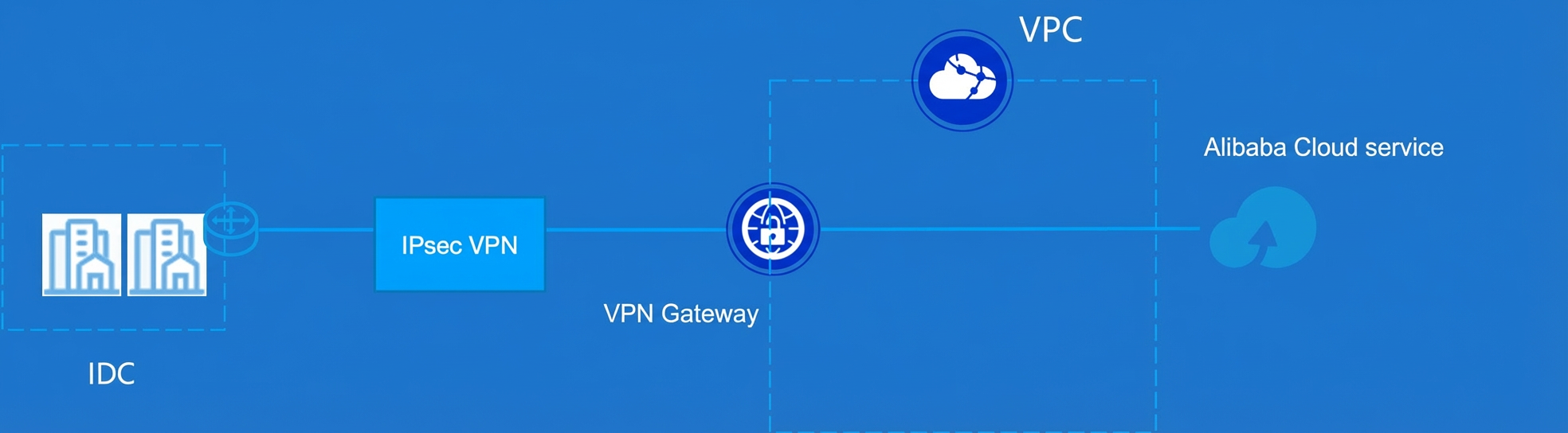
IPsec-VPN supports two deployment models. We recommend that you first consider the transit router model:
Attach to a VPN Gateway: This model is suitable for encrypting traffic between an on-premises data center and a single cloud VPC. It works well for accessing cloud services in the same region.
Attach to a Transit Router (TR): This model is ideal when an on-premises data center needs to interconnect with multiple cloud VPCs at the same time. The transit router enables unified access and efficient routing. This model supports access to cloud services in both the local region and other regions.
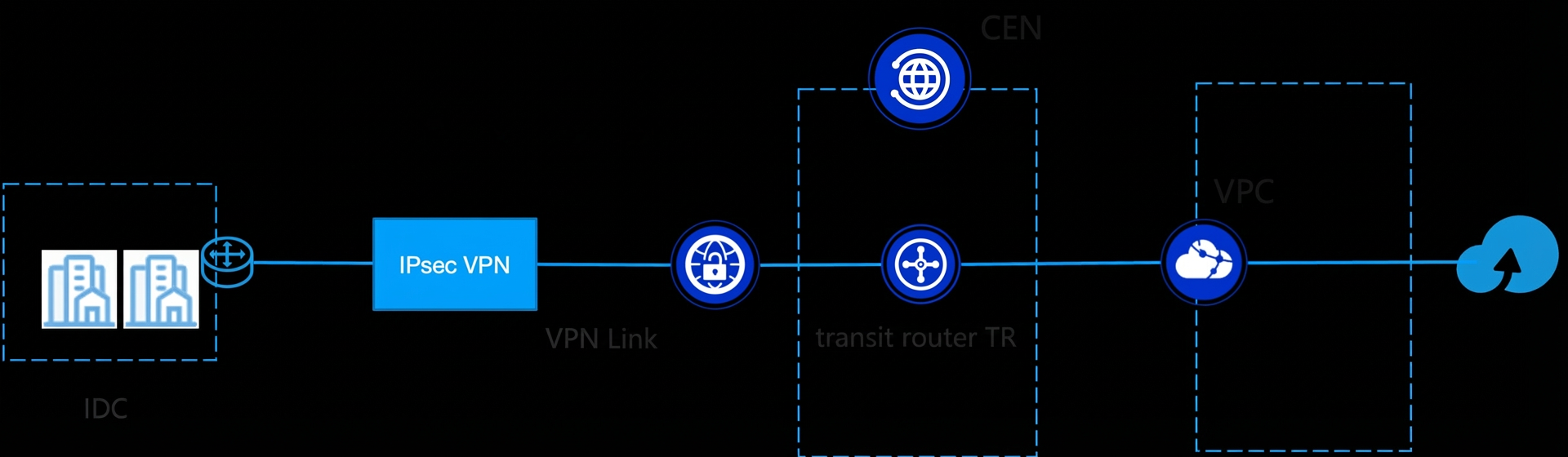
After you connect the IDC and VPC using IPsec-VPN, the IDC can access Alibaba Cloud services in different ways depending on the service architecture:
Directly access cloud services that are deployed inside the VPC, such as services exposed through an ENI.
Access cloud services that use the 100.64.0.0/10 private address range through TR routing.
For scenarios that involve IP conflicts or require enhanced security controls, you can use PrivateLink (PVL) to expose cloud services as VPC-native endpoints. This ensures that all traffic stays within the private network, avoids public exposure, and supports unified cross-region and cross-account scheduling.
3.3 Customer Benefits
Customers can quickly establish an encrypted private channel without deploying physical leased lines. This enables secure internal access to services such as cloud databases and object storage at a lower cost. Compared with direct access over the public internet, a VPN provides end-to-end encryption, network isolation, and controllable access boundaries. This significantly improves security and eliminates the risks of public exposure. It also reduces costs compared with expensive leased lines. This solution is ideal for businesses that need rapid deployment, have limited budgets, or require a temporary or backup alternative to leased lines. It delivers basic security and connectivity while enabling fast cloud adoption and flexible operations.
3.4 Products and Billing
VPN Gateway: You can use a VPN Gateway and its tunnel encryption to securely connect on-premises data centers, office networks, clients, and cloud VPCs over a private network.
Transit Router (TR) (optional): A high-performance network hub in Cloud Enterprise Network (CEN). It supports large-scale interconnection and intelligent routing across regions, accounts, and hybrid cloud environments to meet the complex networking needs of medium and large enterprises.
Product | Billing | Notes |
VPN Gateway | ||
Transit Router (TR) | Applies only when VPN is attached to a transit router. | |
Cloud Data Transfer (CDT) | Applies only when VPN is attached to a transit router. | |
PrivateLink (PVL) | Products that exclusively use PrivateLink (PVL) |
3 Important Notes
When a VPC communicates with an on-premises IDC using IPsec-VPN, the underlying infrastructure uses an active-active architecture. This architecture supports sub-second failover at the device level to prevent service interruption.
All VPN Gateways support dual-tunnel mode (primary and backup tunnels) by default. If the primary tunnel fails, traffic automatically switches to the backup tunnel. This ensures link-level high availability.
To avoid service interruption, you should upgrade a single-tunnel IPsec connection to dual-tunnel mode during a maintenance window.
You can attach multiple IPsec connections to the same transit router (TR) to enable equal-cost multi-path (ECMP) for load balancing and high availability. A single TR supports up to 16 ECMP IPsec connections in single-tunnel mode.
You can deploy multiple gateway devices in the on-premises IDC to achieve device-level high availability.
Data transmission is encrypted using the IKE and IPsec protocols to ensure security and trustworthiness.
IKE version selection: The Chinese cryptographic (Guomi) VPN supports only IKEv1. The standard VPN supports both IKEv1 and IKEv2. We recommend that you use IKEv2 (default) for more efficient negotiation and better support for multiple CIDR blocks.
Supported encryption algorithms:
Standard VPN: AES128 (default), AES192, AES256, DES, 3DES.
Chinese cryptographic (Guomi) VPN: SM4 (default).
For bandwidth of 200 Mbps or higher, use AES-series algorithms. Avoid 3DES because of its high performance overhead.
Supported authentication algorithms:
Standard VPN: SHA1 (default), MD5, SHA256, SHA384, SHA512.
Chinese cryptographic (Guomi) VPN: SM3 (default).
Alibaba Cloud VPN Gateway supports non-cross-border connections only. For cross-border scenarios, you can combine Cloud Enterprise Network (CEN) with a cross-border leased line.
A single IPsec connection supports up to 1000 Mbps of bandwidth. You can scale horizontally by deploying multiple connections with ECMP.
A single IPsec connection supports up to 120,000 packets per second (PPS) with a 256-byte packet size.
IPsec-VPN is ready to use immediately after activation. The configuration takes effect in real time, which enables rapid deployment and elastic scale-out.
You can use Cloud Monitor and Network Intelligence Service (NIS) to monitor the status, traffic, and other metrics of VPN Gateways and IPsec connections. You can also configure threshold alerts to receive immediate notifications of anomalies.
VPC firewalls do not protect scenarios where VPN Gateways, such as IPsec-VPN or SSL VPN, connect directly to a VPC. However, VPC firewalls do support protection when IPsec-VPN is attached to a transit router.
For cloud services that are accessed using private IP addresses, which are typically in the 100.64.0.0/10 range, ensure that the IDC does not use this CIDR block to avoid IP conflicts. If a conflict occurs and the service supports PrivateLink, use PrivateLink for access.
To apply network access control to cloud services, you can use PrivateLink for service access.
4 Implementation Steps
4.1 Preparation
Determine the cloud service access method and complete network planning for both your cloud and on-premises environments.
4.2 Procedure
4.2.1 Access Cloud Services via IPsec-VPN Attached to a VPN Gateway
Attach the VPN to a VPN Gateway. For more information, see Quick Start: Attach a VPN Gateway.
Configure cloud service access.
To access cloud services that are deployed inside the VPC, you can connect directly.
To access cloud services that use private IP addresses in the 100.64.0.0/10 range, add a custom route in the advertised route table of the Alibaba Cloud VPN Gateway. Path: VPN Gateway > Destination CIDR Block > Add Custom Advertised Route:
100.64.0.0/10. You must also configure a static route on the on-premises IDC router or firewall for100.64.0.0/10with the next hop set to the VPN.To use PrivateLink (PVL) for cloud service access, especially if IP conflicts with 100.64.0.0/10 occur or additional security controls are needed, see Access Alibaba Cloud Services.
4.2.2 Access Cloud Services via IPsec-VPN Attached to a Transit Router
For more information, see Quick Start: Attach a Transit Router.
Configure cloud service access.
To access cloud services that are deployed inside the VPC, you can connect directly.
To access cloud services that use private IP addresses in the 100.64.0.0/10 range, see Configure Cloud Service Access.
To use PrivateLink (PVL) for cloud service access, especially if IP conflicts with 100.64.0.0/10 occur or additional security controls are needed, see Access Alibaba Cloud Services.
4.3 Monitoring and Alerting Configuration
For an IPsec-VPN connection that is attached to a VPN Gateway, configure Cloud Monitor alert rules as follows:
Monitored Object | Alert Level | Monitoring Metrics and Conditions |
VPN Gateway | Info | Trigger when any of the following conditions occur at the instance level:
|
Warn | Trigger when any of the following conditions occur at the instance level:
| |
Critical | Trigger when any of the following conditions occur at the instance level:
|
Subscribe to the following Cloud Monitor system events and configure alert push notifications:
Product: VPN Gateway. Event type: Abnormal, Status Notification. Event names: Certificate Expiry, All IPsec Tunnels Failed to Negotiate, IPsec Tunnel Negotiation Failed, Health Check Failed, or VPN Connection Health Check Failed.
For an IPsec-VPN connection that is attached to a transit router, configure Cloud Monitor alert rules as follows:
Monitored Object | Alert Level | Monitoring Metrics and Conditions |
VPN connection | Info | Trigger when any of the following conditions occur:
|
Warn | Trigger when any of the following conditions occur:
| |
Critical | Trigger when any of the following conditions occur:
| |
VPN Gateway | Critical | Trigger when any of the following conditions occur at the vpnconnection dimension:
|