Access Alibaba Cloud services over Express Connect
1. Scenario description
In addition to accessing compute and network resources within a Virtual Private Cloud (VPC), customers often need to access other types of Alibaba Cloud services, such as Object Storage Service (OSS), Simple Log Service (SLS), Model Studio, and big data computing services.
From a network perspective, Alibaba Cloud services and products can be divided into three categories:
Services deployed within your VPC that use standard VPC private IP addresses. For example, with ApsaraDB RDS, you can manage these private IP addresses and communicate using a standard VPC internal network or a cross-VPC network design.
Services not deployed within your VPC that do not have standard VPC private IP addresses but provide addresses within Alibaba Cloud's service CIDR block (100.64.0.0/10), such as OSS. Your VPC can access these services directly, but you cannot manage their private IP addresses.
Services that have only public endpoints and no private endpoints, such as the Model Studio service platform.
In this scenario, your on-premises data center needs to access both services deployed within a VPC and services deployed outside a VPC over an Express Connect circuit.
2. Solutions
2.1 Customer requirements
You need a long-term connection with stable quality and high bandwidth between your on-premises data center or office and the cloud.
You need a long-term multi-cloud connection with stable quality and high bandwidth.
You need to access Alibaba Cloud services, such as databases and Object Storage Service (OSS), from your on-premises data center, office, or other non-Alibaba Cloud systems. This access must be established over a private network instead of the Internet. The following table compares different cloud service access methods.
2.2 Solution architecture
2.2.1 Common cloud service access methods
Cloud service access method | Internet access | Private network access |
High access quality requirements for complex applications |
|
|
High security requirements for enterprise applications |
|
|
Cost reduction and efficiency improvement for IT applications |
| |
Note: An Express Connect circuit requires installation time and is subject to limitations from the leased line provider and data center. Therefore, it is not suitable for temporary use. For a fast connection between your data center or another cloud and Alibaba Cloud, you can use an IPsec-VPN connection or a third-party SD-WAN solution.
2.2.2 Cloud service architecture
Services deployed in a VPC: These services are provided through methods such as Elastic Network Interfaces (ENIs), and their IP addresses belong to the CIDR block of a vSwitch in the VPC. No extra configuration is required. You can access them directly after you establish a route between the Express Connect circuit and the VPC.
Services accessed through private endpoints: The IP addresses of these services are typically in the 100.64.0.0/10 service CIDR block, which does not belong to the VPC's CIDR block.
Services accessed through PrivateLink (PVL): These services are connected to a VPC using PrivateLink, which provides an endpoint with an IP address within the VPC. For a list of Alibaba Cloud services that can be accessed through PrivateLink, see Alibaba Cloud services that are integrated with PrivateLink.
2.2.3 Architecture for accessing cloud services
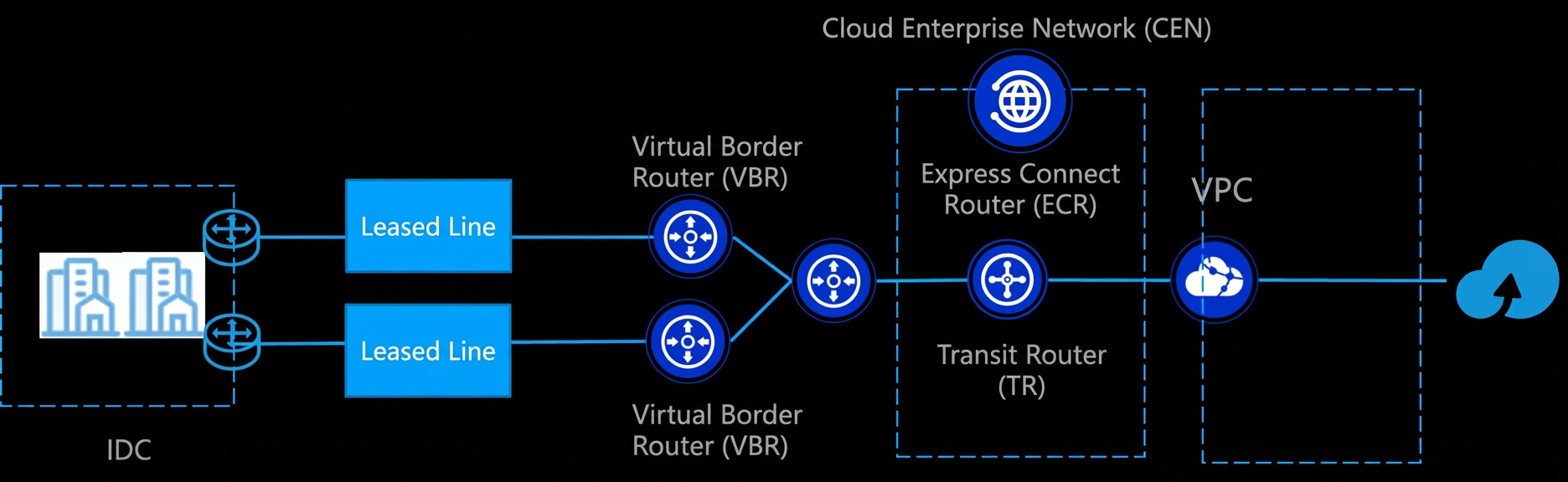
This solution uses an Express Connect circuit to securely connect your on-premises data center to Alibaba Cloud with low latency. The connection is routed through a virtual border router (VBR) and an Express Connect Router (ECR) to a transit router (TR) that is part of a Cloud Enterprise Network (CEN) instance. This enables private network peering between your data center and the VPC.
Depending on the cloud service architecture, your data center can access Alibaba Cloud services in different ways:
Directly access services deployed in the VPC, such as services exposed through ENIs.
Access cloud services that use the 100.64.0.0/10 private CIDR block using TR routing.
For scenarios with IP address conflicts or that require enhanced security control, you can use PrivateLink (PVL) to securely expose cloud services with a private IP address in the VPC. This ensures that all access occurs within the private network, avoids exposure to the Internet, and supports unified cross-region and cross-account scheduling.
2.3 Customer value
You can use an Express Connect circuit to securely and efficiently access various Alibaba Cloud services, such as databases and Object Storage Service (OSS), over a private network. This significantly improves access performance and security. Compared to public network access, a private channel offers lower latency and higher stability. It also disables the public network endpoint by default, which reduces the attack surface. Additionally, it helps you avoid data transfer costs for public network traffic, lowering your overall costs. By combining the ECR and TR architecture with PrivateLink, you can also flexibly handle IP address conflicts, implement fine-grained access control, and manage your data center and multi-cloud resources on a unified network platform. This achieves secure and controllable access, cost reduction, efficiency improvement, and simplified O&M.
2.4 Products and billing
Express Connect (connection over an Express Connect circuit): Express Connect uses a dedicated physical connection to connect your on-premises data center's internal network to an Alibaba Cloud access point. One end of the Express Connect circuit connects to the gateway device in your on-premises data center, and the other end connects to a VBR. This provides a secure, reliable, and high-speed connection with low latency.
Express Connect Router (ECR): A network hub in Alibaba Cloud that connects an Express Connect circuit to a VPC. It is responsible for routing and traffic management to enable private network peering between an on-premises data center and cloud resources.
Transit Router (TR): A high-performance network hub in CEN. It supports unified connectivity and smart routing for large-scale VPCs and on-premises data centers in cross-region, cross-account, and hybrid cloud scenarios. It is suitable for the complex networking needs of medium and large enterprises.
PrivateLink: PrivateLink helps you securely and stably access services deployed in other VPCs from your VPCs and on-premises data centers over a private network. It simplifies the network architecture and helps you avoid the security risks associated with accessing services over the Internet.
Product | Billing | Notes |
Express Connect | ||
Transit Router (TR) | ||
Cloud Data Transfer (CDT) | Applies only to cross-region scenarios. | |
PrivateLink (PVL) | Applies only to products that use PrivateLink (PVL). |
3. Notes
Express Connect circuits are not elastic and require advance planning. The scale-out cycle for an Express Connect circuit is long. The bandwidth should be planned to meet your business growth needs for at least the next three months to avoid performance bottlenecks and business losses due to insufficient bandwidth.
You can use the Quality of Service (QoS) of the Express Connect circuit or the rate-limiting feature of the VBR for resource allocation.
Multiple access point connections: Connect your data center to at least two different Alibaba Cloud access points through at least two independent Express Connect circuits. This provides physical link redundancy and load balancing. When you use multiple access points, try to select different ISPs.
Multiple Express Connect circuit connections: In addition to multiple access point connections, you can add more Express Connect circuits at each access point. The Express Connect circuits should be from different ISPs, and the access routes and campus lines should be as diverse as possible.
Use equal-cost multi-path (ECMP) routing for multiple Express Connect circuits: Compared to the active/standby routing mode, ECMP routing offers advantages such as fast fault convergence, high horizontal extensibility, and high resource utilization, especially for scenarios with sporadic traffic. If your business does not have restrictions such as source-in, source-out routing, we recommend that you prioritize ECMP routing for multiple Express Connect circuit connections.
Use a VPN connection as a standby connection: In Enterprise Edition TR scenarios, VPN connections can serve as standby connections for Express Connect circuits. You can use a VPN Gateway to create a redundant backup for an Express Connect circuit. This ensures that hybrid cloud connectivity remains available even if all Express Connect circuits fail.
We recommend that you use Border Gateway Protocol (BGP) with Bidirectional Forwarding Detection (BFD) as the interconnection protocol for the Express Connect circuit.
We recommend that you use an ECR and a TR for the Express Connect circuit uplink, rather than a VBR uplink.
Configure monitoring and alerting. You can use disaster recovery drills to determine the fault detection and recovery capabilities of the Express Connect circuit.
Note that for cloud services accessed through private endpoints, their IP addresses are typically in the 100.64.0.0/10 service CIDR block. Your data center cannot use this CIDR block to avoid IP address conflicts. If a conflict occurs and the cloud service supports PrivateLink, you can use PrivateLink for access.
If you need network access control for cloud services, you can use PrivateLink to access them.
4. Procedure
4.1 Preparations
Determine the cloud service access method and complete the network planning for both your cloud and on-premises networks.
4.2 Procedure
4.2.1 Configure the Express Connect circuit
Apply for an Express Connect circuit: Select an access point, contact a provider, and connect to Alibaba Cloud. For more information, see Procedure for applying for a dedicated Express Connect circuit or Procedure for applying for a shared Express Connect circuit.
Dedicated Express Connect circuit solution
You connect your on-premises data center to an Alibaba Cloud access point on your own. This method gives you exclusive use of a physical port. You can apply for a dedicated Express Connect circuit in the Express Connect console.
Shared Express Connect circuit solution
The partner's access point is already connected to an Alibaba Cloud access point. You only need to contact an Alibaba Cloud partner, and the partner will deploy the Express Connect circuit from your on-premises data center to the partner's access point. In this connection method, the connection between the ISP and Alibaba Cloud is shared among multiple tenants.
After the Express Connect circuit is connected, create a VBR and configure BGP routing. For more information, see Configure and manage BGP.Note: In ECR scenarios, VBRs do not support static routing.
For fast failover, you can use BFD and a failover group. For more information, see Configure a failover group.
Add the VBR to an ECR. For more information, see Create and manage an Express Connect Router (ECR).
Use the ECR as the bearer network gateway for the Express Connect circuit and connect it to a regional TR. For more information, see Connect an ECR to a transit router.
Connect the TR to a VPC in the same region and configure the corresponding routing rules.
To access resources in other regions, you can connect TRs from different regions.
4.2.2 Configure cloud service access
If you are accessing a cloud service deployed in a VPC, you can access it directly.
If you are accessing a cloud service through a private endpoint (with an IP address in the 100.64.0.0/10 CIDR block), see Configure access to cloud services.
If you want to use PrivateLink (PVL) to access a cloud service, especially in scenarios with IP address conflicts with the 100.64.0.0/10 CIDR block or that require extra security control, see Access Alibaba Cloud services.
4.3 Monitoring and alert settings
We recommend that you configure the following alert rules for the Express Connect circuit in Cloud Monitor:
Monitored object | Alert level | Metrics and conditions |
Express Connect - Physical port | Info | When one of the following conditions occurs:
|
Warn | When one of the following conditions occurs:
| |
Critical | When one of the following conditions occurs:
| |
Express Connect - Virtual border router | Info | When one of the following conditions occurs:
|
Warn | When one of the following conditions occurs:
| |
Critical | When one of the following conditions occurs:
| |
Express Connect - Express Connect Router | Info | When the following condition occurs at the transit router (TR) instance monitoring dimension:
When the following condition occurs at the cross-domain connection dimension:
|
Warn | When the following condition occurs at the transit router (TR) instance monitoring dimension:
When the following condition occurs at the cross-domain connection dimension:
| |
Critical | When the following condition occurs at the transit router (TR) instance monitoring dimension:
When the following condition occurs at the cross-domain connection dimension:
| |
Express Connect - Peering connection | Info | When one of the following conditions occurs at the instance dimension:
|
Warn | When one of the following conditions occurs at the instance dimension:
| |
Critical | When one of the following conditions occurs at the instance dimension:
|
Subscribe to the following Cloud Monitor system events and configure alert pushing:
Product: Express Connect - Express Connect circuit. Event type: Down. Event name: BGP Peer status changes from Established to Down.