Overview
Agent Manager helps enterprises manage Agents centrally on Alibaba Cloud. Administrators deploy the platform and configure users, models, Agent types, sandboxes, and other resources; team members create and use Agent instances through the user-side /user entry.
Platform architecture
The following figure shows the Agent Manager platform architecture and role relationships.
Service instance and administrator console
Compute Nest creates and updates the Agent Manager service instance. After the service instance is deployed, you manage users, models, Agent types, sandboxes, Skills, instance backups, and sandbox upgrades in the Agent Manager administrator console.
Use this document
Administrators: Start with the administrator guide to complete platform deployment and configuration. When an exception occurs, see FAQ and troubleshooting.
Regular users: Start with User guide, then log in to create and use your own Agents. When an exception occurs, see the user-side FAQ in the user guide.
Administrator tasks
Task to complete | Document |
Create a service instance, confirm costs, and prepare permissions and parameters | |
Configure the Agent access gateway and HTTPS domain | |
Manage users, groups, and login methods | |
Configure model providers, Alibaba Cloud AI Gateway, or LiteLLM | |
Configure the Agent types available for users to select | |
Configure sandbox images, resources, and SandboxSet | |
Manage official Skills and enterprise custom Skills | |
View application running status and application monitoring | |
Back up an Agent instance, or create a new Agent instance from a backup | |
Replace the image, startup command, or runtime parameters | |
View version changes and upgrade the Compute Nest service instance | |
Restore or switch the database used by Agent Manager | |
Troubleshoot deployment, login, access, model, and upgrade issues |
Regular user tasks
Task to complete | Document |
Log in and use your own Agent |
Administrator first-time deployment path
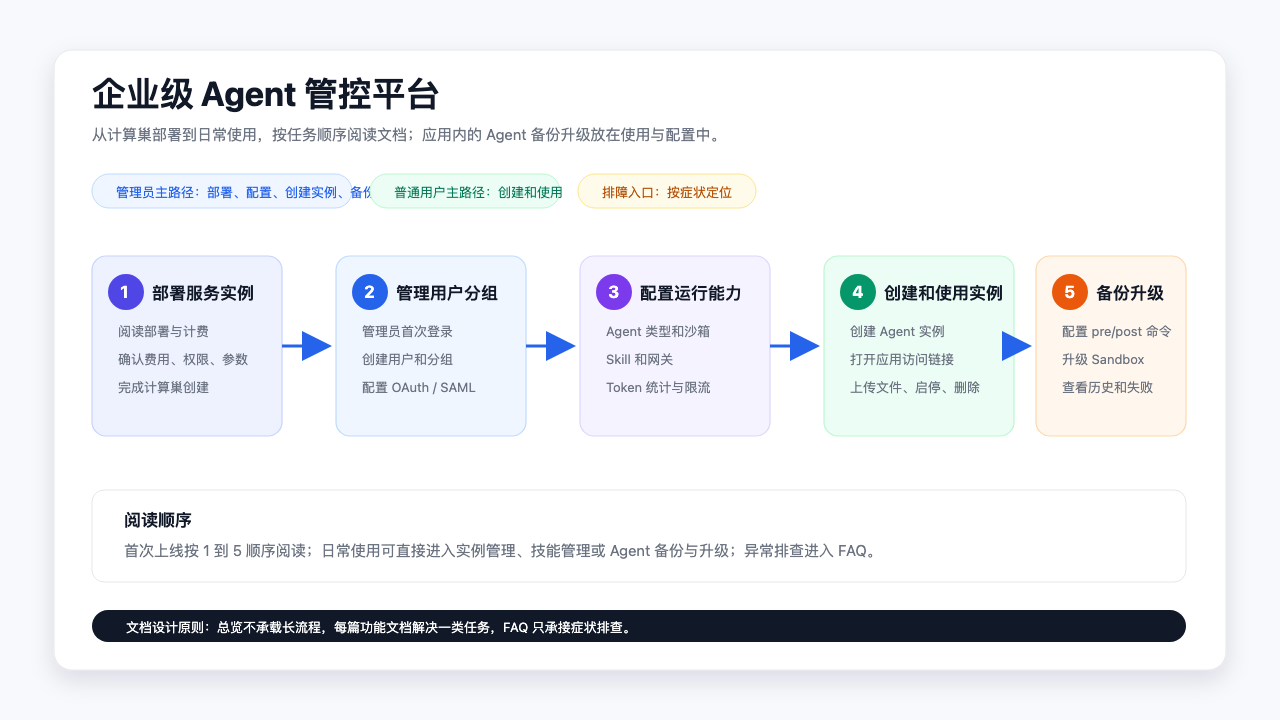
Complete the first-time deployment in the following order:
Read Service instance deployment and billing to prepare the sandbox cluster, network, and deployment parameters.
Create a service instance in the Compute Nest console, and get the platform address and administrator account from the instance output.
Follow User logon and group management to complete the administrator's first login, change the initial password, and create users.
Follow Configure model providers, gateway access, and rate limiting to add model providers and models.
Follow Configure Agent types and Configure SandboxSet to prepare instance templates and the runtime environment.
Follow Skill management to configure official Skills or enterprise custom Skills.
Follow Create and manage Agent instances to create or check the first Agent instance, and open the application access link to verify the environment.
Follow Agent backup to configure and verify Agent instance backup.
When you need to replace the image or runtime parameters, follow Agent upgrade to configure the upgrade process.
Regular user first-time usage path
After the administrator completes the platform configuration and creates accounts, regular users start from User guide:
Open the platform login page and log in with the account provided by the administrator or your enterprise single sign-on method.
Go to
/user/instancesand click Create Instance.Select the Agent type, model, and optional channel opened by the administrator, and create a personal or group Agent instance.
Wait until the Agent instance status becomes Running, then open the application access link to start using it.
When you need to collaborate, select a group Agent instance in My Groups. When you need to extend capabilities, install a Skill from the Skill marketplace on the target Agent instance.
Operation entry points
Service instance upgrade, platform database restore, Agent instance backup, and Agent sandbox upgrade are different operations with different entry points:
Service instance upgrade: Release notes
Platform database restore: Database backup and recovery operations guide
Agent instance backup: Agent backup
Agent sandbox upgrade: Agent upgrade