Create Blink calculation source
This topic describes how to create a Blink calculation source.
Background information
Alibaba Cloud real-time computing Blink edition supports both shared and exclusive clusters, with the exclusive mode offering additional features. For more information about Blink, see Service notices of real-time computing Blink.
Procedure
On the Dataphin home page, click Planning in the top menu bar.
Refer to the instructions in the figure below to navigate to the Create Calculation Source page.
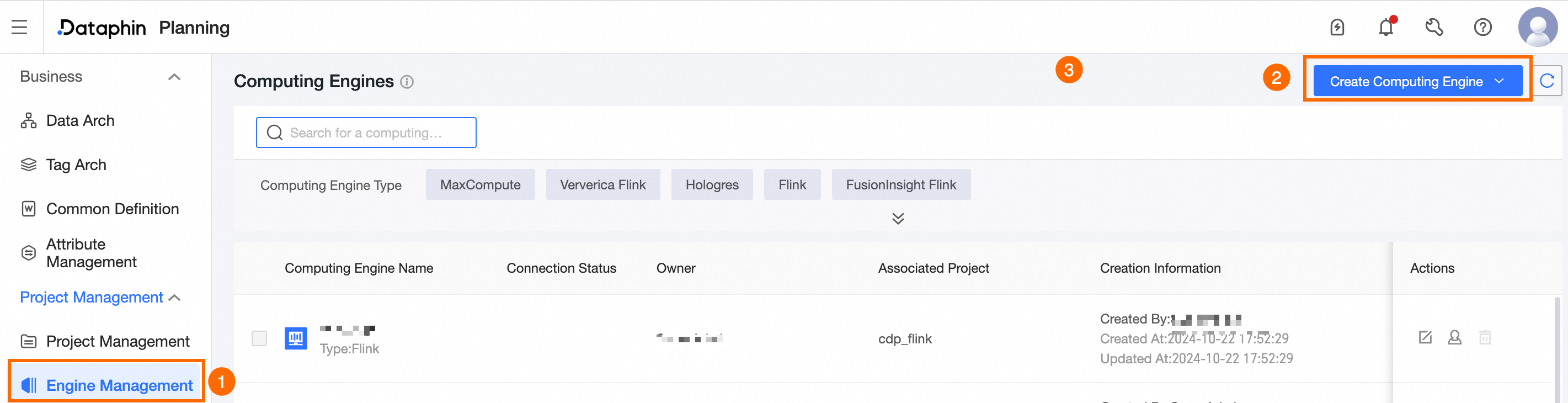
On the Create Calculation Source page, configure the following parameters:
Parameter
Description
Calculation Type
Select Blink.
Calculation Source Name
Enter the name of the calculation source, adhering to the following naming convention:
May include Chinese characters, numbers, letters, underscores (_), or hyphens (-).
Must not exceed 64 characters.
Calculation Source Description
Provide a description for the calculation source.
Project Name
Enter the English name of the Blink project, obtainable from the Blink console.
Access ID and Access Key
Enter the AccessKey ID and AccessKey Secret for the account authorized to access the Blink project. Retrieve the AccessKey ID and AccessKey Secret from the User information management page.
ImportantFor a stable connection between the Dataphin project space and the Blink project, it is recommended to use the AccessKey of the Blink project administrator.
To maintain consistent metadata collection, avoid changing the Blink project's AccessKey.
Click Test Connection to verify the calculation source's connectivity.
Click Submit to finalize the creation of the Blink calculation source.
What to do next
Once the Blink calculation source is created, you can proceed to attach it to the project. For more information, see Create a general project and .